1
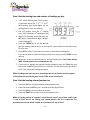
How to set the number of days to feed
1. Press the DAY key and the left side of the LCD shows the number of days your
automatic feeder will feed your pet until it stops. The default setting of (0)
means the feeder is set to continuously feed every day.
2. To change the number of days to feed, press the DAY key then press and hold
the SET key for 2 seconds until the days flashing on the LCD display
3. Press the DAY key to change the number of days. Hold down the DAY key to
speed through the numbers.
4. If you set a number of days to feed (1 to 99), then the feeder Alarm will start
beeping at 6am after the last day in the setting.
5. To repeat the same schedule without any changes, just press the START key.
6. To feed continuously, set the number of days to 0.
How to erase the feeding time and feeding Volume
You can erase the preset feeding time and feeding volume by pressing the SET and
START keys at the same time. Then just reset the feeder from the beginning.
How to record voice message to be played at the feeding times
1.
2.
3.
4.
Press and hold the REC key, the Red LED light will turn on.
Speak to the feeder for your message. You have up to 6 seconds.
When finished, release the REC key.
Press the PLAY key to listen the message you just record. Repeat 1-3 if you want
to record it again.
Note: Your message will be played 3 times at each feeding time
How to manually feed your pet
Press the SET and VOL keys at same time to manually dispense ¼ cup of food. Set
feeding schedule is not affected.
Alarm
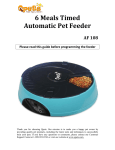
1. Your AF-100 Automatic Pet Feeder has an ALARM (a continuous beeping) to alert
you when your feeding schedule has ended and no more food will be dispensed.
2. Then alarm will start at 6:00AM the next morning to avoid disturbing anyone at
night. You can press any key to stop the beeping.
6