1
DVR accessories generally include: mouse, power lines and data lines.
1.3 Front panel buttons description
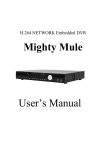
Statement: the front panel interface, button layout and type, real product shall prevail.
The front panel buttons Description:
Buttons on Front Panel
1) IR Sensor(Red Color): IR receiver for the remote control.
2) LED Indicators: Shows status of alarm, rec, power,link,HDD .
3) Playback: During playback, press the following:
•
•
: Increase reverse playback speed 1X, 2X, 4X,8X
: Press to start playback
•
: Press to freeze playback to one frame, then press again to advance
frame-by-frame
•
: Press to slow playback speed by 1/2, 1/4, 1/8
•
: Press to increase forward playback speed 1X, 2X, 4X,8X
4) MENU/ OK: Press to open/close the main menu.or confirm.
5) Navigation: Press the Navigation buttons to perform the following:
•: In menus, press to confirm selections; in PTZ mode, press to change the
navigation buttons to control the connected PTZ camera (not included)
•
: Press to move cursor up; in PTZ mode, press to pan camera up
•
: Press to move cursor down; in PTZ mode, press to pan camera down
•
: Press to move cursor left; in PTZ mode, press to pan camera left
•
: Press to move cursor right; in PTZ mode, press to pan camera right
6) USB: Connect a USB flash drive to the top port for data backup and firmware
upgrades connect a USB mouse to the bottom port.
5