1
Reigate Junior School
Equipment User Manual
Lighting - Basic day to day use
1.
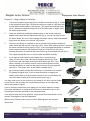
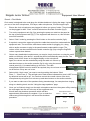
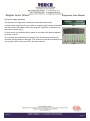
Open the black cupboard and turn on the dimmers using the two large
switches shown in the middle of fig 13.
2.
If the lighting control rack (top of fig 13) is not powered (indicated by the
LED’s on the various units) then open the lid to the fuse box (bottom of fig 13)
and turn on the switch labelled “Lighting Control”.
3.
Using the lighting desk at the top, firstly push the master fader to 100%, this is
located on the far right hand side of the desk.
4.
Push up the faders for each of the lights you want on, the higher you push the
fader the brighter the light. This is usually the first four faders for the stage
lighting, however this depends on how the system has been left after the
previous show.
5.
Fig 13
To power down the system, reverse the above procedure. To preserve lamp
life, you should not turn on the system with any faders up so the lights do not
come straight on.
Lighting - Show use
1.
For show use, follow steps 1 & 2 above to power up the lighting system.
2.
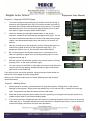
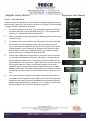
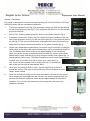
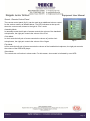
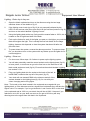
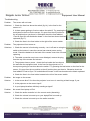
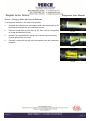
You will also potentially need the normal sockets on the lighting bars (fig 16)
to have power, to turn these on go to the fuse box on the wall near to the
black metal equipment rack (fig 14). Ensure that the switch labelled “Lighting
bar sockets” is on.
3.
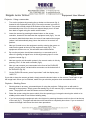
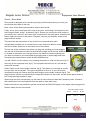
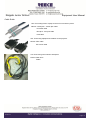
Plug your lighting desk into the socket at the back of the hall, labelled DMX, located at the top left of the panel (fig 15).
4.
Your desk will now transmit DMX to the dimmers and all of the
sockets located on the lighting bars (fig 16), for use with your
colour changing and moving lights.
Note - The levels on the desk located in the cupboard are merged with your
lighting desk, so if the dimmers receive a signal from both desks they will take the
higher value. For example, if you’ve got channels 1 and 2 set to 80% on the desk
in the cupboard and at 100% on your desk, they will be at 100%. However if you
fade them out to 0% on your desk, as soon as you get to 80% they will stop
dimming due to the signal from the desk in the cupboard.
Version 2.1
Fig 14
Fig 15
Fig 16
Page 11