1
POWER CONNECTION, CONT.
7. Slide one side of the battery door so that it clears the edge of the indicator enclosure and
then remove the battery door.
8. Place the battery door on a table or bench with the battery holder and battery strap up.
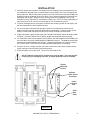
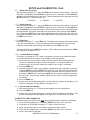
9. Referring to Figure No. 3, remove the 2 Philips screws securing the battery strap to the
battery door and remove the strap.
Battery Strap
Battery
Connector
Figure No. 3
Remove Philips Screws
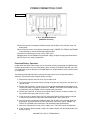
10. To install or replace the batteries, first remove the battery holder cover by pushing in on
the tab and lifting it up. Refer to Figure No. 4.
11. If replacing the batteries, remove all 6 batteries from the battery holder. If installing new
batteries, proceed to step 12.
NOTE! To insure optimum performance of your PZ3000 when powered by the
internal battery, replace all 6 batteries with new “AA” size, NiMH batteries
(2300mAh minimum). DO NOT mix new and used batteries.
Figure No. 4
Battery
Cover
Push in and
lift here
12. Install the 6 new “AA” size batteries in the battery holder, noting the polarity markings
located in the battery holder. Refer to Figure No. 5.
13. After placing all 6 batteries in the holder, replace the battery cover and battery strap.
Secure the battery strap with the 2 Philips screws removed earlier.
14. Replace the battery door on the indicator and then re-connect the connector on the end of
the battery holder.
8528-M372-O1 Rev D • PZ3000 Series
5