1
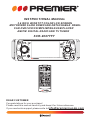
INSTRUCTIONAL MANUAL
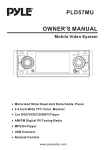
3.6 INCH WIDE TFT COLOR LCD SCREEN
MOTORIZED SLIDE DOWN AND DETACHABLE PANEL
CAR DVD/VCD/CD/MP3/MPEG4/USB PLAYER
AM/FM DIGITAL RADIO AND TV TUNER
SCR-2067TFT
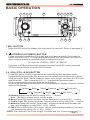
RESET
CH 1-6
IR
BND
MIC
REL
EQ
VOL-
SEL
AP SI DISP
VOL+
MU
PAIR
AUX/MP3-IN
CAR DVD/VCD/CD/MP3/MPEG4/TV PLAYER SCR-2067TFT
MOD
DVD/RECEIVER CONTROL
MODE
MUTE
REDIAL
PAIR
MENU
PLAY/PAUSE
STOP
ANGLE
MO/ST
LOUD
EQ
CLK
LO/DX
OSD
ENTER
BAND
TITLE/PBC
A/PS
VOL
TOP
VOL
RDM
1
4
RPT
INT
2
3
5
6
SEL
7
8
9
SETUP
GOTO
+10
0
DEAR CUSTOMER
Congratulations for your purchase!
Please read this manual carefully,and deep it for future reference.
If you need extra support,please write to [email protected]
WWW.PREMIERMUNDO.COM
CONTENTS
Safety Information...................................................................................... 2
Disc Notes ................................................................................................. 3
Installation ................................................................................................. 4
Panel Angle Adjustment ............................................................................ 7
Electric Connection ....................................................................................8
Remote Control .......................................................................................... 9
Basic Operation ........................................................................................11
MP3/WMA/JPEG Disc Play .................................................................... 15
MPEG4 Player .........................................................................................15
.
AUX Operation .................................................................... ................... 15
Scroll Caption Adjustment ........................................................................15
Blue-tooth Operation ............................................................................... 16
Video Quality Adjustment .......................................................................17
Rear View Camera .................................................................................17
USB Operation .......................................................................................18
On-Screen Display Function ...................................................................18
Multi-Audio Language Function .............................................................. 19
Multi-Subtitle Language Function ........................................................... 19
Multi-Angle Function ............................................................................. 19
Title Menu Function ............................................................................... 19
TV Operation .......................................................................................... 19
Setup .........................................................................................................20
General Setup ........................................................................................20
Speaker Setup ....................................................................................... 22
Dolby Digital Setup ................................................................................ 22
Preferences Setup ................................................................................. 23
Defaults Table ........................................................................................24
Specifications ........................................................................................... 25
Trouble Shooting ...................................................................................... 26
Page 1
WWW.PREMIERMUNDO.COM
SAFETY INFORMATION
CAUTION:
THIS DVD PLAYER IS A CLASS I LASER PRODUCT. HOWEVER THIS DVD
PLAYER USES A VISIBLE/INVISIBLE LASER BEAM WHICH COULD CAUSE .
HAZARDOUS RADIATION EXPOSURE IF DIRECTED. BE SURE TO OPERATE
THE DVD PLAYER CORRECTLY AS INSTRUCTED.
USE OF CONTROLS OR ADJUSTMENTS OR PERFORMANCE OF
PROCEDURES OTHER THAN THOSE SPECIFIED HEREIN MAY RESULT IN
HAZARDOUS RADIATION EXPOSURE.DO NOT OPEN COVERS AND DO NOT
REPAIR YOURSELF. REFER SERVICING TO QUALIFIED PERSONNEL.
WARNING:
TO REDUCE THE RISK OF FIRE OR ELECTRIC SHOCK, DO NOT EXPOSE THIS
EQUIPMENT TO RAIN OR MOISTURE.
TO REDUCE THE RISK OF FIRE OR ELECTRIC SHOCK, AND ANNOYING
INTERFERENCE, USE ONLY THE RECOMMENDED ACCESSORIES.
THIS DEVICE IS INTENDED FOR CONTINUOUS OPERATION.
This product incorporates copyright protection technology that is protected
by method claims of certain U.S. Patents and other intellectual property rights
owned by Macrovision Corporation and other rights owners.Use of this
copyright protection technology must be authorized by Macro vision Corporation,
and is intended for home and other limited viewing uses only unless
otherwise authorized by Macrovision Corporation. Reverse engineering or
disassembly is prohibited.
REGION MANAGEMENT INFORMATION:
This DVD Player is designed and manufactured to respond to the Region
Management Information that is recorded on a DVD disc. If the Region number
described on the DVD disc does not correspond to the Region number of this
DVD Player, this DVD Player cannot play this disc.
Page 2
WWW.PREMIERMUNDO.COM
DISC NOTES
Disc formats supported by this
player
DVD
Audio and Video
Disc size 12 cm
VCD
Audio and Video
Disc size 12 cm
CD
Audio
Disc size 12 cm
MP3
MP
CD-RW
3
unusable) depending on your handle it
and conditions in the usage environment.
Note these scratches are not an
indication of any problem with the player.
Label side
up
Do not touch
the
underside
of the disc
Audio
Disc size 12 cm
Discs which cannot be played
with this player
DVD-ROM
DVD-R/DVD-RAM
CDV
CD-G
Handling and Cleaning
Dirt, dust, scratches and warping disc
will cause misoperation.
Do not place stickers or make
scratches on discs.
Do not warp discs.
A disc should always be kept in its
case when not in use to prevent from
damaging.
Do not place discs in the following
places:
1.Direct sunlight
2.Dirty, dusty and damp areas
3.Near car heaters
4.On the seats or dashboard
Disc Cleaning
Use a dry soft cloth to wipe the surface.
If the disc is quite dirty, use a soft cloth
slightly moistured with isopropyl (rubbing)
alcohol. Never use solvents such as
benzine, thinner or conventional record
cleaners as they may mar the surface of
the disc.
Note:
A disc may become somewhat scratched
(although not enough to make it
Do not
bend
Wipe the disc from
center
toward the outside
edge
Preparing New Discs with Rough
Spots
A new disc may have rough edges on
its inside and outside edges.If a disc
with rough edges is used, the proper
setting will not be performed and the
player will not play the disc.Therefore,
remove the rough edges in advance
by using a ball point pen or pencil as
shown on the right.To remove the
rough edges, press the s i d e o f t h e pen
or pencil against the inside and outside
edges of the disc.
Rough spots
on
outside edge
Ball point pen
or pencil
Rough spots
on inside
edge
Page 3
WWW.PREMIERMUNDO.COM
NOTES:
Choose the mounting location where the unit will not interfere with the normal
driving function of the driver.
Before finally installing the unit, connect the wiring temporarily and make sure
it is all connected up properly and the unit and the system work properly.
Use only the parts included with the unit to ensure proper installation. The use
of unauthorized parts can cause malfunctions.
Consult with your nearest dealer if installation requires the drilling of holes or
other modifications of the vehicle.
Install the unit where it does not get in the driver ' s way and cannot injure the
passenger if there is a sudden stop, like an emergency stop.
If installation angle exceeds 30 from horizontal, the unit might not give its
optimum performance.
30
Avoid installing the unit where it would be subject to high temperature, such
as from direct sunlight, or from hot air, from the heater, or where it would be
subject to dust, dirt or excessive vibration.
DIN FRONT/REAR-MOUNT
This unit can be properly installed either from "Front"(conventional DIN
Front-mount) or "Rear"(DIN Rear-mount installation, utilizing threaded
screw holes at the sides of the unit chassis). For details, refer to the following
illustrated installation methods.
Page 4
WWW.PREMIERMUNDO.COM
INSTALLATION
DASH BOARD
HEX NUT
METAL MOUNTING
STRAP
SPRING WASHER
PLAIN WASHER
TAPPING SCREW
CONSOLE
SLIDE BRACKET
HOUSING
HEX BOLT
KEY PLATE
PLASTIC COVER
KEY PLATE
If you want to take CHASSIS out of the SLIDE BRACKET HOUSING,
first remove the PLASTIC COVER of the both sides away, then insert
the two KEY PLATE into left and right side of chassis as above illustration.
Page 5
WWW.PREMIERMUNDO.COM
INSTALLATION
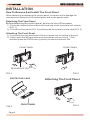
How To Remove And Install The Front Panel
When detaching or attaching the control panel, be careful not to damage the
connectors on the back of the control panel and on the panel holder.
Detaching The Front Panel
Before detaching the control panel, be sure to turn off the power.
1). Press the release button and the left hand side of the front panel will release.
(FIG. 1)
2). Pull-off the front panel (FIG. 2) and keep the front panel into the case (FIG. 3)
Attaching The Front Panel
1). First insert the right hand side of the front panel into the hollow of the unit .
2). Gently push the left hand side of the front panel until you feel a “ Click” .
and then press the PWR button (2) briefly to switch the device ON.
FRONT PANEL
FRONT PANEL
RELEASE BUTTON
FIG.1
FIG.2
PROTECTIVE CASE
FIG.3
Page 6
FRONT PANEL
Attaching The Front Panel
FIG.4
WWW.PREMIERMUNDO.COM
PANEL ANGLE ADJUSTMENT
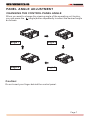
CHANGING THE CONTROL PANEL ANGLE
When you want to change the viewing angle of the operating unit to play,
you can press the
(angle)button repeatedly to select the desired angle
as follows:
Angle 1
Angle 2
Angle 4
Angle 3
Caution:
Do not insert your finger behind the control panel.
Page 7
WWW.PREMIERMUNDO.COM
ELECTRIC CONNECTION
WIRING CONNECTION
MAIN UNIT
WHITE
GREEN
TV ANT IN
YELLOW
AUX(optional)
ANTENNA CONNECTOR
RCA CABLE
IGNITION
SWITCH(B+)
RED
MEMORY YELLOW CHOKE
BOX
BACK-UP(B+)
GROUND(B-)
REAR RCA OUTPUT
CABLE (optional)
FRONT RCA OUTPUT
CABLE
BLACK
(B+)12V
REAR CAMERA SWITCH
(B-)PARKING BRAKE
REAR CAMERA INPUT
VIDEO IN YELLOW
RCH IN RED
LCH IN WHITE
GREY SUBWOOFER
VIDEO OUT 2 YELLOW
COAXIAL OUT BROWN
RCH RED
LCH WHITE
FRONT RCA RED R
VIDEO OUT 1 YELLOW
FRONT RCA WHITE L
(FOR RCA LINE OUT VERSION ONLY)
AUTO
ANTENNA
FUSE
BLUE
FRONT
Lch SPK.
REAR
Lch SPK.
WHITE
GREY
WHITE/BLACK
GREY/BLACK
GREEN
VIOLET
GREEN/BLACK
VIOLET/BLACK
FRONT
Rch SPK.
REAR
Rch SPK.
Note:
the earth connection cable (parking brake B-) must be connected in order for DVD
pictures to be played back to the monitor. If the cable has not been correctly
connected, the message “PARKING BRAKE” appears on the monitor.
Page 8
WWW.PREMIERMUNDO.COM
REMOTE CONTROL
DVD/RECEIVER CONTROL
15
MODE
17
7
2
22
24
18
7. REDIAL/
8.GOTO/
9.
/
10.SEL
11. VOL+/VOL12.
/ / /
13.MENU
SUB WOOFER
14.BAND(OSD)
15.
/MOD
16.PLAY/PAUSE
17.MUTE
18.TITLE/PBC
(A/P)
19.
20.ANGLE
21.EQ/LOUD
22.SEARCH
23.ENTER
16
20
PAIR
MENU
EQ
CLK
5
1
LOUD
21
23
OSD
BAND
ENTER
9
TITLE/PBC
A/PS
VOL
TOP
11
VOL
RDM
SEL
4
SETUP
10
6. SUBTITLE
LO/DX
MO/ST
3
1
1.CLK
2.PAIR/
3.STOP
4.SETUP
5.MO/ST(AUDIO)
STOP
ANGLE
LO/DX
6
8
PLAY/PAUSE
19
13
14
MUTE
REDIAL
RPT
12
INT
2
3
5
6
7
8
9
GOTO
+10
0
4
27
26
25
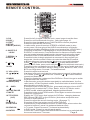
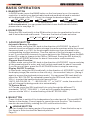
Press it briefly to show / hide the clock, press longer to set the time.
Press it to use the Bluetooth function , refer to the page 16 .
Press it to stop playback, press PLAY/PAUSE to resume playback .
Press it to open the SETUP menu.
In radio mode, press it to select STEREO or MONO mode (In disc
mode, press it to changing of the AUDIO soundtrack on multiaudio
soundtrack dvd disc. Changing of the sound mode of the VCD/CD disc.)
Changing of the SUBTITLE language on multi-subtitle language
DVD disc. In radio mode,.Press this button for distance reception when
you are located at weak signal location, depress it for stronger signal.
Press this button to use the Bluetooth function, refer to the page 16.
Press this button to begin playback at a moment in the program you
designate. Use the number buttons to enter the data that is needed.
In Bluetooth menu, it serves as the button on your mobile handset.
Press
to skip to the next track & press
to skip back one track.
(Note:In DVD mode, press continually the
twice to skip back one track.)
Press this button repeatedly to cycle through the various audio and video
adjustments you can make: Volume, Bass, Treble, Balance, Fader, Color,
BG Color, Brightness, Contrast , Tint and Bluetooth .
Press it to adjust volume level
Use these buttons to navigate the various menus present in the product.
In TV mode, press
/ to fine tune. Press the
/
to select channel
upward and downward.
Press it to display the root menu of the DVD disc. Press it longer to switch
the Subwoofer ON and OFF.
In Radio mode, press this button repeatedly to switch between the five
radio bands, In Disc Playback modes, Press this button to see information
about the disc currently in play.
Press this button to turn the unit ON , press and hold to turn the unit OFF.
Press it briefly to select the TV, Disc, Radio , AUX In ,BT Music mode.
In DISC mode, starting playback, stopping picture/track.
Press this button to turn off the audio. Press again to restore the sound
to its prior volume level.
Display the TITLE menu that is stored in DVD disc changing between
PBC ON and PBC OFF on the VCD disc.(Auto store and preset scan
function in radio stations .)
Press it to adjust the screen viewing angle. (See page 7.)
Changing of the view angle on multi-angle DVD disc.
Press it to turn to equalization function. In radio mode, when reduce the
volume to half level, press it to enhance the bass effect.
In TV mode, Press it to search TV channel automatically.
In DISC mode, Press it to start forward rapidly.
Confirm the Track/Chapter selected with the number key or selected with
the cursor buttons on TV screen.
Page 9
WWW.PREMIERMUNDO.COM
REMOTE CONTROL
24.SKIP
In TV mode, press it to ADD and DELETE channel .
In DISC mode, press it to reverse rapidly
25. 0 - 9
26.+10/
Numeric buttons.
Tens digit select button, cooperatively used with numeric buttons.
In Bluetooth menu, it serves as the button on your mobile handset.
27. RADIO PRESET Six preset memory buttons.
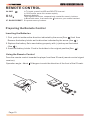
Preparing the Remote Control
Inserting the Batteries
1.First push to inside as the direction indicated by the arrow (See 1 )And then
Remove the battery holder as the direction indicated by the arrow (See 2 ).
2.Replace the battery Set a new battery property with (+)side up as illustrated
(See 3 ).
3.Insert the battery holder. Push in the holder to the original position(See 4 ).
Using the Remote Control
Face the remote control towards the player front face IR mark (remote control signal
receiver).
Operation angle: About
Page 10
30 degree in each the direction of the front of the IR mark.
WWW.PREMIERMUNDO.COM
BASIC OPERATION
1 10 3 14
15 5 11 6 13
18
RESET
CH 1-6
IR
BND
MIC
REL
EQ
VOL-
SEL
4
AP SI DISP
VOL+
7
MU
PAIR
AUX/MP3-IN
CAR DVD/VCD/CD/MP3/MPEG4/TV PLAYER SCR-2067TFT
12 16
9
MOD
17
8
2
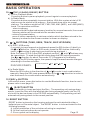
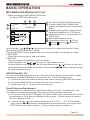
1.REL BUTTON
Press the REL button to release the front panel for removal . Refer to see page 6 .
2.
(POWER On/Off)/MOD BUTTON
Press it to switch the device ON, press and hold (approximately 2 seconds) to
switch the device OFF . During the playback mode, you can press it to select an
input mode by pressing repeatedly until proper one is found:
TV > AUX IN > RADIO > DISC > BT MUSIC
If you are in USB playback mode and want to select the DISC mode, press the
STOP button and then press the GOTO button.
3-4 .VOL+/VOL- & SEL BUTTON
Press SEL button briefly to across the sound/picture mode selection menu
by repeatedly pressing the SEL button you can select the individual menu items
such as volume, bass, treble, balance, fader, color, bright, contrast, tint ,BG color
and Bluetooth . Then rotate the VOL + / - to adjust the selected mode.
(The corresponding value will show on the display.)
When mode has not been adjusted for several seconds, display returns to normal
radio or CD display.
Volume
Tint
Bass
Treble
Contrast
Balance
Bright
Fader
Color
Bluetooth
BG Color
A.Volume: Adjust volume level by using VOL + / - button.
Note: The unit is initially set to volume mode.
B.Bass: Press SEL button one time. Adjust bass level by using VOL + / - button.
C.Treble: Press SEL button two times. Adjust treble level by using VOL + / -button.
D.Balance: Press SEL button three times. Adjust sound balance between left
and right speakers by using VOL + / VOL - button.
E.Fader: Press SEL button four times. Adjust sound balance between front and
rear speakers by using VOL + / VOL - button.
( NOTE : the function of the Color, Bright, Contrast and Tint. Please see page 17.)
Page 11
WWW.PREMIERMUNDO.COM
BASIC OPERATION
5 . BAND BUTTON
In RADIO mode, press the BAND button on the front panel or on the remote
controller to select your desired radio band and word which band is selected
will be displayed in the TFT . Press it to change the bands as below :
FM
MW
LW
FM
For 3 Bands (Europe)
MW
FM
For 2 Bands (Europe)
AM
For 2 Bands (USA)
In Bluetooth menu, you can press this button to use the Bluetooth funtion,
please refer to see page 16.
6. EQ BUTTON
Swing the SEL knob briefly in the EQ direction to turn to equalization function
and to select desired audio mode. There are five kinds of mode as below:
JAZZ
CLAS
POP
ROCK
FLAT
7. APS/DISP BUTTON
Automatic Memory Function:
In Radio mode, swing the SEL knob in the direction of APS/DISP for about 2
seconds to active automatic station storage.the radio searches within the current
frequency band, e.g. FM1, for the strongest station are then allocated to the
corresponding storage locations. Then the station of the first storage location
is set. If you would like to search for more stations in the FM band, press the BND
button(5) in order to change to the FM2 or FM3 band. Swing the SEL button (4)
again in the APS/DISP direction for about 2 seconds to continue search.
Program Scan Function:
In Radio mode, swing the SEL knob in the direction of APS/DISP to scan and play
all the preset sations in order, and it will hold at each band for about 5 seconds .
If you like one of them, press the PLAY/PAUSE button to stop the scanning .
Display ON/OFF Function:
In Disc mode, swing the SEL knob briefly in the direction of APS/DISP to turn off
the display image (the monitor on the unit only) , the sound will stay on. (Swing it
again to resume the playback picture mode.) You can press SEL knob briefly to
select the “BG COLOR” by repeatedly pressing the SEL knob, then rotate the
VOL+/- to select the background color among of the
“AUTO, BG COLOR: 01........BG COLOR: 11”, in “ AUTO” mode, the monitor of
unit will change the background color automatically.
TV System Select
In TV mode, press the SEL knob briefly to cycle through the different TV
standards ( “NTSC”,“PAL-M/N” ) , if you are in European frequency mode ,
you can use the VOL+/- to select among of the NTSC/PAL-M/N .
8. MU BUTTON
Press it button to switch of the loudspeakers for a short period. The word MUTE
flashes in the display. Press it again to cancel the mute function. This function
can also be cancelled by rotating the VOL multifunction button.
9.
(ANGLE)BUTTON
you can change the viewing angle of the operating unit . Press this button up to
four times in order to select the desired position.
Page 12
WWW.PREMIERMUNDO.COM
BASIC OPERATION
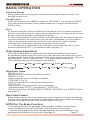
10.
/CH 1-6 (RADIO PRESET) BUTTON
a). In Disc Playback Mode
Press this button to pause playback, press it again to resume playback.
b). In Radio Mode
Press this button repeatedly to preset station. With this system a total of 30
stations can be stored in the memory . Each band store up to six preset
stations. The stations might be FM1, FM2, FM3, AM1 (MW1) and AM2 (MW2)
band. The operation as below:
- store in memory
press and hold the desired memory location for several seconds, the current
listening station will be stored into the number location.
- retrieve a preset station
press it button repeatedly to retrieve a station which had been stored in the
memory in advance the chosen number is shown on display.
11.
/
BUTTONS (TUNE, SEEK, TRACK, SKIP UP/DOWN)
a) In DISC, USB mode:
if you wish to jump forwards or backwards press the SEL button (4) briefly in
the or direction. (Note: in DVD mode, press the SEL button continually
twice in direction to skip back one track during playback.)
Note:For some VCD 2.0 dics(PBC-playback control),
and
buttons may
be unavailable. To wind through the tracks keep the SEL button pressed in
the or direction for about 2 seconds. FF X2 appears in the display.
Operating the SEL button again, the speed of rapid forward/reverse changes
according to the disc as follow:
Normal Playback 2x
4x
8x
16x
DVD/VCD/CD/MP3:
b) In Radio Mode:
Move the SEL button in the direction of
or
in order to set a radio station
manually. Keep the SEL taste pressed down in the
or
direction in order to
start the search for a radio station automatically.
12.PAIR/
BUTTON
In Bluetooth menu, press this button to use the Bluetooth function, how to use it ,
please refer to see page 16.
13.
(EJECT) BUTTON
Press this button to insert and eject the Disc . The operating unit swings downwards. Insert the Disc with the labelled side facing upwards gently into the CD
slot until the device draws in the CD/DVD automatically. The operating unit will
automatically swings back to the normal position.
14. RESET BUTTON
RESET button is placed on the housing and must be activated with either a
ballpoint pen or thin metal object. The RESET button is to be activated for the
following reasons:
A. Initial installation of the unit when all wiring is completed.
B. All the function buttons do not operate.
C. Error symbol on the display.
Page 13
WWW.PREMIERMUNDO.COM
BASIC OPERATION
TOP/RPT/INT/RDM FUNCTION (Only for the RC.)
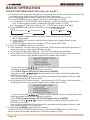
A.To memorize the current frequency, press any one of the six preset buttons[1-6]
on the remote controller hold for more than 2 seconds.
B.To recall the preset memory, press one of the preset buttons [1-6].
C.Press 1/(TOP) button to select the first track/chapter to play.
a. In the state of VCD/CD/MP3 disc playing, press the button to select the
first track/chapter to play.(depend on the disc used for VCD)
b. In the state of DVD disc playing, the 1TOP button is not available.
D.Press 2(RPT) button briefly to select repeat mode as follow.
VCD/CD/MP3:
DVD:
CHAPTER REPEAT ON
TITLE REPEAT ON
REP-ONE
REP-ALL
REPEAT ALL
a. Continuously repeat at the current chapter/track, when selected
REP-ONE mode.
b. Select REP-ALL mode to continuously repeat all chapter/track on the
current disc.
c. REPEAT feature does not support VCD2.0 (with PBC ON).
E.Long Press 3/(INT) button to scan disc.
a. In the state of CD disc playing, press the 3/INT button to play the previous 6
seconds part of each track/chapter on disc.
b. In the state of Mp3 disc playing, the 3/INT button is not available.
c. In the state of VCD disc playing , long press the 3/INT button, the screen will
display as follow (long press it again will release this mode.):
SELECT DIGEST TYPE:
TRACK DIGEST
DISC INTERVAL
TRACK INTERVAL
1). you can use the / / / buttons on the remote control to select the item,
and then press the ENTER button to confirm .
2). In Track Digest OR Disc/Track Interval MODE.
You can use the
/ / / buttons to select the items ,and then press the
ENTER to confirm .
You can also select the items using the corresponding number buttons, and
then press the ENTER to confirm .
d. In the state of DVD disc playing , long press the 3/INT button, the screen will
display as follow (long press it again will release this mode.):
SELECT DIGEST TYPE:
TITLE DIGEST
CHAPTER DIGEST
TITLE INTERVAL
CHAPTER INTERVAL
1). you can use the / / / buttons on the remote control to select the item,
and then press the ENTER button to confirm .
2). In Title/Chapter Digest OR Title/Chapter Interval MODE.
You can use the / / / buttons to select the items ,and then press the
ENTER to confirm .
You can also select the items using the corresponding number buttons, and
then press the ENTER to confirm .
F. Long Press 4/(RDM) to play disc in random.
In the DVD/VCD/CD/MP3 disc playing, press the 4/RDM button on the front
panel to play in random (depend on the disc used for VCD).
Page 14
WWW.PREMIERMUNDO.COM
BASIC OPERATION
MP3/WMA/JPEG/MPEG4 DISC PLAY
1.When inserting an MP3/WMA/JPEG disc.
Ex: When MP3 file is detected.
4
3
00:56
2
003/112
5
6
04:07
1 .Current track(file)(highlighted bar)
2 .Current track (file) number/total
Repeat one
3
1
Mp3
K
Mp3
woman 1
Mp3
new ton
P
....... .......
4
5
6
number of tracks(files) in the current
folder.
.Elapsed playing time of the current
track( not available for JPEG disc)
.total playing time. ( not available for
JPEG disc)
.Selected playback mode
.Operation mode icon.
(Play),
(stop), (pause), (forward)
(reverse).
In stop mode , use / / / on the remote control to select the item or folder,
then press ENTER button to confirm.
Pressing REPEAT button repeatedly can select two kinds of repeat play mode.
2.REP-ONE:
Play the same song over and over again.
3.REP ALL:
Play all songs in the discover and over again.
In the playback, use
or
to skip an item ahead or back.
In the playback, swing the SEL knob in the direction of
/
button on the front
panel and keep more than 2 seconds or short press
on the remote control
/
to rapid forward/reverse.
AUX IN Socket (16)
To connect analogue replay devices. Use this jack to replay sound of other replay
equipment such as DVD players, computers, etc. Via the loudspeakers.
1). Please connect the external device with stereo jack plug the AUX IN socket.
2). Press the MOD button to select the AUX IN connection.
3). Rotate the VOL+/- to adjust the volume level.
Scroll Caption Adjustment
The function of the scroll caption adjustment about this unit. In radio mode, You
can adjust your desired scroll bar, the method of the operation as follow:
a). Press and hold the SETUP button (for about 2 seconds) on the remote control,
the adjustment scroll bar will display on the screen . (Press it again to restore
the prior display mode. )
b). Use the VOL+/- button to select among of the “A, B, C ....X, Y, Z,and blank ”,
and use the
/
buttons to ahead/back (proceed/cancel), then press the
SETUP button briefly to confirm . (Press it longer again to renew .)
Page 15
WWW.PREMIERMUNDO.COM
BASIC OPERATION
BLUETOOTH CAR KIT USER MANUAL
1. “Pair” To Your Bluetooth Phone
Prior to using the Car Kit for the fist time, you must pair it with a Bluetooth-enabled
mobile handset.
The following steps describes pairing the instruction for a typical Bluetoothenabled mobile handset.
1). Place the Car Kit and mobile handset in 3 meters apart.
2). Put the Car Kit in pairing mode.
Press the POWER button to turn ON, the ICON will flash on the TFT .
Press and hold the “PAIR/ ” button until the word “ PAIRING NOW ” display, it’s
now ready for pairing. (If you want not to pair, please press it longer again.)
3). Set your bluetooth phone to “discover” the Car Kit .
Following your phone’s instruction guide for details, active your mobile handset’s
Bluetooth function, the handset will search for accessible Bluetooth devices.
4). Your phone will find this Car Kit .
Select this Car Kit from the list.
5). Enter passkey “8888”, then press “OK” to pair the Car Kit and the handset,
the word “PAIR OK, PLEASE CONNECT” will display in the TFT .
6). Select the “CONNECT” from the list on the phone,
if you connect successfully , the ICON remains solid on the screen , then you
can operate the function of blue-tooth about the unite .
Important:
a. If the pairing can not be completed within approximately 2 minutes , whiles
the pairing mode is actived, and you will need to reattempt pairing
(See steps 2-5 above) .
b. After pairing is completed, if the
ICON is stilling flash on the TFT , please
follow the steps to to reattempt pairing through your handset until the
ICON
remains solid on the screen.
2. Using The Bluetooth Car Kit.
Once connecting is complete, you may access the following function. Some of the
below mentioned functions only accessible for handset supported with hands-free
profile.
Answer a call
After you hear the ring tone (the incoming telephone number will display on the
TFT LCD), press the “ ”button briefly on the front panel to listen . (During talking,
if you want to use your phone to listen, please press it button)
Make a call
Press and hold the “ ” button on the front panel or remote control, the word
“DIAL NUMBER” will display on the TFT, then you dial the number on the remote
control and then press briefly the “ ” button .
When you dials the wrong number, press “ ” button to delete it.
End/Reject a call
In Bluetooth menu, press the “ ” button briefly on the front panel or on the remote
control , the TFT LCD display “CALL HOOKED/CALL EJECTED” .
Redial last number
In Bluetooth menu, press and hold the “ ” button(approximately 2 seconds) on the
front panel or on the remote control, the “DIAL LAST CALL/DIAL OUT NOW ” will
display on the TFT LCD.
Page 16
WWW.PREMIERMUNDO.COM
BASIC OPERATION
Adjust the Volume
During conversation in progress, tune the Volume switch until you reach the
desired volume level.
Play MP3 music
In Bluetooth menu, press MOD to select the “BT MUSIC”, you can play the MP3
from your mobile handset. (Note: please make sure it support the Bluetooth
A2DP profile.)
Note:
a). Before using the function of the Blue-tooth about the unit, please check your
phone’s instruction guide or contact phone manufacture if you are not sure if your
phone supports the hands-free Bluetooth function .
b). When operating the function of blue-tooth about the unit, you need make your
call-phone and the unit successfully for one time. Afterwards, you only need to
take on the power and the function of blue-tooth will work in three minutes
automatically if you want to operate the function of blue-tooth .
c). If you want not to use the function of the Blue-tooth about the unit, you can
select the Bluetooth OFF .(The method to see the page 11.)
Video Quality Adjustment
Press SEL button briefly to across the sound/picture mode selection menu
by repeatedly pressing the SEL button you can select the individual menu items
such as volume, bass, treble, balance, fader, color, bright, contrast, tint , BG color
and Bluetooth . Then rotate the VOL + / - to adjust the selected mode.
(The corresponding value will show on the display.)
Volume
Bass
Tint
Treble
Contrast
Balance
Bright
Fader
Color
Bluetooth
BG Color
Adjustable Items:
COLOR: 0 to 32
Adjust the color fo the picture-lighter or darker.
BRIGHT: 0 to 32
Adjust if the picture is too bright or too dark.
CONTRAST: 0 to 32
Adjust the contrast of the bright ans dark portion.
TINT: 0 to 32
Adjust the tint if the human skin color is unnatural.
-Adjustable when “NTSC “ is selected for “ NTSC/PAL “ .
(The function of the VOLUME, BASS, TREBLE, BALANCE and FADER, Please
see page 11.)
Rear View Camera
When connecting the rear view camera.the mirror image of the rear view through
the rear view camera is automatically displayed on the monitor when you change
the gear to the back position.(The monitor on the unit only.)
NOTE(For The Brake Function)
if the parking brake is not engaged,“parking brake” flashes on the monitor,
and no playback picture will be shown. Only the audio will be heard.
-This warning appears only when the parking brake wire is connected to the
parking brake system built in the car. (See page .8)
Page 17
WWW.PREMIERMUNDO.COM
BASIC OPERATION
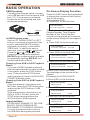
USB Operation
On-Screen Display Function
Following the diagram below, connect
your USB device to the front panel USB
port (17). If it is properly connected,
the device will be mounted and start
playing automatically.
Press the OSD button during playback
to display the contents of the current
disc on the screen.
A.Example for DVD:
a.Press OSD for the first time:
TITLE ELAPSED
TT 01/01 CH 01/38
USB port
(USB connect line)
In USB Playback mode
Use the UP, DOWN, RIGHT or LEFT
buttons to navigate to and select files
to play, and press ENTER to begin
playback (or viewing, in the case of
JPEG files). To skip to the next or
last track, press the
or
buttons.
Press the
or
buttons for Fast
Forward or Fast Reverse playback.
REPEAT play modes are also available
by repeatedly pushing REPEAT until
the desired mode is found.
Changing From USB to DISC Playback
Modes
If you are in USB Playback mode and
wish to begin playback of a disc already
in the player, press the STOP button
once. Then press the GOTO button
and the player will switch to DVD/VCD/
CD/MP3 Playback mode.
Changing From DISC to USB Playback
Modes
If the disc present in the player is an
MP3 disc, press the STOP button once
and press the GOTO button to USB
playback.
If the disc present in the player is an
DVD or VCD or CD disc, press the
STOP button twice and press the
GOTO button to USB playback.
Important Note:
TO PREVENT DAMAGE TO THE USB
DEVICE, DO NOT REMOVE OR
DISCONNECT IT DURING PLAYBACK.
It is also a good practice to remove
the USB drive during disc playback.
Page 18
0:02:06
Title Number, Total Title Number,
Chapter Number, Total Chapter
Number of this Title of the disc
currently being played will be shown
on the screen,along with the elapsed
time.
b.Press OSD for the second time:
TITLE REMAIN
TT 01/01 CH 01/38
3:24:36
c.Press OSD for the third time:
CHAPTER ELAPSED
TT 01/01 CH 01/38 0:02:56
d.Press OSD for the fourth time:
CHAPTER REMAIN
TT 01/01 CH 01/38
0:04:32
e.Press OSD for the fifth time:
The message on the screen will be
cleared.
B.Example for VCD/SVCD/CD:
a.Press OSD for the first time:
SINGLE ELAPSED
TRACK 01/16
00:49
b.Press OSD for the second time:
SINGLE REMAIN
TRACK 01/16
02:45
c.Press OSD for the third time:
TOTAL ELAPSED
TRACK 01/16
00:60
d.Press OSD for the fourth time:
TOTAL REMAIN
TRACK 01/16
78:46
WWW.PREMIERMUNDO.COM
BASIC OPERATION
e.Press OSD for the fifth time:
The message on the screen will be
cleared for SVCD and VCD.
C.Example for MP3:
Each time OSD is pressed, the
message displayed on screen changes
as follows:
SINGLE ELAPSED
SINGLE REMAIN
Multi-audio Language Function
For DVD:
Press AUDIO during playback.
Each time the button is pressed,
number of the audio soundtrack
language changes on sequential order.
NOTES:
- The language number is different
according to the disc.
- Some disc only contain one language
soundtrack
- When no different language
soundtrack are recorded
will be
display at screen left top corner.
For VCD/CD:
Press AUDIO during playback. It is
possible to switch the sound between
monaural and stereo sound.
MONO LEFT
MONO RIGHT
MIX-MONO
STEREO
Title Menu Function
For DVD:
If the DVD has multiple titles recorded
on the disc. It can select preferred title
from the title menu to start playback.
- Press TITLE during playback.The title
menu is display.
- Press the cursor button shown in TV
screen, select preferred title by the
cursor button and confirmed by
ENTER key.
For VCD:
Press TITLE/PBC button on the remote
control while the disc is playing, you can
switch between "PBC on"and "PBC off"
mode.
Multi-subtitle Language Function
(for DVD Only)
Press SUBTITLE during playback.
Each time the button is pressed, number of
the subtitle language changes in
sequential order.
Notes:
- The language number is different
according to the disc.
- Some discs only contain one subtitle
language.
- When no different subtitle language
are recorded,
will be displayed
at screen left top corner.
Multi-angle Function
(for DVD Only)
Press ANGLE during playback. Each
time the button is pressed, number of
the angle changes in sequential order.
Notes:
- The angle number is different
according to the disc.
- The function only work for disc having
scenes recorded at different angles.
- When no different angle are recorded,
will be displayed at screen left top
corner.
TV Operation
Switching to TV mode
1.Connect the TV antenna to the TV.IN
(from Ant) jack on the back of the unit.
2. Press the mode button on the remote
control to select the TV mode.
Auto searching TV channels
Press the SEARCH button on the remote
controller to star search channel
automatically.
Selecting channel
- Press the /
button to choose the
channel upward and downward.
- The numeric button (0-9) allow you to
select the corresponding channel directly.
Note:
In TV mode, the +10 button is not available.
Fine TV channel
You can press /
button on the remote
controller to fine TV channel. It can be
improve the picture quality .
Channel ADD/DEL
In TV mode ,after search channel
automatically, when you want delete the
no sign channel, press the SKIP button (the
screen display SKIP),the channel will be
deleted. Also, you can press numeric button
to select channel, then press SKIP to add
channel(the screen display SAVE).
Page 19
WWW.PREMIERMUNDO.COM
SETUP
GENERAL SETUP
--- GENERAL PAGE --DOLBY
DOLBY
-----General setup page----
-----General setup page---TV Display
LB
TV Display
Normal/PS
Angle Mark
ON
Angle Mark
Normal/LB
OSD Lang
ENG
OSD Lang
Wide
Spdif Output
SPDIF/RAW
Spdif Output
Captions
ON
Captions
Screen Saver
ON
Screen Saver
Last Memory
ON
Last Memory
Set TV Display Mode
Go To General Setup Page
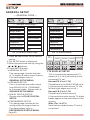
1. Press SETUP button on the remote
control .
2.The SETUP menu is displayed.
3.Select the preferred item by using the
/ / /
buttons
4.Press ENTER button.
a.GENERAL SETUP
This setup page includes the item
of TV display & audio output feature.
The detail please refer to
GENERAL SETUP MENU.
b.SPEAKER SETUP
This is to activate the audio output
from DOLBY AC3 5.1 DOWNMIX
to 2 channel mode. Please refer to
SPEAKER SETUP MENU.
c.DOLBY DIGITAL SETUP
Please refer to DOLBY DIGITAL
SETUP.
d.PREFERENCE SETUP
This setup page includes all the
configuration of support feature.
The detail please refer to
PREFERENCES SETUP MENU.
Page 20
TV Screen
Video
Material
Wide(16:9)
Normal
Pan Scan
Letter-box
4:3
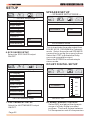
1.TV DISPLAY SETUP
This is to select the appropriate TV
aspect (4:3 or 16:9) according to the
connected TV set.
Normal/PS (For 4:3 TV)
Played back in the PAN & SCAN style.
(If connected to wide-screen TV, the
left and right edges are cut off.)
Normal/LB (For 4:3 TV)
Played back in letterbox style.
(If connected to wide-screen TV, black
bands appear at top and bottom of the
screen.)
Wide (For 16:9 TV)
Select when a wide-screen TV set is
connected.
WWW.PREMIERMUNDO.COM
SETUP
DOLBY
DOLBY
-----General setup page---TV Display
-----General setup page---TV Display
Angle Mark
ON
Angle Mark
OSD Lang
OFF
Osd Lang
Spdif Output
Spdif Output
Captions
Captions
Screen Saver
Screen Saver
Last Memory
Last Memory
SPDIF OFF
SPDIF/RAW
SPDIF/PCM
Set Angle Mark
Setup SPDIF
2. ANGLE MARK DISPLAY SETUP
If it is set to ON, when the multi-angle
DVD disc is playing,
(the angle
mark) will appears on the screen; if is
set to OFF, the mark will not appear.
4.SPDIF OUTPUT
This is to activate the audio output
from SPDIF OFF mode to SPDIF/RAW
mode to SPDIF/PCM mode.
DOLBY
-----General setup page---TV Display
DOLBY
-----General setup page---TV Display
Angle Mark
English
Angle Mark
OSD Lang
French
OSD Lang
Spdif Output
German
Spdif Output
ON
Captions
Spanish
Captions
OFF
Screen Saver
Italian
Screen Saver
Last Memory
Portuguese
Last Memory
Set OSD Language
3.OSD LANG TYPE SETUP
Select the preferred OSD language
by using the / buttons.
Closed Caption
5.CAPTIONS SETUP
Activate the CAPTIONS feature by
selecting ON. And release this feature by selecting OFF.
Page 21
WWW.PREMIERMUNDO.COM
SETUP
SPEAKER SETUP
DOLBY
--- SPEAKER SETUP PAGE --DOLBY
-----General setup page---TV Display
-----Speaker Setup Page----
Angle Mark
OSDLang
DOWNMIX
Spdif Output
LT/RT
STEREO
Captions
Screen Saver
ON
Last Memory
OFF
Screen Saver
6.SCR SAVER SETUP
Select the SCR SAVER output
ON/OFF.
DOLBY
Set Downmix Mode
This is to activate the audio output from
DOLBY AC3 5.1 DOWNMIX to 2 channel
mode. Select the preferred SPEAKER
connection by using the cursor buttons.
Select the LT/RT to activate the Dolby
surround compatible output.
Select the STEREO to activate simple
stereo mode.
DOLBY DIGITAL SETUP
-----General setup page---TV Display
DOLBY
-----Dolby Digital Setup----
Angle Mark
FULL
OSD Lang
6/8
Spdif Output
DYNAMIC
Captions
4/8
Screen Saver
ON
2/8
Last Memory
OFF
OFF
Set Last Memory State
7.LAST MEMORY SETUP
Select the LAST MEMORY output
ON/OFF.
Page 22
Set DRC OFF
DYNAMIC RANGE CONTROL
Select DRC and adjust the dynamic
range of a Doby Digital encoded
program. There are 8 steps between
full compression and off compression.
WWW.PREMIERMUNDO.COM
SETUP
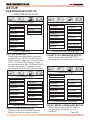
PREFERENCES SETUP
--- PREFERENCES PAGE --DOLBY
-----Preference Page----
DOLBY
-----Preference Page----
TV Type
PAL
TV Type
Audio
AUTO
Audio
French
Subtitle
NTSC
Subtitle
Spanish
Disc Menu
Disc Menu
German
Parental
Parental
Password
Password
Default
Default
Set TV standard
1.TV TYPE SETUP
This player can play discs recorded
in either PAL or NTSC format.Select
NTSC format, when you connected to
NTSC TV.Select PAL format, when
you connected to PAL TV.Select AUTO
format, the player TV output format
will according to the DVD disc format..
DOLBY
-----Preference Page---TV Type
Audio
Subtitle
Disc Menu
English
French
Spanish
German
Parental
Password
Italian
English
Italian
Portuguese
OFF
Preferred Subtitle Language
3.SUBTITLE LANGUAGE SETUP
Select the preferred SUBTITLE
language by using the cursor buttons.
DOLBY
-----Preference Page---TV Type
Audio
English
Subtitle
French
Disc Menu
Spanish
Parental
German
Password
Italian
Default
Portuguese
Portuguese
Default
Preferred Audio Language
2.AUDIO LANGUAGE SETUP
Select the preferred AUDIO soundtrack by using the cursor buttons.
Preferred Menu Language
4.DISC MENU LANGUAGE SETUP
Select the preferred DISC MENU
language by using the cursor
buttons.
Page 23
WWW.PREMIERMUNDO.COM
SETUP
DOLBY
DOLBY
-----Preference Page----
-----Preference Page----
TV Type
1KID SAF
TV Type
Audio
2G
Audio
3PG
Subtitle
4PG13
Disc Menu
5PGR
Parental
Subtitle
Disc Menu
Parental
Password
Default
6R
7NC 17
Password
Default
RESET
8 ADULT
OFF
Set Parental Control
5.PARENTAL
Select suitable parental guidance by
the cursor buttons and conformed by
pressing ENTER button.
Load Fcatory Setting
7.DEFAULTS
Select reset to become factory initial
setting.
DEFAULTS TABLE
DOLBY
-----Preference Page----
TV DISPLAY
NORMAL/LB
ANGLE MARK
ON
OSD LANGUAGE
ENGLISH
Audio
SPDIF OUPUT
SPDIF/RAM
Subtitle
CAPTIONS
ON
SCR SAVER
ON
LAST MEMORY
ON
TV Type
GENERAL SETUP
Disc Menu
Parental
SPEAKER SETUP DOWNMIX
Password
CHANGE
DOLBY DIGITAL
Default
Change Password
6.PASSWORD
Select the change and press ENTER
button. Type the old password (The
initial factory code is 1379 ) and key
in 4 characters password now you
want to use, and retype again to
confirm key in correctly.
Page 24
PREFERENCES
STEREO
DYNAMIC
OFF
TV TYPE
AUTO
AUDIO
ENGLISH
SUBTITLE
OFF
DISC MENU
ENGLISH
PARENTAL
8 ADULT
PASSWORD
1379
WWW.PREMIERMUNDO.COM
SPECIFICATION
Supply Voltage:
Current Consumption:
Signal System:
Discs Played:
TV System:
12V DC (11V-15V)
Less than10 A
Compositive video 1.0Vp-p 75
(1)DVD-VIDEO Disc
5"(12 cm) single-sided, single-layer
5"(12 cm) single-sided, double-layer
(2)Compact Disc (CD-DA, VIDEO CD)
5"(12cm) disc
NTSC/PAL-M/N
TV Sensitivity:
Audio Signal Output:
Characteristics:
Frequency Coverage:
IF:
Sensitivity (S/N = 30 dB):
Frequency Coverage:
IF:
Sensitivity (S/N = 20 dB):
Frequency Coverage:
IF:
Sensitivity (S/N = 20 dB):
Monitor Screen Size:
Number of Pixels:
Color System:
2ch&4ch line out
(1)Frequency Response
(2)S/N Ratio
(3)Wow and Flutter
For 3 Bands
(Europe)
FM
87.5 to108 MHz
10.7 MHz
15 dBu
MW
522 to1620 KHz
450 K H z
40 dBu
LW(Optional)
144 to290 KHz
450 KHz
45 dBu
20 Hz - 20 KHz
90 dB (JIS)
Below measurable limits
For 2 Bands
(Europe)
FM
87.5 to108 MHz
10.7 M H z
15 dBu
MW
522 to1620 KHz
450 KHz
40 dBu
For 2 Bands
(U.S.A.)
FM
87.5 to107.9 MHz
10.7 MHz
15dBu
AM
530 to1710 KHz
450 KHz
40 dBu
3.6 Inch Wide
960 X 234 pixels
NTSC/PAL
Bluetooth specification:
V1.2 Class 2
Bluetooth profile supported: Headset, Handsfree and A2DP profiles
Range of frequency:
2.4GHz Spectrum
NOTE: Specifications and design are subject to modification, without notice,
due to improvements in technology.
Page 25
WWW.PREMIERMUNDO.COM
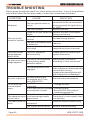
TROUBLE SHOOTING
Before going through the check list, check wiring connection. If any of the problems
persist after check list has been made, consult your nearest service dealer.
SYMPTOM
No power
CAUSE
The car ignition switch is
not on
The fuse is blown
SOLUTION
If the power supply is properly
connected to the car accessory
terminal,switch the ignition key
to "ACC"
Replace the fuse
Presence of disc inside the Remove the disc in the player,
then put a new one
player.
Disc can not be
loaded or ejected
Inserting the disc in reverse Insert the compact disc with
the label facing upward
direction
The disc is extremely dirty Clean the disc or try to play a
new one
or defective
Temperature inside the car Cool off or until the ambient
is too high
temperature return to normal
Television/video
imageappears
black-white
The color system is
set incorrectly
The unit is not connected
No television/video to the parking brake
image appears
detection switch
The parking brake is not
engaged
No color in picture The disc format is not
accordingto the TV-set
used (PAL/NTSC)
JPEG disc can
not be played
back
No JPEG files are recorded
on the disc.
Please switch to correct color
system from menu
Make proper connection
according to “ wire connection ”
For safety reasons no television
/video images are displayed while
the vehicle is moving.
Engaging the parking brake will
cause images to be displayed.
Please the television mode of
the choice accommodation
Change the disc
JPEG files are not recorded Change the disc
Record JPEG files using a
in a compliant formant
compliant application
The built-in microcomputer Press the RESET button.
The operation keys is not operating properly
Front panel is not properly fixed
do not work
due to noise
into its place
The
antenna
cable
is
not
The radio does not
Insert the antenna cable firmly
connected
work
The signals are too weak
Page 26
Select a station manually
888-J3011-05S