1
Transfer data from a BlackBerry 7 device using a media card ...................................................................... 27
Transfer data to a new device using a computer and BlackBerry Link .......................................................... 28
Transfer data to a new device using BlackBerry Protect .............................................................................. 28
Transfer data from an iPhone or Android device .......................................................................................... 29
After you switch devices ............................................................................................................................. 29
Restoring your BBM contacts and groups ................................................................................................... 29
Transfer passwords from the Password Keeper app .................................................................................... 30
Add an account to your device .................................................................................................................... 30
Tips after switching devices ........................................................................................................................ 30
Troubleshooting: Device Switch .................................................................................................................. 31
I can't switch my SIM card to my new BlackBerry 10 device ........................................................................ 31
How do I reset my lost or forgotten BlackBerry ID password? ....................................................................... 31
Some of the data from my previous device isn't on my new device ............................................................... 31
I can't transfer items using my media card .................................................................................................. 32
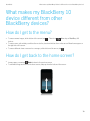
What makes my BlackBerry 10 device different from other BlackBerry devices? .......................................... 33
How do I get to the menu? .......................................................................................................................... 33
How do I get back to the home screen? ....................................................................................................... 33
How do I change my settings and options? .................................................................................................. 34
Where are my ring tones and notification profiles? ....................................................................................... 34
Where are my messages? ........................................................................................................................... 34
Where are my apps? ................................................................................................................................... 35
Where are my tasks, memos, and voice notes? ............................................................................................ 35
Where do I find my files? ............................................................................................................................. 35
Where can I find my device info and passwords? ......................................................................................... 36
How do I search? ........................................................................................................................................ 36
What is BlackBerry Link? ............................................................................................................................ 36
Get your message out with the BlackBerry Keyboard ................................................................................... 37
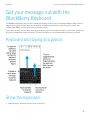
Keyboard and typing at a glance ................................................................................................................. 37
Show the keyboard ..................................................................................................................................... 37
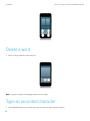
Delete a word ............................................................................................................................................. 38
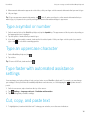
Type an accented character ....................................................................................................................... 38
Type a symbol or number ........................................................................................................................... 39
Type an uppercase character ..................................................................................................................... 39