1
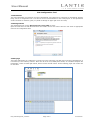
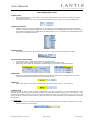
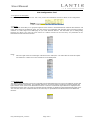
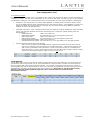
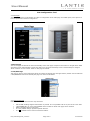
User Manual YCS Configuration Tool 3.1 Name and IP Name that describes the zone is filled in. This will be displayed in the Lantic Service Tool and also used in the Central Command. IP address is filled in. This is only used as documentation and has no effect on the actual configuration. 3.2 OLED panel selection Enable the desired amount of OLED panels. A new tab/page is automatically generated when an OLED is enabled. If an OLED is disabled again the current configuration for that OLED page is preserved in the excel file but will not uploaded to the OLED panel. The OLED number 1-10 corresponds to the actual address/node that is set on the OLED panel itself. 3.3 Enable buttons When passive buttons are connected to the YCS server. A new tab will automatically be created. 3.4 Air Condition common settings Air Condition Count – select the amount of air condition zones. Adjust the common settings for the zones – Fanspeed and Temperature range. Select what zones should be presented in Entertainment and give them an appropriate name. 3.5 Main Light Select what “Main Light” should be controlled from the RC20 remote control. The RC1 and RC10 remote controls always utilize the default Scene 1 in the Dimmer map. 3.6 Main Lift Select what “Main Lift” should be controlled from the Lantic remote controls – RC1 and RC10. 3.7 Dimmer Map The Dimmer map is used to create the light configuration for the entire cabin/zone. A uniqe combination of a zone and light name is created. Light level values are filled in to define the collection of light circuits. The topmost 6 rows are the lights controlled from the Central command. If prefered these 6 rows can frealy be used. The order of the names and zones created in this Excel sheet is the same order they will be presented in the Entertainment and RC20 iPxd interface. 3.7.1 DMX count Adjust this value if more than 22 DMX circuits are used (maximum 32). The DALI count (maximum 10) will then be reduced by equal amount. UM_YCS Config Tool_5.0.docx Page 3 of 9 07.05.2013