1
2.4 Device Setup & Configuration
The Advantech Navigator program is a utility that allows you to set up, configure and
test your device, and later stores your settings on the system registry. These settings
will be used when you call the APIs of Advantech Device Drivers.
Setting Up the Device
1. To install the I/O device for your card, you must first run the Advantech Navigator program (by accessing Start/Programs/Advantech Automation/DAQNavi/
Advantech Navigator).
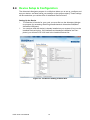
2. You can then view the device(s) already installed on your system (if any) on the
Installed Devices list box. If the software and hardware installation are completed, you will see PCIE-1810 card in the Installed Devices list.
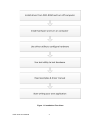
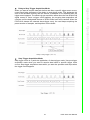
Figure 2.3 The Device Setting of PCIE-1810
PCIE-1810 User Manual
12