1
IP Camera
IE Browser User's Manual
V 3.0
IP Camera IE Browser User’s Manual
Statement
Thank you for using our IP camera products. This series of products are all-in-one IP cameras
designed for network video surveillance, including box IP camera, infrared box IP camera, dome IP
camera, speed dome IP camera, etc. The products adopt high performance and powerful single
SOC chip media processor to integrate audio and video capture, compression and transmission.
Standard H.264 Main Profile coding algorithm ensures clearer and smoother video transmission
effect. Built-in Web Server allows users to easily perform real-time monitoring and remote control
over front-end cameras via IE browser.
This series of IP cameras is suitable for small and medium-sized enterprises, families, and
other environments that require remote network video transmission and monitoring. It is easy to
install and operate.
Before installation, please check to see whether you have the product and all accessories
ready. If anything is missing, please contact your supplier in time.
Package contents:
1 IP Camera
2 Power Adapter (model depends on the camera model)
3 User ’s Manual
4 Compact Disk
5 Certificate of quality
6 Warranty Card
----1pc
----1pc
----1pc
----1pc
----1pc
----1pc
Optional Accessories:
1 WIFI Antenna
----1pc
Notes:
u
“IP Camera” mentioned in this manual refers to network camera, including box IP camera,
dome IP camera, infrared box IP camera, speed dome IP camera, etc.
u
Click - press the left mouse button once
u
Double-click - press the left mouse button twice
Note:
u
Contents in this manual may be different from the edition that you are using. Should any
unsolved problem occur given that the product is used according to this manual, please
contact our technical support department or your product suppliers.
u
The content of this manual may be updated at irregular intervals without prior notice.
2/31
IP Camera IE Browser User’s Manual
Table of Contents
1 Download and install ActiveX......................................................................................................................... 4
2 Login.................................................................................................................................................................. 4
3 Live Preview ..................................................................................................................................................... 5
4 Record playback .............................................................................................................................................. 6
5 Set System Parameters.................................................................................................................................. 8
5.1 System Settings ....................................................................................................................................... 8
5.2 Video Settings.......................................................................................................................................... 8
5.3 Alarm Settings ....................................................................................................................................... 10
5.4 Network Settings ................................................................................................................................... 12
5.5 User Management.................................................................................................................................. 18
5.6 Front-end Settings ................................................................................................................................. 18
5.7 Storage Device....................................................................................................................................... 19
5.8 Visit Settings.......................................................................................................................................... 21
Appendix 1 Network Interface of IP Camera ................................................................................................ 22
Appendix 2 Default Network Parameters...................................................................................................... 22
Appendix 3 Apply for DDNS domain name service ..................................................................................... 22
Appendix 4 Visit IP camera under different network environments .......................................................... 23
Appendix 5 FAQs.............................................................................................................................................. 29
3/31
IP Camera User’s Manual
1 Download and install ActiveX
You need to install ActiveX Control when you visit IP camera for the first time through IE
browser.
ActiveX installing method:
Download installation
Input the IP address of IP camera in Internet Explore to enter into login page,
Click [File] to download the ActiveX:
Download ActiveX
File download dialogue box pops up, click [Run] or [Save] to download ActiveX, after download it ,
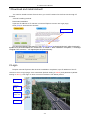
double-click the downloaded file “xdview.exe” to install it. After installation completes, a message
“Register OCX success!” will appear(see the picture below):
2 Login
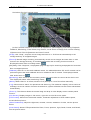
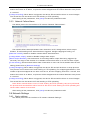
Reopen Internet Explorer after ActiveX installation completes, input IP address of the IP
camera to turn to login page, enter username (default setting is admin) and password (default
setting is admin), click login to enter into main interface. See below picture:
Live Preview
Parameter
settings
Image
display area
PTZ control
4/31
IP Camera User’s Manual
3 Live Preview
See below for the Liveview page:
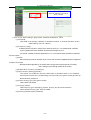
In the Liveview interface, users can do operations like Snapping, Recording, Playback,
Talkback, Monitoring, Clear Alarm, Log Search, Local Zoom of Image, Full-screen Viewing,
Lightness and Color Adjustment and Lens Control.
[Snap]: click “Snap”, snap the current image and save it in .JPG format automatically to the
storage directory of snapped images.
[Record]: Manual image recording, automatically record current images and save them in .264
format to the storage directory of recorded images after the recording function turned on.
Displayed status after recording starts:
[Playback]: Click “Playback”, the playback page will pop up for searching and playback of recorded
files or snapped pictures.
[Talkback]: After turn on the audio talkback switch, the talkback between PC and IP camera can be
performed given that audio talkback device is installed to the IP camera. The displayed status
after audio turns on:
[Monitoring]: After switch on the monitoring switch, PC can monitor the sound at the device end.
The displayed status after monitoring starts :
[Alarm]: When there is an alarm, double-click [Alarm] to cancel the alarm manually.
[Log]: Allow users to search for operations and alarm log. The maximum capacity is 512 entries of
message, when the number of entries exceeds 512, system will delete records of the earliest date
automatically.
[Zoom In]: This feature allows the manual drag and drop of video display area to realize partial
zoom in.
[Full Screen]: Display images in full-screen, right click to exit full screen mode.
[PTZ Control]: Allows four-directional rotation, automatic adjustment of PTZ rotation speed,
encase below picture:
[Video Parameters]: Adjust the lightness, contrast, chroma, saturation of video, see the picture
below:
[Lens Control]: Allows PTZ operations like Zoom, Focus, Aperture, Light, Brush, Preset, and Recall,
see the picture below:
5/31
IP Camera User’s Manual
PTZ Control
Lens Control
Video Parameters
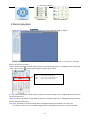
4 Record playback
Click [Playback] button:
, enter into video playback page as follow:
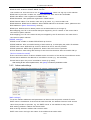
Users can search for recorded image files or snapped pictures in local PC or storage
device according to date.
[Date]: Users can select certain date to perform recorded image file or snapped picture searching,
click “date” button
, data selection page will pop up as follow:
Click
Click
Click
Click
“《 ”icon
“ 》 ”icon
“〈 ”icon
“ 〉 ”icon
to
to
to
to
turn
turn
turn
turn
to
to
to
to
previ ous year
next year
previ ous m onth
next m onth
[Local]: Users can select certain date to perform recorded image file or snapped picture (stored in
local PC) searching.
[Device]: Users can select certain date to perform recorded image file or snapped picture (stored in
device SD card) searching.
[File List]: Shows the recorded image files or snapped pictures searched in the File List.
The way to search for recorded image files or snapped pictures of a specific period:
6/31
IP Camera User’s Manual
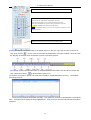
Select to search for record files or snapped pictures in PC or device SD card
The rec ord file list searched is displayed on the left
The picture list searched is displayed on the right
The left side stands for hour, each grid m eans one hour
The right side stands for m inute, each grid m eans 2 minutes
Yellow indicates the sel ected search peri od
Blue indicates there are files and pictures searched of the
sel ected peri od
Display the files and pictures searched of the selected period
[Play]: Choose the recorded image or snapped picture in file list, right click the file or picture or
click “play” button
to play. The contents will be displayed in the right window, users can view
the playing information and control the process, see below picture:
[Download]: Select the recorded files or snapped pictures searched from SD card in the file list,
click “download” button
to download the files to PC.
[Download information]: Users can view the information downloaded after clicking
“Download”,
see below picture:
Click [Pause] to pause download manually,click [Start] to continue to download the unfinished
files,click [Delete] to delete the downloaded files,click [Close] to close the download information
interface.
7/31
IP Camera User’s Manual
5 Set System Parameters
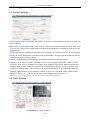
5.1 System Settings
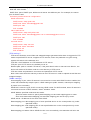
See below picture for the interface of “System Settings”:
[System Clock]: click “synchronize with system” to synchronize the date and time of IP camera with
those of the PC.
[Network Clock Setup]: after starting the function, switch on NTP switch and select time zone, save
it to turn to [Liveview], the system time that has been automatically corrected by NTP server can
be displayed.
[System Information]: Display device name, device number, etc. Device name can be user-defined.
[Reset]: All device parameters (including network parameters, excluding physical address) will be
recovered as factory setting values.
[Reboot]: Click [Reboot], the IP camera will restart automatically after 5 seconds.
[Upgrade]: Click “Review” button, and select correct file of upgrade (kernel file, suffix.uot),click
[upgrade], then you can upgrade your system, the completion rate will be displayed during this
process. After upgrade completes, IP camera will restart automatically. Re-log in device, enter
into system settings page, check to see whether the kernel edition is the upgraded edition. For
example: kernel edition of the current IP camera is (V2.2.1.2), the latest edition obtained from
supplier is (V2.2.1.3),
then the kernel edition after upgrade should be V2.2.1.3.
Note: Don’t cut off the power and internet connection while upgrading.
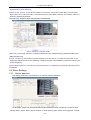
5.2 Video Settings
See below picture for the interface of “Video Settings”:
Video interface of CCD models
8/31
IP Camera User’s Manual
[Video Name]: the name of video channel, displayed at the bottom left of image(movable), maximum
characters allowed: 32.
[Title Overlay]: display or not to display name, date, time, week and frame rate/bitrate of channels.
[Position Adjustment]: Can adjust the display position of video title.
[Preferred and alternate streams]: set up video parameters for preferred and alternate streams.
[Coding algorithm]: H.264 and MJPEG.
[Definition]: set definition of images, modes supported are:
PAL mode – four definition format: D1(704*576)/Half-D1(704*288)/CIF(352*288)/QCIF(176*144)
NTSC mode – four definition formats:
D1(704*480)/Half-D1(704*240)/CIF(352*240)/QCIF(176*120).
[Image Quality]: users can choose the right quality according to their needs: Best, Good, Normal,
and the parameters can also be user-defined by checking [advanced settings] checkbox.
[I frame interval]: adjustable between 5~200.Smaller I frame interval means higher image bitrate
and better image quality. It is recommended to set the I frame interval as above 25.
[Frame Rate]: set encoding frame rate per second. Under poor network condition, frame rate can
be reduced to control encoding bitrate to make motion images flow more smoothly.
[CBR/VBR]: CBR and VBR are optional. CBR adopts constant encoding bitrate, VBR adopts
variable encoding bitrate.
[Bitrate]: the range of preferred and alternate stream is 30~16384Kbps.Higher bitrate setting can
generate better image quality, but it occupies more bandwidth, please adjust the setting according
to your actual bandwidth.
Under CBR setting, [Bitrate] is the constant bitrate of encoding.
Under VBR setting, [Bitrate] is the variable bitrate of encoding.
[Image Quality]: under CBR setting: set the bitrate range via “Image Quality”, 1 means it is
controlled by the software.
Bitrate range, 2~6 means corresponding bitrate range is ±10%~
±50%
Under VBR setting: set image quality via “Image Quality”, smaller value of image
quality means better quality and higher bitrate, but the bitrate will not
exceed its set value.
[LAN default value]: I frame interval: 100, frame rate: 25, bitrate: VBR, 2048kbps, image quality:2
[WAN default value]: I frame interval: 25, frame rate: 5, bitrate: CBR, 384kbps, image quality:4
Note: Non-professional users please use “Advanced Settings” with caution
[Auto Iris Level]: adjust the control level of auto-iris to control the illumination of lens iris.“-”: reduce
illumination of auto-iris, “+”: increase illumination of auto-iris. Works only on auto-iris lens.
[Auto]: select this button when using auto-iris lens.
[Manual]: select this button when using manual-iris lens.
[Auto White Balance]: select this button to realize automatic adjustment of white balance.
[Auto Gain Control]: Enabling auto gain will improve the effect of images under low illumination.
[Back Light Compensation]: When there is strong light behind the monitored objects, illumination
compensation will be provided in the required range to get better image quality.
[Video Masking On/Off]: enable or disable video masking.
[Masking Area Setup]: right click and move cursor to set image masking area, an image can be
entirely or partially masked, maximum 4 areas supported.
[All]: mask the whole image.
[Clear]: clear masked areas.
9/31
IP Camera User’s Manual
[Parameter setup for snapshot function]: supports only images of JPG format currently, definition is the
same as set in [video definition].
[Audio on/off]: turn on or turn off the audio of IP camera, users can choose MIC or linear input,
When there is no need for audio, close audio input to save DSP resource and network resource.
Audio is disabled by default.
[Sample rate]: Supports audio sample rates of 8k and 32k.
Video interface of CMOS model
[Definition]: set image definition, supported definitions are VGA(640*480), QVGA(320*240) and
QQVGA(160*128).
[Power Frequency]: Environment power frequency of the device. In indoor environment, if the
flashing of lamps results in the flickering of images, please choose 50HZ or 60HZ according to the
power frequency.
[Video Mirror/Rollover]: set video mirror(vertical mirror of images) and rollover(horizontal rollover
of images).
5.3 Alarm Settings
5.3.1
Motion detection
See below picture for the interface of IP camera “Motion detection”:
In this page, users can set features like motion detection on/off, sensitivity, detection time,
linkage alarm output, alarm output duration, E-mail sending when alarm been triggered, linkage
10/31
IP Camera User’s Manual
snapping/recording, etc.
[Detection On/Off]: enable or disable motion detection.
[Sensitivity]: sensitivity range is 1~5, greater value means higher sensitivity.
[Detection time setup]: set the period of time for motion detection, two periods allowed.
[Linkage Alarm output]: enable or disable linkage alarm output
[Alarm Output Duration]: Set the duration of the linkage alarm output after being triggered (in
seconds), the range of the duration is 0~86400s.0 means that there is no limit for alarm output.
[E-mail sending]: Send video loss detection alarm information to users via E-mail, details about
E-mail setting please refer to [Network Settings].
[Linkage Snapping]: When alarm is triggered, the device SD card will be driven to snap pictures.
The pictures can be saved via E-mail sending or FTP uploading. For snapping parameters, if the
number of pictures snapped at one time is set as 10, and the snapping interval is 1 second, that
means when there is an alarm, 10 pictures will be snapped and the interval between each picture
is 1 second.
[Linkage recording]: When alarm is triggered, the device SD card will be driven to record images.
The record files can be saved via E-mail sending or FTP uploading.
[Set detective area]: left click and drive the mouse to set the surveillance areas (4 areas at most).
[All]: set the whole video as motion detection area.
[Clear]: clear all motion detection areas.
After setting all the parameters, click [save] to make the parameters valid.
5.3.2
Sensor Alarm
See below picture for the interface of IP camera “Sensor Alarm”:
Set sensor alarm parameters here: detection on/off, sensor type, detection time, linkage alarm
output, linkage output duration, E-mail sending when alarm has been triggered, linkage
snapping/recording, etc.
[Detection On/Off]: enable or disable sensor alarm detection.
[Sensor Mode]: NO and NC mode.
[Detection time setup]: set the period of time for sensor alarm detection, two periods allowed.
[Linkage Alarm output]: enable or disable linkage alarm output
[Alarm Output Duration]: Set the duration of the linkage alarm output after being triggered (in
seconds), the range of the duration is 0~86400s.0 means that there is no limit for alarm output.
[E-mail sending]: Send sensor alarm information to users via E-mail, details about E-mail setting
please refer to [Network Settings].
[Linkage Snapping]: When alarm is triggered, the device SD card will be driven to snap pictures.
The pictures can be saved via E-mail sending or FTP uploading. For snapping parameters, if the
11/31
IP Camera User’s Manual
number of pictures snapped at one time is set as 10, and the snapping interval is 1 second, that
means when there is an alarm, 10 pictures will be snapped and the interval between each picture
is 1 second.
[Linkage recording]: When alarm is triggered, the device SD card will be driven to record images.
The record files can be saved via E-mail sending or FTP uploading.
After setting all the parameters, click [save] to make the parameters valid.
5.3.3
Network Failure Alarm
See below picture for the interface of IP camera “Network Failure Alarm”:
Set network failure alarm parameters here: detection on/off, linkage alarm, alarm output
duration, E-mail sending when alarm has been triggered, linkage snapping/recording, etc.
[Detection On/Off]: enable or disable network failure alarm detection.
[Linkage Alarm output]: enable or disable linkage alarm output
[Alarm Output Duration]: Set the duration of the linkage alarm output after being triggered (in
seconds), the range of the duration is 0~86400s.0 means that there is no limit for alarm output.
[E-mail sending]: Send network failure alarm information to users via E-mail, details about E-mail
setting please refer to [Network Settings].
[Linkage Snapping]: When alarm is triggered, the device SD card will be driven to snap pictures.
The pictures can be saved via E-mail sending or FTP uploading. For snapping parameters, if the
number of pictures snapped at one time is set as 10, and the snapping interval is 1 second, that
means when there is an alarm, 10 pictures will be snapped and the interval between each picture
is 1 second.
[Linkage recording]: When alarm is triggered, the device SD card will be driven to record images.
The record files can be saved via E-mail sending or FTP uploading.
Note: When network failure occurs, E-mail sending and FTP uploading cannot be performed,
the pictures and recorded files will be stored in SD card. E-mail sending and FTP uploading will
resume after network is recovered.
After setting all the parameters, click [save] to make the parameters valid.
5.4 Network Settings
5.4.1
Basic settings
See below picture for the interface of IP camera “Network Settings”:
12/31
IP Camera User’s Manual
[Basic Parameters]
DHCP: If DHCP function of the router is enabled, IP camera will automatically fetch IP address
from the router.
IP Address: Set the device IP of IP camera
Subnet mask: default value is 255.255.255.0 (users are recommended not to change it).
Gateway: Set the gateway IP of IP camera, for example when the device is connected to public
network via a router, the gateway IP is the router IP.
Physical address: the MAC address of IP camera (users are recommended not to change it).
Data port: default value is 5000 (users are recommended not to change it).
Web port: default value is 80 (users are recommended not to change it).
DNS address: The default DNS address is the DNS address of Guangdong province, users
outside the area please use DDNS function to set the DNS address as their local DNS
address.
Note: after revise and save parameters, the device will restart. If it is applied in LAN, please pay
attention to avoid conflict between its IP address and the IP addresses of other devices or PC in
the LAN.
[Wi-Fi settings]
Note: applies to models with Wi-Fi function only.
A wireless router needs to be deployed in order to use the Wi-Fi function of IP camera, e.g.
TP-Link WR340G 54M wireless router. The content and steps of the settings are as follows:
1 Network parameters setup for wireless router
First enter into the wireless router “network parameter” page under the menu “LAN
Setting”, set the IP of wireless router
13/31
IP Camera User’s Manual
192.168.1.1 is the wireless
gateway address to be set for
the IP camera
2 Turn to the “basic settings” page under “wireless parameters” menu,
(1) Set SSID:
This SSID is for identity validation of wireless network, it must be the same as the
SSID setting of the IP camera
(2) Frequency range
It determines the frequency range of the network, which is 1~13, default value is 6.Note:
If your neighbor also uses wireless network and its frequency is 6,
you should consider revise this parameter to 1 or 13 to reduce radio interference between
the two routers.
(3) Mode
Set the working mode of wireless router. The mode must be compatible with the supported
modes of IP camera.
Wireless mode supported by IP camera: 802.11b/g protocol (low power Wi-Fi model)
802.11a/b/g/n protocol (high power Wi-Fi model)
(4) Enable Wi-Fi function (compulsory)
(5) Open security setting (optional)
This option can enable the security certification of wireless router. If it is enabled,
users need to select the corresponding security mode (encryption mode) and set up
authentication password.
(6) Select security type (encryption mode)
WEP, WPA and WPA2
(7) Security options
WEP security type: developing system, sharing key and auto-selection
WPA, WPA2 security type: TKIP and AES
(8) Set key (authentication password)
14/31
IP Camera User’s Manual
TP-LINK_5ABB68 is the
login SSIDnumberofWi-Fi
for
identity
Che
ck th
is o
pti
on t
o en
abl
e
WiFifun
ct
ion
Security setting is the
password for identity
authentication,
the
password is empty if this
option is not checked
3 WiFi function settings of IP camera:
(1) Wireless network on/off
Select this switch will enable Wi-Fi function of IP camera.
(2) IP address
Set the wireless IP address of IP camera, e.g. 192.168.1.160.
(3) Gateway
Set the IP address of current wireless gateway, e.g. 192.168.1.1.
(4) SSID number:
It is the login name of Wi-Fi for identity authentication, it must be the same as the
SSID number of the wireless router (e.g. TP-LINK_5ABB68).
(5) Password
It is the login name of Wi-Fi for identity authentication, it must be the same as the
key of the wireless gateway (router/AP).
(6) Master authentication encryption type
Three encryption types are WEP, WPA and WPA2. Its selection must be the same as
the security type setting of wireless gateway (router/AP).
(7) Auxiliary encryption mode
WEP security type: developing system, sharing key and auto-selection
WPA, WPA2 security type: TKIP and AES
It must be the same as the security option setting of wireless gateway (router/AP).
After setting completes, save all parameters. Then disconnect the network cable, IP camera
can be visited via wireless IP, such as 192.168.1.160.
Note:
The wireless network IP address and cable network IP address cannot be in the same
segment.
The Wi-Fi switch appears to be grey when IP camera doesn't have Wi-Fi function.
[DDNS settings]
Bind the device with a fixed domain name by DNNS setting so that visiting to the device can
15/31
IP Camera User’s Manual
be realized no matter how the public IP changes.(refer to Appendix 3 for detailed steps)
DDNS On/Off: enable or disable DDNS function.
Link mvddns.net: click this link to turn to www.mvddns.net, users can sign up on this website.
DDNS service provider: mvddns.net, 3322.org and user ddns server are selectable.
DDNS User Name: User registered in DDNS server.
DDNS Password: User password registered in DDNS server.
DDNS Domain Name: The domain name set up by users, e.g.: test1.mvddns.net.
DDNS Address: DDNS server address. When DDNS address is the domain name, please set the
DNS address in [Basic Parameters] correctly.
DDNS port: default value is 30000 (users are recommended not to change it).
Data mapping port: fill in the external data port mapped by the IP camera on the router that is
connected to public website.
Web mapping port: fill in the external web port mapped by the IP camera on the router that is
connected to public website.
[PPPOE settings]
PPPOE on/off: enable or disable PPPOE dial-up function.
PPPOE address: after successful setting of device dial-up, it will display the public IP Address.
PPPOE user name: ADSL dial-up account, obtain from the IP service provider.
PPPOE password: ADSL dial-up password, obtain from the IP service provider.
On-line duration: start timing after dial-up to see the online duration after successful dial-up.
[Active connection mode]
Active connection switch: enable or disable active connection of the device to surveillance center.
Central server address: the address of surveillance center (e.g. 192.168.55.8).
Central server port: the port of surveillance center (e.g. 6000).
After setting all the network parameters, click [save] to make the parameters valid.
5.4.2
Advanced settings
See below picture for the interface of IP camera “Advanced Settings”:
[Mail settings]
To set the mailbox addresses and parameters of alarm mails and public network IP mails.
SMTP server: the address of servers that send the mails, the address format of mail servers
varies from provider to provider, e.g. the SMTP server of 163 mailbox is smtp.163.com.
Mail sending address: mailbox that sends mails.
Mail receiving address: mailbox that receives mails.
SMTP user name: the login user name of the mailbox that sends mails.
16/31
IP Camera User’s Manual
SMTP password: the login password of the mailbox that sends mails.
Mail title: title of mails.
SMTP Port: port of SMTP port, different mail server has different port. For example, the server
port of Gmail is 465.
Commonly used mail server configuration:
Gmail mail server:
SMTP server: smtp.gmail.com
SMTP user name: [email protected]
SMTP port: 465
SSL: enabled
Yahoo mail server:
SMTP server: smtp.mail.yahoo.com
SMTP user name: [email protected] or [email protected]
SMTP port: 465
SSL: enabled
163 mail server:
SMTP server: smtp.163.com
SMTP user name: username
SMTP port: 25
SSL: disabled
[FTP settings]
FTP server sends the record files and snapped images generated after alarm is triggered in FTP
mode to specified FTP server, supports 2 FTP servers, when the preferred one goes wrong,
system will switch to the alternate one.
FTP URL: the IP address or HTTP address of FTP server.
FTP port: port of FTP server, the default port is 21.
Remote path: path on remote FTP server, if the path doesn’t exist or has not been filled in, the
device will create a file folder under the root directory of FTP server.
FTP user name and password: user name and password of FTP server.
Note: Users must have the authority to write on the FTP server in order to upload record files and
snapped images.
[UPNP settings]
Auto-mapping of port, when IP camera is connected to a router with UPNP function enabled, the
router will automatically map the port in UPNP settings to public network, manual port mapping
by users is not necessary.
UPNP NIC: select the type of NIC connecting UPNP router. For WiFi models, when IP camera is
connected to router via WiFi network, select “wireless” mode.
UPNP Modes: specified mode and auto mode.
Specified mode means to specify data mapping port and web mapping port to router.
Auto mode means data mapping port and web mapping port are set up by router.
UPNP server: IP address of the router with UPNP.
Data mapping port: data mapping port of user-specified device on the router(works only under
specified mode).
Web mapping port: web mapping port of user-specified device on the router(works only under
specified mode).
Data mapping port status: When UPNP function runs successfully, the status bar will echo the
17/31
IP Camera User’s Manual
data port mapped to the router by the device.
Web mapping port status: When UPNP function runs successfully, the status bar will echo the
web port mapped to the router by the device.
After setting all the parameters, click [save] to make the parameters valid.
[RTSP settings]
RTSP on/off: check RTSP switch to enable RTSP function.
RTSP port: default port is 554.
With RTSP function enabled, users can review the audio and video streams in real time via
players that supports standard RTSP protocol
(e.g. VLC, Quicktime).
[Public IP mail notification]
Mail notification on/off: check this switch to enable public IP mail notification function.
Interval: select the interval of public IP mail notifications.
After enable this function, when the device starts or detects public IP change, it will send
notification mail to
the mail address set in “mail settings”.
5.5 User Management
See below for IP camera user manager settings interface:
You can set three users for every camera, one is Administrator, the others are general users.
Administrator authority: can operate and set all functions and parameters of IP camera
General user authority: (1) can perform operations like snapping, recording, playback,
talkback, monitoring, alarm clearing, log searching, zooming and
full-screen reviewing;
(2) Can perform operations like visit setting, image lightness and color
adjustment, PTZ and lens control, etc.
Note: User name and password must be 1-16-character-strings consisted by letters,
numbers, underlines or dots. The characters are case sensitive.
Default user name of administrator: admin
Default user name of general user: user 1 \user 2
Note: user name and password are case sensitive
Password: admin
Password: user 1 \user 2
5.6 Front-end Settings
See below picture for the interface of IP camera “Front-end Settings”:
18/31
IP Camera User’s Manual
[Serial port settings]: When IP camera is connected to RS485 (or RS232) communication or control
device (e.g. PTZ decoder, dome camera), the parameters of RS485 (or RS232) need to be set
according to the settings of the communication control device (address, protocol, baud rate), and
the corresponding protocol need to be downloaded.
Note: Only when the parameters and protocol are correctly set that the control of add-on
communication control device can be implemented.
[PTZ decoder protocol]
Decoder address: 1~255.
Built-in protocol: echo the built-in protocol name of current IP camera.
PTZ decoder protocol file uploading: to upload the decoder/dome camera communication protocol
selected by users. The system supports hundreds of decoder/dome camera communication protocols, it
can also be defined by users according to the standard format of protocols.
After setting all the parameters, click [save] to make the parameters valid.
5.7 Storage Device
5.7.1
Device Management
See below picture for the interface of IP camera “Device Management”:
[Storage Device information]: view information of SD card here, including total capacity, free capacity, and
formatting status. Users can also click [Formatting] button to format SD card, during the formatting
process, please click [Refresh] button to the display formatting completion percentage.
[Device Recording Parameters]
Stream selection: set record stream for SD card, preferred stream and alternate stream are
selectable.
Record files packing interval: set packing intervals for each segment of record file when SD card
is recording.1 means files will be packed every 1 minute.
[Other Parameters]
19/31
IP Camera User’s Manual
Automatically delete old files when storage device gets full: when the storage capacity of SD card
is used up, the device will delete old files automatically. The way to delete old files: first
delete the files of the earliest date, if the space is still not enough, then delete the files of the
earliest date but one, then go on like this if necessary. If the record files are taken on the
current date, then first delete the files of the earliest hour. But files of the current hour cannot
be deleted, if the SD card gets full in one hour, the device will stop recording and snapping
images. After the one-hour session ends, system will delete the files of the hour and continue
to record and snap pictures.
Scan the disk when device starts: check storage device or not when IP camera starts.
C Note:
1 Hot-plugging is not recommended for SD card, compulsory hot-plugging may damage the SD
card, causing data loss or abnormal operation.
2 Do not cut off the power of the device during formatting process.
3 ext2 file is used to format system by default.
After setting all the parameters, click [save] to make the parameters valid.
5.7.2
Record Schedule
See below picture for the interface of IP camera “Record Schedule”:
[Device Record Schedule]: set the period of scheduled recording, two periods allowed.
[Record file storage mode]: set to save scheduled recorded files to FTP server via FTP uploading,
FTP server can be set up in [FTP settings].
Note: record files are saved via FTP uploading. SD card is needed for cache memory support,
otherwise record files will be overwritten by new files due to insufficient cache memory space.
After setting all the parameters, click [save] to make the parameters valid.
5.7.3
Snap Schedule
See below picture for the interface of IP camera “Snap Schedule”:
[Picture snapping parameters of the device]: set the interval of IP camera picture snapping,
minimum interval is 1 second.
[Device Snap Schedule]: set the period of scheduled snapping, two periods allowed.
[Snapped files saving mode]: IP camera snapped pictures can be saved via E-mail sending or FTP
20/31
IP Camera User’s Manual
uploading. E-Mail server can be set up in [Mail Settings], FTP server can be set up in [FTP
Settings].
After setting all the parameters, click [save] to make the parameters valid.
5.8 Visit Settings
See below picture for the interface of IP camera “Visit Settings”:
[PC live preview parameters setup]
Stream selection: set video stream for PC live preview, preferred stream and alternate stream are
selectable. The parameters of preferred and alternate stream can be set up in [Video Settings].
Preview mode: users can choose real-time priority or fluency priority mode according to their
needs.
[Anti-crack]: select this option to make image quality better, but CPU usage rate will be higher at
the same time.
[PC record storage settings]
Record files packing time: set packing time of record files for local PC when it is recording.
Record/snapped files storage directory: set the storage directory for local records and snapped
files, the default path is C:\XDNVS.
21/31
IP Camera User’s Manual
Appendix 1 Network Interface of IP Camera
The default network ports of IP camera are:
TCP
80
Web port
5000
Communication port, audio/video data transmission port,
talkback data transmission port
UDP
5000
Multi-cast
Multicast original port + channel number
Audio/video data transmission port
port
Appendix 2 Default Network Parameters
Default network parameters
Cabled Network:
IP Address: 192.168.55.160
Subnet mask: 255.255.255.0
Gateway: 192.168.55.1
Wireless Network:
IP Address: 192.168.1.160
Gateway: 192.168.1.1
Subnet mask: 255.255.255.0
Data Port: 5000
Web Port: 80
DHCP: Off
Frequency: Auto
Mode: Auto
Note:
The wireless network IP address and cable network IP address cannot be in the same
segment.
Appendix 3 Apply for DDNS domain name service
1 IP camera DDNS introduction
Ø DDNS f unction of IP ca mera
DDNS (Dynamic Domain Name Service) refers to the real-time analysis of a fixed domain
name and the dynamic public IP address of the IP camera.
With this function, all Internet users can visit the IP camera via a fixed domain name.
Ø
The DDNS process of IP camera is as follow:
The DDNS process flow diagram of IP camera
2 Apply for DDNS domain name service
Step 1: Sign up
Users need to sign up to manage and inquire about domain name status when using this
22/31
IP Camera User’s Manual
dynamic domain name management system for the first time. Visit DDNS server
(http://www.mvddns.net) to sign up. See the picture below:
Step 2: User login
Enter registered user name and password, click “login” to enter into domain name
management interface as follow:
Step 3: Domain name registration
A domain name must be registered first, then put into use. Click “Domain name management”,
a page appears as follow:
Register and submit the domain name to be used. For example: “test.mvddns.net”.
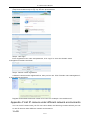
Appendix 4 Visit IP camera under different network environments
You can visit IP camera with your PC via LAN or WAN, the following contents will tell you how
to use IP camera under different network environments.
1 LAN
23/31
IP Camera User’s Manual
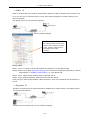
There are two ways to connect IP camera to LAN: static IP and dynamic IP
Ø Static IP
Static IP means that Your network administrator assigns a LAN IP address to IP camera. The
IP of your PC and IP camera must be in the some network segment to make visiting to the
camera possible.
See below picture for the network topology:
Please refer to below picture for the network settings:
If a wireless IP camera needs to
be visited via WiFi mode, users
need to set IP address, subnet
mask, gateway, SSID number
and password in “WiFi
settings”
Setup steps:
Step 1: Log in IP camera via the IE browser (the default IP is 192.168.55.160).
Step 2: Switch to the page [network settings], fill in the device IP address assigned by network
administrator in to [Basic Parameters], e.g. 192.168.55.160;
Step 3: Fill in subnet mask, default value is 255.255.255.0;
Step 4: Fill in gateway address, default value is 255.255.255.0;
Click [Save] to save the parameters. Start the device, enter its IP address into IE browser to
visit it.
Ø Dyna mic IP
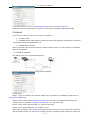
Dynamic IP means that IP camera obtains IP address from DHCP server. See below picture
for the network topology:
Please refer to below picture for the network settings:
24/31
IP Camera User’s Manual
Log in IP camera via IE, turn to [Network Settings] and check [DHCP on/off].
After setting all the parameters, click [save] and restart to make the parameters valid.
2 Internet
You have three ways to connect IP camera to Internet:
Ø
Fixed IP mode;
Ø
Broadband and router sharing Internet access mode (dynamic obtainment of extranet
IP address mode) like ADSL and so on;
Ø
PPPoE dial-up access.
After IP camera is connected to Internet, remote Internet users can visit it directly via domain
name or IP address.
Ø Fixed IP mode
See below picture for the network topology:
Please refer to below picture for the network settings:
Setup steps:
Step 1: Log in IP camera via crossover cable direct connection.(For details, please refer to
[Hardware Installation])
Step 2: Switch to the page [network settings], fill in the device IP address requested from
network service provider in to [Basic Parameters], e.g. 218.84.31.168;
Step 3: enter correct subnet mask, e.g. 255.255.255.192;
Step 4: enter correct gateway, e.g. 218.84.31.131;
After setup completes, click [Save] and restart the device, then connect it to public network so
that all Internet users can visit the IP camera remotely via entering http://218.84.31.168 to IE
25/31
IP Camera User’s Manual
browser.
Ø Broadband and ro uter s ha ring Internet access mode (dyna mic
obtainment of extranet IP address mode) like ADSL and so on;
For dial-up access with router, see below picture for the network topology:
Users can set up DDNS domain name service at the same time. Fills the username and
password which were applied in the DDNS server into the DDNS setting item, implement port
mapping from the router. The router determines and points to the IP camera that need to be
visited according to different ports, long-distance Internet user can visit the IP camera on the
network via domain name directly.
Please refer to below picture for the network settings:
DDNS setup steps:
Step 1: Log in DNNS server (e.g.http://www.mvddns.net), register user account and password.(For
details, please refer to Appendix 3)
Step 2: Click to open DDNS;
Step 3: Select DDNS service provider, e.g. mvddns.net;
Step 4: Fill in the registration name to log into DDNS server;
Step 5: Fill in the registration password to log into DDNS server;
Step 6: fill in the domain name applied on DDNS server, e.g. test.mvddns.net;
Step 7: Fill in DDNS server address, e.g.www.mvddns.net;
Step 8: fill in the port of DDNS server, default value is 30000 (users are recommended not to
change it);
Step 9: fill in the port number of public network data after mapping, the default port is 5000.If
several IP cameras are connected to one router, different web ports need to be specified for
each device, and port mapping needs to be done for every specified port.
Step 10: fill in the port number of public network web after mapping, the default port is 80.If
several IP cameras are connected to one router, different web ports need to be specified for
each device, and port mapping needs to be done for every specified port.
After setting all the parameters, click [save] and restart to make the parameters valid.
Port mapping setup steps:
26/31
IP Camera User’s Manual
Take the TL-WR340G router of TP-LINK as an example for illustration:
Step 1: Ask network administrator for the IP address of the router (i.e. LAN gateway address),
login user name and password, then log in the router. The main interface is as follow:
Step 2: Open “Forwarding”, select “Virtual Servers” as below picture shows:
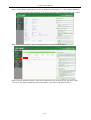
Step 3: Select “Add New Items”, enter the IP address of the IP camera (e.g.192.168.1.100 ),
port (e.g. 85), status (valid) and other information, click save, see below picture:
27/31
IP Camera User’s Manual
Step 4: After save successfully, below screen appears:
Step 5: If DDNS is successfully set in “Network Settings” of IP camera, direct visit to the IP camera can
be realized via entering http://test.mvddns.net:85 into IE browser.
Ø PPPoE dial-up access
For IP camera dial-up access, see below picture for the network topology:
Setup steps:
Step 1: Log in IP camera via crossover cable direct connection.(For details, please refer to
[Hardware Installation])
Step 2: Set PPPoE parameters.(for details, please refer to [PPPOE settings])
Step 3: Connect IP camera to Internet.
Step 4: If DDNS service is successfully set for the device, the device can be visited via
entering domain name into IE browser.
28/31
IP Camera User’s Manual
See below picture for PPPoE settings:
Appendix 5 FAQs
1 Forget Password
Solution: There is a [RESET] button on the back panel of the IP camera, press it to restore all
default parameters (Factory Settings), user name and password are both “admin”.
Note: Please don’t press RESET if you are not a professional operator. After reset, all
parameters will restore factory settings (except for the physical network address).
2、 IP camera audio/video function fails after abnormalities or abnormal power cut occur
during upgrade, core edition is V4.0.0.0 (Backup file)
Solution: Connect the power cord and network cable of IP camera, press on RESET button
and release it after 10 seconds, system will run the back-up programme
automatically. After enter into the back-up programme, upgrade system. After
upgrade completes, the IP camera will work normally. The back-up programme
offers only upgrade and parameter setup functions, audio and video functions are
not available.
3、 No video image displayed in IE browser
Possible reason: ActiveX not installed
Solution: ActiveX must be installed when visiting IP camera for the first time via Internet
Explore.
How to install: Visit IP camera, click [Download Address], file download dialog will pop up,
select [Run] or [Save] to download. After download finishes, installation interface
will pop up, click “install”,
the installation of ActiveX will start automatically,
“Register OCX success” dialog box will pop up to remind the completion of
installation process.
4、 Fail to visit IP camera via IE after upgrade
Solution: Delete the caching of Browser.
Steps: Open IE—click “Tools”—select “Internet Options”—click “delete files” button in “Internet
temporary files”, select “delete all offline contents”, then click “OK” and re-log in IP
camera.
5、 The images do not flow
Possible reason 1: The frame rate of IP camera is too low.
Solution: Increase the video frame rate
Possible reason 2: Too many users are viewing the images.
Solution: Block some clients or reduce the video frame rate.
Possible reason 3: The bandwidth is low.
Solution: Reduce video frame rate or video compression bitrate.
6、 Fail to visit IP camera via IE browser
29/31
IP Camera User’s Manual
Possible Reason 1: Network is disconnected.
Solution: Connect your PC to network, checking whether it works properly or not. Check
whether there is cable failure or network failure caused by PC virus, until PCs can
be connected with the command of Ping.
Possible reason 2: IP Address has been occupied by other devices
Solution: Stop the connection between IP camera and Network, hook up IP camera to PC
separately, reset IP address according to the proper operations recommended.
Possible reason 3: IP addresses are in different subnets.
Solution: Check IP address, subnet masking address of the DVS and the settings of Gateway.
Possible reason 4: Physical address of network conflict with IP camera
Solution: modify the physical address of IP camera.
Possible Reason 5: Web port has been modified
Solution: Contact Network Administrator to obtain related information.
Possible Reason 6: Unknown
Solution: Press RESET to restore default settings then connect it again, the default IP address
is 192.168.55.160, subnet mask is 255.255.255.0
7、 The color of images is abnormal (green or other colors)
Solution: Sometimes IP camera images cannot display properly for the difference between
Graphics Cards, the images appears to be green or other colors, then you should
run the programme Config.exe (or run C:\windows\system32\Config.exe)to set the
following parameters of display buffer: auto-detection, used display card memory
or system memory, then reopen IE and connect IP camera.
8、 There is no sound while monitoring
Possible Reason: No audio input connection
Solution: Check audio connection of the host
Possible Reason 2: the audio option of IP camera is off
Solution: Check audio parameter settings to see if you have opened the audio.
9、 Search NVS software cannot find device
Possible reason: Search NVS software adopts multicast protocol to perform searching. But the
firewall forbids multicast data packet.
Solution: disable the firewall.
10、
Image processing doesn’t work properly
Possible Reason 1: system issue, DirectX function is disabled, which will cause slow display of images
and abnormal color.
Possible Reason 2: hardware issue, graphics card doesn’t support image acceleration and hardware
zooming functions.(For hardware issue, the only solution is to replace graphics card)
Solution: install DirectX image drive, then StartàRunàinput “DXDIAG” as follows:
30/31
IP Camera User’s Manual
Note:
Enable DirectDraw speedup, Direct3D speedup, AGP veins speedup in DirectX function. If they
can not be enabled, that means DirectX installation fails or hardware not supportive.
31/31