1
H31.0.02.6C-09
User’
s Manual
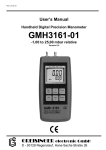
Handheld Digital Precision Manometer
GMH3160-07
-10,0 to 350,0 mbar relative
Version 4.7
H31.0.02.6C-09
User’
s Manual GMH3160-07
page 2
CONTENTS
1
2
3
4
5
6
7
GENERAL.................................................................................................................................................2
1.1 SAFETY REQUIREMENTS .......................................................................................................................2
1.2 OPERATION AND MAINTAINANCE ADVICE ...............................................................................................3
1.3 CONNECTIONS .....................................................................................................................................3
1.4 DISPLAY...............................................................................................................................................3
1.5 BASIC OPERATION ................................................................................................................................3
CONFIGURATION ....................................................................................................................................4
2.1 UNIT: COICE OF THE DISPLAY UNIT ......................................................................................................4
2.2 P.OFF: AUTO POWER OFF TIME ...........................................................................................................4
2.3 ADR: BASE ADDRESS OF INTERFACE .....................................................................................................4
ERROR AND SYSTEM MESSAGES ........................................................................................................4
PRESSURE CONNECTION TO THE SENSORS .....................................................................................5
CALIBRATION SERVICES .......................................................................................................................5
THE SERIAL INTERFACE ........................................................................................................................5
SPECIFICATION.......................................................................................................................................6
1 General
1.1 Safety Requirements
This device has been designed and tested in accordance with the safety regulations for electronic devices.
However, its trouble-free operation and reliability cannot be guaranteed unless the standard safety
measures and special safety advises given in this manual will be adhered to when using the device.
1. Trouble-free operation and reliability of the device can only be guaranteed if the device is not subjected
to any other climatic conditions than those stated under "Specification".
2. Device and sensors have to be handled with care (don’
t throw, hit, etc.). Protect plugs and sockets from
soiling.
3. If the device is transported from a cold to a warm environment condensation may cause in a failure of
the function. In such a case make sure the device temperature has adjusted to the ambient temperature
before trying a new start-up.
4. If device is to be connected to other devices (e.g. via serial interface) the circuitry has to be designed
most carefully. Internal connection in third party devices (e.g. connection GND and earth) may result in
not-permissible voltages impairing or destroying the device or another device connected.
Warning: If device is operated with a defective mains power supply (e.g. short circuit from mains
voltage to output voltage) this may result in hazardous voltages at the device (e.g. at sensor socket or
interface).
5. If there is a risk whatsoever involved in running it, the device has to be switched off immediately and to
be marked accordingly to avoid re-starting.
Operator safety may be a risk if:
- there is visible damage to the device
- the device is not working as specified
- the device has been stored under unsuitable conditions for a longer period of time.
In case of doubt, please return device to manufacturer for repair or maintenance.
_______________________________________________________________________________________________________________________
H31.0.02.6C-09
User’
s Manual GMH3160-07
page 3
1.2 Operation And Maintainance Advice
Battery Operation
If ! and ´bAt´ are shown in the secondary display the battery has been used up and needs to be
replaced. The device will, however, operate correctly for a certain amount of time. If ´bAt´ is shown in the
upper display the voltage is too low to operate the device; the battery has been completely used up.
Please note: We recommend to take out battery if device is not used for a longer period of time!
Mains Operation With Power Supply
Warning: When using a power supply please note that operating voltage has to be 10.5 to 12 V DC.
Do not apply overvoltage!! Cheap 12V-power supplies often have excessive no-load voltage.
We, therefore, recommend using regulated voltage power supplies. Trouble-free operation is
guaranteed by our power supply GNG10/3000.
Prior to connecting the power supply to the mains make sure that the operating voltage stated at the
power supply is identical to the mains voltage.
1.3 Connections
Connection for pressure tubes: „
+“= higher pressure, „
-“= lower pressure
Interface: Connection for el. isolated interface adapter (p.r.t. chapter 6)
The mains adapter socket is located at the left side of the device.
1.4 Display
Units: an arrow points to
the chosen measuring unit
Tara: appears if tarafunction is activated.
SL: no function
main display: shows measuring value.
! : indicates weak battery or other warnings
secondary display: min-, max- or hold value
Logg: no function
AL: no function
1.5 Basic Operation
When switching on the device and a zero point adjustment was carried out it shows shortly „
nuLL Corr“
.
On-/Off-Switch
ON
Tara
OFF 2 max 3
Tara:
Calling of tara function, zero point adjustment
1
min/max: Showing the min- resp. max-memory in sec. display
Set
min
Store
Store/Quit: Calling of hold function
Menu
Quit
4
5
6
Set/Menu: Calling of configuration
Max Memory:
Pressing ´max´ (key 2) shows the maximum of the measured values. Pressing it again
hides it. To clear the max memory press key ´max´ for >2 seconds.
Min Memory:
Pressing ´min´ (key 5) shows the minimum of the measured values. Pressing it again
hides it. To clear the min memory press key ´min´ for >2 seconds.
Hold Function: By pressing ´Store/Quit´ (key 6) the last measuring value will be held in the secondary
display. Pressing it again hides it.
Tare Function: By pressing ´Tara´ (key 3) the display will be set to 0. All measurings from then on will be
displayed relatively to the set tare value. When tara function is activated, the arrow
"Tara" appears in the display. To deactivate tare function press ´Tara´ for >2 seconds.
Please Note: Activating/deactivating tara clears the max- & min-memories.
Zero-Point Adjustment: If there is no pressure applied to the pressure ports the device will display 0. If
there is a permanent deviation (and device is operated under steady conditions), a
permanent zero point adjustment can be carried out.
To carry out the adjustment press key 3 for 5 seconds.
(Please note: A zero-point adjustment can only be carried out if the difference between
the value on display and the value calibrated on site is less than 2%! E.g. for the
measuring range of –10.0 ..+350.0mbar, =>zero-point adjustment up to 7.0mbar possible)
To recall the manufacturer`s calibration press button 3 for approx. 7 seconds.
Note: If a zero-point adjustment was carried out, this will be signalled by the short
displaying of „
NuLL Corr“when switching on the device.
_______________________________________________________________________________________________________________________
H31.0.02.6C-09
User’
s Manual GMH3160-07
page 4
2 Configuration
To change device settings, press Menu (key 4) for 2 seconds. This will call the configuration menu.
Pressing key Menu jumps between the parameters.
The parameters can be changed with (key 2) or (key 5).
Quit (key 6) finishes the configuration and returns to standard measuring operation.
2.1 Unit: Coice Of The Display Unit
mbar
bar
Pa
kPa
MPa
mbar
PSI
SL Tara A L Logg
Choose the desired display unit, the refering unit is displayed by means of a functional arrow in
the display. The selection is permanently stored in the device, therefore after power on the unit
will instantly reapear. The choice depends on the used sensor.
The unit [m] =mH2O is just supported by devices with [m] printed below the display!
2.2 P.oFF: Auto Power Off Time
mbar
ba r
PSI
Pa
kPa
MPa
SL Tara A L Logg
The device will be automatically switched off if no key is pressed/no interface communication
takes place for the time of the power off time.
The power off time can be set to values between 1 and 120 min. It can be completely
deactivated by setting the paramter to ‚
P.oFF = oFF“
.
2.3 Adr: Base Address of Interface
bar
Pa
kPa
MPa
mbar
mbar
PSI
SL Tara
AL Logg
Up to 10 devices of the GMH3xxx- handheld-family can be connected to a serial interface at
once (depending on interface converter, e.g. GRS3105: 5 devices). To get access to each
device the base addresses of the devices have to be different. For example choose 01 for the
first, 11 for the second device and so on.
3 Error And System Messages
Display
No display or
confused
characters,
device does
not react on
keypress
Err.1
Err.2
Err.4
Err.9
Err.7
Meaning
Low battery power, device will only continue
operation for a short period of time
What to do?
Replace battery
Battery empty
Replace battery
Mains operation without battery: wrong voltage Check power supply, replace it when
necessary
Battery empty
Replace battery
Mains operation without battery: wrong voltage Check power supply, replace it when
or polarity
necessary
System error
Disconnect battery and power supplies,
wait shortly, then reconnect
Device defective
Return to manufacturer for repair
Measured value above allowable range
Check: pressure above 350mbar?
-> measuring value to high
Sensor defective
Return to manufacturer for repair
Measured value below allowable range
Check: pressure below -10mbar?
-> measuring value to high
Sensor defective
Return to manufacturer for repair
Value is too low to be displayed, tara is set
Check: display below -2000 (tara?)?
Measured value far out of allowable range
Check: pressure not within sensor range?
System error
Return to manufacturer for repair
_______________________________________________________________________________________________________________________
H31.0.02.6C-09
User’
s Manual GMH3160-07
page 5
4 Pressure Connection To The Sensors
For measurements of over pressure (-10.0mbar...350.0mbar):
Connect plastic tube with internal dia of 4 mm to pressure port "+". Port "-" will not be used!
For measurements of under pressure (-350.0mbar...0.0mbar):
Plug the tube to pressure port "-". The measuring range covers then -350.0 to 0.0 mbar.
Note: All values are displayed now as positive values. No minus sign will be shown.
Example: it is possible to messure under pressure down to -350.0 mbar, the display shows then the
value 350.0 (no minus sign).
For measurements of pressure differences:
Connect both plastic tubes with an internal dia of 4 mm to pressure port "+" and "-"; make sure to apply
higher pressure to port "+".
5 Calibration Services
Calibration certificates –DKD-certificates –other certificates:
If device should be certificied for its accuracy, it is the best solution to return it with the refering sensors to
the manufacturer.
Only the manufacturer is capable to do efficient recalibration if necessary to get results of highest accuracy!
6 The Serial Interface
By means of the serial interface and a suitable electrically isolated interface adapter (GRS3100 or
GRS3105) the device can be connected to a computer for data transfer. With the GRS3105 up to 5 devices
of the GMH3xxx- series can be connected to one interface (see also manual of GRS3100 or GRS3105)
To avoid transmission errors, there are several security checks implemented e.g. CRC.
The following standard software packages are available:
EBS9M:
9-channel software to display the measuring values
EASYCONTROL: Universal multi channel software (EASYBUS-, RS485-, or GMH3000- operation
possible) for real-time recording and presentation of measuring data of one
GMH3xxx
device in the ACCESS®-data base format
In case you want to develop your own software we offer a GMH3000-development package including:
a universally applicable Windows functions library ('GMH3000.DLL') with documentation that can be
used by the most programming languages.
Programming examples Visual Basic 4.0, Testpoint (Keithley Windows measuring software)
Note:
The measuring and display range values read back from the interface are always in the
selected measurement unit (mbar, bar...)!
Supported functions:
Code
0
3
6
7
12
174
175
176
177
178
179
180
Name/Function
Read measurement value
Read system state
Read min memory
Read max memory
Read ID number
Clear min memory
Clear max memory
Read min measuring range
Read max measuring range
Read measuring range –measuring unit
Read measuring range –decimal point
Read kind of measuring of sensor
Code
194
199
200
201
202
204
208
222
223
240
254
Name/Function
Set display unit
Read kind of measuring of display
Read min display range
Read max display range
Read display range - unit
Read display range –decimal point
Read # of channels
Read power off time (Conf-P.oFF)
Set power off time (Conf-P.oFF)
Reset
Program version
_______________________________________________________________________________________________________________________
H31.0.02.6C-09
User’
s Manual GMH3160-07
page 6
7 Specification
Measuring ranges:
Display range:
Overload:
Resolution:
Pressure units:
Accuracy: (typ.)
Measuring rate:
Nominal temperature:
Sensor:
Connection:
-10.0 to 350.0 mbar relative (under pressure down to –350.0 mbar, p.r.t. chapter 5)
max. 1000 mbar rel. (without destruction or recalibration of sensor being necessary)
0.1 mbar (10 Pa)
mbar, bar, kPa, MPa, mmHg, PSI mH2O (only for devices with ‚
m‘printed below
display), selectable
±0,2%FS (hysteresis and linearity)
±0,4%FS (temperature dependency 0-50°C)
OPTION higher accuracy:
±0.1%FS (hyst., lin.)
±0.4%FS (temp. dep. 0-50°C)
4 meas./sec
25°C
Piezo-resistive relative pressure sensor integrated in device. Suitable for air and
non-corrosive and non-ionizing gases and liquids.
(Not suitable for water –use air buffering)
2 metal pressure ports for connection to 6 x 1 mm tubes at the top of device (4mm
inner tube Ø)
Power-Off-Function:
Device will be automatically switched off if no key is pressed/no interface
communication takes place for the time of the power-off delay. The power-off delay
can be set to values between 1 and 120 min.; it can be completely deactivated.
Display:
2 four digit LCDs (12.4mm high and 7 mm high) for measuring values, and for min/
max memories, hold function, etc. as well as additional functional arrows.
Pushbuttons:
6 membrane keys
Interface:
Serial interface (3.5mm jack) can be connected to RS232 interface of a PC via
electrically isolated interface adapter GRS3100 or GRS3105 (see accessories).
Power supply:
Power consumption:
Low battery warning:
9V battery, type: IEC 6F22 (included in scope of supply)
as well as additional d.c.connector (diameter of internal pin 1.9 mm) for external
10.5-12V direct voltage supply. (suitable power supply: GNG10/3000)
Slow measuring rate: < 1.2 mA
! -display and ' bAt '
Housing:
Dimensions:
Working temperature:
Allowable rel. humidity:
Storage temperature:
impact-resistant ABS, membrane keyboard, transparent panel, Front side IP65
142 x 71 x 26 mm (L x W x D) + metal pressure ports 11mm at top of device
0...+50°C
0...95 % r.H. (not condensing)
-20...+70°C
EMC:
The GMH3160-07 device corresponds to the essential protection ratings
established in the Regulations of the Council for the Approximation of Legislation
for the member countries regarding electromagnetic compatibility (89/336/EWG).
<1%
Additional fault:
_______________________________________________________________________________________________________________________