1
Safety and Efficacy of a New and Emerging Dental X-ray Modality
Project Deliverable
Project number:
Project Acronym:
212246
Project title:
SEDENTEXCT
Safety and Efficacy of a New and
Emerging Dental X-ray Modality
Instrument:
Activity code:
Collaborative Project (Small or medium-scale
focused research project)
Start date of project:
Fission-2007-3.2-01
Duration:
1 January 2008
42 months
Title:
D3.4 QA Procedure Writing (QA protocol)
Contractual Delivery date:
1st January 2011
Organisation name of lead beneficiary for this
Deliverable:
NKUA (National Kapodistrian
University of Athens)
Actual Delivery date:
27th March 2011
Document version:
v1.0
Dissemination level:
PU
Public
PP
Restricted to other programme participants (including the
Commission)
RE
Restricted to a group defined by the consortium (including the
Commission)
CO
Confidential, only for members of the consortium (including
the Commission)
1 SEDENTEXCT D3.4 Report
X
Authors (organisations):
Kostas Tsiklakis (NKUA): WP3 Lead
Harry C. Stamatakis (NKUA)
Ruben Pauwels (KUL)
Anne Walker (UNIMAN)
Adrian Walker (LTO)
Abstract:
In order to develop tools for Quality Assurance on CBCT in terms of image quality
evaluation, successive prototype phantoms were constructed and tested using
specifically designed software for the evaluation of image quality, in three rounds
during the project. In the third round, results from the prototype phantoms and
versions of software were taken into account for the construction of the final QA
phantom and the accompanying software for semi-automatic image evaluation of
the phantom images.
The definitive phantom consists of a cylindrical Poly (methyl methacrylate) (PMMA)
holder (16cm diameter) and a number of inserts (3.5cm diameter) for evaluating
different physical properties of the CBCT technique, employing several CBCT units.
For the semi-automatic evaluation of phantom images, a specific software program
was developed.
A Quality Assurance (QA) procedure protocol was formed comprising a generic part
about the implementation of a QA programme in CBCT, followed by a specific part
on the SEDENTEXCT tools (the phantom and the software) used for running the
respective tests described in the QA protocol.
The results lead to the conclusion that SEDENTEXCT has met the WP3 objective,
to develop a phantom, software and a QA procedure protocol for CBCT QA analysis
that will be used to inform the writing of the Guidelines (WP1).
2 SEDENTEXCT D3.4 Report
Table of Contents
1. The Context ............................................................................................................ 4 1.1 SEDENTEXCT aims and objectives ................................................................ 4 1.2 Work package 3 (WP3) objectives ................................................................... 4 1.3 Anticipated impact of the work ......................................................................... 5 1.4 Current state of the art ..................................................................................... 5 1.5 Deliverable D3.4 .............................................................................................. 7 2. Earlier Work in WP3 ............................................................................................... 8 2.1 Deliverable 3.1 .................................................................................................. 8 2.2 Deliverable 3.2 .................................................................................................. 8 2.3 Deliverable 3.3 .................................................................................................. 9 3. Work in the Final Period: Methodology................................................................. 10 4. Work in the Final Period: Results ......................................................................... 11 4.1 Generic QA protocol ....................................................................................... 11 4.2 User manual for using the SEDENTEXCT phantom and software ................. 12 5. Work in the Final Period: Conclusions.................................................................. 13 5.1 Conclusions ................................................................................................... 13 5.2 Implications for future work ............................................................................ 13 6. Overall Work Package Conclusions ..................................................................... 14 6.1 SEDENTEXCT Guidelines ............................................................................. 14 6.2 Impact ............................................................................................................ 14 6.3 Roadmap ....................................................................................................... 14 6.4 Future dissemination ..................................................................................... 15 7. References ........................................................................................................... 16 Appendix I: Generic QA Protocol: Quality Control for Dental Cone Beam Computed
Tomography (CBCT) Systems ........................................................................... 18 Appendix II: SEDENTEXCT User Manual - Image Quality Scanning Protocol ......... 34 Appendix III: SEDENTEXCT Quality Control Phantom Specification Sheet ............. 50 3 SEDENTEXCT D3.4 Report
1. The Context
1.1 SEDENTEXCT aims and objectives
The aim of this project is the acquisition of the key information necessary for sound
and scientifically based clinical use of dental Cone Beam Computed Tomography
(CBCT). In order that safety and efficacy are assured and enhanced in the ‘real
world’, the parallel aim is to use the information to develop evidence-based
guidelines dealing with justification, optimisation and referral criteria and to provide a
means of dissemination and training for users of CBCT. The objectives and
methodology of the collaborative project are:
1. To develop evidence-based guidelines on use of CBCT in dentistry, including
referral criteria, quality assurance guidelines and optimisation strategies. Guideline
development will use systematic review and established methodology, involving
stakeholder input.
2. To determine the level of patient dose in dental CBCT, paying special attention to
paediatric dosimetry, and personnel dose.
3. To perform diagnostic accuracy studies for CBCT for key clinical applications in
dentistry by use of in vitro and clinical studies.
4. To develop a quality assurance programme, including a tool/tools for quality
assurance work (including a marketable quality assurance phantom) and to define
exposure protocols for specific clinical applications.
5. To measure cost-effectiveness of important clinical uses of CBCT compared with
traditional methods.
6. To conduct valorisation, including dissemination and training, activities via an
‘open access’ website.
At all points, stakeholder involvement will be intrinsic to study design.
1.2 Work package 3 (WP3) objectives
The Quality Assurance (QA) process is vital in order to provide confidence in the
suitability of an imaging technique for its intended purpose and to ensure its safe use
in clinical use. It is usually performed by using a test phantom in conjunction with
software routines that help in the interpretation of the results.
Preliminary tests before the start of this project on the NewTom 3G CBCT unit
showed that using a phantom designed for Quality Assurance on medical CT
equipment results in images with worse low-contrast resolution than the medical CT
scan. Furthermore, discrimination between objects with different density was not
always successful. It is speculated that this is due to the fact that NewTom 3G - and
possibly all other dental CBCT units – are optimized for imaging of hard tissues. This
is also related to the low dose delivered compared with medical CT. Therefore, the
development of a specifically designed phantom, with a size and densities
resembling those of dental interest is necessary. A variety of test objects would be
4 SEDENTEXCT D3.4 Report
included in the phantom body (as inserts) for the testing of the imaging performance
characteristics. Software tools would be developed for the interpretation of the
results and the evaluation of image quality.
The objectives of WP3 are the following:
•
•
•
•
to develop, design and test a phantom for QA tests on dental CBCT
equipment.
to develop software tools for the evaluation of image quality and for routine QA
testing
to form an Image Quality testing protocol and determine its implementation on
CBCT units
to form and implement a routine QA protocol, for periodic QA tests in daily
clinical practice
1.3 Anticipated impact of the work
This section describes the impact of the work in this Work Package as anticipated at
the start of the project.
The outcome of the WP3 (QC phantom, software and QA protocol) is expected to
have a great impact on several stakeholder groups. Dentists and radiologists will
benefit from following the QA protocol frequently, and using the phantom and the
software ensures that their CBCT equipment operates efficiently in terms of output
image quality. Medical physicists may use the same phantom and software for
advanced imaging performance tests on CBCT units. The research community may
use the phantom and the software for further studies on imaging characteristics.
Finally, the CBCT unit manufacturers may use the phantom and the software for
testing prototypes units, their new equipment before delivery and any new features
added to their units.
Stakeholder(s)
Impact
Radiologists
Dentists
Medical physicists
Research community
CBCT unit manufacturers
follow QA protocol, use phantom + software
to test CBCT equipment efficacy
advanced imaging performance tests
studies on imaging characteristics
testing prototypes units and new equipment
1.4 Current state of the art
Due to the increasing use of Cone Beam CT (CBCT) in dental practice and the large
number of devices on the market, there is a need for a quantified and objective
analysis of the technical image quality and radiation dose to enable an optimal use
for this imaging modality (Horner et al. 2009, Loubele et al. 2008). Three different
aspects have to be considered in the optimization of an X-ray imaging modality:
quantifying the radiation dose and risk for patients, assessment of technical image
5 SEDENTEXCT D3.4 Report
quality and assessment of diagnostic image quality. By means of an appropriate test
object, the first and second aspect can be studied in one investigation process.
Ideally, the development of test objects goes along with the formation of Quality
Assurance (QA) protocols. During these activities, the diagnostic image quality must
always be considered, implying that dose measurements are to be reported in terms
of diagnostic needs, and technical image quality assessments need to be evaluated
for their diagnostic relevance. This is particularly the case for dental imaging, as it
involves a large variety of diagnostic indications requiring different imaging
approaches (Scarfe et al. 2002).
There is a lack of standardized tools for image quality analysis for dental CBCT. To
develop such a tool, all available knowledge regarding image quality assessment on
other 3D or pseudo-3D imaging modalities (spiral CT, tomosynthesis, kV-CBCT used
in radiotherapy, etc.) (Du et al. 2007, Daly et al. 2006, McCann et al. 2004, Suess et
al. 1999) needs to be combined with the existing knowledge of CBCT and previous
studies on CBCT image quality. Even though a large number of CBCT image quality
studies have been published over the last few years, most have focused on the
diagnostic image quality. However, a number of studies have already assessed
technical image quality for one or more CBCT devices, using an existing commercial
Quality Control (QC) phantom (Jaffray et al. 2000, Marguet et al. 2009), a phantom
provided by a CBCT manufacturer (Loubele et al. 2008, Watanabe et al. 2010), a
water phantom (Jaffray et al. 2000, Vassileva et al. 2010), a customized test object
(Bryant et al. 2008, Lascala et al. 2004, Katsumata et al. 2009, Lagravère et al.
2008) or clinical data (Loubele et al. 2006, Naitoh et al. 2009. Although these studies
have provided useful insights regarding certain image quality aspects, they also
show the need for a standardized QC phantom which is suited for use on all CBCT
devices, and which provides results that are relevant to dental imaging and that can
be compared between systems. Commercial QC phantoms have been described for
conventional CT, but these are not applicable for dental CBCT due to the difference
in performance for certain image quality aspects. CT phantoms use soft tissueequivalent materials for gray value analysis, which are not relevant for dental CBCT
(McCann et al. 2004, Suess et al. 1999). Furthermore, dental imaging requires a
high spatial resolution and a limitation of metal artifacts, both of which are not
assessed by conventional CT phantoms.
A CBCT system uses a cone- or similarly shaped X-ray beam that rotates around an
object and acquires two-dimensional projections, reconstructed into a threedimensional volume (Scarfe et al. 2008). There is a variety of CBCT devices
available with large differences for a number of imaging parameters: peak voltage,
amount of filtration, quantity of X-rays (mAs), pulsed versus continuous exposure,
beam geometry, number of projections, detector type, field of view (FOV) size,
reconstruction algorithm, reconstructed voxel size, pre- and post-processing of raw
and reconstructed data, etc. Designing a QC phantom requires a cross-section of all
available CBCT devices, identifying common properties. These properties, most of
which are intertwined, are (ordered from general to specific): (1) CBCT images show
very poor soft tissue differentiation, as they are meant for the visualization of hard
tissues (bone, teeth) and air (sinus and air cavities); (2) spatial resolution is high
(voxel sizes are generally below 0.4 mm) and nominally identical in all planes
(isotropic); (3) most devices expose at a kVp below 100, and a low mAs; (4) there is
a relatively large degree of scattered radiation resulting in image noise and
6 SEDENTEXCT D3.4 Report
nonuniformity; (5) voxel values are not standardized and cannot directly be used as
quantitative CT numbers for use in bone mineral density (BMD) evaluation; (6) high
density tissues and metal objects result in metal artifacts due to scatter, beam
hardening and photon starvation. All of these considerations affect the design of a
QC phantom. Another limitation is the minimum FOV size of all currently available
CBCT devices; the phantom must be suitable for all CBCTs, including those with a
FOV of a few cubic centimeters.
The objective of the current study is to develop a quality control phantom which is
suited for dental CBCT imaging, can be used on any CBCT device and allows for the
measurement of parameters which are relevant to dental imaging requirements. As
an initial evaluation of the phantom, it was scanned using a variety of CBCT devices
to evaluate the reproducibility and applicability of the evaluated parameters and to
investigate CBCT imaging performance.
1.5 Deliverable D3.4
Deliverable D3.4 is the final deliverable of SEDENTEXCT Work Package 3. The
objects of deliverable D3.4 are:
•
•
To summarise earlier work
To describe new work in this Work Package in the last period. The purpose of this
work is to form a QA protocol for periodic QA tests in daily clinical practice and
determine its implementation on CBCT units
• To describe the possible impact of work in this Work Package
• To outline dissemination plans and possible future work
7 SEDENTEXCT D3.4 Report
2. Earlier Work in WP3
2.1 Deliverable 3.1
The purposes of Deliverable 3.1 were:
•
•
•
•
to provide a 1st prototype phantom together with inserts for the testing of the
imaging performance characteristics
to provide results on the suitability of the phantom and the inserts for their
intended purpose
to reveal the required changes and improvements to the design of the 1st
prototype
to test a preliminary version of the software tools that help in the interpretation of
the results and the evaluation of the image quality
The evaluating procedures carried on the first prototype phantom and the results
obtained by the first version of the software tools (D3.1) lead to important
conclusions regarding required improvements of the design of the prototype
phantom and inserts at the next phase (2nd prototype).
2.2 Deliverable 3.2
The purposes of Deliverable 3.2 were:
•
•
•
•
to provide a 2nd prototype phantom together with inserts for the testing of the
imaging performance characteristics
to provide results on the suitability of the phantom and the inserts for their
intended purpose
to reveal the required changes and improvements to the design of the prototype
for the development of the final phantom
to test the 2nd beta version of the software that help in the interpretation of the
results and the evaluation of the image quality, using a beta test evaluation form.
The design changes that were implemented into the 2nd prototype are found
appropriate for both the phantom body and the inserts for the different image quality
tests. A final round of small design changes that will further improve the suitability of
the phantom for QC testing are recorded and will be implemented into the final
version of the phantom.
The beta testing of the software revealed that the following should be implemented in
the final version:
•
•
•
•
•
Compatibility with DICOM data from all available CBCTs
Optimisation of viewing (MPR scrolling, window/level adjustment)
Optimisation of insert selection (Manual insert selection tool, 3D selection)
Insert analysis (implementation of all image analysis parameters)
Automatic report creation
8 SEDENTEXCT D3.4 Report
2.3 Deliverable 3.3
The purposes of Deliverable 3.3 were:
•
•
to provide the definitive phantom together with inserts for the testing of the
imaging performance characteristics
to validate the readiness of the associated software, including that:
o the software is able to open datasets from all available CBCT devices;
o the software allows for the measurement of all image quality parameters
that are relevant for quality control;
o there is a sufficient agreement between repeated measurements (by
different observers or by the same observer).
The design changes that were implemented into the definitive phantom are found
appropriate for both the body and the inserts for the different image quality tests.
Validation of the associated software by five consortium partners was successful. A
clear protocol for all measurements was established. It was found that the final
software is easy to work with, that the working speed has been significantly
increased, and that the measurements can be sufficiently reproducible for QC
purposes. The purpose of this work, to produce a marketable QA phantom for dental
CBCT with associated software is met, as indicated by the presented marketing
plans of the partner LTO, where the acceptance of the final phantom and the
associated software for commercial production is demonstrated.
9 SEDENTEXCT D3.4 Report
3. Work in the Final Period: Methodology
Sections 3, 4 and 5 of this deliverable report the work in WP3 in the last period. The
purpose of this work is to form a QA protocol for periodic QA tests in daily clinical
practice and determine its implementation on CBCT units.
As reported in earlier deliverables, the tools (phantom and software) were
developed in three rounds during the project and tested by NKUA and KUL resulting
in the construction of the final QA phantom and the accompanying software for
semi-automatic image evaluation of the phantom images. The definitive phantom
and inserts were scanned on a wide range of CBCT devices. Depending on the field
of view size, the number of scans needed varied between different devices.
Validation of the associated software by five consortium partners was successful
and a clear scanning procedure protocol for all measurements was established as
part of D3.3.
The methodology used in the previous deliverable (D3.3) for the evaluation
procedure carried out on the definitive phantom with the use of the validated
software formed the basis for the writing of the QA Procedure (QA Protocol) as part
of the final deliverable (D3.4).
10 SEDENTEXCT D3.4 Report
4. Work in the Final Period: Results
A Quality Assurance (QA) procedure protocol comprises two parts. The first is a
generic part about the implementation of a QA programme in CBCT (Appendix I)
that was formed based on previous knowledge on QA programmes with special
consideration of the particularities of the CBCT technology. The generic part is
followed by a specific part on how to use the SEDENTEXCT tools (the phantom and
the software) for running the respective image quality tests (Appendix II).
4.1 Generic QA protocol
The Quality Control Programme in general lays out the necessary testing to ensure
that all parameters during the examination procedure are in accordance with the
standard operating protocol, thus resulting in images with diagnostic value, without
exposing the patient to unnecessary risk.
The programme of equipment tests for dental cone beam CT considers the following
aspects:
•
•
•
•
Performance of the X-ray tube and generator
Patient dose
Quantitative assessment of image quality
Display screen performance
This protocol outlines those physical tests and measurements that are considered to
be part of a standard quality control programme for a dental CBCT unit. It does not
cover quality assurance of the clinical image.
A range of tests are appropriate for dental CBCT looking at different aspects of the
equipment and image display. Some of the tests are straightforward and can be
readily performed by the clinical staff using the CBCT equipment. Other tests are
more complex and the input of a medical physicist is required. Therefore, the
expertise required for each test is indicated in the protocol.
Routine quality control tests primarily involve comparison of results with those
determined during commissioning. Significant variation, as indicated by predetermined action levels, should be investigated, either with the help of a medical
physics expert (MPE) or the equipment service engineer.
Not all possible methods of assessment are considered essential. It is important to
perform enough tests to confirm that the equipment is operating as intended. More
complex tests do add extra information that is helpful in the optimisation process and
they are detailed here for completeness. However, whether the more detailed tests
are undertaken will depend on the availability of expert support and the necessary
resources.
The tests described in the generic part are summarised in the table at the end of the
Appendix I.
11 SEDENTEXCT D3.4 Report
4.2 User manual for using the SEDENTEXCT phantom and software
The user manual describing how to use the SEDENTEXCT tools (the phantom and
the software) for running the respective image quality tests is provided in Appendix
II. There are detailed instructions on the phantom handling and positioning, test
inserts selection, inserts placing in the phantom and using the software for specific
image quality tests, based on the knowledge acquired from the past deliverable
D3.3. This is supplemented by the Leeds Test Objects specification sheet for the
phantom (Appendix III).
12 SEDENTEXCT D3.4 Report
5. Work in the Final Period: Conclusions
5.1 Conclusions
In conclusion, the SEDENTEXCT project has met the WP3 objective, to develop a
phantom, associated software and a QA procedure protocol for CBCT QA analysis
that will be used to inform the writing of the Guidelines (WP1).
5.2 Implications for future work
The recommendations of priority, level of expertise, frequency and action levels are
based on published guidance and the experience of the SEDENTEXCT team in
validating the use of the SEDENTEXCT QC test phantom. This represents an initial
assessment of what is sensible and achievable but, as experience of testing these
units is obtained over a period of years, these recommendations should be critically
reviewed as new evidence becomes available.
Apart from the obvious future use of the QA protocol and QC phantom (i.e. to be
used in a long-term assessment of CBCT performance), the QC phantom can also
be used as a tool for CBCT optimisation. The phantom is applicable on all CBCT
devices that are currently on the market. Furthermore, it can be applied to any new
or upgraded devices that will be released in the coming years, providing an initial
assessment of imaging performance. By using the QC phantom and evaluating
technical image quality parameters in relation with radiation dose, it can be ensured
that new and upgraded CBCT devices are optimized for dental imaging.
The QC phantom can also be used as a research tool for various applications.
Algorithmic improvement of CBCT image quality can be investigated using raw data
of the phantom. Improvements of image reconstruction in terms of noise, spatial and
contrast resolution, and metal artefacts can be evaluated this way.
Furthermore, it can be used as a validation tool for a Monte Carlo simulation
framework, to verify if the imaging chain is modelled appropriately. Subsequently, a
voxel model of the phantom can be used to optimise CBCT imaging through
simulation.
13 SEDENTEXCT D3.4 Report
6. Overall Work Package Conclusions
This section considers both the earlier work and the work in the final period, to draw
conclusions regarding the SEDENTEXCT Guidelines and the overall impact of the
work, and to summarise the implications for further work.
6.1 SEDENTEXCT Guidelines
A Quality Control Programme lays out the necessary testing to ensure that all
parameters during the examination procedure are in accordance with the standard
operating protocol, thus resulting in images with diagnostic value, without exposing
the patient to unnecessary risk. The resulting QA procedure protocol of this
deliverable (D3.4) will feed into the Guidelines as an essential chapter regarding
safety and efficacy of CBCT in daily practice.
6.2 Impact
The outcome of WP3 (QC phantom, software and QA protocol) is expected to have a
great impact on several stakeholder groups. Dentists and radiologists will benefit
from following the QA protocol frequently and using the phantom and the software to
ensure that their CBCT equipment operates efficiently in terms of output image
quality. Medical physicists may use the same phantom and software for advanced
imaging performance tests on CBCT units. The research community may use the
phantom and the software for further studies on imaging characteristics. Finally, the
CBCT unit manufacturers may use the phantom and the software for testing
prototypes units, their new equipment before delivery and any new features added to
their units.
6.3 Roadmap
Less than a decade has passed since CBCT has been widely accepted in dental
practice. Therefore, there is no information available on image quality issues for
CBCT devices that have been in commission for several years. X-ray tube or
detector degradation can lead to a progressive deterioration of image quality. This
topic can be addressed using the QC phantom and QA protocol, as it allows for a
long-term assessment of image quality and can help to define clear and evidencebased action levels for different image quality parameters.
The QC phantom can serve an additional purpose as a research tool for
optimisation, enabling the accurate evaluation of the variability in image quality for
different exposure settings and reconstruction algorithms.
14 SEDENTEXCT D3.4 Report
6.4 Future dissemination
WP task
Topic
(Provisional) Title
WP3.1
Phantom
evaluation
prototype 1
Artefact
analysis
Image analysis
Development and applicability of a
quality control phantom for Cone
Beam CT
Evaluation of metal artefacts on
Cone Beam CT
Image quality evaluation of Cone
Beam CT part 1: contrast resolution,
noise and uniformity
Stability and reproducibility of image
quality parameters measured on a
quality control phantom for Cone
Beam CT
Image quality evaluation of Cone
Beam CT part 2: spatial resolution,
MTF and geometric accuracy
Accuracy and stability of density
measurement with Cone Beam
Computed Tomography
Development of a quality assurance
protocol for dental Cone Beam CT
WP3.2
WP3.2
WP3.1
WP3.2
Phantom
evaluation
prototype 2
Image analysis
Image analysis
WP3.2
Image analysis
WP3.3
Quality
assurance
15 SEDENTEXCT D3.4 Report
Main
responsible
KUL / NKUA
journals/conferences targeted
Journal of Applied Clinical
Medical Physics
KUL / NKUA
Clinical Oral Implants Research
KUL / NKUA
Dentomaxillofacial Radiology
(or alternative)
KUL / NKUA
Unknown (not yet decided)
KUL / NKUA
Dentomaxillofacial Radiology
(or alternative)
KUL / NKUA
Dentomaxillofacial Radiology
(or alternative)
UNIMAN / NKUA
/ KUL
Unknown (not yet decided)
7. References
The following reference list includes references from the QA Protocol (Appendix 1).
Bryant JA, Drage NA, Richmond S. Study of the scan uniformity from an i-CAT cone beam computed
tomography dental imaging system. Dentomaxillofac Radiol. 2008;37(7):365-74.
Council Directive 97/43/Euratom of 30 June 1997 on health protection of individuals against the
dangers of ionizing radiation in relation to medical exposure Official Journal of the European
Communities No L 180/11 1997
Cranley K, Fogarty GW. The measurement of total filtration of diagnostic X-ray tubes. Br J Radiol.
1988 May;61(725):388-92.
Daly MJ, Siewerdsen JH, Moseley DJ, Jaffray DA, Irish JC. Intraoperative cone-beam CT for
guidance of head and neck surgery: Assessment of dose and image quality using a C-arm prototype.
Med Phys. 2006;33(10):3767-80.
Draft Euratom Basic Safety Standards Directive – Version 24 February 2010
http://ec.europa.eu/energy/nuclear/radiation_protection/doc/art31/2010_02_24_draft_euratom_basic_
safety_standards_directive.pdf
Du LY, Umoh J, Nikolov HN, Pollmann SI, Lee TY, Holdsworth DW. A quality assurance phantom for
the performance evaluation of volumetric micro-CT systems. Phys Med Biol. 2007;52(53):7087-108.
Horner K, Islam M, Flygare L, Tsiklakis K, Whaites E. Basic principles for use of dental cone beam
CT: consensus guidelines of the European Academy of Dental and Maxillofacial Radiology.
Dentomaxillofac Radiol. 2009;38(4):187-95.
HPA-RPD-065 Recommendations for the design of X-ray facilities and quality assurance of dental
Cone Beam CT (Computed tomography) systems JR Holroyd and A Walker Health Protection Agency
2010
IPEM Quality assurance in dental Radiology Report No 671995
IEC (International Electrotechnical Commission) 2008 Medical electrical equipment - Part 1-3:
General requirements for basic safety and essential performance - Collateral Standard: Radiation
protection in diagnostic X-ray equipment. IEC publication 60601-1-3.
IPEM Report 32 Measurement of the Performance characteristics of diagnostic X-ray systems used in
medicine Part III Computed Tomography X-ray scanners 2nd Ed IPEM 2003
IPEM Report 32 Measurement of the Performance characteristics of diagnostic X-ray systems used in
medicine Part VII Digital imaging system IPEM 2010
IPEM Report 91 Recommended standards for the routine performance testing of diagnostic X-ray
imaging systems IPEM 2005
Jaffray DA, Siewerdsen JH. Cone-beam computed tomography with a flat-panel imager: initial
performance characterization. Med Phys. 2000;27(6):1311-23.
Katsumata A, Hirukawa A, Okumura S, et al. Relationship between density variability and imaging
volume size in cone-beam computerized tomographic scanning of the maxillofacial region: an in vitro
study. Oral Surg Oral Med Oral Pathol Oral Radiol Endod. 2009;107(3):420-25.
Lagravère MO, Carey J, Ben-Zvi M, Packota GV, Major PW. Effect of object location on the density
measurement and Hounsfield conversion in a NewTom 3G cone beam computed tomography unit.
Dentomaxillofac Radiol. 2008;37(6):305-08.
Lascala CA, Panella J, Marques MM. Analysis of the accuracy of linear measurements obtained by
cone beam computed tomography (CBCT-NewTom). Dentomaxillofac Radiol. 2004;33(5):291-94.
Loubele M, Jacobs R, Maes F, et al. Image quality vs radiation dose of four cone beam computed
tomography scanners. Dentomaxillofac Radiol. 2008;37(6):309-18.
Loubele M, Maes F, Schutyser F, Marchal G, Jacobs R, Suetens P. Assessment of bone
segmentation quality of cone-beam CT versus multislice spiral CT: a pilot study. Oral Surg Oral Med
Oral Pathol Oral Radiol Endod. 2006;102(2):225-34.
16 SEDENTEXCT D3.4 Report
McCann C, Alasti H. Comparative evaluation of image quality from three CT simulation scanners. J
Appl Clin Med Phys. 2004;5(4):55-70.
Marguet M, Bodez V. [Quality control of a kV cone beam computed tomography imaging system].
Article in French. Cancer Radiother. 2009;13(5):345-52.
Naitoh M, Hirukawa A, Katsumata A, Ariji E. Evaluation of voxel values in mandibular cancellous
bone: relationship between cone-beam computed tomography and multislice helical computed
tomography. Clin Oral Implants Res. 2009;20(5):503-06.
NHS Breast Screening Programme – Commissioning and routine testing of full field digital
mammography systems . NHSBSP equipment report 0604, April 2009.
Samei E, Badano A, Chakraborty D, Compton K, Cornelius C, Corrigan K, Flynn MJ, Hemminger B,
Hangiandreou N, Johnson J, Moxley M, Pavlicek W, Roehrig H, Rutz L, Shepard J, Uzenoff R, Wang
J, Willis C. Assessment of Display Performance for Medical Imaging Systems, Report of the American
Association of Physicists in Medicine (AAPM) Task Group 18, Medical Physics Publishing, Madison,
WI, AAPM On-Line Report No. 03, April 2005.
Scarfe WC, Farman AG. What is cone-beam CT and how does it work? Dent Clin North Am.
2008;52(4):707-30.
Scarfe WC, Farman AG, Sukovic P. Clinical applications of cone-beam computed tomography in
dental practice. J Can Dent Assoc. 2002;72(1):75-80.
Suess C, Kalender WA, Coman JM. New low-contrast resolution phantoms for computed tomography.
Med Phys. 1999;26(2):296-302.
Vassileva J, Stoyanov D. Quality control and patient dosimetry in dental cone beam CT. Radiat Prot
Dosimetry. 2010;139(1-3):310-12.
Watanabe H, Honda E, Kurabayashi T. Modulation transfer function evaluation of cone beam
computed tomography for dental use with the oversampling method. Dentomaxillofac Radiol.
2010;39(1):28-32.
17 SEDENTEXCT D3.4 Report
Appendix I: Generic QA Protocol: Quality Control for
Dental Cone Beam Computed Tomography (CBCT)
Systems
18 SEDENTEXCT D3.4 Report
Quality Control for Dental Cone Beam Computed
Tomography (CBCT) Systems
1
Introduction
A Quality Control Programme lays out the necessary testing to ensure that all
parameters during the examination procedure are in accordance with the standard
operating protocol, thus resulting in images with diagnostic value, without exposing the
patient to unnecessary risk.
A programme of equipment tests for dental cone beam CT should consider the
following aspects:
−
−
−
−
Performance of the X-ray tube and generator
Patient dose
Quantitative assessment of image quality
Display screen performance
Such a programme is a requirement of the European Union Medical Exposures
Directivei as part of the optimisation process to ensure patient dose is as low as
reasonably practicable whilst achieving clinically adequate image quality. Any practice
undertaking medical exposure should have access to the advice of a medical physics
expert on such matters. The Medical Exposures Directive is currently under revisionii
and the role of the Medical Physics Expert is given higher prominence in the most
recent draft.
Testing and patient dose assessment is carried out when the equipment is first
installed as part of the commissioning process and then throughout the life of the
equipmentiii. This protocol outlines those physical tests and measurements that are
considered to be part of a standard quality control programme for a dental CBCT unit.
It does not cover quality assurance of the clinical image.
A range of tests are appropriate for dental CBCT looking at different aspects of the
equipment and image display. National guidance exists in some EU countries iv and
the SEDENTEXCT projectv has developed phantoms to facilitate carrying out a wide
range of measurements. Some of the tests are straightforward and can be readily
performed by the clinical staff using the CBCT equipment. Other tests are more
complex and the input of a medical physicist is required.
Routine quality control tests primarily involve comparison of results with those
determined during commissioning. Significant variation, as indicated by predetermined action levels, should be investigated, either with the help of a medical
physics expert (MPE) or the equipment service engineer.
Not all possible methods of assessment are considered essential. It is important to
perform enough tests to confirm that the equipment is operating as intended. More
complex tests do add extra information that is helpful in the optimisation process and
they are detailed here for completeness. However, whether the more detailed tests
19 SEDENTEXCT D3.4 Report – Appendix 1: Generic QA Protocol
are undertaken will depend on the availability of expert support and the necessary
resources.
The tests are summarised in the table at the end of the manual. The
recommendations of priority, level of expertise, frequency and action levels are based
on published guidancev and the experience of the SEDENTEXCT team in validating
the use of the SEDENTEXCT QC test phantom. This represents an initial assessment
of what is sensible and achievable but it must be borne in mind that, as experience of
testing these units is obtained over a period of years, these recommendations should
be critically reviewed as new evidence becomes available.
Some manufacturers of dental CBCT systems provide a quality assurance phantom
with their system, which should come with recommendations on the tests that should
be performed, the best way to perform them, how often they should be performed and
how the results should be interpreted. Some of these quality assurance phantoms are
also provided with software that automatically performs analysis of the acquired
image.
Where a phantom has been supplied, the manufacturer’s recommendations are likely
to be broadly similar to those contained within this manual. Where there are some
tests that are included in the manufacturer’s recommendations but not in this manual,
they should be performed as there may be a specific reason for its inclusion. Where a
test is included in this manual but not in the manufacturer’s recommendations,
consideration should be given to performing the test. Consult a medical physicist if
necessary.
2
X-ray tube and generator
The correct and reliable performance of the X-ray tube and generator is crucial to the
production of consistent images. Both radiation output and tube kilovoltage should be
regularly monitored whilst tube filtration and leakage should be performed as part of
the equipment commissioning and should be repeated if major repair work is carried
out on the tube head.
2.1
Radiation output
This is assessed by measuring the absorbed dose in air at a fixed point in the
X-ray beam, e.g. by using a small thimble ionisation chamber placed at the
isocentre. It should be noted that the ionisation chamber should have isotropic
sensitivity.
2.1.1
Radiation Output Repeatability
This test monitors the consistency of the radiation output for a series of
radiation exposures using constant exposure parameters.
Example: Repeat five measurements using constant exposure parameters at a
typical clinical setting.
20 SEDENTEXCT D3.4 Report – Appendix 1: Generic QA Protocol
2.1.2
Radiation Output Reproducibility
This test monitors the effect of the exposure parameters (tube voltage and
mAs) on the radiation output. Comparison should be made with the baseline
values established at commissioning.
Example: Measure at a range of tube voltages e.g. 70, 80, 90kVp at a range of
typical clinical mAs settings.
Note: Many CBCT units do not allow a manual selection of tube voltages and
mAs.
For these units, the above exposures should be made at the
automatically selected exposure settings.
2.2
Tube potential
The voltage applied to the X-ray tube determines the energy of the X-ray
photons and is a major factor in determining the contrast in the image.
Assessment of the tube potential ensures that the delivered kVp is close to that
set on the unit by the operator. Poor agreement between the two would affect
clinical image quality, equipment radiation output and patient dose.
2.2.1
kV accuracy
The kVp should be measured directly using a kV divider device at intervals of
10kVp across the full range the unit is capable of producing.
2.2.2
kV repeatability
The consistency of the tube potential should be monitored by repeating five
measurements at at least two clinically relevant kVp values, where possible.
2.2.3
kV reproducibility
The reproducibility of the tube potential over time should be monitored by
comparing the measured results for kVps at intervals of 10kV across the full
range the unit can produce with those established as baseline values at
commissioning.
2.3
Filtration
The filtration of an X-ray tube absorbs the low energy photons that do not
contribute to the image formation but do contribute to patient skin dose. Having
adequate filtration is essential to ensure that patient dose is controlled. The
total filtration should be marked on the X-ray tube housing.
Total filtration can be estimated by measuring the Half-Value Layer (HVL). The
HVL is the thickness of the absorber required to reduce the intensity of the
incident X-ray beam by half. The HVL is an estimate of the penetrating power of
the X-ray beam which means that the higher the HVL the more penetrating the
X-ray beam is.
21 SEDENTEXCT D3.4 Report – Appendix 1: Generic QA Protocol
2.3.1
How to measure HVL
A dosimeter such as a thimble ionisation chamber should be positioned at the
isocentre of the X-ray beam or at the surface of the detector. If possible, the
scanner should be set to operate in ‘service mode’ so that the X-ray tube is
stationary. If this is not possible, then alternatives should be considered, such
as the possible use of the ‘scout’ mode. Alternatively the scanner can be
operated under normal conditions with care taken in setting up the dosemeter
and the filters. A typical protocol for measuring HVL should be followedvi, in
which the transmission through known thicknesses of high purity aluminium is
assessed. Using this HVL measurement and knowledge of the X-ray tube
design, the total filtration can be estimated from look-up tablesvii.
2.4
Radiation Field of View
The field of view (FOV) of a dental CBCT scanner is usually defined at the
isocentre. The scanner should be set to operate in ‘service mode’ and a film or
a CR cassette can be placed at the isocentre and exposed to different field
sizes. The size of the film or the CR cassette should be chosen so as to extend
over the nominal dimensions of the FOV. The dimensions of the imaged field
can be measured and compared to the nominal FOV, as quoted by the
manufacturers, and the dimensions of the FOV measured at baseline. If the
manufacturers state that it is necessary to irradiate beyond the nominal FOV for
the purposes of image reconstruction this should be taken into account.
If the scanner cannot be operated at the ‘service mode’, then the film or the CR
cassette could be placed on the detector and exposed to the maximum and
different FOVs. If the distance of the focal spot to the detector is known, then
the dimensions of the nominal FOV on the detector can be calculated and
compared to the imaged FOV. Alternatively, two sets of thermoluminescent
dosimeters (TLDs) could be placed using holders at the isocentre with the first
set placed vertical and the second set placed parallel to the z-axis and exposed
to one FOV at a time. The number of TLDs should be chosen so as to extend
over the nominal dimensions of the FOV. The TLDs are read out and the
dimensions of the irradiated FOV are compared with the dimensions of the
nominal FOV.
In addition, it should be confirmed that the X-ray beam is contained within the
detector. A film or a CR cassette should be placed on the surface of the
detector and the edges of the active area of the detector should be marked on
the film or CR cassette and then exposed to radiation. The radiation field
should not extend beyond the marked edges on the film or the CR cassette.
2.5
X-ray beam alignment
This test is to assess the coincidence of the centre of the radiation and imaged
FOV with the isocentre as defined by the alignment lasers or the scout view.
22 SEDENTEXCT D3.4 Report – Appendix 1: Generic QA Protocol
Any radiopaque object positioned at the isocentre allows for a measurement of
the distance between the imaged object and the centre of the imaged FOV
using the measuring tool of the scanner’s software. Note that the accuracy of
this measurement is reliant on the correct calibration of the measurement
software (see section xxx) and the voxel size of the reconstructed image.
2.6
Leakage
Radiation is emitted from all directions from the focal spot, not just in the
direction of the primary X-ray beam. The tube housing is designed to attenuate
the radiation outside the main beam so that patient and staff are not
significantly exposed. This source of secondary radiation is known as leakage.
On standard X-ray equipment, leakage is measured during commissioning,
usually by a medical physics expert, to confirm that the tube head design and
construction is adequate. It should also be measured if physical damage to the
tube head has occurred or the tube head has been dismantled during repair.
The measurement of leakage on a dental CBCT is problematic and can only
reliably be achieved if the movement of the tube head can be stopped (likely to
be available in ‘service mode’ only) and the primary beam can be blocked
either by the use of collimators or a lead block at least 1mm thick placed as
close to the tube window as possible. If this can be achieved, standard
methods for leakage measurement can be appliedviii, involving the identification
of areas of leakage and the measurement of dose rate at these areas. When
interpreting the results, due regard should be made to the effectiveness of the
attenuation applied at the tube window.
If the movement of the tube head cannot be stopped, securely fixing a lead
block as close to the tube window as possible should still allow meaningful
measurements of secondary radiation to be made at accessible points adjacent
to the unit. These results will give an indication of whether the leakage from
part of the tube housing is higher than expected. The use of film or computed
radiography plates around the tube housing can also be useful in detecting
small areas in which there is less shielding, or where the shielding is absent
altogether. If detected, measurements of secondary radiation can be focussed
in these areas.
3
Patient dose
Knowledge of patient dose is essential for clinicians who are making the decision
regarding the justification of the exposure. It is also important to ensure that doses are
optimised and in line with any national and international guidelines. The dose quantity
‘effective dose’ gives an indication of radiation risk and can be compared to doses
from other radiation sources. However, effective dose cannot readily be measured and
must be inferred from more easily measureable dose quantities.
23 SEDENTEXCT D3.4 Report – Appendix 1: Generic QA Protocol
3.1
Dose measurement
A variety of dose indices are used to characterise patient dose.
3.1.1
CTDI
For CT scanners the CT dose index (CTDI) is usually used. This is a
measurement of the dose integrated across the dose profile along the patient’s
length. It is measured using a pencil detector either in air or in a perspex
phantomix. Such a dose index has drawbacks for use in dental CBCT units due
to the greater beam size and asymmetry of the dose distribution. However, if a
CTDI is quoted by the manufacturers, it is suggested that this be measured by
the medical physics expert at commissioning for comparison with the
specification.
3.1.2
CBCT dose index
The SEDENTEXCT project has investigated the use of a dose index obtained
from measurements using a small volume dosemeter in a Perspex phantom.
This is measured at points across the X-Y plane in the centre of the Z axis.
Measurements can be performed using an ion chamber or TLDs, within a
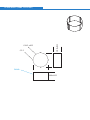
suitable PMMA phantom (diameter 16cm is recommended). Two CBCT dose
indices are currently proposed. Index 1 requires measurements along a
diameter of the phantom (Figure 1) and is calculated as the mean of the
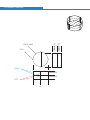
readings. Index 2 involves measurements at the centre of the phantom and at
points around the periphery. Index 1 allows the measurement of an index for
on-axis and off-axis exposures, and full and partial dose distributions simply by
rotating the phantom in such a way that the isocentre of the x-ray beam lies on
the measuring diameter as shown in Figure 1. Index 2 is only suitable for
symmetrical dose distributions.
Measuring
points
FOV at the
central
axis
Phantom
FOV off
central
axis
Figure 1 Measurement points for Index 1
24 SEDENTEXCT D3.4 Report – Appendix 1: Generic QA Protocol
FOV axis
Measuring
points
Phantom
Figure 2 Measurement points for Index 2
Such indices can be used to monitor the reproducibility of the dose distribution
over time, to relate to manufacturer’s specification and national or international
diagnostic reference levels if set using a dose index.
3.1.3
Dose area product (DAP)
The product of the dose in the beam multiplied by the area of the beam at that
point is known as the dose area product (DAP) and is a dose index routinely
used in general radiography and fluoroscopy.
DAP can readily be measured by the medical physics expert using either a
calibrated ionisation chamber that integrates the dose across the primary beam
(DAP meter) or by measuring dose and beam size at a fixed point. Care should
be taken on units where the beam size changes during the scan and a suitable
DAP meter must be used for these units.
If a DAP reading is provided on the equipment readout, the medical physics
expert should confirm the accuracy of such a readout. The readout may then be
used by the dentist to audit and monitor dose and compare to any national or
international audit levels (see diagnostic reference levels).
If no DAP reading is provided, the medical physics expert should provide the
DAP readings for all standard settings of the equipment so the dentist can
compare the levels to any national or international audit levels (see diagnostic
reference levels).
3.2
Diagnostic reference levels
The European Medical Exposures Directive requires that diagnostic reference
levels are set and used as part of the optimisation process. Exactly how this
requirement is applied varies from country to country depending on how it has
been implemented into national legislation. However, the overall aim is that
patient dose is audited and the dose for a typical patient is compared to past
levels and any national and international levels. This will give the dentist
25 SEDENTEXCT D3.4 Report – Appendix 1: Generic QA Protocol
confidence that doses in their practice are not unnecessarily drifting upwards
and that they are in line with accepted levels.
Diagnostic reference levels may be set using a variety of dose indices. The UK
Health Protection Agency has recommended the use of dose area product
(DAP) and has proposed setting reference levels for the UK for both adult and
child procedures. The adult level is for the clinical protocol for the placement of
an upper first molar implant in a standard male patient and the child level is for
the clinical protocol used to image a single impacted maxillary canine of a 12
year old male. Based on current national audit data an initial achievable level of
250 mGy cm2 is proposed and further data is requested so that national
reference levels for both adult and child can be set.
It is recommended that clinical dose levels are determined in a practice (by
measurement of standard protocols or by patient dose audit if dose index
readouts are provided by the equipment) and compared to past results and any
national and international levels when set. Dose levels higher than these
standards merit investigation as this would suggest that dose is not optimised.
4
Quantitative image quality performance
A range of image quality indicators can be measured using phantoms designed for
such measurements. A variety of different phantoms are available.
Phantoms, such as the Catphan, designed for use on CT scanners can be used for
dental CBCT units but are difficult to position and tend to use soft tissue-equivalent
materials for the more accurate evaluation of grey scale accuracy.
Dental imaging has a few specific requirements (e.g. hard tissue visualisation and
sub-millimetre spatial resolution) which are not assessed by phantoms not specifically
designed for the purpose. Some manufacturers provide phantoms with their scanners
and the SEDENTEXCT project has designed a phantom specifically with dental CBCT
units in mind.
In addition, software tools are required to analyse the images of the phantom. These
may be available as part of the image viewing software or may be separately provided
with the phantom. The SEDENTEXCT phantom is provided with standard software for
image analysis.
Acquisition of such a phantom and software tools is essential if the image quality
measurements are to be performed. MPEs should normally have access to such
phantoms and software and will be able to carry out these measurements.
Note that whilst most systems exhibit a linear relationship between image pixel value
and object density within a single scan, the use of histogram shifting by some units
means that this is not always the case from scan to scan. Care should be taken when
comparing uncorrected data across scans or from unit to unit.
26 SEDENTEXCT D3.4 Report – Appendix 1: Generic QA Protocol
4.1
Image density values
A clinically useful image relies on the system’s ability to distinguish between
and clearly display the different materials in an image. The accuracy with
which a system can continue to do this over time can be determined
quantitatively.
4.1.1
•
•
Acquire an image of the image density value section of the phantom. This
should be an area in which there are many different materials clearly
distinguished from one another
Draw a region of interest in each of the different materials and record the
mean pixel value and standard deviation in each
4.1.2
•
•
Setting a baseline
Routine measurements
In future visits, expose the same test object using the same protocol, draw a
region of interest in each of the different materials and record the mean
pixel value and standard deviation in each
Compare the mean pixel value for each material with that measured on the
first visit
4.2
Contrast detail assessment
Assessing a system’s ability to display details of known varying contrast can
give important information as to the deterioration of image quality over time. A
phantom containing objects with a range of different sizes and/or contrasts is
required.
4.2.1
•
•
Acquire an image of the contrast detail section of the phantom. This should
be an area in which there are various details of the same material that vary
in diameter and depth, or various details of different materials
The simplest check of contrast detail is counting the number of details that
can be clearly resolved on a reporting monitor
o
It may be useful to derive a single value for contrast detail
assessment, for example the threshold detection index, the image
quality factor or the contrast to noise ratioxii. Action levels will
depend on the test object and scoring methodology used
o
Some phantoms may provide software that calculates contrast
detail values after analysing images. In these cases, follow the
instructions that come with the phantom
4.2.2
•
•
Setting a baseline
Routine measurements
Acquire an image of the contrast detail section of the same phantom using
the same exposure protocol as at baseline
Count the number of details on the image using the same monitor as at
baseline where possible
o
If a threshold detection index, image quality factor or contrast to
noise ratio is being used, compare with the baseline results
o
If automated scoring with phantom software is being used, results
should be compared with baselines
27 SEDENTEXCT D3.4 Report – Appendix 1: Generic QA Protocol
Scoring test objects by eye is very subjective. It should be ensured that where
there are different personnel scoring the details, they use a similar
methodology.
4.3
Uniformity and artefacts
It is important that the entire detector is capable of producing a useful image,
and so it must be ensured that there are no significant areas of damage or
problems with detector calibration that could lead to artefacts in acquired
images. Similarly it must be confirmed that damaged or dead pixels are
appropriately corrected for in the final image.
4.3.1
•
•
•
Acquire an image of the uniformity section of the phantom. This should be a
large homogeneous area so that it can be assured that any deviations on
the image are the result of the imaging system and not the phantom itself
A visual check of the uniformity of the image will reveal any significant
uniformity problems
Where quantitative tools are available, draw a region of interest in the centre
of the test object and then four evenly spaced regions around the periphery
and measure the mean pixel value in each. Assess the image uniformity
using the results
4.3.2
•
•
•
Where a QC phantom is available:
Where no QC phantom is available:
Acquire an image with nothing in the beam. Be aware that this could give
odd images on some scanners if the reconstruction relies on a head or
equivalent phantom being present. In these cases consider the use of a
scout view
A visual check of the uniformity of the image will reveal any significant
uniformity problems. In this case, some windowing of the image may be
necessary to better assess uniformity
Where quantitative tools are available, draw a region of interest in the centre
of the test object and then four evenly spaced regions around the periphery
and measure the mean pixel value in each. Assess the image uniformity
using the results
4.4
Noise
There are many processes that could affect the quality of a clinical image,
including tube output, detector efficiency and image processing. A quantitative
assessment of the noise in an image can identify any deterioration in image
quality with time and help determine the cause of the deterioration.
4.4.1
•
•
Setting a baseline
Acquire an image of the uniformity section of the phantom. This should be a
large homogeneous area so that it can be assured that any deviations on
the image are the result of the imaging system and not the phantom itself
Draw a region of interest in the centre of the test object, with diameter no
greater than one fifth the diameter of the test object. Record the standard
deviation
28 SEDENTEXCT D3.4 Report – Appendix 1: Generic QA Protocol
•
Repeat for five consecutive axial slices and calculate the average standard
deviation.
4.4.2
•
•
Routine measurements
Acquire an image of the uniformity section of the same phantom using the
same protocol as at baseline
Draw a region of interest in the centre of the test object, as close in size and
position to that at baseline as possible, and record the average standard
deviation across five consecutive axial slices
Further analysis:
Consideration should be given to the calculation of a signal to noise ratio in
addition to the noise measurements described above. The information
provided by signal to noise ratios can be useful in investigating potential
problems with the system where they are suggested by noise measurements
alone.
4.5
Spatial Resolution
Spatial resolution is a measure of the ability of the system to detect small high
contrast detail.
4.5.1
Limiting resolution
This test measures the smallest high contrast detail that can be detected,
usually by using a phantom in which small lines get closer and closer together.
Method
Place a suitable object made of a high contrast material on the detector and
expose at clinically relevant exposure factors. Magnify the reconstructed image
of the test object and optimise the window level. Score the number of
resolvable groups of lines and convert to the corresponding resolution. Be sure
to use the same exposure factors as at baseline year on year.
4.5.2
Modulation Transfer Function (MTF)
Measurement of the limiting resolution will assess the system’s ability to
transfer the high frequencies (finest details) but it does not provide any
indication on how other frequencies are transferred. This can be assessed by
measuring the modulation transfer function (MTF) of the system. The MTF can
be calculated by measuring the Point Spread Function (PSF) or the Edge
Spread Function (ESF).
The PSF can be measured directly by imaging a high contrast wire. The wire is
embedded in a suitable medium and placed perpendicular to the scan plane.
The PSF is obtained by plotting the pixel values across the image cross-section
of the image of the wire. Resolution can be measured directly from the PSF by
measuring the full width at half maximum (FWHM).
The ESF is measured by imaging an edge of a block of material embedded in a
suitable material with the face of the block perpendicular to the scanned plane.
29 SEDENTEXCT D3.4 Report – Appendix 1: Generic QA Protocol
The ESF is obtained by plotting the pixel values across the image.
Differentiating the ESF will give the Line Spread Function (LSF). The LSF can
be used to asses the spatial resolution of the system similar to the PSF.
The MTF can be calculated as the modulus of the Fourier transform of the PSF
or the LSF. The values quoted are the frequencies at which the modulation falls
to 50% or 10% of its initial value.
A more detailed description of the MTF method is given in the IPEM Report 32,
Part VII.x
4.6
Geometric Accuracy
Where it may be clinically useful to perform measurements of distance or angle
on an image, it must be ensured that measurements made on a system
accurately reflect true distances and angles. A phantom is required that
contains an area with objects at known distances and angles from one another.
•
•
•
•
•
5
Acquire an image of the geometric accuracy section of the phantom.
Where quantitative test tools are available, measure distances and angles
across a variety of the objects within the phantom
Compare the measured values with known distances and angles. A more
detailed analysis can be performed by calculating the aspect ratio and pixel
pitch if required.
Ensure the aspect ratio is correct by calculating measured x / measured y
for distances of the same intended length. The ratio should be 1±0.04
Ensure the pixel pitch is as stated by the manufacturer by calculating
measured distance (mm) / number of pixels covering the measured
distance. Measure the pixel pitch for various distances in the x and y axes
Display equipment
Regardless of the quality of the x-ray equipment with which an image is acquired, a
clinical image can only be digitally displayed as well as the monitor on which it is
viewed is capable of. It is essential therefore to ensure that any monitor that is used
to report on clinical images is well set up and subject to regular QC.
The QC programme outlined in the report of the AAPM task group 18xi, or equivalent,
is an appropriate methodology for MPE tests. Regular in-house checking of the
display monitors should also be performed, as follows:
5.1
•
•
•
General condition
A suitable test pattern, such as an AAPM TG18 or SMPTE image, should be
installed on the computer and viewed on the monitor, which should be clean
It should be ensured that all distinct greyscale levels on the test pattern can
be individually resolved. The small black and white squares within the
larger black and white squares should also be clearly resolved
Where two monitors are used for reporting, it should be ensured that the
perceived contrast of each of the distinct greyscale levels is consistent
between the two
30 SEDENTEXCT D3.4 Report – Appendix 1: Generic QA Protocol
5.2
•
Monitor resolution
It should be ensured that all of the bars on each of the resolution patterns
on the AAPM TG18 or SMPTE test image can be clearly resolved
Version 4 26/1/11
31 SEDENTEXCT D3.4 Report – Appendix 1: Generic QA Protocol
References
i
Council Directive 97/43/Euratom of 30 June 1997 on health protection of individuals against the
dangers of ionizing radiation in relation to medical exposure Official Journal of the European
Communities No L 180/11 1997
ii
Draft Euratom Basic Safety Standards Directive – Version 24 February 2010
http://ec.europa.eu/energy/nuclear/radiation_protection/doc/art31/2010_02_24_draft_euratom_basic_sa
fety_standards_directive.pdf
iii
IPEM report 91 Recommended standards for the routine performance testing of diagnostic X-ray
imaging systems IPEM 2005
iv
HPA-RPD-065 Recommendations for the design of X-ray facilities and quality assurance of dental
Cone Beam CT (Computed tomography) systems JR Holroyd and A Walker Health Protection Agency
2010
v SEDENTEXCT http://www.sedentexct.eu/
vi
IPEM Quality assurance in dental Radiology Report No 671995
vii
Cranley K. & Fogarty G.W.A. 1988 The measurement of total filtration of diagnostic X-ray tubes BJR
61
viii IEC (International Electrotechnical Commission) 2008 Medical electrical equipment - Part 1-3:
General requirements for basic safety and essential performance - Collateral Standard: Radiation
protection in diagnostic X-ray equipment. IEC publication 60601-1-3.
ix
IPEM Report 32 Measurement of the Performance characteristics of diagnostic X-ray systems used in
medicine Part III Computed Tomography X-ray scanners 2nd Ed IPEM 2003
x
IPEM Report 32 Measurement of the Performance characteristics of diagnostic X-ray systems used in
medicine Part VII Digital imaging system IPEM 2010
xi
Samei E, Badano A, Chakraborty D, Compton K, Cornelius C, Corrigan K, Flynn MJ, Hemminger B,
Hangiandreou N, Johnson J, Moxley M, Pavlicek W, Roehrig H, Rutz L, Shepard J, Uzenoff R, Wang J,
Willis C. Assessment of Display Performance for Medical Imaging Systems, Report of the American
Association of Physicists in Medicine (AAPM) Task Group 18, Medical Physics Publishing, Madison,
WI, AAPM On-Line Report No. 03, April 2005.
xii
NHS Breast Screening Programme – Commissioning and routine testing of full field digital
mammography systems . NHSBSP equipment report 0604, April 2009.
32 SEDENTEXCT D3.4 Report – Appendix 1: Generic QA Protocol
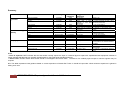
Summary
Test
Priority
Level of
expertise*
Output repeatability
Output reproducibility
Filtration
Essential
Essential
Essential
MPE
MPE
MPE
Tube potential
Field size and alignment
Leakage
Essential
Essential
Essential
MPE
MPE
MPE
Quantitative image
Quality
Image density values
Uniformity and artifacts
Recommended
Essential
Display specific
Noise
Limiting resolution
Contrast detail
Geometrical accuracy
General condition
Patient dose
X-ray tube and
generator
Suggested
frequency
Action levels**
Mean ±10%
Baseline ±10%
< 2.5mm aluminium (of which 1.5mm
should be permanent)
In house/MPE
In house
12 monthly
12 monthly
When new, if output
changes or tube head
dismantled
12 monthly
12 monthly
When new and if damage
suspected
Monthly
Monthly
Recommended
Essential
Recommended
Essential
Essential
In house/MPE
In house/MPE
In house/MPE
In house/MPE
In house
12 monthly
12 monthly
12 monthly
12 monthly
Monthly
Monitor resolution
Patient dose index
Recommended
Recommended
In house
MPE
Monthly
12 monthly
Patient dose audit
Essential
In house/MPE
At least 3 yearly
> ±5% of intended kV
>10% expected field size
> 1000µGy hr-1 at maximum tube
rating.
>10% from baseline
Visible artefacts on the image or
>±10% of the mean
> ±10% from baseline
> ±20% from baseline
Dependent on method used.
within ±2mm and ±2º
Failure to resolve different contrasts
in test pattern/ not consistent between
monitors
Not consistent with baseline image
Outside ±15% of manufacturer’s
specification
> national or international reference
level
Notes
* Level of expertise: MPE indicates that this test would normally require the input of a medical physics expert with sophisticated test equipment whereas in
house indicates that the tests can normally be performed by clinic staff using standard phantoms
** Action level: Results outside these levels should be investigated and action taken. The advice of a medical physics expert or service engineer may be
required
N.B. This table represents initial guidance based on current experience of dental CBCT units. It should be kept under critical review as experience is gained in
testing such units.
33 SEDENTEXCT D3.4 Report – Appendix 1: Generic QA Protocol
Appendix II: SEDENTEXCT User Manual - Image
Quality Scanning Protocol
34 SEDENTEXCT D3.4 Report
SEDENTEXCT Image Quality Scanning Protocol
This protocol provides specific instruction for performing CBCT scans of the
SEDENTEXCT image quality phantom. It is important to place some of the inserts in
a specific way, to avoid interference between inserts. Furthermore, the phantom
should be scanned using an accurate and reproducible positioning, as deviations in
positioning may lead to variable results for a few image quality parameters.
Placement of inserts
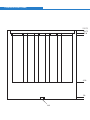
As seen in Figure A1, the phantom has six rows for insert placement, numbered 1
(bottom) to 6 (top).
Figure A1. Six phantom rows for insert placement.
There are seven columns (one central, six peripheral) named A to G (Figure A2).
35 SEDENTEXCT D3.4 Report – Appendix II: User Manual
Figure A2. Columns for insert placement.
The distribution of the inserts over the different rows is determined in a more or less
strict way, with limited user freedom. There are a few other restrictions regarding the
choice of columns.
Row 1
Place ‘Artefacts Titanium’ inserts inside a column that enables the rods to be placed
along the radius of the phantom (i.e. perpendicular to the edge). Place second
‘Artefacts Titanium’ insert at a position which enables the rods to be placed
(approximately) parallel to the edge of the phantom. The two artefact inserts cannot
be adjacent; they should be separated by 2 peripheral columns. Fill up other (central
and peripheral) columns using PMMA inserts.
Row 2
Fill up all columns using PMMA inserts. This row is used to separate the artifact
inserts from all other inserts, avoiding interference.
Row 3
Place the five ‘Contrast Resolution’ inserts at peripheral positions. The placement of
these inserts is not crucial, as long as the central hole is not used. Place the ‘Pixel
Intensity Value’ insert in the remaining peripheral hole. Use a PMMA insert for central
hole.
Row 4
Distribute 4 remaining inserts (LSF – PSF – Spatial Z – Spatial XY) along peripheral
holes. Fill up remaining holes using PMMA inserts.
Rows 5&6
Fill up all columns using PMMA inserts.
Scanning protocol
Phantom and FOV positioning
36 SEDENTEXCT D3.4 Report – Appendix II: User Manual
The positioning of the phantom should be done with a tripod or stable platform,
ensuring that the phantom is level. Having the phantom level is one of the key factors
for accurate software measurements.
The positioning of the FOV depends on the size of the FOV. When considering the
number of columns obtained in once scan, there are different possibilities:
• Large FOV (15cm diameter or larger): scan all columns in one scan by placing
phantom centrally in the FOV. If there is considerable image quality loss at the
border of the FOV (streaks / darkening) affecting the peripheral inserts, the
FOV should be considered as ‘Medium’ (see below).
• Medium FOV (8-14cm diameter): scan 2 or 3 columns per scan, depending on
the actual size of the FOV and the image quality near the border of the FOV. If
scanning 2 columns, place the centre of the FOV (isocentre) in the mid-point
between the two columns. If scanning 3 columns, place the isocentre between
the middle of the peripheral columns and the central column (so you will
actually be scanning 4 columns).
• Small FOV (up to 6cm diameter): scan 1 column per scan.
When considering the number of rows included in one scan, the height of FOV
should be considered as well as image quality loss, artifacts and FOV narrowing near
the upper and lower edge of the FOV. Use the minimum amount of scans without
hampering image quality.
For the PMMA portion and geometric pattern (at the border between the PMMA
portion and the insert portion), it is important not to position the FOV too low if using a
tripod or other high-density phantom support to avoid artifacts. If possible, place the
phantom on rigid object of medium density (another phantom if available, papers,
books, etc.) and not directly on a metal platform. For medium and small FOVs, scan
the peripheral PMMA portion of the phantom as well as the central portion. For large
FOVs, position the FOV centrally to scan the entire PMMA portion in one scan.
Exporting data
Export (only) axial slices using the thinnest slice thickness and smallest slice interval.
Check the folder after exporting for any non-DICOM files (e.g. DICOMDIR) and
delete them, as they will hamper the import of the dataset into the SEDENTEXCT
software (see below).
37 SEDENTEXCT D3.4 Report – Appendix II: User Manual
Software protocol final phantom
Setting up the software
No installation is required, just download the file “SedentexCT.zip” and unzip into a
chosen folder. To run the program, run the executable file “Sedentex.exe”.
NOTE: The program must be placed within folders (folders and subfolders) which
have no space in their names. For example: Path:
“C:\My Folder\My Program\SedentexCT”
is incorrect because there are spaces between words in two folder names: “My
Folder” and “My Program”. A few examples of a correct path:
“C:\MyFolder\MyProgram\SedentexCTsoftware”
“C:\SedentexCTsoftware”
“C:\CBCT\QC\SedentexCTsoftware”
Stack of images (datasets)
Similar to the software, datasets used in the software must be placed within folders
which have no space in their names.
For example: Path: “C:\My Folder\DeviceName” is incorrect. The most convenient
place for the datasets would be in a subfolder of the SedentexCT software. You can
create a first subfolder called ‘datasets’ in the main folder of the software (e.g.
“C:\SedentexCTsoftware\datasets”) and create further subfolders showing the type of
device, the name of the imaging protocol (FOV / resolution / mA / …), the date of
exposure, etc, for example:
“C:\SedentexCTsoftware\datasets\Scanora\60x60_HR_8mA\2010_11_14”
38 SEDENTEXCT D3.4 Report – Appendix II: User Manual
Make sure there are no spaces in any of the folder names.
Also, the stack of images must be placed on a writeable medium (hard drive) with at
least 1 GB of free space. Opening the images from CDs/DVDs is not possible as the
program will not be able to convert the images.
To load a stack of images click on: “File” and then on “Open set of images”. In the
pop-up window, browse to the folder containing the dataset, click on any file within
this folder and click on the “Open” button to start the loading process. This process is
divided into 7 steps (Figure A3). It is possible to cancel the loading process during
these steps (except for Step 2 – Converting files).
39 SEDENTEXCT D3.4 Report – Appendix II: User Manual
Figure A3. Seven consecutive steps in the dataset loading process.
40 SEDENTEXCT D3.4 Report – Appendix II: User Manual
Main control elements of the program
On the left side, there are three preview panels showing a slice of each of the three
views (axial, coronal, sagittal). It is possible to change the view (in main window) by
clicking on them or on the bookmarks which are placed on the top right side of
program window.
On the “preview panels”, there are also scroll bars to enable scrolling through the
slices in all three directions.
Inserts menu manager
To open the inserts menu manager click on: “Options” and then on “Insert menu
manager”. It is possible to add, change and remove inserts (name and measurement
file). The software provided to the user will have implemented all required
measurements; normally, the user does not have to add or change anything to this
manager.
Insert measurements
Software measurements
Contrast-to-noise ratio
Use the dataset containing the ‘pixel intensity value’ insert. Scroll through the axial
slices using the slider underneath the top window of the three small windows at the
left. Scroll until you have a clear view of the ‘pixel intensity value’ insert.
Click and drag the left mouse button to create a selection window. After releasing the
left mouse button, you can still change the position of each border by selecting the
small squares in the middle of the borders and dragging them:
41 SEDENTEXCT D3.4 Report – Appendix II: User Manual
Align the border of the selection with the border of the insert. Do not align them with
the small wedges you see at the top, bottom, left and right. Align them as if the insert
would be a perfect circle:
NO:
YES:
The most crucial borders are the top and left border. The size of the selected region
is not important, as long as those two borders are aligned with the insert border.
Once the borders have been set in the axial view, switch to either the coronal or
sagittal view by clicking in the middle or bottom (small) window on the left side of the
screen. Scroll through the slices until you are at the position of the insert (around
slice nr. 180 in the coronal view and nr. 270 in the sagittal view. Adjust the top border
with the top of the insert. The lower border is not important.
42 SEDENTEXCT D3.4 Report – Appendix II: User Manual
Select ‘CNR’ from the insert list from the bottom and press ‘Evaluate’. After some
processing time, the results will appear in a pop-up screen. Copy the CNR values
into the QC form (see below).
Metal artefacts
In a dataset containing the ‘metal artefacts’ inserts, in the axial view, scroll to the
insert and position the selection box using the same criteria as for the CNR insert
(again, the top and left borders are the ones that should be accurate):
43 SEDENTEXCT D3.4 Report – Appendix II: User Manual
Switch to the coronal or sagittal view and align the top border of the selection with the
top of the insert. The lower border is not important, as demonstrated:
Select ‘Artefacts’ from the insert list and press Evaluate. Copy the value from the
pop-up window into the form.
PMMA (noise & uniformity)
44 SEDENTEXCT D3.4 Report – Appendix II: User Manual
In the dataset containing the PMMA portion of the phantom, in the axial view, scroll to
the homogeneous PMMA section. For large FOV devices, place the selection box by
putting all four corners of the box on the edge of the phantom. For medium and small
FOV devices, make the box as large as possible without going outside the phantom.
Also be sure to avoid artifact regions at the border of the FOV, as they will hamper
the analysis.
Next, switch to the coronal or sagittal view. Align the top border of the selection with
the top border of the PMMA section, so at the bottom border of the geometric pattern
(the small holes).
Select ‘PMMA’ from the insert list and press Evaluate. Copy the ‘NOISE’ and ‘UNI’
values into the form.
Visual analyses
For all visual analyses, the first choice should be to perform them using the
workstation and software provided by the manufacturer of the CBCT device. Visual
45 SEDENTEXCT D3.4 Report – Appendix II: User Manual
assessments can be affected by the screen, room conditions and software function,
so ideally this should be performed in clinical conditions. If it is not possible to
perform this analysis on the manufacturer’s workstation, the SEDENTEXCT software
can be used, providing that optimal viewing conditions are ensured.
All analyses require an optimal setting of the grey levels displayed, by adapting the
so-called ‘window’ (number of grey values displayed) and ‘level’ (grey value of the
center of the window). Any software use for image viewing should have a
window/level (or brightness/contrast) tool.
Contrast resolution analysis
Five inserts are used for this analysis, each containing five rods of a certain material
in PMMA surrounding. Open a dataset containing the contrast resolution insert(s) and
adjust the level and window for optimal viewing of the rods. Then, count the number
of distinguishable rods for each insert and fill in the number of visible rods in the form
below. Do not count these rods using 1 axial slice, but scroll through the slices; this
can help to determine whether or not the smallest rods are visible. Repeat for all five
inserts.
Spatial resolution analysis
46 SEDENTEXCT D3.4 Report – Appendix II: User Manual
There are two inserts for spatial resolution, containing the same pattern but in a
perpendicular (X-Y and Z) orientation. Open the dataset contain the spatial resolution
insert(s). For this insert, the window and level need to be adjusted for optimal
contrast between the different lines in the pattern. Also, it is needed to zoom into the
insert (using the zoom tool of the software) to make sure you can accurately count
the number of lines.
Count the number of white lines that can be distinguished from the next. NOTE: a line
can only be counted if the separation with the previous line, but also with the next line
can be identified.
Fill in the number of counted lines for the X-Y and Z insert into the QC form. This
concludes the spatial resolution analysis.
Geometric accuracy (linear measurements)
As this analysis requires some degree of visual interaction to enable accurate
measurements, the software and workstation provided by the manufacturer should
preferably be used. If this is not possible, the SEDENTEXCT software package can
be used.
47 SEDENTEXCT D3.4 Report – Appendix II: User Manual
Adjust the window and level to enable optimal viewing of the hole pattern between
the PMMA portion and the insert portion of the phantom. Measure the length
between the centre of two (randomly chosen) holes.
Calculate the deviation by subtracting the measured length with the actual length (in
the example above, the actual length was 50mm). For holes that are in-line, the
distance is 10 mm per hole. For other measurements, use the Pythagorean Theorem
to calculate the distance between the holes.
Perform at least 3 measurements using different angles and combinations of holes.
Calculate the average deviation and enter it into the form. Do not enter the
measurement itself, the value entered in the form should be the difference between
the measurements and the real distance.
This concludes the geometric accuracy measurement.
48 SEDENTEXCT D3.4 Report – Appendix II: User Manual
SEDENTEXCT phantom QC form
QC information
User
Date & hour
QC measurements
Geometric accuracy
Contrast resolution
Contrast-to-noise ratio
(CNR)
Noise & uniformity
Artefacts
Spatial resolution
Average deviation: … mm
Air: … rods visible
Aluminium: … rods visible
Delrin: … rods visible
LDPE: … rods visible
PTFE: … rods visible
Air: …
Alunium: …
Delrin: …
LDPE: …
PTFE: …
Noise: …
Uniformity: …
…
X-Y: … lines visible
Z: … lines visible
49 SEDENTEXCT D3.4 Report – Appendix II: User Manual
Appendix III: SEDENTEXCT Quality Control Phantom
Specification Sheet
50 SEDENTEXCT D3.4 Report
Leeds Test Objects
www.leedstestobjects.com
SEDENTEXCT
user manual
Draft Summary
Medical Imaging Phantoms
PHANTOM HOUSING (PMMA)
A2
A1
A6
A7
A5
Holes A1-6
at 60°
intervals on
circle Ø 104.8mm
10.0 mm
10.0 mm
177 x Æ
2.0 recesses (3.0mm depth)
in the body of the phantom centred
3.5mm below the base of the 7 holes Geometric Distortion.
A3
A4
PHANTOM HOUSING (PMMA)
176.75
170.75
165.0
45.0
5.0
M6
Housing
(1 per set)
HORIZONTAL ENGRAVED LINE
(6 lines, labelling 6 x 20.0mm intervals through 140.0mm depth of holes)
VERTICAL ENGRAVED LINE
(Centred on each of 6 peripheral holes)
20.0
20.0
20.0
20.0
20.0
20.0
20.0
Æ
34.5 ±0.25
Æ
2.5
20.0±0.25
BLANK INSERT (PMMA, 30 PER SET)
PMMA
20.0±0.25
Æ
34.5 ±0.25
Æ
2.5
PMMA
10.0±0.25
10.0±0.25
PTFE
CL
10.0±0.25
10.0±0.25
LSF INSERT (1 PER SET)
PSF INSERT (1 PER SET)
Æ
31.5 ±0.25
Æ
34.5 ±0.25
Æ
25.0 ±0.25
20.0±0.25
0.25mm diameter Stainless Steel Wire
Æ
2.5
Æ
0.26 ±0.01
PMMA
1.5±0.25
17.0±0.25
1.5±0.25
Æ
0.25mm recess
(1.0mm depth)
M31.5 ±0.25
Thread to fit above
1.5±0.25
1.5±0.25
ARTEFACT (BEAM HARDENING) INSERT
Æ
31.5 ±0.25
Æ
34.5 ±0.25
Æ
5.15 ±0.1
10mm
pitch
20.0±0.25
2 per set
Titanium inserts
Æ
2.5
PMMA
1.5±0.25
17.0±0.25
1.5±0.25
1.5±0.25
M31.5 ±0.25
1.5±0.25
SPATIAL RESOLUITION Z (1 PER SET)
Æ
31.5 ±0.25
Æ
34.5 ±0.25
20.0±0.25
3.5±0.25
1.0 LP/mm
1.7 LP/mm
2.0 LP/mm
2.5 LP/mm
2.8 LP/mm
4.0 LP/mm
5.0 LP/mm
Æ
2.5
PMMA
1.5±0.25
17.0±0.25
1.5±0.25
11.1±0.25
M31.5 ±0.25
1.5±0.25
1.5±0.25
Continued...
11.0
3.25±0.25
1.0±0.25
1.0±0.25
3.25±0.25
M12
SPATIAL RESOLUTION INSERT XY
1 x XY per set
20.0±0.25
1.0 LP/mm
1.7 LP/mm
2.0 LP/mm
2.5 LP/mm
2.8 LP/mm
4.0 LP/mm
5.0 LP/mm
Æ
2.5
Æ
34.5 ±0.25
24.0±0.25
10.5±0.25
PMMA
CL
11.1±0.25
11.0
10.25±0.25
2.5±0.25
2.5±0.25
10.25±0.25
M12
CONTRAST RESOLUTION INSERT (5 PER SET)
Æ
31.5 ±0.25
Æ
34.5 ±0.25
20.0±0.25
Aluminium 2.70 g/cc
PTFE 2.16 g/cc
Delrin 1.42 g/cc
LDPE 0.92 g/cc
Air
Water (PMMA - use blank insert)
Æ
2.5
PMMA
1.5±0.25
17.0±0.25
1.5±0.25
1.5±0.25
M31.5 ±0.25
1.5±0.25
PIXEL INTENSITY INSERT (1 PER SET)
Aluminium 2.70 g/cc
PTFE 2.16 g/cc
Delrin 1.42 g/cc
LDPE 0.92 g/cc
Air
Water (PMMA)
Each disc is 3.3mm thick, from aluminium at the base up to air at the top
LEEDS TEST OBJECTS LTD
MiRo House
Becklands Close
Boroughbridge
North Yorkshire
YO51 9UY
United Kingdom
phone +44 (0)1423 321102
email [email protected]
web
www.leedstestobjects.com
66 SEDENTEXCT D3.4 Report