1
FEATURES
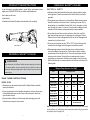
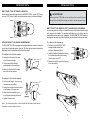
Tr i g g e r S w i t c h w i t h Va r i a b l e S p e e d D i a l
ASSEMBLY
UNPACKING
The pressure switch in the handle turns the saw ON and OFF. To turn your
reciprocating saw ON, depress switch trigger. Release switch trigger to turn your
saw OFF. The speed of the reciprocating saw blade can be adjusted by turning
the variable speed dial on the trigger. Turn the dial clockwise (right) to increase
the speed; turn the dial counter-clockwise (left) to decrease the speed. The blade
stroke rate may be adjusted during cutting operation by presetting the dial on or
between any one of the six letters.
•Carefully remove the tool and any accessories from the box. Make sure that all
the items listed in the packing list are included.
•Inspect the tool carefully to make sure no damage occurred during shipping.
•Do not discard packaging material until you have carefully inspected and
satisfactorily operated the tool.
•If any parts are damaged or missing please call 1-888-760-4405 for assistance.
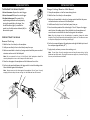
Setting SPM rating (strokes per minute)
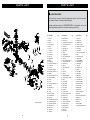
PACKING LIST
A-B Low stroke | C-D Medium stroke | E-F High stroke
Higher speed settings are generally used for fast cutting or when cutting softer
materials such as wood, composite materials, and plastics. Slower speed settings
are generally used when precision is required or when cutting harder materials.
Materials typically cut using slower speeds include sheet metal, conduit, and pipe.
Lock-On Button
Your saw is equipped with a lock-on feature, which is convenient when continuous
cutting for extended periods is required. The lock-on button is located on the side
of the handle. To lock-on, depress the trigger switch, press and hold the lockon button, and then release the trigger switch and lock-on button. Your saw will
continue running. To release the lock, depress the trigger switch and release it.
Shoe Assembly
The shoe pivots up and down, allowing you to position the saw so that its blade
teeth are at different angles with respect to the cutting surface. In addition, the
shoe can be moved in or out to adjust the depth to which the saw blade cuts.
Quick Blade Change Access Area
The Quick Blade Change (QBC) lock eliminates the need for tools when changing
the blade. Lift the QBC access area cover to access the blade lock. Open the lock
to insert/release a blade; close the lock to hold the blade firmly in place.
180o Rotating Handle Release
The housing assembly can be rotated 180o with respect to the saw handle. Pull
back on the handle release latch to rotate the assembly; release the latch to lock
the housing assembly in place. The handle locks in place every 45o.
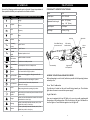
•DUALSAW® RS 1200
•Saw Blades (multi-purpose)
•Allen Wrench
•Saw Case
•Owner’s Manual
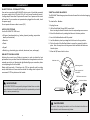
WARNING!
• If any parts are missing or damaged, do not operate the saw until missing
parts are replaced. Failure to do so could result in serious personal injury.
• Do not attempt to modify the saw or create accessories not recommended
for use with it. Any such alteration or modification is misuse and could
result in a hazardous condition and could result in serious personal injury.
• To prevent accidental starting that could cause serious personal injury,
always unplug the saw when assembling parts.
WARNING!
The operation of any power tool can result in foreign objects flying into
your eyes. Always wear safety goggles, safety glasses with side shields,
or a full face mask, as appropriate.
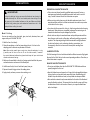
Stroke Key
The DUALSAW® RS1200provides two stroke length options: short (.75”, 20mm);
long (1.125”, 30mm). Use the stroke key on the top of the handle to select the
stroke length. Choose the stroke length that is most appropriate for the job
(e.g., short stroke for metal, tight space, plunge cuts; long stroke for wood).
10
11