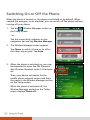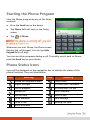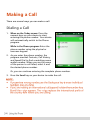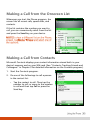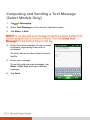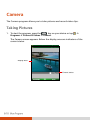
1
PS236 USER MANUAL Rugged Mobile Computing Solutions Aug. 2009 Trademarks Microsoft, Windows, the Windows logo, Windows Media, Outlook and ActiveSync are registered trademarks or trademarks of Microsoft Corporation in the United States and/or other countries. Microsoft products are licensed to OEMs by Microsoft Licensing, Inc., a wholly owned subsidiary of Microsoft Corporation. The Bluetooth word mark and logos are owned by the Bluetooth SIG, Inc. All other brand and product names are trademarks or registered trademarks of their respective companies. Disclaimer Specifications and manuals are subject to change without notice. Getac assumes no liability for damage incurred directly or indirectly from errors, omissions, or discrepancies between the device and the manuals. Notes Depending upon the specific model purchased, the color and look of your device and accessories may not exactly match the graphics shown in this document. The screenshots and other presentations shown in this document are for reference only. They may differ from the actual screens and presentations generated by the actual product. ENERGY STAR® is a government program that offers businesses and consumers energy-efficient solutions, making it easy to save money while protecting the environment for future generations. Please reference ENERGY STAR® related information from www.energystar.gov. As an ENERGY STAR® Partner, MiTAC Technology Corporation has determined that this product meets the ENERGY STAR® guidelines for energy efficiency. An ENERGY STAR® qualified computer uses 70 % less electricity than computers without enabled power management features. Earning the ENERGY STAR® When every home office is powered by equipment that has earned the ENERGY STAR® , the change will keep over 289 billion pounds of greenhouse gases out of the air. If left inactive, ENERGY STAR® qualified computers enter a low-power mode and may use 15 watts or less. New chip technologies make power management features more reliable, dependable, and user-friendly than even just a few years ago. Spending a large portion of time in low-power mode not only saves energy, but helps equipment run cooler and last longer. Businesses that use ENERGY STAR® enabled office equipment may realize additional savings on air conditioning and maintenance. Over its lifetime, ENERGY STAR® qualified equipment in a single home office (e.g., computer, monitor, printer, and fax) can save enough electricity to light an entire home for more than 4 years. Power management (‚sleep settings‛) on computers and monitors can result in much savings annually. Remember, saving energy prevents pollution Because most computer equipment is left on 24 hours a day, power management features are important for saving energy and are an easy way to reduce air pollution. By using less energy, these products help lower consumers’ utility bills, and prevent greenhouse gas emissions. Table of Contents Chapter 1 Getting Started .............................................................1-1 Identifying Hardware Components ....................................... 1-1 Front Components .............................................................. 1-1 Back Components ............................................................... 1-5 Top Components ................................................................ 1-6 Bottom Components .......................................................... 1-6 Getting Your Device Ready for Use ....................................... 1-7 Installing the SIM Card and Battery .................................. 1-7 Connecting to AC Power and Charging the Battery ........ 1-9 Performing the Initial Startup ......................................... 1-10 Synchronizing with Your Computer .................................... 1-11 Installing ActiveSync or WMDC ....................................... 1-11 Using Options ........................................................................ 1-12 Using an SD Card .............................................................. 1-12 Using the Hand Strap ....................................................... 1-13 Chapter 2 Basic Skills .....................................................................2-1 Power Saving and Turning Off .............................................. 2-1 Backlight Off ....................................................................... 2-1 Entering the Suspend Mode .............................................. 2-1 Turning Off ......................................................................... 2-2 Navigating on the Screen ....................................................... 2-2 Using the Stylus .................................................................. 2-2 Using the Keypad ............................................................... 2-2 Today Screen ........................................................................... 2-3 Landscape View .................................................................. 2-3 Navigation Bar and Toolbar ................................................... 2-4 Running Programs .................................................................. 2-5 Shortcut Menus ....................................................................... 2-5 Notifications ............................................................................ 2-6 Entering Information .............................................................. 2-6 Entering Text Using the Input Panel ................................. 2-6 Writing on the Screen ........................................................ 2-8 Drawing on the Screen....................................................... 2-9 Recording a Message........................................................ 2-10 Using My Text ................................................................... 2-11 Securing Your Device ............................................................ 2-12 Locking the Keypad .......................................................... 2-12 Locking Your Device ......................................................... 2-12 Chapter 3 Using the Phone (Select Models Only) ........................3-1 About Your Phone .................................................................. 3-1 Switching On or Off the Phone ......................................... 3-2 Starting Microsoft Phone ................................................... 3-3 Phone Status Icons .............................................................. 3-3 Making a Call .......................................................................... 3-4 Dialing a Call ....................................................................... 3-4 Making a Call from the Onscreen List ............................... 3-5 Making a Call from Contacts ............................................. 3-5 Making a Call from the Call History List ........................... 3-6 Making a Call from Speed Dial .......................................... 3-7 Responding to a Call ............................................................... 3-8 Answering a Call ................................................................. 3-8 Rejecting a Call ................................................................... 3-8 Ending a Call ....................................................................... 3-8 Operations during a Call ........................................................ 3-9 Adjusting the Phone Volume............................................. 3-9 Using the Mute Function ................................................... 3-9 Using the Speakerphone .................................................... 3-9 Managing More Than One Call ....................................... 3-10 Taking a Note during a Call ............................................. 3-11 Using Call History .................................................................. 3-12 Viewing Call History ......................................................... 3-12 Adding an Entry to Contacts Using Call History ............. 3-13 Using Speed Dial ................................................................... 3-13 Creating a Speed Dial Entry ............................................. 3-13 Editing or Deleting a Speed Dial Entry ........................... 3-14 Customizing Your Phone ...................................................... 3-15 Changing Phone Settings ................................................. 3-15 Changing Security Settings .............................................. 3-16 Changing Services Settings .............................................. 3-16 Changing Network Settings ............................................. 3-17 Additional Phone Operations .............................................. 3-17 Using Text Messages......................................................... 3-17 Setting up an Internet Connection ................................. 3-18 Checking Your Voice Mail ................................................ 3-18 Making an Emergency Call .............................................. 3-18 Dialing an International Call............................................ 3-18 Chapter 4 Managing Your Device .................................................4-1 Managing Power..................................................................... 4-1 Low Battery Signals and Actions ....................................... 4-1 Power-Saving Tips ............................................................... 4-2 Customizing Your Device ....................................................... 4-3 Settings – Personal .............................................................. 4-3 Settings – System ................................................................ 4-4 Settings – Connections ....................................................... 4-5 Searching and Organizing Information ................................ 4-6 Chapter 5 Microsoft Pocket Outlook.............................................5-1 Calendar: Scheduling Appointments and Meetings............. 5-1 Creating an Appointment .................................................. 5-2 Using the Calendar Summary Screen ................................ 5-3 Contacts: Tracking Friends and Colleagues ........................... 5-4 Creating a Contact .............................................................. 5-4 Using the Contacts Summary Screen ................................. 5-5 Tasks: Keeping a To Do List .................................................... 5-6 Creating a Task ................................................................... 5-6 Using the Tasks Summary Screen ...................................... 5-7 Notes: Capturing Thoughts and Ideas ................................... 5-8 Creating a Note .................................................................. 5-8 Messaging: Sending and Receiving Messages ...................... 5-9 About Accounts .................................................................. 5-9 Reading E-mail Messages ................................................. 5-10 Composing and Sending an E-mail ................................. 5-10 Reading Text Messages (Select Models Only) ................. 5-11 Composing and Sending a Text Message (Select Models Only) ................................................................. 5-12 Chapter 6 More Programs ..............................................................6-1 ActiveSync ................................................................................ 6-1 Synchronizing Data ............................................................ 6-2 Synchronizing Directly with Exchange Server .................. 6-2 Office Mobile .......................................................................... 6-4 Creating a Document/Workbook/Note ............................. 6-4 Opening a Document/Workbook/Note/Presentation ...... 6-5 Internet Explorer ..................................................................... 6-6 Windows Live and Messenger ................................................ 6-7 Setting up Windows Live ................................................... 6-7 Signing in to Messenger..................................................... 6-7 Windows Media ...................................................................... 6-8 Pictures & Videos..................................................................... 6-9 Viewing Pictures and Videos.............................................. 6-9 Camera ................................................................................... 6-10 Taking Pictures .................................................................. 6-10 Recording Video Clips ...................................................... 6-12 Internet Sharing (Select Models Only) ................................ 6-15 Remote Desktop Mobile ....................................................... 6-16 Other Programs ..................................................................... 6-17 E-Compass ......................................................................... 6-17 TacLink............................................................................... 6-19 Chapter 7 Getting Connected ........................................................7-1 Types of Connections .............................................................. 7-1 Using Cellular Connection (Select Models Only) .................. 7-2 Setting up a Cellular (GPRS) Connection .......................... 7-2 Setting up a Dial-up Connection ....................................... 7-3 Using Wireless Network ......................................................... 7-4 Switching On or Off the Wi-Fi Radio ................................ 7-4 Connecting to a Wireless Network .................................... 7-5 Using the Bluetooth Function ................................................ 7-6 Switching On or Off the Bluetooth Radio ........................ 7-6 Sending Files via the Bluetooth Function ......................... 7-7 Creating a Bluetooth Partnership ..................................... 7-8 Chapter 8 Troubleshooting and Maintenance .............................8-1 Resetting Your Device ............................................................ 8-1 Restoring Factory Default State ............................................. 8-2 Troubleshooting...................................................................... 8-3 Caring for Your Device ........................................................... 8-4 Chapter 9 Regulatory Information ................................................9-1 Regulations Statements .......................................................... 9-1 European Notice ................................................................. 9-1 FCC Regulations .................................................................. 9-2 Safety Precautions................................................................... 9-3 About Charging .................................................................. 9-3 About the Charger ............................................................. 9-3 About the Battery ............................................................... 9-4 About the Radio Frequency Exposure............................... 9-4 Chapter 1 Getting Started This chapter introduces you to the external components of your device and guides you through the process of setting up your device for use. Identifying Hardware Components Front Components Ref Component Description Mobile Phone Indicator Flashes in blue to indicate that the phone function is switched on (select models only). RF (Radio Frequency) Indicator Flashes in blue to indicate that the Bluetooth radio is on. Flashes in amber to indicate that the Wi-Fi (wireless network) radio is on. Flashes in purple to indicate that the GPS receiver is on. If more than one module is switched on, the indicator changes color in a cyclic way. Charge/ Notification Indicator Glows in amber to indicate that battery charging is in progress. Glows in green to indicate that the battery is fully charged. Glows in red to indicate that the battery power is critically low (less than 10%). Flashes in red to inform you of scheduled appointments, alarms and reminders. Earpiece Serves as the phone earpiece during a call (select models only). Touch Screen Displays the output of your device and responds to your tapping. Keypad Includes keys for numbers and specific functions. It lights up when a key is pressed. (See the next section for details.) Power Button Turns on or off your device. Microphone Records voices. Serves as the mouthpiece during a call (select models only). Keypad Ref Component Description Numeric Keys Enter numbers (majorly for models with the phone function). Alternative Function Keys Provide functions as indicated by the orange icons when Fn lock is on. (See also item later in this table.) Moves up, down, left and right within the screen or menu. Goes to the next input field. Backspaces over one character when in a text input field. Enters the symbols when in an input field. Increases the brightness level of the screen. It cycles to the lowest level after reaching the highest level. Send Key Dials or answers a call (select models only). Ref Component Description Left/Right Soft Performs the command shown on the bottom left or Key right corner of the screen. Function Key Switches on or off the ‚alternative functions‛ of the numeric keys. Fn lock is off by default. When it is switched on, the icon shows in the navigation bar. Camera Key Starts the Camera program. Serves as the shutter release button if the Camera program is currently in use. End Key Ends or rejects a call (select models only). Returns to the Today screen from another program. Start Key Opens the Start menu. OK Key Closes the current displayed menu or program. Action Key Confirms your selection by pressing, similar to the Enter key on a keyboard. Back Components Ref Component Description Stylus Serves as the input device by tapping on the touch screen to make selections and enter information. Camera Lens Takes still pictures or records video clips. Flash Provides extra light when taking pictures. Hand Strap Holders The hand strap attaches here. Speaker Plays music, sounds and voices. Battery Cover Inside is the battery. Top Components Ref Component SD Card Slot Cover Description Inside is the SD card slot. Bottom Components Ref Component Description Power Connector Serial Connector Provides D-sub 9 pins RS232 function. Docking Connector Connects to the office dock (an option). Connects to the AC adapter. USB OTG (Host & Connects to the USB cable. Client) Connector Getting Your Device Ready for Use Installing the SIM Card and Battery 1. Lift the latch handle of the battery cover and turn it counterclockwise to the unlock (vertical) position. Then, detach the cover from the device. Unlock position 2. If you model has the phone function, you need to install the SIM card provided by your mobile operator. With the SIM card’s chip side facing up and the beveled corner pointing to the slot, insert the card all the way into the slot. 3. To install the battery, attach the bottom side of the battery to the compartment at an angle and then lower the upper side to engage the connector. 4. Attach the bottom side of the battery cover to the device at an angle and then, with the handle still in the unlock (vertical) position, fit the latch handle into place. Secure the latch by turning it clockwise to the lock (horizontal) position. Lock position Connecting to AC Power and Charging the Battery Be sure to fully charge the battery before using your device for the first time. 1. Plug the DC cord of the AC adapter into the power connector of the device (). 2. Plug the female end of the AC power cord into the AC adapter and the male end into an electrical outlet (). 3. The charge indicator glows in amber when charging is in progress. Do not disconnect your device from AC power until the battery is fully charged, as indicated by the amber indicator turning into green. This will take a couple of hours. Performing the Initial Startup When turning on your device for the very first time, you will be guided through a setup process. 1. Make sure that your device is either connected to AC power or the battery has power. 2. Press the power button to turn on your device. The backlight of the keypad will light up and, after a few seconds, the setup screen appears. 3. Follow the on-screen instructions to complete the setup wizard. 4. For models with the phone function only: If a SIM card has been inserted and the mobile phone network operator (or you) has set the PIN, you will be prompted to enter the PIN. Enter the PIN and tap Enter. If a SIM card has not been inserted yet, a message of an invalid or missing SIM card will appear on the screen. You can tap Cancel to continue the startup procedure. 5. After the setup is completed, the Today screen appears. You can now use your device. Synchronizing with Your Computer ActiveSync and Windows Mobile Device Center (WMDC) provide an easy way to synchronize data on a Windows-based computer with your device. ActiveSync works on computers that have the Windows XP operating systems. WMDC works only on computers that have Windows Vista. ActiveSync and WMDC act as gateways between your device and your computer for transferring Outlook e-mail, appointments, contacts, and tasks, and media such as pictures, music, and videos. You can also use the Explore feature in either program to move files or programs from your computer to your device. Installing ActiveSync or WMDC If you’re using Windows XP or earlier versions of Windows, install ActiveSync with the supplied Getting Started Disc. If you’re using Windows Vista, download and install Windows Mobile Device Center 6.1. (Visit the Microsoft website to download the program and to obtain operating instructions.) NOTE: After the software installation, connect your device to your computer with the USB cable and you are ready to synchronize. Using Options Using an SD Card Your device has a SD (Secure Digital) card slot where you can insert an SD/SDHC memory card or SDIO card. To insert an SD card: 1. Remove the rubber protection cap by unfastening two screws. 2. Insert the card into the slot, with the connector pointing to the slot and its label facing the back of the device. 3. Replace the cap and secure with the two screws. The cap is required for the waterproof capability of your device. Using the Hand Strap You can attach the hand strap to your device. Chapter 2 Basic Skills This chapter familiarizes you with the basic operations of your device. Power Saving and Turning Off Backlight Off The backlight of the screen dims out after a period of inactivity (default 30 seconds while on battery power and 1 minute while on external power). To restore the backlight, tap the screen or press a button. Note that where you tap or what you press also causes the related task to be performed. Entering the Suspend Mode Your device automatically suspends after a period of inactivity (default 3 minutes while on battery power and 5 minutes while on external power). To manually suspend the device, briefly press the power button. To resume operation, press the power button. You will be back to where you left off. Turning Off If you are not using your device, press and hold the power button for at least 3 seconds until the device plays a notification sound and turns off. Navigating on the Screen Using the Stylus Use the stylus to navigate and select objects on the screen. Pull the stylus out of the slot and extend it for ease of use. Store it in the slot when not in use. Tap Touch the screen once with the stylus to open items and select options. Drag Hold the stylus on the screen and drag across the screen to select text and images. Drag in a list to select multiple items. Tap and hold Tap and hold the stylus on an item to see a list of actions available for that item. On the shortcut menu that appears, tap the action you want to perform. Using the Keypad You can also use the keypad to navigate on the screen. (See ‚Keypad‛ in Chapter 1 for information.) Today Screen When you switch on your device for the first time each day, you will see the Today screen. The Today screen can be easily accessed from any screen by tapping and then Today. The Today screen shows your upcoming appointments, active tasks, information about e-mail messages, and more. You can tap a section on the Today screen to open the program that is associated with that section. Landscape View You can use your device in a landscape manner. To change the screen view, tap Settings System Screen General Landscape or Portrait. Navigation Bar and Toolbar The navigation bar is located at the top of the screen. It displays the active programs and allows you to switch programs and close screens. The navigation bar and Start menu: Tap to select a program. Tap to quickly select a program you have recently used. Tap to see additional programs. Tap to customize your device. The navigation bar also contains the volume indicator, battery indicator, and connectivity indicators. You can tap an indicator for related controls. Use the toolbar at the bottom of the screen to perform tasks in programs. The toolbar includes a left soft key, a right soft key, and the Input panel button in between. The right soft key is usually Menu while the left soft key varies with programs. An example of the toolbar: Left Soft Key Right Soft Key Input panel button Running Programs You can switch from one program to another without closing any program. To run a program, tap from the Start menu. on the left-top corner of the screen and select To access additional programs, tap icon. Programs and tap the program Shortcut Menus With shortcut menus, you can quickly choose an action for an item. The actions in the shortcut menus vary from program to program. To access a shortcut menu, tap and hold the stylus on the name of the item that you want to perform the action on. When the menu appears, lift the stylus and tap the action you want to perform. Or tap anywhere outside the menu to close the menu without performing an action. Notifications Your device reminds you in a variety of ways when you have something to do. For example, if you have set up an appointment in Calendar, a task with a due date in Tasks or an alarm in Clock, you will be notified in any of the following ways: A message appears on the screen. A sound, which you can specify, is played. The notification indicator flashes in red. To choose reminder types and sounds for your device, tap Personal Sounds & Notifications. Settings Entering Information You have several options for entering new information: Use the Input panel to enter typed text, either by using the on-screen keyboard or other input methods. Write directly on the screen. Draw pictures on the screen. Speak into the microphone to record a message. Entering Text Using the Input Panel Use the Input panel to enter information in any program on your device. You can either type using the on-screen keyboard or write using a recognizer. In any case, the characters appear as typed text on the screen. To show or hide the Input panel, tap the Input panel button. Tap the arrow next to the Input panel button to see your choices. Select an input method. Input panel button. Tap to see your choices. When you use the Input panel, your device anticipates the word you are typing or writing and displays it above the Input panel. When you tap the displayed word, it is inserted into your text at the insertion point. The more you use your device, the more words it learns to anticipate. Tap here if this is the right word. Recognizer With a recognizer, you can write letters using the stylus just as you would use a pen on paper. When you write a letter, it is converted to typed text that appears on the screen. For specific instructions on using a recognizer, open a recognizer and then tap the question mark next to the writing area. Writing on the Screen In any program that accepts writing, such as the Notes program, you can use your stylus to write directly on the screen. Write the way you do on paper. You can edit and format what you have written and convert the information to text later. To write on the screen, tap Menu Draw to switch to drawing mode. A check () appears before the command. Drawing on the Screen You can draw on the screen in the same way that you write on the screen. 1. Tap Menu Draw to enable drawing mode. A check () appears before the command. 2. To create a drawing, cross three ruled lines on your first stroke. A drawing box appears. 3. Subsequent strokes in or touching the drawing box become part of the drawing. Drawings that do not cross three ruled lines will be treated as writing. The drawing box indicates the boundaries of the drawing. Recording a Message You can quickly capture thoughts, reminders and phone numbers by recording a message. In the Notes program, you can either create a stand-alone recording or include a recording in a written note. If you want to include the recording in a note, open the note first. In the Messaging program, you can add a recording to an email message. To create a recording: 1. Tap Programs Notes to switch to the program. 2. Tap Menu View Recording Toolbar to show the Recording toolbar. 3. Hold the device’s microphone near your mouth or other source of sound. 4. Tap the Record button on the Recording toolbar to start recording. 5. To stop recording, tap the Stop button on the Recording toolbar. The new recording appears in the note list or as an embedded icon. To play a recording, tap it in the list or tap its icon in the note. Indicates an embedded recording. Recording toolbar Recording Formats Your device supports several formats for voice notes. The formats vary in both the quality of the recording and the size of the sound file. When selecting a recording format, you should consider the quality you need as well as how much storage memory the recording will use on your device. Not all recording formats are compatible with other software or computers. If you will share your recordings with others or transfer a recording to your desktop computer, be sure to choose a recording format that is supported by the software used to play recordings on the other computer. To select a recording format: 1. Tap Settings Personal Input. 2. On the Options tab in the Input control panel, select a voice recording format from the drop-down list. Using My Text When using Messaging, use My Text to quickly insert preset or frequently used messages into the text entry area. To insert a message, tap Menu My Text and then tap a message. Tap to select a prewritten message. Securing Your Device Locking Your Device When not using your device, you can lock the device so that accidental touching of the keypad or touchpad does not cause it to operate. To lock the device: tap Device unlocked on the Today screen. To unlock the device: tap Unlock (or press the left soft key on the device) Unlock (or press the * key on the device). Securing Your Device with a Password You can help keep your data more secure by requiring a password every time your device is switched on. 1. Tap Settings Personal Lock. 2. Tap to select Prompt if device unused for, and in the box to the right select a desired period of time. 3. Select the password type. 4. Enter the password you want to use to access your device when it is locked, and then confirm the password. 5. Tap ok to save the setting. The next time your device is switched on, you will be prompted to enter your password. You also need to enter this password on the computer for the ActiveSync connection. Chapter 3 Using the Phone (Select Models Only) This chapter tells you how to use the mobile phone function of your device. About Your Phone Select models are equipped with the HSDPA (High-Speed Downlink Packet Access) module. HSDPA is an enhanced 3G (third generation) mobile telephony communications protocol. It can operate on 850/900/1800/1900/ 2100MHz. To use the phone, you need to first set up an account with a mobile phone network service. The functions available to you depend on the services offered by your mobile phone network service provider and your type of subscription. Your service provider will provide you with a SIM card. This card contains your mobile phone account details and rights, contacts that can be stored and any additional services to which you have subscribed. You must install a SIM card before you can make or receive phone calls or use wireless data services. (See ‚Installing the SIM Card and Battery‛ in Chapter 1 for installation instructions.) Switching On or Off the Phone When the device is turned on, the phone is switched on by default. When needed (for example, on an airplane), you can switch off the phone without turning off your device. 1. Tap the Wireless Manager section on the Today screen. - or Tap the connectivity indicator on the navigation bar and tap Wireless Manager. 2. The Wireless Manager screen appears. Tap Phone to switch it from on to off or the other way around. Tap Done. 3. When the phone is switched on, you may be requested to enter the PIN (Personal Identification Number) code if it has been set. Then, your device will search for the mobile phone network service and show the name in the Wireless Manager section on the Today screen. When the phone is switched off, the Wireless Manager section on the Today screen displays Phone off. Starting the Phone Program Start the Phone program by any of the three methods: Press the Send key on the device. Tap Phone (left soft key) on the Today screen. Tap Phone. Whenever you start Phone, the Phone screen displays the soft keypad. You can tap Hide Keypad (left soft key). You can use other programs during a call. To quickly switch back to Phone, press the Send key on your device. Phone Status Icons Icons will be displayed on the navigation bar to indicate the status of the phone functions. They are listed below. Icon Meaning Icon Meaning Phone off (airplane mode) EDGE in use Signal strength WCDMA/UMTS available Call in progress WCDMA/UMTS in use Missed call HSPA available Call on hold HSPA in use GPRS available New message GPRS in use Missing SIM card EDGE available Making a Call There are several ways you can make a call. Dialing a Call 1. When on the Today screen: Press the numeric keys on your device to start entering the phone number. Your device will automatically switch to the Phone program. While in the Phone program: Enter the phone number using the physical or onscreen keypad. 2. As you enter the phone number, the program searches Contacts, Call History, and Speed Dial to find a matching name and/or number. When you see the name of the person to call listed, select it and the desired phone number. Or, you can continue entering the complete phone number. 3. Press the Send key on your device to make the call. Making a Call from the Onscreen List Whenever you start the Phone program, the screen lists all recent calls, speed dials, and contacts. If the list contains the number you want to call, you can conveniently select from the list and press the Send key on your device. Making a Call from Contacts Microsoft Contacts displays your contact information stored both in your device’s memory and on your SIM card. (See ‚Contacts: Tracking Friends and Colleagues‛ in Chapter 5 for detailed information on the Contacts program.) 1. Start the Contacts program. 2. Do one of the followings to call a person in the contact list: Tap the contact to call. Then tap the number to call; or move to the number to call and then tap Call or press the Send key. Tap and hold on the contact to call, and then tap the number to call in the shortcut menu. Making a Call from the Call History List The Call History list displays the calls you made, received or missed. 1. While in the Phone program, tap Call History. If have hidden the keypad, tap Keypad to see the Call History key. 2. Do one of the followings to call a person in the Call History list: Select the number to call and then tap Call or press the Send key on your device. Tap and hold on the number to call and then tap Call in the shortcut menu. Making a Call from Speed Dial If you have created speed dial entries, you can call a person quickly. (See ‚Using Speed Dial‛ in this chapter for information.) When on the Today screen or in the Phone program, press and hold the numeric key of the assigned speed dial number to make the call. Responding to a Call When an incoming call is received, your device rings or vibrates according to the options you have set for the phone. The name and number of the caller are displayed on the pop-up window. If the name of the caller is not in your contact list, only the caller’s phone number is displayed. Answering a Call To answer an incoming call, press the Send key on your device or tap Answer (left soft key). Rejecting a Call To reject an incoming call, press the End key on your device or tap Ignore (right soft key). Ending a Call To end a call, press the End key on your device or tap End on the screen. Operations during a Call Adjusting the Phone Volume To adjust the volume during a call, tap the icon on the navigation bar and select a volume level. CAUTION: Using the Mute Function During a call, you can mute your microphone so that the person with whom you are speaking cannot hear you, but you can still hear him or her. On the Phone keypad, tap Mute to switch on the mute function. The icon will appear on the upper-right corner. To switch off the mute function, tap Unmute. Using the Speakerphone You can switch on the speakerphone to use your device as a hands-free solution. On the Phone keypad, tap Speaker On to switch on the speakerphone function. The icon will appear on the navigation bar. To switch off the speakerphone function, tap Speaker Off. Managing More Than One Call NOTE: During a call, you can make or take a second call while putting the current call on hold. Then, you can choose to swap between the two callers or set up a conference call between all three parties. Holding a Call to Take a Second Call 1. If there is another incoming call when you are talking on your device, a pop-up window appears to notify you. 2. Tap Answer to place the first call on hold, and answer the second call. 3. To end the second call and go back to the first, tap End. Rejecting the Second Call To reject the second call and keep your current call in progress, tap Ignore. Be careful not to tap End; doing so will end the current call. Placing a Call on Hold to Make a Second Call 1. During a call, tap Hold to place the first call on hold. 2. Dial a second number or the first few letters of the second contact’s name by using the numeric keypad on your device. Then press the Send key to connect. Wait for it to be picked up. 3. To end the second call and go back to the first, tap End. Swapping between Calls When you have put a call on hold and made or taken another call as described earlier, you can swap between the two calls by tapping Swap. Setting up a Conference Call NOTE: 1. When you have put a call on hold and made or taken another call as described earlier, you can set up conference calling by tapping Menu Conference. 2. To add additional people to your conference, tap Hold. Dial a second number and press the Send key to connect. Wait for it to be picked up. Then tap Menu Conference. 3. If you want to talk to one of the parties privately during the call, tap Menu Private. Select a number, and tap Private. To include everyone in the call again, tap Menu Conference. Taking a Note during a Call You can take a note during a call. 1. Tap Note. 2. Enter your note and tap ok. To access a note you created during a call: 1. While in the Phone program, tap Call History. 2. The icon indicates that the phone call entry contains a note. Tap and hold the name or number for that entry, and tap View Note in the shortcut menu. NOTE: Programs Notes Using Call History Call History provides the time and duration of all incoming, outgoing, and missed calls, and a summary of total calls. Call History also provides easy access to any notes taken during a call. To access Call History while in the Phone program, tap Call History. Viewing Call History You can tap Menu Filter to change the Call History view (All Calls by default). All Calls: Displays all calls made to and from your device in a chronological order. Missed ( ): Displays only calls that were not answered. Outgoing ( ): Displays only calls made from your device. Incoming ( ): Displays only calls made to your device. To see the time, date and duration of a call, tap the item on the list to view details. To clear all items on the list, tap Menu Delete All Calls. Adding an Entry to Contacts Using Call History You can add a phone number in the Call History to Outlook Contacts or SIM Contact. 1. Tap and hold the entry you wish to transfer, and tap Save to Contacts in the shortcut menu. 2. Tap <New Contact> and select a contact type. 3. Enter the contact’s name, and select the proper number type. 4. Tap Save to save the entry. Using Speed Dial You can create Speed Dials for frequently-called phone numbers so you can dial a number with a single key press. Creating a Speed Dial Entry Speed dials can only be created for numbers stored in Contacts. 1. While in the Phone program, tap Speed Dial. 2. Tap Menu New. 3. Tap the desired contact. 4. In Name, accept the current name or change it if you want to. 5. In Number, select the phone number if there is more than one number for the contact. 6. If Location, accept the current speed dial number or change the number if you want to. 7. Tap ok to save the setting. The new Speed Dial entry is now on the Speed Dial list. The letter on the lower-right corner of the entry indicates the assigned phone number. For example, ‚m‛ indicates the mobile phone number. NOTE: Editing or Deleting a Speed Dial Entry 1. While in the Phone program, tap Speed Dial. 2. Tap the desired entry and tap Delete. – or – Tap and hold on the desired entry, and tap Delete in the shortcut menu. 3. Tap Yes. Customizing Your Phone To access the Phone Settings, start the Phone program and tap Menu Options. Changing Phone Settings Tap the Phone tab. You can customize phone settings, such as the ring type and ring tone to be used for incoming calls, and the keypad tone to be used when entering phone numbers. NOTE: Changing Security Settings Tap the Security tab. You can protect your phone from unauthorized use. You might be prompted to enter the PIN2 code for specific functions (such as the pre-paid card’s charging counters). Consult your mobile phone network service to check if your SIM card supports PIN2-related functions and services. NOTE: Changing Services Settings Tap the Services tab. You can access and configure settings for the phone services you subscribed to through your mobile phone network service. For example, you may want to block certain types of incoming and/or outgoing calls, forward incoming calls to a different phone number based on your situation, be notified of incoming calls when you are already in a call, or let others know your identity when making calls. Services available to you depend on your mobile phone network service and the type of your subscription. To view your services settings, tap a service and then tap Get Settings. Changing Network Settings Tap the Network tab. You can view available wireless networks, determine the order in which your phone accesses another network if the current one is unavailable, and specify whether you want to change networks manually or automatically. The current network will remain active until you change it, lose your signal, or change your SIM card. Additional Phone Operations Using Text Messages Text messages are automatically received when your phone is switched on. The Today screen shows if there are new text messages. You can tap the section to open the message list. To send a text message, you can do one of the followings: First select a phone number from a program such as Phone or Contacts. Then select Send Text Message from the shortcut menu or soft key. First start the Messaging program. Then select the phone number. See ‚Reading Text Messages‛ and ‚Composing and Sending a Text Message‛ in Chapter 5 for more information. Setting up an Internet Connection You can set up an Internet connection using the mobile network. See ‚Using Cellular Connection (Select Models Only)‛ in Chapter 7 for information. Checking Your Voice Mail The first position in your speed dial list defaults as your voice mailbox. When you insert your SIM card, your device automatically detects your voice mailbox number and sets it to the first position in your speed dial list. Making an Emergency Call You can use your device to dial the international emergency number 112. This number can normally be used to make an emergency call in any country with or without a SIM card inserted, as long as you are within a mobile phone network. Some mobile phone network services may require that a SIM card be inserted, and in some cases that the PIN be entered. There may be other emergency numbers available. Your mobile phone network service may save additional local emergency numbers in the SIM card. Dialing an International Call When you are manually dialing a number, tap and hold on the number key 0 until the + sign appears. The + sign replaces the international prefix of the country from where you are calling. Enter the full phone number you want to dial including country code, area code (without the leading area code zero) and local phone number. Chapter 4 Managing Your Device This chapter tells you how to effectively manage power, settings, data and programs of your device. Managing Power A fully charged battery should provide power for up to 8 hours of use. The operating time of a fully charged battery depends on how you are using the device. Some functions, such as using multimedia or operating a SD/MMC card, may consume the battery power considerably. Low Battery Signals and Actions You can monitor the battery power by tapping Settings System Power. The remaining power is displayed on a status bar in the Power control panel. When the battery is low, your device will pop up a warning message and a beep will sound. You should save your data and recharge the battery immediately upon a warning of low power; otherwise your device will turn off automatically. You need to connect the device to external AC power for charging before you can use it again. Power-Saving Tips Follow these suggestions to maximize the battery’s operating time, particularly when you are relying solely on the battery power for extended time periods. Suspend frequently. By default, the screen backlight will automatically dim out and the device will also suspend when it has been idle for a period of time. You can shorten the length of the idle time using Settings System Power Advanced to set up. Press the power button to suspend your device when it is not in use, even for a short time. Turn off functions not needed or adjust settings. Settings Personal Sounds & Notifications Avoid power-consuming situations such as: Customizing Your Device You can customize the settings of the device to your own preferences. Tap Settings. Then tap the Personal, System or Connections tab. Settings – Personal Item Description Buttons To assign programs to hardware buttons (not supported by your device) and set the repeat rate of the up/down control. Input To set up items related to the input methods and voice recording format. Lock To set a password for security. (See ‚Securing Your Device‛ in Chapter 2 for more information.) Menus To customize what appears on the Start menu. Owner Information To enter your personal information. Phone To customize the phone function. (See ‚Customizing Your Phone‛ in Chapter 3 for more information.) Sounds & Notifications To set the conditions and types of the sounds, system volume and ways of notifications. Today To select the information you want displayed on the Today screen and to select a desired theme for the background. Settings – System Item Description About To show the hardware information of your device and to define the name that your device uses for identifying itself to other computers. Backlight To adjust the brightness level of the display and to set the automatic turnoff for power saving purposes. Certificates To establish your identity or the identity of other computers. This helps prevent unauthorized users from accessing your device and information. Clock & Alarms To change the time and date and to set alarms. Customer Feedback To set if you want to send your feedback on using the Windows Mobile software. Encryption To set if you want to encrypt files placed on storage cards. The encrypted files will be readable only on this device. Error Reporting To enable or disable error reporting. Error Reporting sends information needed by technical support groups to diagnose a program error for a device running Windows Mobile software. GPS To configure the GPS hardware settings and manage GPS. Managed Programs To manage the programs you installed. Memory To display the allocation between storage and program memory, to view the memory on the storage card (if installed) and to manually stop a program if it becomes unstable or program memory is low. Power To show the remaining battery power and to set the time for the device to turn off automatically. Regional Settings To specify the region of your location and the formats of the number, currency, time and date. Item Description Remove Programs To remove programs you added to the memory of your device. Screen To set the orientation of the screen to portrait or landscape. To adjust the touch screen for accurate screen taps. To enable the ClearType feature for easier reading of text in programs that support ClearType. To adjust the text size to see more content or increase the readability in many programs. System Information To display the system information. Task Manager To display the information about the system performances and the detailed information of the running programs on your device. You can also end or manage the running programs in Task Manager. Windows Update To set how you want your device to check for important updates. Settings – Connections Item Description Beam To receive information and files via Bluetooth technology. Bluetooth To set up or change the Bluetooth connection. Connections To set up or change connection information. Domain Enroll To connect your device with company resources. You will need the enrollment password provided by your system administrator. Item Description USB to PC To change the type of USB connection your device is using and to enable advanced network functionality. Wi-Fi To search for wireless networks and configure the wireless network module. Wireless Manager To change the Wi-Fi, Bluetooth, and Phone radio status. Searching and Organizing Information The Search feature on your device helps you quickly locate information. To search a file, tap Programs Search. Enter the text you want to find, select a data type and then tap Search to start the search. You can also use the File Explorer to find files on your device and to organize these files into folders. Tap Programs File Explorer. Chapter 5 Microsoft Pocket Outlook Microsoft Pocket Outlook includes Calendar, Contacts, Tasks, Notes, and Messaging. You can use these programs individually or together. For example, e-mail addresses stored in Contacts can be used to address e-mail messages in Messaging. Help Calendar: Scheduling Appointments and Meetings Use Calendar to schedule appointments, including meetings and other events. You can check your appointments in one of several views (Agenda, Day, Week, Month and Year), and set Calendar to remind you of appointments with a sound or other methods. Appointments for the day can be displayed on the Today screen. Tap Calendar. Tap to go to today. Tap to display or edit the appointment details. Tap to switch to another view. NOTE: Menu Tools Options Creating an Appointment 1. In Day or Week view, tap the desired date and time for the appointment. 2. Tap Menu New Appointment. 3. Using the Input panel, tap first to select the field, and then enter a description and a location. 4. Enter other desired information. You will need to hide the Input panel to see all available fields. 5. Tap ok to save and return to Calendar. Using the Calendar Summary Screen When you tap an appointment in Calendar, a summary screen is displayed. To change the appointment, tap Menu Edit. NOTE: Reply Contacts: Tracking Friends and Colleagues Contacts maintains a list of your friends and colleagues so that you can easily find the information you are looking for, whether you are at home or on the road. Tap Contacts. The Contacts list appears. For models with the phone function, contacts stored in the SIM card also appear in the list (indicated by the icon ). Creating a Contact 1. In Contacts, tap New. 2. For models with the phone function, you will be asked to select Outlook contact or SIM contact if the phone function is switched on. 3. Using the Input panel, enter a name and other contact information. You will need to scroll down to see all available fields. NOTE: 4. Tap ok to save and return to the contact list. Using the Contacts Summary Screen When you tap a contact on the contact list, a summary screen is displayed. To change the contact information, tap Menu Edit. Tasks: Keeping a To Do List Use Tasks to keep track of what you have to do. Tap Programs Tasks. Creating a Task 1. In Tasks, tap Menu New Task. 2. Using the Input panel, enter a description. 3. You can enter a start date and due date or enter other information by first tapping the field. If the Input panel is open, you will need to hide it to see all available fields. 4. Tap ok to save and return to the task list. Using the Tasks Summary Screen When you tap a task on the task list, a summary screen is displayed. To change the task, tap Edit. Notes: Capturing Thoughts and Ideas Quickly capture thoughts, reminders, ideas, drawings and phone numbers with Notes. You can create a written note or an audio recording. You can also include a recording in a note. Tap Programs Notes. Creating a Note 1. In Notes, tap New. 2. Create your note by writing, drawing, typing, or recording. 3. Tap ok to save and return to the note list. Messaging: Sending and Receiving Messages You can work with e-mail and text messages (select models only) from Messaging. Tap Messaging. The account selection screen appears. About Accounts You can use multiple services to send and receive messages. For different ways of accessing messages, there are different types of account: Text Messages (select models only): This item appears if your model comes with the phone function. Outlook E-mail: This item appears if you have synchronized directly with a Microsoft Exchange Server account or with Microsoft Outlook on your computer. An Internet account: You have to manually set up such an account. This type of account depends on a service provider or a mobile operator (select models only) to provide the messaging services that enable you to send and receive e-mail over the Internet. Setting up an Internet E-mail Account You can set up only one Outlook account on your device. However, you can set up multiple Internet e-mail accounts. 1. Tap Messaging. 2. Tap Setup E-mail on the account selection screen. 3. Follow the on-screen instructions to complete the setup. During setup, you can enable Auto Setup to search for and enter the settings of the e-mail account with which you want your device to synchronize. If Auto Setup does not find the settings, you may have to ask your ISP, mobile operator, or system administrator for the correct settings, and then enter them yourself. Reading E-mail Messages When you connect to your email server or synchronize with your desktop computer or server, by default, you will receive messages from the last three days only and the first 2 KB of each new message, and not to sync file attachments. The original messages remain on the server or your desktop computer. To read E-mail messages: 1. Tap Messaging. 2. Tap the account you want to use on the account selection screen. 3. Messages you receive are displayed in the message list. Tap an item to open it. Composing and Sending an E-mail 1. Tap Messaging. 2. Tap the account you want to use on the account selection screen. 3. Tap Menu New. 4. Enter the e-mail address of one or more recipients, separating them with a semicolon. To access addresses from Contacts, tap To. 5. Enter your message and subject. To quickly add common messages, tap Menu My Text, and tap a desired message. 6. To add an attachment to the E-mail message, tap Menu Insert, and tap the item you want to attach: Picture, Voice Note, or File. Then select the file you want to attach or record a voice note. Embedded objects cannot be attached to messages. 7. Tap Send. NOTE: Reading Text Messages (Select Models Only) Text messages are automatically received when your phone is switched on. The Today screen shows if there are new text messages. You can tap the section to open the message list. To manually open the message list: 1. Tap Messaging. 2. Select Text Messages on the account selection screen. 3. The message list appears. Select the item you want to read. Composing and Sending a Text Message (Select Models Only) 1. Tap Messaging. 2. Select Text Messages on the account selection screen. 3. Tap Menu New. 4. Enter the phone number of one or more recipients, separating them with a semicolon. To select phone numbers from Contacts, tap To. 5. Enter your message. To quickly add common messages, tap Menu My Text, and tap a desired message. 6. Tap Send. Chapter 6 More Programs In addition to Microsoft Pocket Outlook, there are other programs built into your device. This chapter tells you how to use these programs. Help ActiveSync ActiveSync on your device works with ActiveSync on a Windows XP computer and with Windows Mobile Device Center on a Windows Vista computer. When you have established the connection between your device and your computer, you can synchronize the information between the two with ActiveSync. Synchronization compares the data on the two sides and updates both computers with the most recent information. For example, you can: Keep your Pocket Outlook Contacts, Calendar and Tasks databases up-to-date by synchronizing your device with Microsoft Outlook data on your computer. Synchronize e-mail messages in your device Outlook Inbox with e-mail messages in Microsoft Outlook on your computer. Synchronize Microsoft Word, Excel and PowerPoint files between your device and computer. Your files are automatically converted to the correct format. You can select which information types are synchronized and control how much data is synchronized. (See the ActiveSync or Windows Mobile Device Center help on your computer.) With ActiveSync, you can also: Copy (rather than synchronize) files between your device and computer. Add and remove programs on your device. Pass through your computer to a network or the Internet. Synchronizing Data Once you have created a synchronization relationship and completed the first synchronization, you can initiate synchronization from your device. 1. Connect your device to your computer. 2. On your device, tap Programs ActiveSync. 3. Tap Sync to begin synchronization. Synchronizing Directly with Exchange Server You can increase your productivity when you are away from the office by setting up an account to access e-mail, voice mail, calendar, and contact information from a Microsoft Exchange Server. Exchange Server, the Microsoft messaging and collaboration server, lets you send and receive your work e-mail, calendar updates, voice mail, and contact information while traveling. To set up the account, you must obtain the name of the Exchange Server and the server domain from the wireless service provider or system administrator. You must also know your Exchange user name and password. 1. Make sure your device is not connected to your computer. 2. On your device, tap Programs ActiveSync. 3. Tap Menu Add Server Source. 4. Follow the on-screen instructions to complete the setup. 5. Connect your device to the Internet for synchronization with Exchange Server. NOTE: OK Menu Options E-mail Programs ActiveSync ok Office Mobile Microsoft Office Mobile works with Microsoft Office on your computer to give you easy access to copies of your documents. Office Mobile and select the program to use. Tap Excel Mobile OneNote Mobile PowerPoint Mobile Word Mobile Creating a Document/Workbook/Note NOTE: 1. Tap Office Mobile and select the program to use. 2. Enter the information. Excel Mobile Word Mobile OneNote Mobile 3. When finished, tap ok and the document/workbook/note is automatically saved and named according to the first characters of text entered in the document. Opening a Document/Workbook/Note/Presentation Whenever you switch to an Office Mobile program, you will see the file list. Tap the desired file to open it. You can open only one document at a time; when you open a second document, the first will be saved and closed automatically. Internet Explorer Settings Connections Connections My ISP Tap Internet Explorer. The Internet Explorer Mobile home page appears. Tap Favorites to display the Favorites list. Tap the page that you want to view. To visit web pages not included in Favorites, in the address bar that appears at the top of the screen, enter the web address you want to visit and then tap . Or, tap the arrow to choose from previously entered addresses. Windows Live and Messenger Windows Live lets you wirelessly access many of the features of the Windows Live Web site. You can access your Windows Live Hotmail. You can access your Windows Live Messenger and contacts. You can merge your Messenger contacts with the contacts on your device. From the device contact list, you can access the contacts’ Windows Live Spaces and you can initiate an e-mail or an instant message to any contact. The Windows Live Search bar can help you find local services, images, and information on the Internet. You can send a photo to your Windows Live Space. NOTE: Setting up Windows Live 1. Tap Programs Windows Live. 2. Tap Sign in to Windows Live. 3. Tap Accept to proceed. 4. Follow the on-screen instructions to complete the setup. Signing in to Messenger Before you sign in to Messenger, you need to sign in to Windows Live first. 1. Tap Programs Messenger. 2. Tap Sign in. Menu Sign out NOTE: Windows Media Use Microsoft Windows Media Player Mobile to play digital audio and video files that are stored on your device or on a network, such as on a web site. You can play files in either Windows Media or MP3 format (including files with the extensions .asf, .wma, .wmv and .mp3). Tap Programs Windows Media. Library Screen Playback Screen Use Microsoft Windows Media Player on your computer to synchronize (if using Windows Media Player 10) or copy (if using Windows Media Player 9) digital audio and video files from your computer to your device. For more information, tap the computer. Help, or see Windows Media Player Help on Pictures & Videos With Pictures & Videos, you can: View pictures and video clips. Send pictures and videos to others. Set a picture as the background on the Today screen. Play slide show. Edit your pictures. Viewing Pictures and Videos 1. To view pictures or video stored on a storage card, insert the card. 2. Tap Programs Pictures & Videos. By default, the program displays thumbnails of the pictures and videos in the My Pictures folder, within the My Documents folder on your device. 3. Thumbnails of pictures and videos appear on the screen. You can tap one of them to view in full screen. Camera The Camera program allows you to take pictures and record video clips. Taking Pictures 1. To start the program, press the key on your device or tap Programs Pictures & Videos Camera. The Camera screen appears. Below the display area are indicators of the current status. Display area Current status 2. For camera controls such as brightness and zooming, tap Menu. Menu Items Descriptions Mode Three choices: 1. Normal 2. Burst – Continuous shooting of 5 pictures 3. Timer – 5 second countdown before shooting Brightness Seven brightness levels Resolution Six choices from 160x120 to 2048x1536 (640x480 by default) Zoom Available choices depend on the resolution. White Balance Five choices from which you can select one that matches the current light source. Flash Flash on or off. Full Screen Full screen on or off. Options Overall settings to the Camera program. Flicker Set to the frequency of the local electrical system (60Hz or 50Hz) for flicker free shooting where electrical lights exist. Night Mode On or off. Set to On for shooting in low light situations. 3. Aim the camera lens at the subject. Press the key halfway down for automatic focusing. A white frame appears. Wait until the color of the frame turns green indicating the subject is in focus. 4. Press the key fully to take the picture. 5. The result shows on the screen if the picture was taken in Normal or Timer mode. At this time, you can tap Menu to perform a desired task to the current picture. Tap Camera or ok to go back to the Camera screen. 6. The picture is saved to the predefined storage location (as long as you didn’t delete it in the previous step). Recording Video Clips 1. To start the program, press the key on your device or tap Programs Pictures & Videos Camera. 2. Tap Menu Video to switch to the video mode. Below the display area are indicators of the current status. 3. For recording controls such as brightness and white balancing, tap Menu. Menu Items Descriptions Brightness Seven brightness levels Quality 352 x 288 White Balance Five choices from which you can select one that matches the current light source. Full Screen Full screen on and off. Options Overall settings to the Camera program. 4. Press the key to start recording. If needed, you can tap Pause to temporarily pause the recording and then tap Resume to continue. 5. To stop, press the key or tap Stop. Or, the recording will automatically stop when the length reaches the pre-defined maximum value (30 seconds by default). 6. The video clip is saved to the predefined storage location. To view the video clip, tap Thumbnails. Internet Sharing (Select Models Only) Using Internet Sharing, you can use your device as an external modem for the computer via the USB or Bluetooth connection. NOTE: 1. Make sure that your device is not connected to another device, and that you have installed proper GPRS settings. 2. To use USB connection, connect your device to the computer with the USB cable. To use the Bluetooth connection, you must first initiate and complete the Bluetooth Personal Area Network (PAN) partnership on the computer. (For more information, refer to Windows Help and Support.) 3. Tap Programs Internet Sharing. 4. In PC Connection, select USB if using USB connection. Select Bluetooth PAN if using Bluetooth connection. When prompted to make your device as visible in the Bluetooth settings, tap Yes. 5. In Network Connection, select your GPRS setting (select models only). 6. Tap Connect for your device to connect to the Internet. Now your computer connects to the Internet via your device. 7. To end the connection, tap Disconnect on your device. Remote Desktop Mobile Using Remote Desktop Connection, you can log on to a Windows Terminal Server and use all programs installed on this server. To connect to a remote computer: 1. Tap Programs Remote Desktop Mobile. 2. Select the computer. Enter the user name, password, and domain. 3. Tap Connect. Other Programs Other programs refer to programs installed by Getac. E-Compass The E-Compass program shows directions of movement including heading, pitch angle, roll angle, and altitude. Reading and Calibrating the Compass To run the program, tap Programs E-Compass. Each time you start the program, you’ll be requested to calibrate the compass. Hold the device in your palm and swing it in the way as shown in the small popup window on the screen. Do this several times until the popup window disappears. Needle on the compass dial To exit the program, tap Exit at the bottom left of the screen. Compass Settings The value of altitude is adjusted according to the change in the ambient pressure. It is important that you regularly set the reference altitude because the compass needs an appropriate starting point (altitude versus ambient pressure) for future adjustments. To configure the compass, tap Setting Setting. When finished, tap OK to save the changes and go back to the Compass screen. Setting Items Descriptions Altimeter Set the reference altitude for the compass. You can either set a specific height (zero by default) or use GPS positioning as the reference (GPS positioning will be initiated after you tap OK). Rotation Type Set to Needle for a pivoting needle on a fixed dial or Wheel for a fixed needle on a rotating dial. TacLink The TacLink program receives GPS satellite signals to calculate the location of your device. You can also record a NMEA log file for the use of other applications. Settings System GPS Mode for the need of third party programs. Running TacLink To run the program, tap Programs TacLink. A red X indicates logging is not activated. No X indicates logging is activated. This icon appears only if SBAS is enabled. (See the next section for information.) Shows the overhead satellite positions. Shows the result of GPS positioning. A minimum of 4 GPS satellite signals is needed to calculate your GPS position. Shows the signal strength of the satellites. A message appears if positioning is not completed in 10 minutes. To exit the program, tap Exit at the bottom left of the screen. NMEA Log To start logging, tap Setting Log Start. To stop, tap Setting Log Stop. For each logging section, new data is added to the end of the existing data in the same file. By default, the log file is named ‚GeTACGPSLog‛ and saved to ‚My Documents‛ folder on your device. To specify a different name and location for file, tap Setting Log File. SBAS Settings SBAS (WAAS, MSAS, ENGOS) provides additional accuracy and reliability for the GPS devices. Ground stations are necessary to achieve the purpose. The SBAS feature works where such stations exist. To enable the feature, tap Settings System GPS Advanced. Tap the checkbox to enable or disable the SBAS function. A check () indicates enabled. Tap the checkbox to enable or disable the function. A check () indicates enabled. Tap ok when finished. If you change the setting while a GPS program (such as TacLink) is running, the change takes effect only after you exit the GPS program and then start it again. Chapter 7 Getting Connected This chapter tells you how you can get your device connected through a variety of ways. Types of Connections Your device can connect to the Internet, to your computer, and to other devices and services. Your device has two groups of connection settings: My ISP and My Work Network. My ISP settings connect your device to the Internet, and My Work Network settings connect to any private network, such as an intranet that you use at work. The following types of connections are available on your device: Cellular (GPRS) is a long-distance wireless data connection that is available through some mobile service operators. (Select models only) Dial-up lets you access the Internet or a corporate network by dialing a phone number. (Select models only) Wi-Fi lets you wirelessly connect your device to the Internet through access points that can be up to 30 meters (about 100 feet) away. Bluetooth lets you create a temporary wireless network that can link up to eight devices that are within 10 meters (about 33 feet) of one another. USB is a wired connection between your device and a computer for synchronizing data or surfing the Internet. (See ‚ActiveSync‛ in Chapter 6 for information.) Using Cellular Connection (Select Models Only) Models supporting mobile phone functions allow you to access the Internet using the mobile network. Setting up a Cellular (GPRS) Connection In most cases, your cellular (GPRS) connection will be preconfigured by your cellular service provider. You will not have to set up a GPRS connection or change your GPRS settings. If you do have to set up a GPRS connection, you must obtain the settings from your mobile operator before you start this procedure. 1. Tap Settings Connections Connections. 2. In either group, tap Add a new modem connection. 3. In the Enter a name for the connection field, enter a name for the connection. 4. In the Select a modem field, select Cellular Line (GPRS), and then tap Next. 5. Enter the access point name provided by your mobile operator, and then tap Next. 6. Enter your user name and password, and then tap Finish. Setting up a Dial-up Connection With dial-up, your service provider gives you a phone number that you dial in order to connect your device to the Internet. 1. Tap Settings Connections Connections. 2. In either group, tap Add a new modem connection. 3. In the Enter a name for the connection field, enter a name for the connection. 4. In the Select a modem field, select Cellular Line, and then tap Next. 5. Enter the phone number provided by your service provider, and then tap Next. 6. Enter your user name and password, and then tap Finish. Using Wireless Network Your device has a built-in wireless network module. As long as you are in a wireless LAN (WLAN) environment, you can connect to the network without physical cables. Switching On or Off the Wi-Fi Radio By default, the Wi-Fi radio is switched off. To switch on or off the Wi-Fi radio: 1. Tap the Wireless Manager section on the Today screen. - or Tap the connectivity indicator on the navigation bar and tap Wireless Manager. 2. In the Wireless Manager screen, tap Wi-Fi to change the Wi-Fi radio status. When switched on, your device will display the word Available if wireless networks are detected. If you have previously connected to a wireless network, your device will try to connect to the same network and display the name of the network after the connection. Connecting to a Wireless Network 1. Switch on the Wi-Fi radio. (See ‚Switching On or Off the Wi-Fi Radio‛ previously.) 2. Your device will detect available Wi-Fi networks. If more than one network is detected, the screen will display a network list. Select the network you want to connect to, and tap OK. 3. Select to connect to the Internet or the private network, and then tap Connect. 4. If the selected network requires a network key, enter the key and tap Connect. The icon appears on the navigation bar and the RF indicator on your device flashes in amber. NOTE: Settings Connections Wi-Fi Search for Networks. Settings Connections Wi-Fi 5. When you have finished using the wireless network, end the Wi-Fi connection by switching off its radio. NOTE: Using the Bluetooth Function NOTE: Your device incorporates the Bluetooth capability. Bluetooth technology is a short-range wireless communications technology. Devices with Bluetooth capabilities can exchange information over a distance of about 10 meters (30 feet) without requiring a physical connection. Switching On or Off the Bluetooth Radio By default, the Bluetooth radio is switched off. To switch on or off the Bluetooth radio: 1. Tap the Wireless Manager section on the Today screen. - or Tap the connectivity indicator on the navigation bar and tap Wireless Manager. 2. In the Wireless Manager screen, tap Bluetooth to switch on or off the radio. The RF indicator flashes in blue to indicate that the Bluetooth radio is on. 3. For other devices to detect your device, tap Menu Bluetooth Settings Mode Make this device visible to other devices. 4. When not using the Bluetooth function, switch off the Bluetooth radio. NOTE: Sending Files via the Bluetooth Function 1. Switch on the Bluetooth radio. (See ‚Switching On or Off the Bluetooth Radio‛ previously.) 2. From the program, tap and hold the item you want to beam, such as an appointment in Calendar, a task in Tasks, a contact card in Contacts, or a file in File Explorer. 3. Tap Beam [type of item] in the shortcut menu. 4. Your device searches for other devices with Bluetooth capabilities within close range, and displays them in the list. Tap the device to which you want to send the item. CAUTION: Creating a Bluetooth Partnership A partnership is a relationship that you create between your device and another device with Bluetooth capabilities to help exchange information in a secure manner. Creating a partnership involves entering the same Bluetooth passcode on both devices. Once a partnership is created, your devices need only have the Bluetooth function switched on to exchange information; they do not need to be visible. 1. Make sure that the two devices are switched on, visible, and within close range. 2. Tap Settings Connections Bluetooth Devices Add new device. Your device searches for other devices with Bluetooth capabilities, and displays them in the list. 3. Tap the name of the other device, and tap Next. 4. In Passcode, enter an alphanumeric passcode between 1 and 16 characters, and tap Next. 5. Enter the same passcode on the other device. 6. Tap Done. Chapter 8 Troubleshooting and Maintenance This chapter gives solutions to common device problems you may encounter. It also provides guidelines on taking care of your device. Resetting Your Device Occasionally, you may need to reset your device. For example, you should reset your device when it stops responding; or appears to be ‚frozen‛ or ‚locked up.‛ To reset your device, remove the battery cover, use the stylus to press the reset switch, and then replace the battery cover. Your device should restart. Restoring Factory Default State In some cases, you may need to restore your device to the factory default state by clearing the memory from your device. For example, you should clear the memory: When your device does not respond after being restarted. When you forget your password. Clearing the memory means all data you have entered in your device’s memory, including all files, system settings and additional programs you have installed, will be erased. (Programs installed to ROM at the factory are not affected.) CAUTION: Follow this procedure to clear the memory from your device: 1. Remove the battery and then replace it. 2. Press the left soft key and the Action key, and while keeping the two keys down, press the power button. 3. Release all the keys when you see the ‚Clean boot now‛ message. Troubleshooting Problem Solution Power does not switch on when using battery power. The remaining battery power may be too low to run your device. Charge the battery. Screen responds slowly. Make sure that your device is not running out of battery power. If the problem still persists, restart your device. Screen freezes. Restart your device. Cannot establish a connection with a computer via USB. Make sure that your device and your computer are both switched on before trying to establish a connection. Make sure that the cable is securely plugged into the USB port on your computer and on your device. Connect the USB cable directly to your computer—do not run the cable through a USB hub. Restart your device before connecting the cable. Always disconnect your device before you restart your computer. In some specific cases, your device may experience connection problems when it is connected to a Windows computer running ActiveSync. To resolve the problems, please tap Settings Connections USB to PC, and then clear Enable advanced network functionality. Problem A warning message of not enough memory appears. Solution Delete files you no longer need. Remove programs you no longer need. Delete all files and clear history in Internet Explorer. Stop programs you are not currently using. To check the state of your active programs, tap Settings System Task Manager. Restart your device. Caring for Your Device Taking good care of your device will ensure trouble-free operation and reduce the risk of damage to your device. Keep your device away from excessive moisture and extreme temperatures. Avoid exposing your device to direct sunlight or strong ultraviolet light for extended periods of time. Do not place anything on top of your device or drop objects on your device. Do not drop your device or subject it to severe shock. Do not subject your device to sudden and severe temperature changes. This could cause moisture condensation inside the unit, which could damage your device. In the event of moisture condensation, allow your device to dry out completely before use. The screen surface can easily be scratched. Avoid touching it with sharp objects. Non-adhesive generic screen protectors designed specifically for use on portable devices with LCD panels may be used to help protect the screen from minor scratches. Never clean your device with it powered on. Use a soft, lint-free cloth to wipe the screen and the exterior of your device. Do not use paper towels to clean the screen. Never attempt to disassemble, repair or make any modifications to your device. Disassembly, modification or any attempt at repair could cause damage to your device and even bodily injury or property damage and will void the warranty. Do not store or carry flammable liquids, gases or explosive materials in the same compartment as your device, its parts or accessories. Chapter 9 Regulatory Information Regulations Statements European Notice Products with the CE marking comply with Radio & Telecommunication Terminal Equipment Directive (R&TTE) (1999/5/EEC), the Electromagnetic Compatibility Directive (89/336/EEC) and the Low Voltage Directive (73/23/EEC) – as amended by Directive 93/68/ECC – issued by the Commission of the European Community. Compliance with these directives implies conformity to the following European Standards: EN301489-1: Electronic compatibility and Radio spectrum Matters (ERM), ElectroMagnetic Compatibility (EMC) standard for radio equipment and services; Part 1: Common technical requirements EN301489-17: Electronic compatibility and Radio spectrum Matters (ERM), ElectroMagnetic Compatibility (EMC) standard for radio equipment and services; Part 17: Specific conditions for 2.4 GHz wideband transmission systems and 5 GHz high performance RLAN equipment EN55022: Radio disturbance characteristics EN55024: Immunity characteristics EN6100-3-2: Limits for harmonic current emissions EN6100-3-3: Limitation of voltage fluctuation and flicker in low-voltage supply system EN60950 / IEC 60950: Product Safety The manufacturer cannot be held responsible for modifications made by the User and the consequences thereof, which may alter the conformity of the product with the CE Marking. FCC Regulations This device complies with part 15 of the FCC Rules. Operation is subject to the following two conditions: (1) This device may not cause harmful interference, and (2) this device must accept any interference received, including interference that may cause undesired operation. This device has been tested and found to comply with the limits for a Class B digital device, pursuant to Part 15 of the FCC Rules. These limits are designed to provide reasonable protection against harmful interference in a residential installation. This equipment generates, uses and can radiated radio frequency energy and, if not installed and used in accordance with the instructions, may cause harmful interference to radio communications. However, there is no guarantee that interference will not occur in a particular installation. If this equipment does cause harmful interference to radio or television reception, which can be determined by turning the equipment off and on, the user is encouraged to try to correct the interference by one or more of the following measures: Reorient or relocate the receiving antenna. Increase the separation between the equipment and receiver. Connect the equipment into an outlet on a circuit different from that to which the receiver is connected. Consult the dealer or an experienced radio/TV technician for help. Changes or modifications not expressly approved by the party responsible for compliance could void the user‘s authority to operate the equipment. The antenna(s) used for this transmitter must not be co-located or operating in conjunction with any other antenna or transmitter. Safety Precautions Prolonged listening of music in maximum volume can damage the ears. The use of headphones other than those recommended/supplied can cause hearing impairment due to excessive sound pressure. About Charging Use only the AC adapter supplied with your device. Use of another type of AC adapter will result in malfunction and/or danger. Use only the car charger supplied by the manufacturer. Use of another type of car charger will result in malfunction and/or danger. This product is intended to be supplied by a LISTED Power Unit marked with ‚LPS,‛ ‚Limited Power Source,‛ and output rated + 12 V dc / 4.16 A. Use a specified cradle approved by the manufacturer. Use a specified battery in the equipment. About the Charger Do not use the charger in a high moisture environment. Never touch the charger when your hands or feet are wet. Allow adequate ventilation around the charger when using it to operate the device or charge the battery. Do not cover the charger with paper or other objects that will reduce cooling. Do not use the charger while it is inside a carrying case. Connect the charger to a proper power source. The voltage and grounding requirements are found on the product case and/or packaging. Do not use the charger if the cord becomes damaged. Do not attempt to service the unit. There are no serviceable parts inside. Replace the unit if it is damaged or exposed to excess moisture. About the Battery Use a specified charger approved by the manufacturer. Do not mutilate, puncture, or dispose of battery in fire. The battery can burst or explode, releasing hazardous chemicals. Important instructions About the Radio Frequency Exposure This device meets the government’s requirements for exposure to radio waves. This device is designed and manufactured not to exceed the emission limits for exposure to radio frequency (RF) energy set by the Federal Communications Commission of the U.S. Government. The exposure standard for wireless devices employs a unit of measurement known as the Specific Absorption Rate, or SAR. The SAR limit set by the FCC is 1.6W/kg. *Tests for SAR are conducted using standard operating positions accepted by the FCC with the device transmitting at its highest certified power level in all tested frequency bands. Although the SAR is determined at the highest certified power level, the actual SAR level of the device while operating can be well below the maximum value. This is because the device is designed to operate at multiple power levels so as to use only the poser required to reach the network. In general, the closer you are to a wireless base station antenna, the lower the power output. The highest SAR value for the device as reported to the FCC when tested for use at the ear is 0.284 W/kg (for the 3G model) or 0.134 W/kg (for the non-3G model) and when worn on the body, as described in this user guide, is 0.285 W/kg (for the 3G model) or 0.036 W/kg (for the non-3G model). (Body-worn measurements differ among device models, depending upon available enhancements and FCC requirements.) While there may be differences between the SAR levels of various devices and at various positions, they all meet the government requirement. The FCC has granted an Equipment Authorization for this device with all reported SAR levels evaluated as in compliance with the FCC RF exposure guidelines. SAR information on this device is on file with the FCC and can be found under the Display Grant section of http://www.fcc.gov/oet/fccid after searching on FCC ID: QYLPS236G (for the 3G model) or QYLPS236 (for the non-3G model). For body worn operation, this device has been tested and meets the FCC RF exposure guidelines for use with an accessory that contains no metal and the positions the handset a minimum of 1.5 cm from the body. Use of other enhancements may not ensure compliance with FCC RF exposure guidelines.