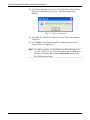
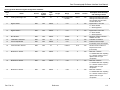
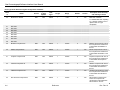
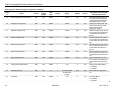
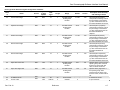
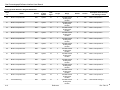
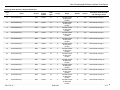
1
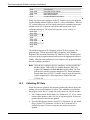
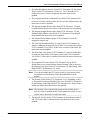
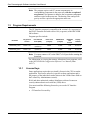
Form A6248 Part Number D301345X012 February 2010 Gas Chromatograph Software Interface (for FloBoss 107 Flow Managers) User Manual Remote Automation Solutions Gas Chromatograph Software Interface User Manual Revision Tracking Sheet February 2010 This manual may be revised periodically to incorporate new or updated information. The revision date of each page appears at the bottom of the page opposite the page number. A change in revision date to any page also changes the date of the manual that appears on the front cover. Listed below is the revision date of each page (if applicable): Page All pages All pages All pages All pages Page 5, 7 Initial release Revision Feb-10 Feb-09 Oct-08 Sep-08 Feb-08 Jan-08 NOTICE Bristol, Inc., Bristol Canada, BBI SA de CV and Emerson Process Management Ltd, Remote Automation Solutions division (UK), are wholly owned subsidiaries of Emerson Electric Co. doing business as Remote Automation Solutions (“RAS”), a division of Emerson Process Management. FloBoss, ROCLINK, Bristol, Bristol Babcock, ControlWave, TeleFlow and Helicoid are trademarks of RAS. AMS, PlantWeb and the PlantWeb logo are marks of Emerson Electric Co. The Emerson logo is a trademark and service mark of the Emerson Electric Co. All other marks are property of their respective owners. The contents of this publication are presented for informational purposes only. While every effort has been made to ensure informational accuracy, they are not to be construed as warranties or guarantees, express or implied, regarding the products or services described herein or their use or applicability. RAS reserves the right to modify or improve the designs or specifications of such products at any time without notice. All sales are governed by RAS’ terms and conditions which are available upon request. RAS does not assume responsibility for the selection, use or maintenance of any product. Responsibility for proper selection, use and maintenance of any RAS product remains solely with the purchaser and end-user. © 2008-2010 Remote Automation Solutions, division of Emerson Process Management. All rights reserved. ii Rev. Feb-10 Gas Chromatograph Software Interface User Manual Contents Page Chapter 1 – Introduction 1-1 1.1 Scope and Organization.................................................................................................... 1-1 1.2 Product Overview.............................................................................................................. 1-1 1.2.1 Communications Wiring......................................................................................... 1-2 1.2.2 Auto-configure ....................................................................................................... 1-3 1.2.3 Validating GC Data ................................................................................................ 1-4 1.3 Program Requirements ..................................................................................................... 1-6 1.3.1 License Keys ......................................................................................................... 1-6 Chapter 2 – Installation 2-1 2.1 Installing the License Key ................................................................................................. 2-1 2.2 Downloading the Program ................................................................................................ 2-3 Chapter 3 – Configuration 3.1 3.2 3.3 3.4 3.5 3-1 GC Interface Screen ......................................................................................................... 3-3 GC Configuration Screen .................................................................................................. 3-6 GC Stream Data Screen ................................................................................................... 3-9 Meter Setup Screen ........................................................................................................ 3-13 Saving the Configuration................................................................................................. 3-15 Chapter 4 – Reference 4-1 4.1 Point Type 22/25: GC User Program Configuration and Status ....................................... 4-2 4.2 Point Type 23/26: GC User C Program Stream Data ....................................................... 4-8 Rev. Feb-10 Contents iii Gas Chromatograph Software Interface User Manual [This page is intentionally left blank.] iv Rev. Feb-10 Gas Chromatograph Software Interface User Manual Chapter 1 – Introduction This chapter describes the structure of this manual and presents an overview of the Gas Chromatograph Software Interface for the FloBoss™ 107. 1.1 Scope and Organization This document serves as the user manual for the Gas Chromatograph Software Interface, which is intended for use in a FloBoss 107 (FB107). This manual describes how to download, install, and configure the Gas Chromatograph Software Interface user program (referred to as the “GC Interface program” or “the program” throughout the rest of this manual). You access and configure this program using ROCLINK™ 800 Configuration Software loaded on an personal computer (PC) running Windows® 2000 (with Service Pack 2), Windows XP, or Windows Vista. The sections in this manual provide information in a sequence appropriate for first-time users. Once you become familiar with the procedures and the software, the manual becomes a reference tool. This manual has the following major sections: Chapter 1 – Introduction Chapter 2 – Installation Chapter 3 – Configuration Chapter 4 – Reference This manual assumes that you are familiar with the FB107 and its configuration. For more information, refer to the FloBoss 107 Flow Manager Instruction Manual (Form A6206) or the ROCLINK 800 Configuration Software User Manual (Form A6217). 1.2 Product Overview The GC Interface program enables the FB107 to communicate directly with up to two gas chromatographs (GCs) on the same EIA-232 (RS-232), EIA-485 (RS-485), or Ethernet communications port. Gas Chromatographs supported include the Daniel (Danalyzer) and Rosemount Analytical Models 500, 570, 590, 700, 770 and 1000/1000A. GC controllers supported include the Daniel and Rosemount Analytical Models 2251, 2255, 2350, 2350A and 2360. The program communicates directly with the GC using Modbus protocol (in which the FB107 has Master status). The FB107 polls data from the GC, validates that data, and updates the appropriate meter run parameters using that data. The program can poll up to eight GC streams on one GC or up to a total of ten streams on two GCs. Rev. Feb-10 Introduction 1-1 Gas Chromatograph Software Interface User Manual Note: Using MON 2000 software, you set the Daniel GC communications port to the SIM 2251 protocol. For all other parameter configurations, refer to the MON 2000 documentation. In order to update meter run data in the FB107, you must assign the streams to a meter run in the FB107’s database. This allows the FB107 to log the gas component data, heating value, and specific gravity and use these values in volume, mass, and energy calculations. Note: Two versions of the program are included. Installation and operation are identical between the two programs, but they use different point type locations, different display numbers, and are loaded into different program slots on the FB107. GCInterface_1.bin loads into user program location 1 and uses point types 22 and 23. GCInterface_2.bin loads into user program location 2 and uses point types 25 and 26. The manual shows installation of GCInterface_1.bin. Load GCInterface_1.bin unless another user program is currently installed in user program location 1. 1.2.1 Communications Wiring The GC must be connected to the communications port on the FB107 with wiring between 16 and 24 AWG. Figure 1 shows the wiring for an EIA232 (RS-232) to a Daniel 2350A GC. FB107 EIA-232 (RS-232) Port Daniel 2350A Terminals J6 (port 2), J10 (port 3), or J11 (port 4) Rx 6 Tx 5 RTS 4 DTR 3 S IN_2 GND 2 S OUT_2 GND 1 Figure 1. Communications Wiring 1-2 Introduction Rev. Feb-10 Gas Chromatograph Software Interface User Manual 1.2.2 Auto-configure The GC Program provides an auto-configure option on the GC Interface screen (see Figure 11). This option enables the program to automatically configure the communication ports and Modbus parameters necessary to poll the GC(s). For this option to work, however, you must first specify a communication port in the Comm Port # field on the GC Interface screen, specify the maximum number of streams and Modbus address for each GC in use, and modify the Modbus register table location, if desired. When you select Auto-configure on the GC Interface screen, the program sets the selected communication port parameters to the following values: Note: The following communication port parameters are configured if you are using an RS-232 or RS-485 module only. Baud Rate Data Bits Stop Bits Parity Key-On Delay Key-Off Delay Port Owner 9600 8 1 None 200 mSec 200 mSec Modbus Master When you select Auto-configure on the GC Interface screen, the program sets the Modbus configuration parameters for the selected communications port to the following values: Transmission Mode Byte Order Event Log Enable Master Starting Request Number Master Number of Requests Master Continuous Polling Enable RTU MSB First Disabled 1 8 Disabled When you select Auto-configure on the GC Interface screen, the program automatically configures the Modbus Master Table (using values in the Comm Port # and Modbus Address fields on the GC Interface screen) to poll for the following registers in the GC: 3001–3016 3017–3032 3034 3035 3045 3046 3047 3059 7001–7016 7033 7034 7035 7036 7037 7038 Rev. Feb-10 Component IDs, Table 1 Component IDs, Table 2 Current Stream Mask of Streams associated with Table 1 Cycle Start Time – minutes GC Alarm 1 GC Alarm 2 Calibration/Analysis Flag Gas Composition Values Mole % Comp 1–16 BTU (day) BTU (saturated) Specific Gravity Compressibility Wobbe Index Total Unnormalized Mole % Introduction 1-3 Gas Chromatograph Software Interface User Manual 7039 7040–7044 7070–7084 9034 9035 Total GPM CF User Defined Calc Values User Defined Average Active Alarm Status Unacknowledged Alarm Status When you select Auto-configure on the GC Interface screen, the program sets the Modbus Master Tables for each GC with a valid address. The first GC’s master table uses the first logical point for the communications port, and the second GC (if present) uses the second logical point for its communications port. The actual poll sequence set for each GC is: 3045–3047 3001–3032 3034–3035 3059 7001–7016 7033–7044 7070–7084 9034–9035 3045 The Modbus Register to TLP Mapping assigns TLPs to registers. The program maps TLPs to the register table you specify in the Modbus Register Table Location field on the GC Interface screen. The parameters necessary for this program automatically map to the appropriate registers. Finally, when the auto-configure process completes, the program disables the auto-configure parameter. Note: After the auto-configure process completes, you may modify the Modbus Master Table and/or the Modbus Register Table, but register 3045 must be the first and last register polled. The first poll must be stored in a register mapped to GC Stream parameter Sample Min Start (23/26,0,17) and the last poll must be stored in a register mapped to GC Stream parameter Sample Min End (23/26,0,16). 1.2.3 Validating GC Data When the polls are complete, the program validates the data to ensure the polling was successful and data is correct. This validation occurs before the program copies the GC stream data to the meter run. Checks include: 1-4 The Communication Status (Point 121, Parameter 6, 12, 18, etc.) must return valid responses (value of 8) for all registers polled. If errors are present, the meter runs are not updated. If you disable Bypass Alarm 1 (Point 22/25, Parameter 11), the Alarm Flag 1 (Point 23/26, Parameter 18, bits 14 & 15) from the GC is checked for errors. If errors are present, the meter runs are not updated. Introduction Rev. Feb-10 Gas Chromatograph Software Interface User Manual If you disable Bypass Alarm 2 (Point 22/25, Parameter 12), the Alarm Flag 2 (Point 23/26, Parameter 19, bits 0, 1, 2 & 3) from the GC is checked for errors. If errors are present, the meter runs are not updated. The program checks the Calibration Flag (Point 23/26, Parameter 20) to ensure it is in the Analysis State. If it is not in the Analysis State, the meter runs are not be updated. The Starting Sample Minute value (Point 23/26, Parameter 17) must be different than the previous value, or the meter runs are not updated. The Starting Sample Minute value (Point 23/26, Parameter 17) and Ending Sample Minute value (Point 23/26, Parameter 16) in the poll must match or the meter runs are not updated. The current Stream Number (Point 23/26, Parameter 2) must be assigned to a meter run. The Total Un-Normalized Mole % value (Point 23/26, Parameter 9) must be within plus or minus the Total Mole % Deviation value (Point 22/25, Parameter 14) of 100%. If this value is outside of this limit, the meter runs are not updated. The Mole Sum value (Point 23/26, Parameter 21) must be within plus or minus the Total Mole % Deviation value (Point 22/25, Parameter 14) of 100%. If this value is outside of this limit, the meter runs are not updated. If you enable HV Limits (Point 23/26, Parameter 90) on the GC Stream Data screen, ensure that the Stream Heating Value is between the Heating Value Low (Point 23/26, Parameter 91) and Heating Value High (Point 23/26, Parameter 92) values. Note: If you do not enable the HV Limits (which is a per-stream value), the module uses the Heating Value (described below) as the default. The Heating Value (Point 23/26, Parameter 4 or 5, depending on Wet vs. Dry) must be between Heating Value Low (Point 22/25, Parameter 9) and Heating Value High (Point 22/25, Parameter 10). If this value is outside the limits, the meter runs are not updated. Note: The Heating Value is the default parameter the module checks first. If you have enabled the HV Limits parameter (which is a perstream value), that value overrides this value. Rev. Feb-10 The Specific Gravity (Point 23/26, Parameter 6) must be between 0.07 and 1.52. If this value is outside of this limit, the meter runs are not updated. Introduction 1-5 Gas Chromatograph Software Interface User Manual Note: The program copies each GC stream component to its corresponding component in the meter run, with the exception of neo-pentane. Neo-pentane is added to the iso-pentane component and then copied to the meter run. The heating value and specific gravity are also copied to the appropriate meter run. 1.3 Program Requirements The GC Interface program is compatible with version 1.01 (or greater) of the FB107 firmware and with version 1.86 (or greater) of the ROCLINK 800 software. Program specifics include: File Name Target Unit/ Version User Defined Point (UDP) Flash Used (in bytes) DRAM Used (in bytes) ROCLINK 800 Version Display Number GCInterface_1.bin FB107 1.01 22, 23 (location 1) 29025 16,384 1.86 22, 23, 24 GCInterface_2.bin FB107 1.01 25, 26 (location 2) 29025 16,384 1.86 24, 25, 26 Note: You must connect a PC to the FB107’s LOI port before starting the download. For information on viewing the memory allocation of user programs, refer to the ROCLINK 800 Configuration Software User Manual (Form A6217). 1.3.1 License Keys Some applications require that you install a license in the CPU to run the application. This license software is specific to these applications and is the property of the individual vendor (shown in the Vendor Name field on the License Key Administrator screens). RAS (and other authorized vendors) distributes software licenses on security-enhanced universal serial bus (USB) drives. You must install the following license keys to use the GC Interface Program. 1-6 GC Interface License Key. Introduction Rev. Feb-10 Gas Chromatograph Software Interface User Manual Chapter 2 – Installation This section provides instructions for installing the GC Interface program. Read Section 1.3 of this manual for program requirements. Note: The program and license key can be installed in any order. The manual shows the installation of the license key first. 2.1 Installing the License Key A license key is required to use the GC Interface program. To install a USB key-based license. 1. Insert the USB license key in a USB port on your PC. 2. Select Utilities > License Key Administrator > Transfer Between Device and Key from the ROCLINK 800 menu bar. The Transfer Licenses Between a Device and a Key screen displays: Figure 2. Transfer Licenses Between a Device and a Key Note: This screen has three sections. The upper portion (Licenses on Device) shows any software licenses installed on the FB107. The middle portion (Licenses on Key) shows software licenses on the license key. The lower portion of the screen (License Key Event Log) provides a rolling log of the last eight events related to this license key. Rev. Feb-10 Installation 2-1 Gas Chromatograph Software Interface User Manual 3. Select the key-based license you want to transfer to the FB107 (GC Interface, as shown in Figure 2). 4. Click Move to Device. ROCLINK moves the license from the key to the FB107 and updates the screen. Figure 3. License Installed Note: An FB107 can hold up to six different licenses, although you can install only one instance of each license on the FB107. When you click Move to Device, ROCLINK 800 moves only one instance of the license onto the FB107 and automatically decreases the license quantity on the USB key by one. 5. Verify the license name displays in the Licenses on Device section of the screen. Proceed to Section 2.2 to download the user program. 2-2 Installation Rev. Feb-10 Gas Chromatograph Software Interface User Manual 2.2 Downloading the Program This section provides instructions for installing the program into the Flash memory on the FB107. Note: Two versions of the program are included. Installation and operation are identical between the two programs, but they use different point type locations, different display numbers, and are loaded into different program slots on the FB107. GCInterface_1.bin loads into user program location 1 and uses point types 22 and 23. GCInterface_2.bin loads into user program location 2 and uses point types 25 and 26. The manual shows installation of GCInterface_1.bin. Load GCInterface_1.bin unless another user program is currently installed in user program location 1. To download the program using ROCLINK 800 software: 1. Connect the FB107 to your computer using the LOI port. 2. Start and logon to ROCLINK 800. 3. Select Utilities > User Program Administrator from the ROCLINK menu bar. The User Program Administrator screen displays (see Figure 4): Figure 4. User Program Administrator Rev. Feb-10 Installation 2-3 Gas Chromatograph Software Interface User Manual 4. Click Browse in the Download User Program File frame. The Select User Program File screen displays (see Figure 5). 5. Select the path and user program file to download from the CD-ROM. (Program files are typically located in the Program Files folder on the CD-ROM). As Figure 5 shows, the screen lists all valid user program files with the .BIN extension: Note: Load only one of the included program files. The manual shows installation of GCInterface_1.bin. Load GCInterface_1.bin unless another user program is currently installed in user program location 1. Figure 5. Select User Program File 6. Click Open to select the program file. The User Program Administrator screen displays. As shown in Figure 6, note that the Download User Program File frame identifies the selected program and that the Download & Start button is active: 2-4 Installation Rev. Feb-10 Gas Chromatograph Software Interface User Manual Figure 6. User Program Administrator 7. Click Download & Start to begin loading the selected programs. The following message displays: Figure 7. Confirm Download 8. Click Yes to begin the download. When the download completes the following message displays: Figure 8. ROCLINK 800 Download Confirmation Rev. Feb-10 Installation 2-5 Gas Chromatograph Software Interface User Manual 9. Click OK. The User Program Administrator screen displays (see Figure 9). Note that: The User Programs Installed in Device frame identifies the installed program(s). The Status field indicates that the program is running. Figure 9. User Program Administrator Note: If you install the program before you install the license key, the Status field reads “License Key Not Found.” 10. Click Close. The main ROCLINK 800 screen displays and the download is complete. 2-6 Installation Rev. Feb-10 Gas Chromatograph Software Interface User Manual Chapter 3 – Configuration After you have loaded the GC Interface program on the FB107, you configure the program using three program-specific screens (GC Interface, GC Configuration, and GC Stream Data) and one ROCLINK 800 screen (Meter Setup): Use the GC Interface screen to configure one or more GC addresses, select a Comm port, modify the Modbus Register Table location (if necessary), assign the GC streams to meter runs, enable GC polling, and enable auto-configuration. Use the GC Configuration screen to set GC-specific parameters, including component IDs, GC alarm options, hexane plus options, data limits, and heating value adjustment parameters. Use the GC Stream Data screen to verify communications between the GC and the FB107, set SRBX alarms, and configure stream-specific heating value checks. Use the Fluid Properties tab on the ROCLINK 800 Meter Setup screen to indicate the type of heating value read from the GC and to select the “live” gas quality option. You must configure the software before you can establish communications with the GC. To configure the program (after logging onto ROCLINK 800 and successfully installing the program and license key), proceed through the program screens as shown in this section. Note: Using MON 2000 software, you set the Daniel GC communications port to the SIM 2251 protocol. For all other parameter configurations, refer to the MON 2000 documentation. You can access all the program-specific screens from the main ROCLINK 800 screen: Rev. Feb-10 Configuration 3-1 Gas Chromatograph Software Interface User Manual Figure 10. ROCLINK 800 3-2 Configuration Rev. Feb-10 Gas Chromatograph Software Interface User Manual 3.1 GC Interface Screen Use this screen to configure one or more GC addresses, select a Comm port, modify the Modbus Register Table location (if necessary), assign the GC streams to meter runs, enable GC polling, and enable automatic configuration of the Modbus parameters and communications ports. To access this screen: 1. From the Directory Tree, select User Program > GC Interface. 2. Double-click Display #22 GC Interface. The GC Interface screen displays: Figure 11. GC Interface 3. Review the values in the following fields: Rev. Feb-10 Field Description Max Streams Sets the maximum number of streams from the gas chromatograph. Valid values are 1–8. You cannot define more than 10 streams for both GCs. Configuration 3-3 Gas Chromatograph Software Interface User Manual Field Description Modbus Address Sets the address the FB107 uses to communicate with the gas chromatograph. You must set this value before the program can poll data and write it to the meter run. If you set this field to 0 (the default), GC polling is disabled. Note: The Auto-configure option uses this value (see Section 1.2.2). Modbus Register Table Location Identifies the location of the Modbus Register Table. Valid values are 1–12. The default value is 12. Note: The program uses this value for automatic configuration (see Section 1.2.2). Comm Port # Indicates which FB107 communications port the program uses for the connection to the GC(s). Valid values are Comm 1 (RS-485), Comm 2 (RS-232), and Comm 3 [RS-485, RS-232, or Enhanced Communication Module (Ethernet)]. Click d to display all valid values. Notes: Polling Interval The program uses this value for automatic configuration (see Section 1.2.2). Unlike other programs, the Comm Port owner is Modbus Master for all values except for an ECM module. For that reason, the Comm Port owner should be something other than this program. Sets the delay, in seconds, the program waits before asking the GC for the next set of results. Note: The GC typically takes 3 to 6 minutes to update results. Next Poll Req This read-only field shows the number of seconds remaining until the next polling cycle. After a poll cycle completes, the program resets this field to the value stored in the Polling Interval field. Comm Timeout Sets the period, in seconds, the system waits for the GC to respond to a Modbus poll. IP Address Identifies the IP address of the GC to be polled. Note: This field only appears if an Enhanced Communication Module (Ethernet) is installed in Slot 1 of the FB107 and Comm 3 is selected in the Comm Port # dropdown box, or an Enhanced Communication Module module is installed in Slot 2 of the FB107 and Comm 2 is selected in the Comm Port # dropdown box. 3-4 Configuration Rev. Feb-10 Gas Chromatograph Software Interface User Manual Field Description IP Port Identifies the IP port of the GC to be polled. Note: This field only appears if an ECM is installed in Slot 1 of the FB107 and Comm 3 is selected in the Comm Port # dropdown box, or an ECM is installed in Slot 2 of the FB107 and Comm 2 is selected in the Comm Port # drop-down box. Meter Run Map Associates GC streams with configured FB107 meter runs. Valid values are 1–8. Enter 0 to disable meter run updating. You must configure this parameter before the program can poll data and write it to the meter run. The program stores the gas composition data for the specified stream in the gas quality parameters of the specified meter run (see Section 3.4). Indicates whether the program attempts to poll the GC(s). Poll Mode Note: A valid license key and at least one valid GC address must be present before polling can be enabled. Autoconfigure Indicates whether the program automatically determines the configuration values for communications ports and Modbus settings for a Daniel gas chromatograph. Polling must be disabled and at least one valid GC address configured before you can initiate Autoconfigure. Notes: See Section 1.2.2 for further information on auto-configuration. If you do not select this option, you must configure the comm port, Modbus comm configuration, Modbus register mapping, and Modbus master table. Alternately, you can select Auto-configure and then use the ROCLINK 800 Modbus Configuration screen (Configure > MODBUS > Configuration) to change the values to suit the application. 4. Click Apply to save any changes you have made to this screen. 5. Click Close to return to the ROCLINK 800 screen. Proceed to Section 3.2 to define GC configuration settings. Rev. Feb-10 Configuration 3-5 Gas Chromatograph Software Interface User Manual 3.2 GC Configuration Screen Use this screen to configure GC settings. It also displays communication status for each polling, configurable AGA update parameters, and some returned data values. To access this screen: 1. From the Directory Tree, select User Program > GC Interface > Display #23, GC Configuration. 2. Double-click #1, GC Config. The GC Configuration screen displays: Figure 12. GC Configuration 3. Complete the screen fields based on your organization’s requirements. 3-6 Field Description Point Number Identifies the GC number for this screen. The program provides one instance for each GC. Click d to display all defined instances. Component IDs Assigns each gas component a value in component data tables 1 and 2. Select Disable to identify any gases the FB107 supports but for which the gas chromatograph does not provide data. Configuration Rev. Feb-10 Gas Chromatograph Software Interface User Manual Rev. Feb-10 Field Description Hexane Split Enable Enables the hexane(+) composition to be split between hexane, heptane, octane, nonane, and decane. The program uses a pre-defined split if the component ID for hexane(+) is set to 8, 9, 10, or 11 (see table below). ID Hexane % Heptane % Octane % Nonane % Decane % 8 47.466 35.34 17.194 0 0 9 50 50 0 0 0 10 50 25 25 0 0 11 57.143 28.572 14.285 0 0 Alarm Bypass 1 and Alarm Bypass 2 Select this check box to allow the program to update the meter run values even if the Alarm 1 or Alarm 2 field in the GC displays an alarm. Heating Value Low Limit Sets the minimum heating value the FB107 accepts for a meter run update. The FB107 considers any heating values sent by the GC that are lower than this value to be invalid and does not forward them to the meter run. Heating Value High Limit Sets the maximum heating value the FB107 accepts for a meter run update. The FB107 considers any heating values sent by the GC that are greater than this value to be invalid and does not forward them to the meter run. Total Mole Deviation Sets, as a percentage, either the difference plus or minus from 100% that the program allows for Total Unnormalized Mole % or the sum of the component mole percentages. The program subtracts or adds this value to 100% to determine the range. The FB107 considers any stream gas compositions that exceed this value to be invalid and does not forward them to the meter run. Valid values are 0-100%. Specific Gravity Low Limit Sets the minimum specific gravity value the FB107 accepts for a meter run update. The FB107 considers any specific gravity values sent by the GC that are lower than this value to be invalid and does not forward them to the meter run. Specific Gravity High Limit Sets the maximum specific gravity value the FB107 accepts for a meter run update. The FB107 considers any specific gravity values sent by the GC that are greater than this value to be invalid and does not forward them to the meter run. Configuration 3-7 Gas Chromatograph Software Interface User Manual Field Description Heating Value Adjustment Sets whether the program (in case of differing base pressures between the GC and the meter run point) adjusts the GC’s heating value before storing the value in the meter run parameter. If you click Enable, the heating value stored in the meter run equals the GC heating value multiplied by the ratio of the meter run base pressure to the GC’s base pressure. GC Base Pressure Sets the base pressure, in PSIA or kPa, the GC uses to determine the heating value that is returned on a Modbus request. Note: This field is active only if you enable the Heating Value Adjustment. 4. Click Apply to save your changes. 5. Click Close to return to the ROCLINK 800 screen. Proceed to Section 3.3 to review stream data. 3-8 Configuration Rev. Feb-10 Gas Chromatograph Software Interface User Manual 3.3 GC Stream Data Screen Use this screen to review stream data the FB107 has received from the GC(s). The program provides one iteration of this screen for each active stream in each GC. You can move between stream data displays using either the Point Number drop-down box on this screen or from the list on the Directory Tree. With the exception of the Alarm Logging Mode and HV Limits, the fields on this screen are read-only. To access this screen: 1. From the Directory Tree, select User Program > GC Interface > Display #24, GC Stream Data. 2. Double-click #1, Cur Stream. The GC Stream Data screen displays: Figure 13. GC Stream Data 3. Review—and change as necessary—the values in the following fields: Rev. Feb-10 Field Description Point Number Identifies the stream number for this screen. Click d to display all defined streams. Calibration/Analysis Flag This read-only field indicates the chromatograph’s status (self-calibration or analysis). HV Limits Select the Enable checkbox to allow userdefined Heating Value (HV) limits to be set for the selected run. If the HV Limits are enabled, the BTU Low/High values override the Heating Value High/Low Limits set on the GC Configuration screen. Configuration 3-9 Gas Chromatograph Software Interface User Manual Field Description BTU Low Limit If HV Limits are enabled, sets the minimum heating value for the selected run that the FB107 accepts for a meter run update. The FB107 considers any heating values sent by the GC that are greater than this value to be invalid and does not forward them to the meter run. Note: Values entered in this field override the Heating Value Low Limits set on the GC Configuration screen for the selected run only. BTU High Limit If HV Limits are enabled, sets the maximum heating value for the selected run that the FB107 accepts for a meter run update. The FB107 considers any heating values sent by the GC that are greater than this value to be invalid and does not forward them to the meter run. Note: Values entered in this field override the Heating Value High Limits set on the GC Configuration screen for the selected run only. Stream This read-only field shows the selected stream for the GC. User Calcs This read-only field shows data returned by the GC, but is not used by the program. For more information, refer to the GC’s user manual. Diagnostics This read-only field shows any diagnostic codes for the selected stream. Stream Data This read-only field shows values for the selected stream. Component Mask This read-only field shows which of the two Component ID tables each stream uses. Bit 0 of the Component Mask represents stream 1, bit 1 represents stream 2, and so on. If the bit is set, the program uses Component ID table 1. If the bit is not set, the program uses Component ID table 2. Note: This value reflects settings from the GC. Error Code 3-10 This read-only field provides a color-coded error display. Red indicates an alarm condition. Configuration Rev. Feb-10 Gas Chromatograph Software Interface User Manual Field Description Alarm Logging Mode Sets how the program logs alarms with Spontaneous Report by Exception (SRBX) notification. Click d to select a mode (described below). Note: The system generates one alarm, regardless of the number of different errors that may occur in the time before the alarm clears. SRBX notification occurs based on the Alarm Logging Mode. For the system to generate an alarm (such as for a Poll Sequence Failure error), you must first enable the Alarm Logging Mode parameter on the current logical stream. Rev. Feb-10 Disable Logging No logging occurs. Enable Logging, No SRBX Logging occurs, but without generating SRBX notifications. Enable Logging, SBRX in Set Logging occurs, and SRBX notifications occur on alarm set. Enable Logging, SRBX on Clear Logging occurs, and SRBX notifications occur on alarm clear. Enable Logging, SRBX on Both Logging occurs, and SRBX notifications occur on both alarm set and alarm clear. Component Data This read-only field shows component values for the selected stream. GC Defined Averages This read-only field shows data returned by the GC, but is not used by the program. For more information, refer to the GC’s user manual. Specific Gravity Limits Select the Enable checkbox to allow userdefined specific gravity limits to be set for the selected run. If enabled, the Specific Gravity Low/High values for the selected run will override the Specific Gravity High/Low Limits set on the GC Configuration screen. Configuration 3-11 Gas Chromatograph Software Interface User Manual Field Description Specific Gravity Low Limit If Specific Gravity Limits are enabled, sets the minimum specific gravity value for the selected run that the FB107 accepts for a meter run update. The FB107 considers any specific gravity values sent by the GC that are greater than this value to be invalid and does not forward them to the meter run. Note: Values entered in this field override the Specific Gravity Low Limits set on the GC Configuration screen for the selected run only. Specific Gravity High Limit If Specific Gravity Limits are enabled, sets the maximum specific gravity value for the selected run that the FB107 accepts for a meter run update. The FB107 considers any specific gravity values sent by the GC that are greater than this value to be invalid and does not forward them to the meter run. Note: Values entered in this field override the Specific Gravity High Limits set on the GC Configuration screen for the selected run only. Disable Event Logging Select the Enable checkbox to disable error events from being written to the FB107’s event log. Note: This option disables logging for ALL error events except parameter change events. For example, an event is not logged if the GC reports an out-of-range specific gravity value and event logging is disabled. 4. Click Apply to save your changes. 5. Click Close to return to the ROCLINK 800 screen. Proceed to Section 3.4 to set up meter run parameters. 3-12 Configuration Rev. Feb-10 Gas Chromatograph Software Interface User Manual 3.4 Meter Setup Screen Use this screen to set gas quality and heating values. To access this screen: 1. Select Meter > Setup from the ROCLINK 800 menu bar. 2. Select the Fluid Properties tab. The Fluid Properties tab displays: Figure 14. Meter Setup, Fluid Properties tab 3. Review—and change as necessary—the values in the following fields: Rev. Feb-10 Field Description Meter Number Select the meter number to which the GC stream has been assigned. Component Mole % Indicates the mole percentage of each gas component. The program retrieves these values from the GC. Heating Value Indicates the heating value of a specified quantity of gas. The program sets this option to Enter and retrieves this value from the GC. Heating Value Basis Determines the heating value (dry or saturated) the program copies to the meter run. Valid values for this program are Dry or Wet. If you select Wet, the program copies the saturated heating value to the meter run. If you select As Delivered or Dry, the program resets the value to Dry and copies the dry heating value to the meter run. Configuration 3-13 Gas Chromatograph Software Interface User Manual Field Description Specific Gravity Indicates the specific gravity ratio of the molar mass gas to the molar mass of air. The program sets this option to Enter and retrieves this value from the GC. Gas Quality Indicates the source of the gas quality. The GC Interface program sets this field to Live when it copies data to the meter run. 4. Click Apply to save your changes. Proceed to Section 3.5 to save the configuration. 3-14 Configuration Rev. Feb-10 Gas Chromatograph Software Interface User Manual 3.5 Saving the Configuration Whenever you modify or change the configuration, it is a good practice to save the final configuration to memory. To save the configuration: 1. Select ROC > Flags. The Flags screen displays: Figure 15. Flags screen 2. Click Save Configuration. A verification message displays: Figure 16. Perform screen Rev. Feb-10 Configuration 3-15 Gas Chromatograph Software Interface User Manual 3. Click Yes to begin the save process. The Flash Write Status field on the Flags screen displays In Progress. The following message displays: Figure 17. Save Confirmation 4. Click OK. The Flash Write Status field on the Flags screen displays Completed. 5. Click Update on the Flags screen. This completes the process of saving your new configuration. Note: For archive purposes, you should also save this configuration to your PC’s hard drive or a removable media (such as a diskette or a flash drive) using the File > Save Configuration option on the ROCLINK 800 menu bar. 3-16 Configuration Rev. Feb-10 Gas Chromatograph Software Interface User Manual Chapter 4 – Reference Materials This section provides tables of information on the user-defined point types used by the GC Interface program. Rev. Feb-10 Point Type 22/25 (GC User Program Configuration and Status) Point Type 23/26 (GC User C Program Stream Data). Reference 4-1 Gas Chromatograph Software Interface User Manual 4.1 Point Type 22/25: GC User Program Configuration and Status Point type 22 and 25 contains the parameters for configuring the GC Interface program and houses the status information from the gas chromatograph. The program maintains two logical points of this point type. Point Type 22/25: GC User Program Configuration and Status Parm # Name Access System or User Update Data Type Length Range Default Version R/W User AC 10 0x20 → 0x7E for each ASCII character “GC Config“ 1.00 Point Type Description Description of functionality and meaning of values 0 Point Tag ID 1 Not Used 2 User Program Status R/O System UINT8 1 0→3 0 1.00 User Program Status 0 = No Error 1 = License Unavailable 2 = Comm Configuration Failed 3 Autoconfiguration R/W Both UINT8 1 0→1 1 1.00 Auto-configuration 0 = Disabled 1 = Enabled 4 Comm Port Number R/W User UINT8 1 2Æ5 2 1.00 Comm Port used to communicate with the GC 5 GC Address R/W User UINT8 1 0Æ255 0 1.00 GC Address (Modbus address of GC) 6 MODBUS Location R/W User UINT8 1 1Æ24 24 1.00 Modbus Register Mapping Table used by GC 7 Polling Interval R/W User FL 4 Any Positive Floating Point Number 60 1.00 Interval at which this program polls the GC for new data (In Secods) 8 Next Poll Request R/O System FL 4 Any Positive Floating Point Number 0 1.00 Amount of time (In Seconds) until the next time the GC will be polled for new data 9 Heating Value Low Limit R/W User FL 4 Any Floating Point Number 900.0 1.00 Heating Value Low Limit. If the Heating Value returned from the GC is less than this value, an alarm will be set. 4-2 Reference Rev. Feb-10 Gas Chromatograph Software Interface User Manual Point Type 22/25: GC User Program Configuration and Status Parm # Name Access System or User Update Data Type Length Range Default Version Description of functionality and meaning of values 10 Heating Value High Limit R/W User FL 4 Any Floating Point Number 1300.0 1.00 Heating Value High Limit. If the Heating Value returned from the GC is greater than this value, an alarm will be set. 11 Bypass Alarm 1 R/W User UINT8 1 0Æ1 0 1.00 Bypass Alarm 1 from GC 0 = Alarm Allowed 1 = Alarm Bypassed 12 Bypass Alarm 2 R/W User UINT8 1 0Æ1 0 1.00 Bypass Alarm 2 from GC 0 = Alarm Allowed 1 = Alarm Bypassed 13 Max Streams R/W User UINT8 1 0Æ255 6 1.00 Maximum number of streams available from GC 14 Total Mole % Deviation R/W User FL 4 0Æ5.0 2 1.00 Total Mole % Deviation 15 Hexane Split Enable R/W User UINT8 1 0Æ1 1 1.00 Enable the Hexane Split functionality of the GC Program 16 Communication Timeout R/W User FL 4 0Æ60.0 45.0 1.00 Amount of time to wait for a response from a GC (In Seconds) 17 Meter Run 1 Stream R/W User UINT8 1 0Æ8 0 1.00 Meter Run 1 Stream 0 = Disable Meter Run Updating 1-8 = Stream number to use to update meter run’s gas composition 18 Meter Run 2 Stream R/W User UINT8 1 0Æ8 0 1.00 Meter Run 2 Stream 0 = Disable Meter Run Updating 1-8 = Stream number to use to update meter run’s gas composition 19 Meter Run 3 Stream R/W User UINT8 1 0Æ8 0 1.00 Meter Run 3 Stream 0 = Disable Meter Run Updating 1-8 = Stream number to use to update meter run’s gas composition Rev. Feb-10 Reference 4-3 Gas Chromatograph Software Interface User Manual Point Type 22/25: GC User Program Configuration and Status Parm # Name Access System or User Update Data Type Length Range Default Version R/W User UINT8 1 0Æ8 0 1.00 Meter Run 4 Stream 0 = Disable Meter Run Updating 1-8 = Stream number to use to update meter run’s gas composition Description of functionality and meaning of values 20 Meter Run 4 Stream 21 Not Used 22 Not Used 23 Not Used 24 Not Used 25 Not Used 26 Not Used 27 Not Used 28 Not Used 29 Methane Component ID R/W User UINT8 1 0Æ255 0 1.00 Methane Component ID. This is the Component ID number that is associated with Methane in the GC. 30 Ethane Component ID R/W User UINT8 1 0Æ255 1 1.00 Ethane Component ID. This is the Component ID number that is associated with Ethane in the GC. 31 Propane Component ID R/W User UINT8 1 0Æ255 2 1.00 Propane Component ID. This is the Component ID number that is associated with Propane in the GC. 32 i-Butane Component ID R/W User UINT8 1 0Æ255 3 1.00 i-Butane Component ID. This is the Component ID number that is associated with i-Butane in the GC. 33 n-Butane Component ID R/W User UINT8 1 0Æ255 4 1.00 n-Butane Component ID. This is the Component ID number that is associated with n-Butane in the GC. 34 Neo-Pentane Component ID R/W User UINT8 1 0Æ255 7 1.00 Neo-Pentane Component ID. This is the Component ID number that is associated with Neo-Pentane in the GC. 4-4 Reference Rev. Feb-10 Gas Chromatograph Software Interface User Manual Point Type 22/25: GC User Program Configuration and Status Parm # Name Access System or User Update Data Type Length Range Default Version Description of functionality and meaning of values 35 i-Pentane Component ID R/W User UINT8 1 0Æ255 5 1.00 i-Pentane Component ID. This is the Component ID number that is associated with iPentane in the GC. 36 n-Pentane Component ID R/W User UINT8 1 0Æ255 6 1.00 n-Pentane Component ID. This is the Component ID number that is associated with nPentane in the GC. 37 Hexane Component R/W User UINT8 1 0Æ255 255 1.00 Hexane Component ID. This is the Component ID number that is associated with Hexane in the GC. 38 Hexane (+) Component ID R/W User UINT8 1 0Æ255 8 1.00 Hexane (+) Component ID. This is the Component ID number that is associated with Hexane (+) in the GC. 39 Nitrogen Component ID R/W User UINT8 1 0Æ255 14 1.00 Nitrogen Component ID. This is the Component ID number that is associated with Nitrogen in the GC. 40 Carbon Dioxide Component ID R/W User UINT8 1 0Æ255 17 1.00 Carbon Dioxide Component ID. This is the Component ID number that is associated with Carbon Dioxide in the GC. 41 H2S Component ID R/W User UINT8 1 0Æ255 255 1.00 H2S Component ID. This is the Component ID number that is associated with H2S in the GC. 42 Water Component ID R/W User UINT8 1 0Æ255 255 1.00 Water Component ID. This is the Component ID number that is associated with Water in the GC. 43 Helium Component ID R/W User UINT8 1 0Æ255 255 1.00 Helium Component ID. This is the Component ID number that is associated with Helium in the GC. 44 Oxygen Component ID R/W User UINT8 1 0Æ255 255 1.00 Oxygen Component ID. This is the Component ID number that is associated with Oxygen in the GC. Rev. Feb-10 Reference 4-5 Gas Chromatograph Software Interface User Manual Point Type 22/25: GC User Program Configuration and Status Parm # Name Access System or User Update Data Type Length Range Default Version Description of functionality and meaning of values 45 Carbon Monoxide Component ID R/W User UINT8 1 0Æ255 255 1.00 Carbon Monoxide Component ID. This is the Component ID number that is associated with Carbon Monoxide in the GC. 46 Hydrogen Component ID R/W User UINT8 1 0Æ255 255 1.00 Hydrogen Component ID. This is the Component ID number that is associated with Hydrogen in the GC. 47 Heptane Component ID R/W User UINT8 1 0Æ255 255 1.00 Heptane Component ID. This is the Component ID number that is associated with Heptane in the GC. 48 Octane Component ID R/W User UINT8 1 0Æ255 255 1.00 Octane Component ID. This is the Component ID number that is associated with Octane in the GC. 49 Nonane Component ID R/W User UINT8 1 0Æ255 255 1.00 Nonane Component ID. This is the Component ID number that is associated with Nonane in the GC. 50 Decane Component ID R/W User UINT8 1 0Æ255 255 1.00 Decane Component ID. This is the Component ID number that is associated with Decane in the GC. 51 Argon Component ID R/W User UINT8 1 0Æ255 255 1.00 Argon Component ID. This is the Component ID number that is associated with Argon in the GC. 52 Heating Value Adjust Option R/W User UINT8 1 0Æ1 0 1.00 Heating Value Adjust Option 0 = Disabled 1 = Enabled 53 GC Base Pressure R/W User FL 4 0ÆValid Positive Floating Point Number 14.73 1.00 Base Pressure Configured in GC 54 Poll Mode R/W User UINT8 1 0Æ1 0 1.00 GC Polling Mode 0 = Disabled 1 = Enabled 4-6 Reference Rev. Feb-10 Gas Chromatograph Software Interface User Manual Point Type 22/25: GC User Program Configuration and Status Parm # Name Access System or User Update Data Type Length Range Default Version Description of functionality and meaning of values 55 Hexane Percentage R/W Both FL 4 0ÆValid Positive Floating Point Number 47.466 1.00 Hexane Split C6 (Hexane) Component Percentage. This is the percentage of the Hexane (+) value returned from the GC that will be attributed to Hexane. 56 Heptane Percentage R/W Both FL 4 0ÆValid Positive Floating Point Number 35.34 1.00 Hexane Split C7 (Heptane) Component Percentage. This is the percentage of the Hexane (+) value returned from the GC that will be attributed to Heptane. 57 Octane Percentage R/W Both FL 4 0ÆValid Positive Floating Point Number 17.194 1.00 Hexane Split C8 (Octane) Component Percentage. This is the percentage of the Hexane (+) value returned from the GC that will be attributed to Octane. 58 Nonane Percentage R/W Both FL 4 0ÆValid Positive Floating Point Number 0 1.00 Hexane Split C9 (Nonane) Component Percentage. This is the percentage of the Hexane (+) value returned from the GC that will be attributed to Nonane. 59 Decane Percentage R/W Both FL 4 0ÆValid Positive Floating Point Number 0 1.00 Hexane Split C10 (Decane) Component Percentage. This is the percentage of the Hexane (+) value returned from the GC that will be attributed to Decane. 60 Spec. Grav Low Limit R/W User FL 4 0ÆValid Positive Floating Point Number 0.07 1.01 Specific Gravity Low Limit. If the specific gravity value returned from the GC is less than this value, an alarm will be set. 61 Spec. Grav High Limit R/W User FL 4 0ÆValid Positive Floating Point Number 1.52 1.01 Specific Gravity High Limit. If the specific gravity value returned from the GC is more than this value, an alarm will be set. 62 IP Address of GC R/W User AC 20 20 Characters 63 IP Port of GC R/W User UINT16 2 0-65535 Rev. Feb-10 Reference “ “ 0 IP address of the GC. IP port of the GC. 4-7 Gas Chromatograph Software Interface User Manual 4.2 Point Type 23/26: GC User C Program Stream Data Point type 23 and 26 contains the parameters for configuring the GC Interface program and houses the status information from the gas chromatograph. The program maintains 11 logical points of this point type. Logical 0 is the current steam, and logical 1 through 10 are mapped to streams on the gas chromatographs, as assigned by the maximum streams per GC (point type 22/25, parameter 13). Point Type 23/26: GC User C Program Stream Data Parm # Name Access System or User Update Data Type Length Range Default Version R/W User AC 10 0x20 → 0x7E for each ASCII character “Cur Stream” or “Stream #“ 1.00 Point Type Description Description of functionality and meaning of values 0 Point Tag Id. 1 Not Used 2 Stream Number R/O System UINT16 2 1Æ8 1-8 depending on logical 1.00 Stream Number 3 Component Table Mask R/W System UINT16 2 0Æ0xFFFF 0 1.00 Component Table Mask. Each bit corresponds to a stream. A bit value of 1 means that the GC will return data from Table 1 will be used. A bit value of 0 means that the GC will return data from Table 2. 4 Dry Heating Value R/W System FL 4 0ÆValid Positive Floating Point Number 0 1.00 Dry Heating Value 5 Saturated Heating Value R/W System FL 4 0ÆValid Positive Floating Point Number 0 1.00 Saturated (Wet) Heating Value 6 Specific Gravity R/W System FL 4 0ÆValid Positive Floating Point Number 0 1.00 Specific Gravity 7 Compressiblitiy R/W System FL 4 0ÆValid Positive Floating Point Number 0 1.00 Compressibility 8 Wobbe Index R/W System FL 4 0ÆValid Positive Floating Point Number 0 1.00 Wobbe Index 4-8 Reference Rev. Feb-10 Gas Chromatograph Software Interface User Manual Point Type 23/26: GC User C Program Stream Data Parm # Name Access System or User Update Data Type Length Range Default Version Description of functionality and meaning of values 9 Total Un-Normalized Mole % R/W System FL 4 0ÆValid Positive Floating Point Number 0 1.00 Total Un-Normalized Mole % 10 Total GPM R/W System FL 4 0ÆValid Positive Floating Point Number 0 1.00 Total GPM 11 User Defined Calc 1 R/W System FL 4 0ÆValid Positive Floating Point Number 0 1.00 User Defined Calc 1 12 User Defined Calc 2 R/W System FL 4 0ÆValid Positive Floating Point Number 0 1.00 User Defined Calc 2 13 User Defined Calc 3 R/W System FL 4 0ÆValid Positive Floating Point Number 0 1.00 User Defined Calc 3 14 User Defined Calc 4 R/W System FL 4 0ÆValid Positive Floating Point Number 0 1.00 User Defined Calc 4 15 User Defined Calc 5 R/W System FL 4 0ÆValid Positive Floating Point Number 0 1.00 User Defined Calc 5 16 Sample Minute End R/W System UINT16 2 0Æ0xFFFF 0xFFFF 1.00 The minute value read from the GC at the end of the GC Interface Program’s polling sequence. 17 Sample Minute Start R/W System UINT16 2 0Æ60 0 1.00 The minute value read from the GC at the start of the GC Interface Program’s polling sequence. 18 Alarm 1 R/W System UINT16 2 0Æ 255 0 1.00 GC Alarm 1 19 Alarm 2 R/W System UINT16 2 0Æ 255 0 1.00 GC Alarm 2 20 Calibration Flag R/W System UINT16 2 0Æ 255 1 1.00 Calibration Flag 0 = Calculation data 1 = Analysis data 21 Mole Sum R/W System FL 4 0ÆValid Positive Floating Point Number 0 1.00 Mole Sum Rev. Feb-10 Reference 4-9 Gas Chromatograph Software Interface User Manual Point Type 23/26: GC User C Program Stream Data Parm # Name Access System or User Update Data Type Length Range Default Version 0Æ8 0 1.00 Error Code 0 = All Checks Pass 1 = Poll Sequence Failed 2 = Alarm Check Failed 3 = Calibration Check Failed 4 = Sample Minute Changed 5 = Total Un-normalized Mole Percentage Failed 6 = Mole Sum Check Failed 7 = Heating Value Range Check Failed 8 = Specific Gravity Range Check Failed 0 1.00 Alarm Logging Mode 0 = Disable Logging 1 = Enable Logging, No SRBX 2 = Enable Logging, SRBX on Set only 3 = Enable Logging, SRBX on Clear only 4 = Enable Logging, SRBX, on both Set and Clear Description of functionality and meaning of values 22 Error Code R/W System UINT8 1 23 Alarm Logging Mode R/W User UINT8 1 24 Component Index #1 Table 1 R/W System UINT8 1 0Æ255 0 1.00 Component Index #1 Table 1 25 Component Index #2 Table 1 R/W System UINT8 1 0Æ255 0 1.00 Component Index #2 Table 1 26 Component Index #3 Table 1 R/W System UINT8 1 0Æ255 0 1.00 Component Index #3 Table 1 27 Component Index #4 Table 1 R/W System UINT8 1 0Æ255 0 1.00 Component Index #4 Table 1 28 Component Index #5 Table 1 R/W System UINT8 1 0Æ255 0 1.00 Component Index #5 Table 1 29 Component Index #6 Table 1 R/W System UINT8 1 0Æ255 0 1.00 Component Index #6 Table 1 30 Component Index #7 Table 1 R/W System UINT8 1 0Æ255 0 1.00 Component Index #7 Table 1 31 Component Index #8 Table 1 R/W System UINT8 1 0Æ255 0 1.00 Component Index #8 Table 1 32 Component Index #9 Table 1 R/W System UINT8 1 0Æ255 0 1.00 Component Index #9 Table 1 33 Component Index #10 Table 1 R/W System UINT8 1 0Æ255 0 1.00 Component Index #10 Table 1 34 Component Index #11 Table 1 R/W System UINT8 1 0Æ255 0 1.00 Component Index #11 Table 1 35 Component Index #12 Table 1 R/W System UINT8 1 0Æ255 0 1.00 Component Index #12 Table 1 4-10 Reference Rev. Feb-10 Gas Chromatograph Software Interface User Manual Point Type 23/26: GC User C Program Stream Data Parm # Name Access System or User Update Data Type Length Range Default Version Description of functionality and meaning of values 36 Component Index #13 Table 1 R/W System UINT8 1 0Æ255 0 1.00 Component Index #13 Table 1 37 Component Index #14 Table 1 R/W System UINT8 1 0Æ255 0 1.00 Component Index #14 Table 1 38 Component Index #15 Table 1 R/W System UINT8 1 0Æ255 0 1.00 Component Index #15 Table 1 39 Component Index #16 Table 1 R/W System UINT8 1 0Æ255 0 1.00 Component Index #16 Table 1 40 Component Index #1 Table 2 R/W System UINT8 1 0Æ255 0 1.00 Component Index #1 Table 2 41 Component Index #2 Table 2 R/W System UINT8 1 0Æ255 0 1.00 Component Index #2 Table 2 42 Component Index #3 Table 2 R/W System UINT8 1 0Æ255 0 1.00 Component Index #3 Table 2 43 Component Index #4 Table 2 R/W System UINT8 1 0Æ255 0 1.00 Component Index #4 Table 2 44 Component Index #5 Table 2 R/W System UINT8 1 0Æ255 0 1.00 Component Index #5 Table 2 45 Component Index #6 Table 2 R/W System UINT8 1 0Æ255 0 1.00 Component Index #6 Table 2 46 Component Index #7 Table 2 R/W System UINT8 1 0Æ255 0 1.00 Component Index #7 Table 2 47 Component Index #8 Table 2 R/W System UINT8 1 0Æ255 0 1.00 Component Index #8 Table 2 48 Component Index #9 Table 2 R/W System UINT8 1 0Æ255 0 1.00 Component Index #9 Table 2 49 Component Index #10 Table 2 R/W System UINT8 1 0Æ255 0 1.00 Component Index #10 Table 2 50 Component Index #11 Table 2 R/W System UINT8 1 0Æ255 0 1.00 Component Index #11 Table 2 51 Component Index #12 Table 2 R/W System UINT8 1 0Æ255 0 1.00 Component Index #12 Table 2 52 Component Index #13 Table 2 R/W System UINT8 1 0Æ255 0 1.00 Component Index #13 Table 2 53 Component Index #14 Table 2 R/W System UINT8 1 0Æ255 0 1.00 Component Index #14 Table 2 54 Component Index #15 Table 2 R/W System UINT8 1 0Æ255 0 1.00 Component Index #15 Table 2 55 Component Index #16 Table 2 R/W System UINT8 1 0Æ255 0 1.00 Component Index #16 Table 2 56 Mole % Component #1 R/W System FL 4 0ÆValid Positive Floating Point Number 0 1.00 Mole % Component 1 57 Mole % Component #2 R/W System FL 4 0ÆValid Positive Floating Point Number 0 1.00 Mole % Component 2 58 Mole % Component #3 R/W System FL 4 0ÆValid Positive Floating Point Number 0 1.00 Mole % Component 3 59 Mole % Component #4 R/W System FL 4 0ÆValid Positive Floating Point Number 0 1.00 Mole % Component 4 Rev. Feb-10 Reference 4-11 Gas Chromatograph Software Interface User Manual Point Type 23/26: GC User C Program Stream Data Parm # Name Access System or User Update Data Type Length Range Default Version Description of functionality and meaning of values 60 Mole % Component #5 R/W System FL 4 0ÆValid Positive Floating Point Number 0 1.00 Mole % Component 5 61 Mole % Component #6 R/W System FL 4 0ÆValid Positive Floating Point Number 0 1.00 Mole % Component 6 62 Mole % Component #7 R/W System FL 4 0ÆValid Positive Floating Point Number 0 1.00 Mole % Component 7 63 Mole % Component #8 R/W System FL 4 0ÆValid Positive Floating Point Number 0 1.00 Mole % Component 8 64 Mole % Component #9 R/W System FL 4 0ÆValid Positive Floating Point Number 0 1.00 Mole % Component 9 65 Mole % Component #10 R/W System FL 4 0ÆValid Positive Floating Point Number 0 1.00 Mole % Component 10 66 Mole % Component #11 R/W System FL 4 0ÆValid Positive Floating Point Number 0 1.00 Mole % Component 11 67 Mole % Component #12 R/W System FL 4 0ÆValid Positive Floating Point Number 0 1.00 Mole % Component 12 68 Mole % Component #13 R/W System FL 4 0ÆValid Positive Floating Point Number 0 1.00 Mole % Component 13 69 Mole % Component #14 R/W System FL 4 0ÆValid Positive Floating Point Number 0 1.00 Mole % Component 14 70 Mole % Component #15 R/W System FL 4 0ÆValid Positive Floating Point Number 0 1.00 Mole % Component 15 71 Mole % Component #16 R/W System FL 4 0ÆValid Positive Floating Point Number 0 1.00 Mole % Component 16 72 User Defined Avg R/W System FL 4 0ÆValid Positive Floating Point Number 0 1.00 User Defined Average 1 4-12 Reference Rev. Feb-10 Gas Chromatograph Software Interface User Manual Point Type 23/26: GC User C Program Stream Data Parm # Name Access System or User Update Data Type Length Range Default Version Description of functionality and meaning of values 73 User Defined Avg R/W System FL 4 0ÆValid Positive Floating Point Number 0 1.00 User Defined Average 2 74 User Defined Avg R/W System FL 4 0ÆValid Positive Floating Point Number 0 1.00 User Defined Average 3 75 User Defined Avg R/W System FL 4 0ÆValid Positive Floating Point Number 0 1.00 User Defined Average 4 76 User Defined Avg R/W System FL 4 0ÆValid Positive Floating Point Number 0 1.00 User Defined Average 5 77 User Defined Avg R/W System FL 4 0ÆValid Positive Floating Point Number 0 1.00 User Defined Average 6 78 User Defined Avg R/W System FL 4 0ÆValid Positive Floating Point Number 0 1.00 User Defined Average 7 79 User Defined Avg R/W System FL 4 0ÆValid Positive Floating Point Number 0 1.00 User Defined Average 8 80 User Defined Avg R/W System FL 4 0ÆValid Positive Floating Point Number 0 1.00 User Defined Average 9 81 User Defined Avg R/W System FL 4 0ÆValid Positive Floating Point Number 0 1.00 User Defined Average 10 82 User Defined Avg R/W System FL 4 0ÆValid Positive Floating Point Number 0 1.00 User Defined Average 11 83 User Defined Avg R/W System FL 4 0ÆValid Positive Floating Point Number 0 1.00 User Defined Average 12 84 User Defined Avg R/W System FL 4 0ÆValid Positive Floating Point Number 0 1.00 User Defined Average 13 85 User Defined Avg R/W System FL 4 0ÆValid Positive Floating Point Number 0 1.00 User Defined Average 14 Rev. Feb-10 Reference 4-13 Gas Chromatograph Software Interface User Manual Point Type 23/26: GC User C Program Stream Data Parm # Name Access System or User Update Data Type Length Range Default Version Description of functionality and meaning of values 86 User Defined Avg R/W System FL 4 0ÆValid Positive Floating Point Number 0 1.00 User Defined Average 15 87 Active Alarm Status R/W System UINT8 1 0Æ1 0 1.00 Active Alarm Status (Red light on GC Controller) 0 = Disabled 1 = Enabled 88 Unacknowledged Alarm Status R/W System UINT8 1 0Æ1 0 1.00 Unacknowledged Alarm Status (Yellow Light on GC Controller) 0 = Disabled 1 = Enabled 89 GC Number R/W System UINT8 1 1Æ2 1 1.00 GC Number. The data in this stream was received from this GC. 90 Stream Heating Value R/W System UINT8 1 0Æ1 0 1.00 Stream Heating Value Limits 0 = Disabled 1 = Enabled 91 Heating Value Low Limit R/W System FL 4 0ÆValid Positive Floating Point Number 900 1.00 Stream Heating Value Low Limit. If the Stream Heating Value Limits parameter is enabled and the Heating Value in this stream is less than this value, then an alarm will be set. 92 Heating Value High Limit R/W System FL 4 0ÆValid Positive Floating Point Number 1300 1.00 Stream Heating Value High Limit. If the Stream Heating Value Limits parameter is enabled and the Heating Value in this stream is greater than this value, then an alarm will be set. 93 Spec Grav Limit R/W User UINT8 1 0Æ1 0 1.01 Specific Gravity Limit 0 = Disabled 1 = Enabled 94 Spec Grav Low Limit R/W User FL 4 0ÆValid Positive Floating Point Number 0.07 1.01 Specific Gravity Low Limit. If the specific gravity value returned from the GC is less than this value, an alarm will be set. 4-14 Reference Rev. Feb-10 Gas Chromatograph Software Interface User Manual Point Type 23/26: GC User C Program Stream Data Parm # Name Access System or User Update Data Type Length Range Default Version Description of functionality and meaning of values 95 Spec Grav Hi Limit R/W User FL 4 0ÆValid Positive Floating Point Number 1.52 1.01 Specific Gravity High Limit. If the specific gravity value returned from the GC is more than this value, an alarm will be set. 96 Event Disable R/W User UINT8 1 0Æ1 0 1.01 Error Event Disable 0 = Error Event Logging Enabled 1 = Error Event Logging Disabled Rev. Feb-10 Reference 4-15 Gas Chromatograph Software Interface User Manual If you have comments or questions regarding this manual, please direct them to your local sales representative or contact: Emerson Process Management Remote Automation Solutions Marshalltown, Iowa 50158 USA Houston, TX 77065 USA Pickering, North Yorkshire UK Y018 7JA Website: www.EmersonProcess.com/Remote