1
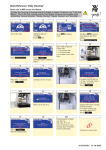
Cleaning When Prompted On Display
Coffee Factory – Presto - Prestolino
1
2
•
•
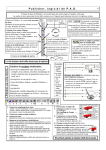
• Select “Cleaning Mode”.
• Make a selection in the
following menu (switch off /
switch on).
• Follow the instructions on the
touch screen.
The cleaner program
will clean the milk,
mixer and brewing unit
systems.
A cleaning tablet is
also required during
the cleaning operation
which is placed in the
decafe chute when
prompted by the
machine.
• Place a suitable container under
the outlet (capacity approx 1 litre).
Optional Monthly Cleaning
Coffee Factory – Presto - Prestolino
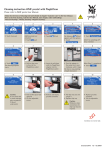
Manual brewer cleaning
When operating movable parts, there is a risk of jamming your fingers.
• Switch off machine with the
Button.
• Move the combi-outlet to the
highest position.
• Remove the grounds container.
• Take out the brewer by holding
the base (as shown above) and
squeezing the mechanical
release.
Café Corporate
Unit 1 / 8 Haden Crt
Myaree WA 6154
• Lower and tilt the brewer to
be able to remove it from the
machine.
Keep squeezing the
brewer release until it is
outside the machine!
Tel: (08) 9330 15 77
Fax: (08) 9330 1833
www.cafecorporate.com.au
• .Wash the brewer thoroughly
under running (hand) warm
water.
• Dry the brewer before reinstalling.
• Hold the brewer as shown.
• If the brewer becomes
misaligned and will not go back
into place, use the multi tool
adjust.
Never use a dish washer
to clean the brewer
PAGE 4