1
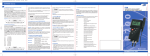
Menu structure Unit Lin2 CAL Chnl Lo6 °C T1-T2 OFF OFF OFF °F OP1 ON ON Ohm OP2 OP3 OP4 Selecting Display Units °C, °F and Ohms To change the units push [ENTER/MENU]. Use the up and down keys [] to select Unit. Push again [ENTER/MENU]. The display shows either °C, °F or o (for Ohms). Use the up and down keys [] again to adjust the requested measuring unit and push [ENTER/MENU] to confirm. Push [ESC] to be back in the measuring mode. MENU Unit * Lin2 CAL* Chnl Log The calibration is hidden when the instrument has been calibrated at Isotech, see page 6 for details. Temperature Difference Mode/ [Line2] To display the temperature difference between Cannels 1 and 2 push [ENTER/MENU]. Use the up and down keys [] to select Lin2. Push again [ENTER/MENU]. On the right corner of the display appears a T1-T2. Use the up and down keys [] to adjust the requested selection. Push [ENTER/MENU] to confirm. Push [ESC] to revert back to the measuring mode. MENU Unit * Lin2 CAL* Chnl Log The calibration is hidden when the instrument has been calibrated at Isotech, see page 6 for details. Note: Both channels have to be activated for displaying temperature difference. Calibration function / [CAL] The TTI-10 has different calibration options that allow the instrument to be matched a thermometer. When the TTI10 is a calibrated with a probe or probes at Isotech the calibration options are removed to prevent accidental or unauthorised change. The display will indicated that the calibration is active by showing [CAL] and the calibration option for each Channel, e.g., [CAL]22 indicates that calibration mode 2 is active for both channels. Should access to the calibration options be required please contact Isotech for details of how to enable the calibration menu. If the instrument has not been calibrated with a thermometer at Isotech then the calibration options will be accessible. Page 6 of 12 TTI-10 Iss.04 – 11/14