1
CueServer Control Modules
Module Application Guide
Description
This suite of modules supports the Interactive Technologies CueServer series of DMX
controllers via UDP/IP and TCP/IP communications. Level control, cue recall, cue saving and
channel feedback, relay outputs, and CueServer buttons are available.
CueServer Poll Levels v1
This module allows a Cue Server to be polled for current level feedback across all 512
channels.
CueServer Channel Level Set v1
This module allows any individual channel on the CueServer to be set to a specific level input
value. The input can be ramped or directly set to a level.
CueServer Cue Recall and Save v1
This module allows any cue to be recalled or saved to the CueServer. In addition to basic
save and recall functions, fade and follow times can be set for a cue to be saved. When a
cue is saved, all 512 channels are saved in the cue.
CueServer Relay Outputs v1
This module allows any of the eight digital relay outputs on a CueServer to be controlled.
There are eight basic functions that are supported by the CueServer. These functions are
detailed below.
CueServer Buttons v1
This module allows triggering button functions and reading button status.
Compatibility
Processor Requirements
CueServer Control Modules v1
Telephone: (+1)440-449-1100
ControlWorks Consulting, LLC
[email protected]
http://www.controlworks.com
Ethernet Configuration Information
This module requires one UDP/IP client connection to the CueServer. Set the Default Address of
the UDP/IP Communications client to either the IP address or the host name (if applicable) of the
CueServer. The default UDP port of a CueServer is set to port 52737 (52737d in the Port
parameter). The connection to the CueServer should be kept open for any communications
between the Crestron Processor and the CueServer, which is driven by the enable digital input.
CueServer Control Modules v1
Telephone: (+1)440-449-1100
ControlWorks Consulting, LLC
[email protected]
http://www.controlworks.com
Module Application
Successful application of this module assumes working knowledge of DMX control systems in
general. It also assumes that you are familiar with the CueServer series of web controls. As the
CueServer series can support multiple types of equipment setups, it is important that you
understand the configuration of these setups and the terminology of the equipment involved.
Note about Polling for current level feedback
This module supports the usage of polling for current feedback of all 512 channels of the
CueServer. However, it is not recommended to continuously poll for updated information as this
is a very intensive request on the Crestron processor for a brief period of time. Furthermore,
while this module polls for information, UDP commands from the CueServer Channel Level Set v1
will not be generated. Please see the demo program for the correct way to program this.
Button Feedback
Included in the module distribution is a module for CueServer buttons. This module is used to
trigger buttons programmed in the CueServer and for button feedback. The feedback state of
CueServer buttons is dependent on how the “Indicator” section has been programmed via the
web control.
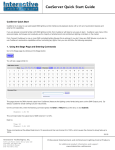
See the example to the left. In this
example, we have set button 1 up as
toggle. In this configuration when the
button is pressed, it will toggle Channel 10
between 100% and 0%. The Indicator
feedback at the bottom of the page is set
to “Channel At 100%”. When the channel is
at 100% the button will feedback will be
high.
There are many other ways to program
buttons, and if you have any questions
regarding button programming please
contact Interactive Technologies.
CueServer Control Modules v1
Telephone: (+1)440-449-1100
ControlWorks Consulting, LLC
[email protected]
http://www.controlworks.com
Supported CueServer Controllers
This module will support any of the CueServer series family of controllers such as:
CueServer Pro (CS-800), CueServer Mini (CS-810), CueServer Express (CS-816), and
CueServer Pro DIN (CS-840).
Additional information on the hardware connections and setup can be found in Interactive
Technologies’ CueServer User Manual Doc. D0420. It can also be found at:
http://interactive-online.com/products/cueserver/downloads.
CueServer Control Modules v1
Telephone: (+1)440-449-1100
ControlWorks Consulting, LLC
[email protected]
http://www.controlworks.com
Signal and Parameter Descriptions
Bracketed signals such as “[signal_name]” are optional signals
CueServer Poll Levels v1 I/O:
DIGITAL INPUTS
poll_levels .............................................polls the CueServer for current feedback of all 512 levels.
ANALOG INPUTS
This module does not utilize any analog inputs.
SERIAL INPUTS
This module does not utilize any serial inputs.
DIGITAL OUTPUTS
polling_busy_fb......................................indicates if the CueServer is currently being polled. No commands
should be sent to the CueServer while it is being polled.
ANALOG OUTPUTS
channelX_fb ..........................................where X is the current channel (from 1 to 512). This is the level of
an individual channel in the range of 0-100% (0d – 65535d).
SERIAL OUTPUTS
This module does not utilize any serial outputs.
PARAMETERS
IP Address .............................................the IP Address of the CueServer.
HTTP Port ..............................................the HTTP Port of the CueServer. This is defaulted to a value of 80d.
CueServer Control Modules v1
Telephone: (+1)440-449-1100
ControlWorks Consulting, LLC
[email protected]
http://www.controlworks.com
CueServer Channel Level Set v1 I/O:
DIGITAL INPUTS
polling_busy ..........................................prevents this module from being run if the CueServer is currently
being polled. This signal should be connected to the polling_busy_fb
signal from the CueServer Poll Levels v1 module.
ANALOG INPUTS
channel_level_input ................................sets the level of an individual channel in the range of 0-100% (0d –
65535d). The new level is set whenever this signal is changed.
SERIAL INPUTS
This module does not utilize any serial inputs.
DIGITAL OUTPUTS
This module does not utilize any digital outputs.
ANALOG OUTPUTS
This module does not utilize any analog outputs.
SERIAL OUTPUTS
udp_tx$ ................................................the command string that is sent to the CueServer. This should be
connected directly to the TX$ serial input of the UDP/IP
Communications Block that is connected to the CueServer.
PARAMETERS
Channel Number ....................................the number of the channel that will have its level changed.
CueServer Control Modules v1
Telephone: (+1)440-449-1100
ControlWorks Consulting, LLC
[email protected]
http://www.controlworks.com
CueServer Cue Recall and Save v1 I/O:
DIGITAL INPUTS
cue_recall .............................................recalls an individual cue. The cue that is recalled is determined by
the cue_number analog input.
cue_save ..............................................saves an individual cue. The cue that is saved is determined by the
cue_number analog input.
ANALOG INPUTS
cue_number ..........................................the number of the cue to be saved or recalled. This number is given
as the cue number multiplied by a factor of ten. For example, if cue
number 2.3 was to be recalled, this signal should have a value of
23d. This signal range is valid from 0d to 64999d (the maximum
number of cues that can be saved by the CueServer).
fade .....................................................the fade time (in tenths of seconds) of the cue to be saved. For
example, if the fade time of a cue is set to 7.8 seconds, this signal
should have a value of 78d. This signal range is valid from 0d to
64999d (the maximum length of time that the fade time can be set
to by the CueServer).
follow ...................................................the follow time (in tenths of seconds) of the cue to be saved. For
example, if the follow time of a cue is set to 0.9 seconds, this signal
should have a value of 9d. This signal range is valid from 0d to
64999d (the maximum length of time that the follow time can be set
to by the CueServer). If the follow time is set to 0 seconds (0d), the
following cue in the cue list will not play unless it is recalled (this is
the default behavior of the CueServer).
SERIAL INPUTS
This module does not utilize any serial inputs.
DIGITAL OUTPUTS
This module does not utilize any digital outputs.
ANALOG OUTPUTS
This module does not utilize any analog outputs.
SERIAL OUTPUTS
udp_tx$ ................................................the command string that is sent to the CueServer. This should be
connected directly to the TX$ serial input of the UDP/IP
Communications Block that is connected to the CueServer.
PARAMETERS
This module does not utilize any parameters.
CueServer Control Modules v1
Telephone: (+1)440-449-1100
ControlWorks Consulting, LLC
[email protected]
http://www.controlworks.com
CueServer Relay Outputs v1 I/O:
DIGITAL INPUTS
This module does not utilize any digital inputs
ANALOG INPUTS
[relayX] ................................................where X is the relay number to be controlled. The valid range for
this analog value is 0d to 7d. The output state of the relay changes
whenever the analog value is changed. The functionality of the relay
is determined by the analog value that is sent. The following table
shows the possible values of each output and how it affects its state:
• Value 0 = OFF
• Value 1 = ON
• Value 2 = Slow Flash
• Value 3 = Slow Flash, Reverse
• Value 4 = Fast Flash
• Value 5 = Fast Flash, Reverse
• Value 6 = Wink
• Value 7 = Wink, Reverse
SERIAL INPUTS
This module does not utilize any serial inputs.
DIGITAL OUTPUTS
This module does not utilize any digital outputs.
ANALOG OUTPUTS
This module does not utilize any analog outputs.
SERIAL OUTPUTS
udp_tx$ ................................................the command string that is sent to the CueServer. This should be
connected directly to the TX$ serial input of the UDP/IP
Communications Block that is connected to the CueServer.
PARAMETERS
This module does not utilize any parameters.
CueServer Control Modules v1
Telephone: (+1)440-449-1100
ControlWorks Consulting, LLC
[email protected]
http://www.controlworks.com
CueServer Buttons v1 I/O:
DIGITAL INPUTS
poll_buttons ..........................................pulse to query the status of all 512 buttons.
[button_001] – [button_512] ..................pulse to initiate the function programmed in the CueServer at the
assigned button.
ANALOG INPUTS
port ......................................................set to the TCP-IP port number used to control the CueServer.
SERIAL INPUTS
This module does not utilize any serial inputs.
DIGITAL OUTPUTS
[button_001_fb] – [button_512_fb] .........shows the status of each button.
ANALOG OUTPUTS
This module does not utilize any analog outputs.
SERIAL OUTPUTS
udp_tx$ ................................................the command string that is sent to the CueServer. This should be
connected directly to the TX$ serial input of the UDP/IP
Communications Block that is connected to the CueServer.
PARAMETERS
This module does not utilize any parameters.
CueServer Control Modules v1
Telephone: (+1)440-449-1100
ControlWorks Consulting, LLC
[email protected]
http://www.controlworks.com
Support
This module is supported by ControlWorks Consulting, LLC. Should you need support for this
module please email [email protected] or call us at 440-449-1100. ControlWorks
normal office hours are 9 AM to 5 PM Eastern, Monday through Friday, excluding holidays.
Before calling for support, please ensure that you have loaded and tested operation using the
included demonstration program and touchpanel(s) to ensure that you understand the correct
operation of the module. It may be difficult for ControlWorks to provide support until the
demonstration program is loaded.
Updates, when available, are automatically distributed via Email notification to the address
entered when the module was purchased. In addition, updates may be obtained using your
username and password at http://www.controlworks.com/customerlogin.aspx.
Distribution Package Contents
The distribution package for this module should include:
CueServer Module Help v1.pdf ............................. this help file
cueserver_poll_levels_v1.umc ............................. Crestron user module to insert in program
cueserver_channel_level_set_v1.umc ................... Crestron user module to insert in program
cueserver_cue_recall_and_save_v1.umc ............... Crestron user module to insert in program
cueserver_relay_outputs_v1.umc ......................... Crestron user module to insert in program
cueserver_buttons_v1.umc ................................. Crestron user module to insert in program
cueserver_engine_v1.usp .................................... Crestron SIMPL+ for use in the above module
cueserver_engine_v1.ush .................................... Crestron SIMPL+ for use in the above module
cueserver_button_engine_v1.usp ......................... Crestron SIMPL+ for use in the above module
cueserver_button_engine_v1.ush ......................... Crestron SIMPL+ for use in the above module
cueserver_demo_v1.vtp ...................................... example touchpanel (TSW-1050)
cueserver_demo_v1.smw .................................... sample program for a MC3
CueServer Control Modules v1
Telephone: (+1)440-449-1100
ControlWorks Consulting, LLC
[email protected]
http://www.controlworks.com
Revision History
V1 [email protected] 2014.10.23
- first release of version
- supports polling of CueServer feedback
- supports setting channel values
- supports recalling cues
- supports saving cues with fade and follow times
- supports control of digital relay outputs
- supports control and feedback of buttons
Development Environment
This module version was developed on the following hardware and software. Different versions
of hardware or software may or may not operate properly. If you have questions, please contact
us.
CueServer Hardware
CueServer Mini (CS-810)
Hardware
Crestron MC3 Processor
Software
Crestron SIMPL Windows
Crestron Vision Tools Pro-e
Crestron Database
Device Database
Software Version
5.2.5
Firmware Version
1.008.0040
Software Version
4.02.38
5.4.17
45.00.002.00
56.02.003.00
CueServer Control Modules v1
Telephone: (+1)440-449-1100
ControlWorks Consulting, LLC
[email protected]
http://www.controlworks.com
ControlWorks Consulting, LLC Module License Agreement
Definitions:
ControlWorks, We, and Us refer to ControlWorks Consulting, LLC, with headquarters located at 701 Beta Drive,
Suite 22 Mayfield Village, Ohio 44143-2330. You and Dealer refer to the entity purchasing the module. Client
and End User refer to the person or entity for whom the Crestron hardware is being installed and/or will utilize
the installed system. System refers to all components described herein as well as other components, services,
or utilities required to achieve the functionality described herein. Module refers to files required to implement
the functionality provided by the module and may include source files with extensions such as UMC, USP, SMW
and VTP. Demo Program refers to a group of files used to demonstrate the capabilities of the Module, for
example a SIMPL Windows program and VisionTools Touchpanel file(s) illustrating the use of the Module but not
including the Module. Software refers to the Module and the Demo Program.
Disclaimer of Warranties
ControlWorks Consulting, LLC software is licensed to You as is. You, the consumer, bear the entire risk relating
to the quality and performance of the Software. In no event will ControlWorks Consulting, LLC be liable for
direct, indirect, incidental or consequential damages resulting from any defect in the Software, even if
ControlWorks Consulting, LLC had reason to know of the possibility of such damage. If the Software proves to
have defects, You and not Us must assume the cost of any necessary service or repair resulting from such
defects.
Provision of Support
We provide limited levels of technical support only for the most recent version of the Module as determined by
Us. We do not provide support for previous version of the module, modifications to the module not made by Us,
to persons who have not purchased the module from Us. In addition, we may decline to provide support if the
Demo Program has not been utilized. We may withdraw a module from sale and discontinue providing support
at any time and for any reason, including, for example, if the equipment for which the Module is written is
discontinued or substantially modified. The remainder of your rights and obligations pursuant to this license will
not be affected should ControlWorks discontinue support for a module.
Modification of Software
You may not decrypt (if encrypted), reverse engineer, modify, translate, disassemble, or de-compile the Module
in whole or part. You may modify the Demo Program. In no event will ControlWorks Consulting, LLC be liable for
direct, indirect, incidental or consequential damages resulting from You modifying the Software in any manner.
Indemnification/Hold Harmless
ControlWorks, in its sole and absolute discretion may refuse to provide support for the application of the Module
in such a manner that We feel has the potential for property damage, or physical injury to any person. Dealer
shall indemnify and hold harmless ControlWorks Consulting LLC, its employees, agents, and owners from any
and all liability, including direct, indirect, and consequential damages, including but not limited to personal
injury, property damage, or lost profits which may result from the operation of a program containing a
ControlWorks Consulting, LLC Module or any component thereof.
License Grant
Software authored by ControlWorks remains the property of ControlWorks. ControlWorks grants You the nonexclusive, non-transferable, perpetual license to use the Software authored by ControlWorks as a component of
Systems programmed by You. This Software is the intellectual property of ControlWorks Consulting, LLC and is
protected by law, including United States and International copyright laws.
This Software and the
accompanying license may not be transferred, resold, or assigned to other persons, organizations or other
Crestron Dealers via any means.
The use of this software indicates acceptance of the terms of this agreement.
Copyright (C) 2014 ControlWorks Consulting, LLC All Rights Reserved – Use Subject to License.
US Government Restricted Rights. Use, duplication or disclosure by the Government is subject to restrictions set
forth in subparagraphs (a)-(d) of FAR 52.227-19.
CueServer Control Modules v1
Telephone: (+1)440-449-1100
ControlWorks Consulting, LLC
[email protected]
http://www.controlworks.com