1
Chapter 3
Maintaining the Server
Installing or Replacing Server Components
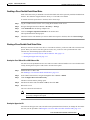
Installing a Trusted Platform Module
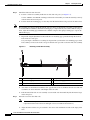
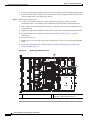
The trusted platform module (TPM) is a small circuit board that attaches to a motherboard socket. The
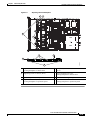
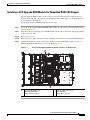
socket location is on the motherboard, below PCIe riser 1 (see Figure 3-25).
Note
For security purposes, the TPM is installed with a one-way screw. It cannot be removed with a standard
screwdriver.
To install a trusted platform module (TPM), follow these steps:
Step 1
Caution
Step 2
Step 3
Step 4
Prepare the server for component installation.
a.
Power off the server as described in the “Shutting Down and Powering Off the Server” section on
page 3-7.
b.
Slide the server out the front of the rack far enough so that you can remove the top cover. You might
have to detach cables from the rear panel to provide clearance.
If you cannot safely view and access the component, remove the server from the rack.
c.
Remove the top cover as described in the “Removing and Replacing the Server Top Cover” section
on page 3-8.
d.
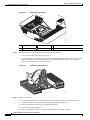
Is there a card installed in PCIe riser 1? See Figure 3-25.
•
If there is no card installed in PCIe riser 1, you can access the TPM socket. Go to Step 2.
•
If there is a card installed in PCIe riser 1, remove PCIe riser 1 from the chassis. See Replacing a
PCIe Riser, page 3-31 for details.
Install a TPM (see Figure 3-25):
a.
Locate the TPM socket on the motherboard, as shown in Figure 3-25.
b.
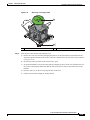
Align the connector that is on the bottom of the TPM circuit board with the motherboard TPM
socket. Align the screw hole and standoff on the TPM board with the screw hole adjacent to the TPM
socket.
c.
Push down evenly on the TPM to seat it in the motherboard socket.
d.
Install the single one-way screw that secures the TPM to the motherboard.
e.
If you removed PCIe riser 1, replace it now. Reconnect cables to the card in the riser.
f.
Replace the top cover.
g.
Replace the server in the rack and then power on the server by pressing the Power button.
Enable the TPM:
a.
On the BIOS Setup utility screen, select the Security tab.
b.
Scroll down to TPM and select TURN ON.
c.
Press F10 to save your settings and reboot the server.
Verify that the TPM is now enabled.
a.
Watch during bootup for the F2 prompt, and then press F2 to enter BIOS setup.
b.
Log into the BIOS Setup utility with your BIOS Administrator password.
Cisco UCS C220 Server Installation and Service Guide
3-42
OL-25760-01