Transcript
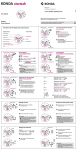
RONDA startech – Movement Cal. 5040.B
20
45
10
8
7
6
5
4
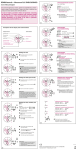
Stop: to stop the timing, press push-
2
3
20
45
10
6
5
4
2
3
A
23
20
15
6
5
4
2
3
Push button A
B
Crown
A
45
10
8
7
9 10 1
6
5
4
15
30
2
3
23
Push button B
8
7
01
45
10
second counter
The chronograph hands are returned
to their zero positions.
15
9 10 1
6
5
4
2
3
60
30
20
45
10
8
7
9 10 1
6
4
5
I
2
3
II
time 8:45.
A
23
45
9 10 1
15
6
4
5
I
2
3
II
III
B
02
45
10
8
7
6
4
5
Turn the crown until the correct date
II
20
10
9 10 1
6
4
5
15
I
2
3
II
60
30
20
45
10
8
7
6
I
2
3
4
5
II
9 10 1
6
4
5
8
7
5
4
I
2
3
chronograph hands are in their correct or
incorrect zero position).
A
23
20
45
8
7
Keep push-buttons A and B depressed
simultaneously for at least 2 seconds
(the second counter hand 360° corrective
mode is activated).
60
10
15
30
9 10 1
6
5
4
III
2
3
B
A
Adjusting the second counter hand
1 x short
Single step
A
long
Continuous
A
Adjusting the next hand B
B
A
Adjusting the 1⁄ 10 second counter hand (position 6h)
1 x short
Single step
A
long
Continuous
A
Adjusting the next hand B
A
I
Example:
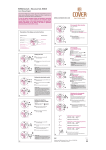
One or several chronograph hands are not in
their correct zero positions and have to be
adjusted (e.g. following a battery change).
Pull out the crown to position III (all
30
date appears 03 .
Adjusting the minute counter hand (position 9h)
Single step
1 x short
A
Continuous
long
A
II
Returning the crown to position I
I
08
A
II
III
Termination of the chronograph hands adjustment
(can be carried out at any time).
**Pull out the crown to position III
(the watch stops).
60
45
10
Turn the crown until the correct dat
15
30
9 10 1
5
III
15
03
6
II
B
2
3
30
8
7
6
15
30
B
B
20
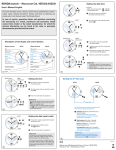
Adjusting the chronograph
hands to zero position
60
45
30
8
7
9 10 1
Turn the crown until yesterday’s
60
45
10
Please note:
* Following , further intervals or intermediates can be displayed by pressing
push-button B (display interval / make up
measured time, ...).
A
(the watch continues to run).
A
30
20
4
10
Pull out the crown to position II
B
03
5
Example:
– Date / time on the watch: 17 / 1:25 AM
04 / 8:30 PM
– Present date / time:
15
30
9 10 1
6
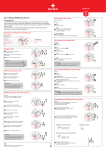
Setting the date/time
following a battery change
A
17
15
30
2
3
30
01
An extreme acceleration in setting the date
with quick mode can induce a false date indication. The synchronization is re-established
by setting the date from 01 till 31 (crown in
position II).
B
03
45
9 10 1
B
Please note:
During the date changing phase between
approx. 9 PM and 12 PM; the date must be
set to the date of the following day.
30
8
7
A
07
appears.
A
60
45
8
7
Push the crown back into position I.
B
01
60
10
20
I
30
20
continues to run).
15
2
3
2
3
30
Pull out the crown to position II (the watch
30
9 10 1
4
23
60
30
20
5
Setting the date (quick mode)
A
31
6
23
Please note:
* In order to set the time to the exact second,
must be pulled out when the second hand
is in position «60».
Once the hour and minute hands have been
set, must be pushed back into position I at
the exact second.
30
8
7
Example:
Start: (start timing)
Display interval:
e.g. 20 minutes 17 seconds (timing
continues in the background)
*
Making up the measured time:
(The chronograph hands are quickliy
advanced to the ongoing measured time.)
Stop: (Final time is displayed)
Reset:
The chronograph hands are returned to
their zero position.
15
30
9 10 1
B
* Push the crown back into position I.
60
10
8
7
Turn the crown until you reach the correct
30
45
10
III
60
30
20
B
20
* Pull out the crown to position III
30
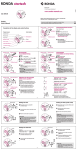
Chronograph:
Intermediate or interval timing
A
23
(the watch stops).
15
B
Setting the time
Please note:
* Following , the accumulation of the
timing can be continued by pressing pushbutton A
(Restart / Stop, Restart / Stop, …).
30
06
A
Reset:
60
30
(hour counter after 30 minutes )
= 20 min 17 sec
(The accumulated measured time is shown)
20
23
Example:
Start: (start timing)
Stop: (e.g. 15 min 5 sec following )
Restart: (timing is resumed)
* Stop: (e.g. 5 min 12 sec following )
30
9 10 1
Chronograph:
Accumulated timing
60
30
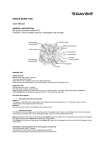
Minute counter
1⁄ 10
60
45
10
8
7
Second counter
B
Date
Hour hand
Press push-button B.
(The chronograph hands will be reset
to their zero positions.).
15
30
9 10 1
30
23
Zero positioning:
60
8
7
Control buttons
20
button A once more and read the
chronograph hands: 4min/38sec / 7⁄ 10 sec
A
23
30
Description of the display and control buttons
Minute hand
Start: Press push-button A.
30
9 10 1
05
Second hand
Example:
15
B
In case of repairs, guarantee claims and questions concerning
the functioning of a watch, purchasers and consumers should
contact their retailer or the watch manufacturer, for which the
relevant information can be found in the sales or guarantee
documentation provided with the watch.
Display elements
(Start / Stop / Reset)
60
30
You have decided to buy a watch, which was assembled by a watchmaker using a Ronda movement. Please note that no watches are
produced or distributed under the Ronda Brand.
Chronograph: Basic function
A
23
User’s Manual English
4
I
2
3
II
04
appears.
III
**Continue to turn the crown until the
correct time 8:30 PM appears.
B
**Push the crown back into position I.
A
04
20
60
30
45
10
8
7
9 10 1
6
5
4
15
30
I
2
3
B
04
II
III
Please note:
**To set your watch to the exact second,
please refer to the chapter entitled «setting
the time».
**Please observe the AM/PM clock rhythm.
06 / 2014
Battery type: 395 (diameter 9.5 mm x 2.6 mm / SR 927 SW)
Accuracy: +20 / -10 seconds per month