1
License installation is only needed if you did not purchase a Sonoscout Kit.
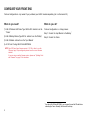
What do you need?
1
2
•
License text file (on USB memory stick from Brüel & Kjær or saved
on a PC or mobile device using, for example, Evernote®)
•
Wireless device with Web browser (PC or mobile device)
•
Password for your Front-end
What do you do?
3
4
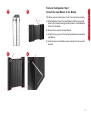
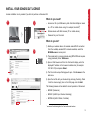
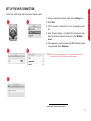
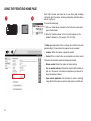
1) Enable your wireless device for wireless network/Wi-Fi connection.
From the available wireless/Wi-Fi networks available, select the
BK3660A-xxxxxx* access point.
2) The access point is a secure network using WPA2-PSK and requires
a key (password). Enter 3660xxxxxx*.
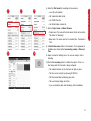
3) Open a Web browser and from the Front-end’s display, enter the
displayed IP address in the browser’s address line (for example:
192.168.1.229) and press <Enter>.
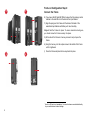
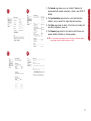
4) The Front-end’s unique Web page will open. Click Licenses in the
side menu.
5
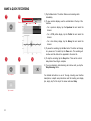
5) Open the text file with your license string and copy the string. Paste
it into the License key(s) box on the Web page and click Add.
The following licenses will be added for correct operation of Sonoscout:
•
BZ-5950 (Sonoscout)
•
BZ-5951 (LAN-XI input channel streaming)
•
BZ-7848-A (LAN-XI Notar, if installed)
*
xxxxxx are the last six digits in the Front-end’s serial number
9
Sonoscout Setup Guide
INSTALL YOUR SONOSCOUT LICENSE