1
Rear Panel
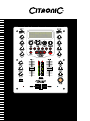
Front Panel
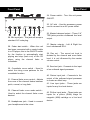
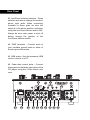
34. Power switch - Turn this unit power
ON/OFF.
35. AC inlet - Use the accessory power
cord to connect to an AC power outlet.
28
29
30
31
32
29
33
28. Mic input jack - This jack will accept a
standard 1/4” male plug.
29. Fader start switch - When the unit
has been connected with a control cable
to a CD player, this is the ON/OFF switch
for the function to automatically start
playing and stop (back cue) of the CD
player using the channel fader or
crossfader.
30. Crossfader curve switch - Used to
select the rising curve patterns for the
crossfader function.
31. Channel fader curve control - Adjusts
the curve of the channel faders between
quick, normal, or long fade.
32. Channel fader curve mode switch Used to select the channel fader curve
desired.
33. Headphones jack - Used to connect
your headphones to the mixer.
36. Master balanced output - These 1/4”
TRS jacks provide a balanced line level
output.
37. Master outputs - Left & Right line
level unbalanced RCA.
38. Rec out - The record out level is
dictated by the channel and cross fader
level, it is not influenced by the master
volume control.
39. Send out jack - Connects to the input
of an outboard signal processor.
40. Return input jack - Connects to the
output of the outboard signal processor
to create an effect loop.
41. Line input jacks - These jacks are
inputs for any line level device.
42. Ph/Aux input jacks - These jacks are
inputs for a phono (RIAA) stage for
magnetic (MM) cartridge or a line level
device.