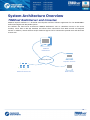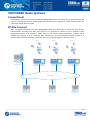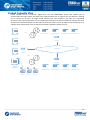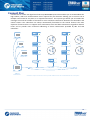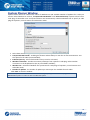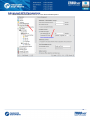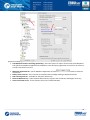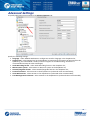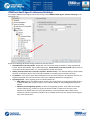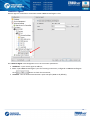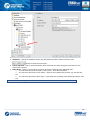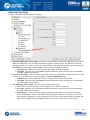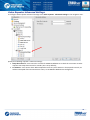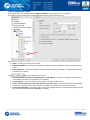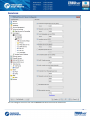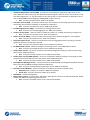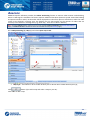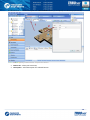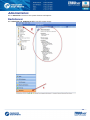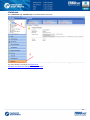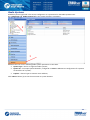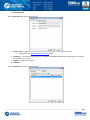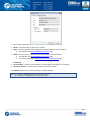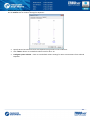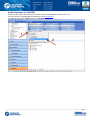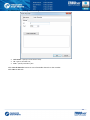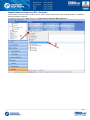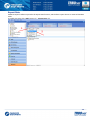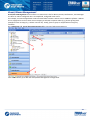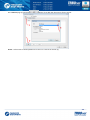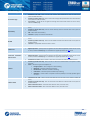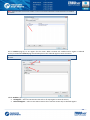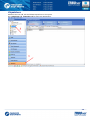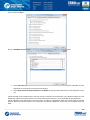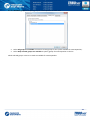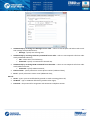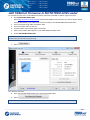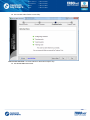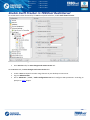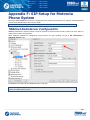
1
TRBOnet Dispatch Software Administration Guide July 17, 2014 1 Table of Contents Preface .................................................................................................................................................................... 8 About the Company ............................................................................................................................................ 8 Contact Details .................................................................................................................................................... 8 Copyright ............................................................................................................................................................. 8 Hardware and Software Requirements ................................................................................................................... 9 System Architecture Overview .............................................................................................................................. 10 TRBOnet RadioServer and Consoles .................................................................................................................. 10 MOTOTRBO Radio Systems ............................................................................................................................... 11 Conventional ................................................................................................................................................. 11 IP Site Connect .............................................................................................................................................. 11 Capacity Plus ................................................................................................................................................. 12 Linked Capacity Plus ...................................................................................................................................... 13 Connect Plus .................................................................................................................................................. 14 IP Backend Network Requirements ............................................................................................................... 15 Linked Capacity Plus Specific Requirements .............................................................................................. 15 TRBOnet RadioServer Installation ......................................................................................................................... 16 Installation Steps ............................................................................................................................................... 16 TRBOnet RadioServer Configuration ..................................................................................................................... 17 License Information........................................................................................................................................... 17 License Types................................................................................................................................................. 17 Move TRBOnet Dispatch Software to Another Server PC .............................................................................. 19 Use Spare Repeater ....................................................................................................................................... 19 Dispatch Connections Limitations ................................................................................................................. 19 License Manager ........................................................................................................................................... 20 Install TRBOnet RadioServer Service ................................................................................................................. 24 Create TRBOnet RadioServer Database ............................................................................................................. 25 Database Authentication ............................................................................................................................... 26 Configure Network Parameters ......................................................................................................................... 28 Service Management......................................................................................................................................... 30 Automatic "Check Radio" Service .................................................................................................................. 31 Location Service ............................................................................................................................................ 31 System Planner Window ............................................................................................................................... 32 Advanced GPS Parameters ............................................................................................................................ 33 Telemetry Service .......................................................................................................................................... 35 2 Text Messaging Service ................................................................................................................................. 35 Indoor Service ............................................................................................................................................... 35 Advanced Settings ............................................................................................................................................. 36 Map Servers for Geocoding ........................................................................................................................... 37 Local Agent ........................................................................................................................................................ 39 MOTOTRBO System Elements ....................................................................................................................... 41 Add a Control Station .................................................................................................................................... 42 Control Station Connection Modes ........................................................................................................... 44 Single Station ......................................................................................................................................... 44 Capacity Plus TRBOnet........................................................................................................................... 45 Capacity Plus MOTOTRBO ..................................................................................................................... 46 IP Site Connect....................................................................................................................................... 47 Common Channel .................................................................................................................................. 48 Add a MOTORBO Repeater ........................................................................................................................... 49 MNIS Data Service ..................................................................................................................................... 51 DDMS Service ............................................................................................................................................ 52 Repeater's Advanced Settings ................................................................................................................... 53 Privacy ................................................................................................................................................... 54 Slots ........................................................................................................................................................... 55 Local Slots .................................................................................................................................................. 56 Audio Path ................................................................................................................................................. 57 Add TRBOnet.Swift Agent.............................................................................................................................. 58 TRBOnet.Swift Agent's Advanced Settings ................................................................................................ 60 Reserve Agent ........................................................................................................................................... 61 Add XRC-9000 Controller ............................................................................................................................... 62 Advanced Settings ..................................................................................................................................... 64 Add XRT-9000 Controller ............................................................................................................................... 65 Audio Paths ............................................................................................................................................... 67 Add a Selex Repeater .................................................................................................................................... 68 Selex Repeater Advanced Settings ............................................................................................................ 70 Selex Repeater Slots .................................................................................................................................. 71 Analog Mode ............................................................................................................................................. 72 Services ......................................................................................................................................................... 73 Analog Control Stations ..................................................................................................................................... 75 Add an Analog Control Station ...................................................................................................................... 76 Serial Port .................................................................................................................................................. 78 3 Remote Agents .................................................................................................................................................. 79 Friendly Servers ................................................................................................................................................. 81 External PBX Server ........................................................................................................................................... 83 Advanced Settings ......................................................................................................................................... 84 Data Sources ..................................................................................................................................................... 85 COM Ports ..................................................................................................................................................... 86 TCP/IP ............................................................................................................................................................ 88 Email Settings .................................................................................................................................................... 90 POP3 Server................................................................................................................................................... 91 SMTP Server .................................................................................................................................................. 92 SMS Settings ...................................................................................................................................................... 93 Administrator Activity in the Dispatch Console ..................................................................................................... 95 Dispatch Console Menu..................................................................................................................................... 95 File ................................................................................................................................................................. 96 View .............................................................................................................................................................. 98 Map ............................................................................................................................................................. 109 Map Types ............................................................................................................................................... 112 Tools ............................................................................................................................................................ 117 Options .................................................................................................................................................... 122 Sound .................................................................................................................................................. 122 Map ..................................................................................................................................................... 123 Coverage Map ..................................................................................................................................... 124 Hardware ............................................................................................................................................. 126 Advanced ............................................................................................................................................. 128 Volume ................................................................................................................................................ 131 Alarm ................................................................................................................................................... 132 Set Language ........................................................................................................................................... 133 Change Password .................................................................................................................................... 133 Help ......................................................................................................................................................... 133 Route Management ........................................................................................................................................ 134 Radio Allocation .............................................................................................................................................. 145 Beacons ........................................................................................................................................................... 147 Administration................................................................................................................................................. 150 RadioServer ................................................................................................................................................. 150 Database.................................................................................................................................................. 151 Radio Systems ......................................................................................................................................... 152 4 Radio Systems Properties .................................................................................................................... 153 System Bridging ....................................................................................................................................... 159 System Bridging Types ......................................................................................................................... 162 Phone Calls .............................................................................................................................................. 166 Outgoing Calls Configuration ............................................................................................................... 167 Incoming Calls Configuration ............................................................................................................... 168 Tasks ........................................................................................................................................................ 170 Agenda ................................................................................................................................................ 170 Audio Recorder for NetCRR ................................................................................................................. 172 Import Beacon Data from DB «Firebird» ............................................................................................. 174 Export Data .......................................................................................................................................... 176 Geofencing .......................................................................................................................................... 181 Idle Time .............................................................................................................................................. 186 Lone Worker ........................................................................................................................................ 188 Radio Allocation (Sprite Forms) ........................................................................................................... 198 Scheduled Task .................................................................................................................................... 200 SMS and Email Notifications ................................................................................................................ 204 User Activity ........................................................................................................................................ 208 Voice Message ..................................................................................................................................... 211 Event/Alarm Management ...................................................................................................................... 217 Telemetry ................................................................................................................................................ 224 Radio Groups Telemetry ...................................................................................................................... 225 Telemetry #N ....................................................................................................................................... 230 Tools ........................................................................................................................................................ 231 Swift.Tracker Configuration Tool ......................................................................................................... 231 Templates for Extended Messages ...................................................................................................... 239 Indoor 2D Map Converter ....................................................................................................................... 244 Disabled Radios ....................................................................................................................................... 246 Dispatchers .............................................................................................................................................. 248 Email Groups ........................................................................................................................................... 253 SMS Groups ............................................................................................................................................. 255 Users........................................................................................................................................................ 257 Logical Groups ......................................................................................................................................... 262 Radio Groups ........................................................................................................................................... 265 Radios ...................................................................................................................................................... 267 Configuring Job Ticketing ................................................................................................................................ 275 5 Installing Web-Console........................................................................................................................................ 282 Installing Web Console .................................................................................................................................... 282 Web Console Setup ......................................................................................................................................... 293 Appendix A: MS SQL Server Edition Considerations ........................................................................................... 296 Appendix B: Configure MS SQL Server 2012 for Local System Account During Setup ........................................ 297 Appendix C: Grant Sysadmin Role to Local System Account in Installed MS SQL Server 2012 ........................... 300 Appendix D: Database and Audio Recordings Backup and Restore .................................................................... 303 Backup Configuration ...................................................................................................................................... 303 Backup Database and Audio Recordings ......................................................................................................... 305 Restore Database ............................................................................................................................................ 309 Restore Audio Recordings ............................................................................................................................... 315 Schedule Backups ............................................................................................................................................ 318 Appendix E: Swift.Tracker Option Board Configuration ...................................................................................... 320 Option Board Support in Radio’s Code plug .................................................................................................... 321 Add TRBOnet Firmware in MOTOTRBO GOB Loader ....................................................................................... 322 Enable Swift.Tracker in TRBOnet RadioServer ................................................................................................. 325 Appendix F: SIP Setup for Motorola Phone System ............................................................................................. 326 TRBOnet RadioServer Configuration ............................................................................................................... 326 Programming Radios ....................................................................................................................................... 328 Appendix G: NAI VOICE & DATA Support ............................................................................................................ 330 Software Requirements................................................................................................................................... 330 Hardware Requirements ................................................................................................................................. 330 Voice and Data Flow 1 ..................................................................................................................................... 331 Voice and Data Flow 2 ..................................................................................................................................... 332 Single PC Installation ....................................................................................................................................... 332 Client-Server Installation ................................................................................................................................. 333 IMPORTANT..................................................................................................................................................... 334 Limitations ....................................................................................................................................................... 334 Radio Subscriber Configuration ....................................................................................................................... 335 Network Settings ......................................................................................................................................... 335 Personality Settings – 1 ............................................................................................................................... 335 Personality Settings – 2 ............................................................................................................................... 336 MNIS and DDMS Settings ................................................................................................................................ 336 General Settings .......................................................................................................................................... 336 Talk Group Settings ..................................................................................................................................... 337 Master Repeater Settings ............................................................................................................................ 337 6 LCP Sites Settings......................................................................................................................................... 338 Advanced Settings ....................................................................................................................................... 338 Network Settings ......................................................................................................................................... 339 DDMS Settings ................................................................................................................................................. 339 ARS TRBOnet Settings ..................................................................................................................................... 340 LCP Repeater Settings ..................................................................................................................................... 341 Audio Paths ................................................................................................................................................. 342 Appendix I: Backup Server .................................................................................................................................. 343 TRBOnet Backup Server Configuration ............................................................................................................ 344 Passive Reserve Mode ................................................................................................................................. 345 Active Reserve Mode................................................................................................................................... 345 Restrictions for Active Reserve Mode ..................................................................................................... 345 Dispatch Console Configuration ...................................................................................................................... 347 Console Connection to Main and Backup Servers ........................................................................................... 348 7 Preface This document is intended for all TRBOnet Administrators to install, upgrade and configure the system. It describes system requirements, prerequisite software, installation and configuration process of TRBOnet RadioServer and Dispatch console. About the Company Neocom Software, Ltd was created in 2007 on the basis of Neocom, Ltd., which was founded in 1997 and is the famous supplier of radio communication systems for professional or license-free use on the ground, seas or rivers. Today, Neocom Software has Motorola Application Partner status in EMEA, Latin America and the Asia Pacific region, and Motorola Application Provider status in North America. Contact Details Region Phone North America +1 872 22 28 726 Latin America +1 872 22 28 726 EMEA APAC +7 812 45 70 893 +7 812 45 70 893 E-mail [email protected] - overview, price lists, licenses [email protected] - technical support service http://kb.trbonet.com - online Knowledge Base Copyright Intellectual property rights protect the voice coding Technology embodied in this product including patent rights, copyrights and trade secrets of Digital Voice Systems, Inc. This voice coding technology is licensed solely for use within this Communications Equipment. U.S. Pat. Nos. 6,199,037, 5,870,405, 5,754,974, 5,664,051, 5,630,011, 5,517,511, 5,491,772, 5,247,579, 5,226,108, 5,226,084, 5,216,747 and 5,081,681. 8 Hardware and Software Requirements TRBOnet RadioServer/Agent with IP connection only Voice Channels CPU Memory HDD Sound Card Supported OS Software Control Stations CPU Memory HDD Sound Card Additional Devices Supported OS Software 4 8 16 24 24+ Intel Core i3 Intel Core i5 Intel Core i7, 4 Cores Intel Core i7, 6 Cores Contact 2 GB 4 GB 4 GB 8 GB technical 300 MB for installation files, +1 MB per 1 minute of voice recording support No Windows 7, Windows 8, Windows Server 2008, Windows Server 2012 .NET Framework 4.0, MS SQL Server 2008 Express Edition or higher TRBOnet RadioServer /Agent with Control Stations 1 2+ Intel Core i5 2 GB 300 MB for installation files, +1 MB per 1 minute of voice recording Multi-channel Sound Card required. Recommended: Integrated sound card can be used. 1. M-Audio Delta 1010 LT 2. Roland OCTA CAPTURE Hi-SPEED USB Audio Capture Cable connector Motorola PMKN4016 Windows 7, Windows 8 .NET Framework 4.0, MS SQL Server 2008 Express Edition or higher Dispatch Console CPU Memory HDD Sound Card Display Additional Devices Supported OS Software Intel Core i3 4 GB 70 MB for installation files Yes 1280x1024 minimal resolution, 1600x900 recommended resolution Speakers and microphone or headset. Imtradex devices are recommended. Windows 7, Windows 8 .NET Framework 4.0 9 System Architecture Overview TRBOnet RadioServer and Consoles TRBOnet Dispatch Software is a PC-based voice-dispatch and AVL software application for the MOTOTRBO™ Professional Digital Two-Way Radio System. The software has client-server architecture: TRBOnet RadioServer runs as a Windows service on the server machine, stores data in MS SQL database and allows client connections from Web Console and Dispatch Console. In addition, remote software and/or hardware agents can be connected to provide voice and data from remote sites. TRBOnet RadioServer WAN/LAN/USB Radio Infrastructure Dispatch Console Web Console 10 MOTOTRBO Radio Systems Conventional Conventional System is conventional two-way MOTOTRBO system that allows you to transmit Voice and Data via conventional channel. Radio groups and subscribers are assigned to a radio channel. Users can select the channel but not system. IP Site Connect IPSC is a digital conventional two-way MOTOTRBO system that allows you to extend the area of your communication providing two wide area channels. It is possible to connect up to 15 repeaters (each geographical location of a repeater is called “site”) to one system using IP connection. It allows you to broaden the coverage zone for voice and data transmissions. The main objective of IPSC systems is to provide stable connection between subscribers and control centers regardless distance issues. Site 1 TRBOnet RadioServer Master Repeater 1 Site 2 Peer Repeater 2 Site 3 Peer Repeater 3 LAN/WAN Dispatcher 1 Dispatcher 2 Dispatcher 3 11 Capacity Plus Capacity Plus is a digital trunk two-way MOTOTRBO system that allows you to accommodate the high volume communication. It is designed to organize stable connection in a few groups within one building or a set of buildings. This system type allows you to increase the number of channels for voice and data transmission between the subscribers and control centers. The subscribers are always automatically forwarded to a free channel. The main objective of Cap+ is to support more simultaneous voice and data transmissions within one capacious system. Talk Group 1 Dispatcher 1 Master Voice Repeater 1 Voice Repeater 2 Dispatcher 2 LAN/WAN Voice Repeater 3 Talk Group 2 Dispatcher 3 Data Repeater 4 Data Repeater 5 TRBOnet RadioServer 12 Linked Capacity Plus Linked Capacity Plus is a multi-site digital trunk two way MOTOTRBO system that enables you to accommodate the high volume and wide area communication that is required for your business allowing you to connect via IP up to 15 single Linked Capacity Plus sites located in one place or in separated territories. This system type allows you to broaden the coverage zone and the number of channels for voice and data transmission between the subscribers and control centers. The main objective of Linked Cap+ is to support more simultaneous voice and data transmissions regardless distance issues. Site 1 Voice Repeater 1 Dispatcher 1 Voice Repeater 2 Data Repeater 3 Data Repeater 4 Switch 2 Dispatcher 2 LAN/WAN Switch 1 Dispatcher 3 Site 1 Switch 3 TRBOnet RadioServer Voice Repeater 5 Control Station 1 Control Station 2 Voice Repeater 6 Data Repeater 7 Data Repeater 8 Control Station N 13 Connect Plus Connect Plus is a multi-site digital trunk two-way MOTOTRBO system that enables you to accommodate the high volume, wide area communication that’s required for your business allowing you to connect via IP multiple sites located in one place or in separated territories. This system type allows you to broaden the coverage zone and the number of channels for voice and data transmission between the subscribers and control centers. The subscribers are always automatically forwarded to the control channel. The main objective of Connect Plus is to support more simultaneous voice and data transmissions regardless distance issues and to provide more structural addressing of those transmissions provided by XRC and XRT controllers. XRC 9000 XRC 9000 Dispatcher 1 Talk Group 3 Talk Group 1 Voice Repeater 3 Voice Repeater 1 Dispatcher 2 Data Repeater 2 Talk Group 2 Data Repeater 4 Talk Group 4 Dispatcher 3 Switch 1 XRT 9000 Switch 2 LAN/WAN TRBOnet RadioServer* * RadioServer requires connections to the only one XRT 9000 Controller and one XRC 9000 Controller in the system 14 IP Backend Network Requirements Before planning any IP connected MOTOTRBO systems read System Planner (chapter “4.6.3.2 Characteristics of Backend Network” for November 2013 edition) Delay/Latency is characterized as the amount of time it takes for voice to leave the source repeater and reach the destination repeater. Delay should be less than 60 ms. It can be up to 90 ms, but requires changes in CPS for subscriber units and for repeaters. Jitter is the variation of packet inter-arrival time. It should be less than 60 ms. Packet Loss. In the case of voice, the ongoing call ends if six consecutive packets do not arrive within 60 ms. of their expected arrival time. In the case of data, the repeater waits for the expected number of packets (as per the data header) before ending the call. Bandwidth. Refer to System Planner for bandwidth calculations, but roughly, it requires 96 kbps for each repeater connection and should be summarized for all repeaters. If the IP backend network does not satisfy MOTOTRBO requirements, it will degrade audio quality significantly up to dropped voice calls. Linked Capacity Plus Specific Requirements Proxy server - The network cannot use a Proxy server that directs all IP devices to a home or logon page before they are allowed access to the WAN. Addresses and Ports - A static IP Address and UDP Port for the master repeater must be made available to all peer devices on the Linked Capacity Plus system. When a peer device registers with the master repeater, the network supplies the return IP address and UDP port of the peer device to the master repeater. The IP address and UDP port must then be made available to all other MOTOTRBO™ LCP devices on the system. 15 TRBOnet RadioServer Installation Note: Administrative privileges are necessary to install TRBOnet RadioServer. The TRBOnet RadioServer Service must also be run under an account with the administrative privileges. If necessary, create a new administrative user account to run TRBOnet RadioServer Service. Installation Steps Double-click the TRBOnet Dispatch Software _vX.X.exe file to run the TRBOnet Dispatch Software setup. Click button to continue. Click «I accept the terms in the License Agreement». Select installation type: 1. Select TRBOnet RadioServer and Dispatch Console to install TRBOnet RadioServer and TRBOnet Dispatch Console. 2. Click button to continue the installation. 3. TRBOnet Dispatch Software is ready to install. 4. Сlick button to install the software. 5. After installation completes, click button to exit the installation wizard. 16 TRBOnet RadioServer Configuration TRBOnet provides TRBOnet RadioServer Configurator tool to customize TRBOnet RadioServer parameters. To open TRBOnet RadioServer Configurator do the following: Use shortcut on the desktop; or Go to Start menu and select for TRBOnet.Enterprise: All Programs/Neocom Software/TRBOnet.Enterprise/ TRBOnet RadioServer vX.X. For TRBOnet.Plus: All Programs/Neocom Software/TRBOnet.Plus/ TRBOnet RadioServer vX.X. License Information To use TRBOnet Dispatch Software you need to purchase a license. License Types For TRBOnet Dispatch Software available 3 (tree) license types: License Type Trial Commerce 2 months By Request According to Customer order 2 Control Stations, 10 Subscriber Units By Request According to Customer order Features All features available All requested features available How to obtain Delivered with installation package. The default license when installing is Demo license. Assigned to server Hardware ID. For more details on Hardware ID see the article. Validity Quantity of Control Stations and Subscriber Units Demo According to Customer order 1. Assigned to server Hardware ID. For more details on Hardware ID see the article. 2. Assigned to Control Stations and/or Repeaters serial numbers from Control Station CodePlug (do not use serial numbers marked on device body). For more details on license and update contact our technical support [email protected] 17 To see your license assigned to Hardware ID or Control Stations and/or Repeaters serial numbers open the INFO file delivered with license file in the Notepad: 1 – Your license assigned to the Hardware ID 2 - Your license assigned to Control Stations and/or Repeaters serial numbers. 18 Move TRBOnet Dispatch Software to Another Server PC In case you need to use TRBOnet Dispatch Software on another server PC or you have reinstalled OS do the following: 1. Your license assigned to Hardware ID. Send old license file and new Hardware ID to TRBOnet technical support ([email protected]). See the article to obtain new Hardware ID. Note: Hardware ID is a unique PC ID, based on CPU and OS data, so you cannot use TRBOnet Dispatch Software on another server by copying license file from one PC to another. 2. Your license assigned to Control Stations serial numbers. You can move TRBOnet Dispatch Software to another PC using the same Control Stations and Repeaters. In case you are going to use another devices send old license file and new Control Stations serial numbers from Control Station CodePlug to TRBOnet technical support ([email protected]). Do not use serial numbers marked on device body. Use Spare Repeater In case you are going to use spare repeaters, e.g. to replace a broken repeater you need to mention it when purchasing a license. E.g. you have 3 repeaters to use with TRBOnet Dispatch Software and 1 spare repeater. Mention repeaters limitations: 3 and send to technical support 4 repeaters serial numbers (including spare repeater serial number). Dispatch Connections Limitations When purchasing a license mention a number of Dispatch Connections you are going to use. Dispatch Connections number consists from: 1. Dispatch Consoles number; 2. Web Consoles number; 3. API Connections number. E.g. if you are going to use 5 Dispatch Consoles and 3 Web Consoles you should mention 8 (5+3) Dispatch Connections when purchasing a license. For more details on license and update contact our technical support [email protected]. 19 License Manager Go to License Manager to see a current license details or to update a license: Before start to work, check that your license is not expired. If you have a commercial license or would like to update you current license with extended demo license you can update it. 20 To update current license use License Manager in License node of left tree: License Manager allows updating a license: 21 Browse license file to update: Browse to a new license file. Select file TRBOnet _XXXX_XX_XX.license on your PC: Click button to continue. 22 Click button to close License Manager. Note: delete all previous licenses files before using. 23 Install TRBOnet RadioServer Service Note: TRBOnet RadioServer is running as a Windows service. To guarantee stable work User Account Control should be configured to not display notifications and require user authorization to run service in Windows Control Panel: Control Panel\User Accounts and Family Safety\User Accounts -, Change User Account Control Settings -, move slider to the down position “Never notify”. Click “Ok” button, restart the PC. Select Service in the navigation tree: TRBOnet Dispatch Software allows two types of accounts to run service: Local System (1) - system account with local system administrator privileges to run the service as Windows service (Recommended); User - account created manually to run the service as Windows service. Should be able to run services in Windows OS, to have read and write access to Neocom Software folders in “%ProgramFiles%” and “%ProgramData%” folders. Required in following cases: 1. Active Directory Domain network is used and current Windows user is not allowed to use Local System account to launch services on the local PC according to domain policy. 2. MS SQL Server is installed on the remote PC and Windows Authentication is required to connect to database. Select logon type and click «Install Service» button (2). Then click «Start Service» button. 24 Create TRBOnet RadioServer Database Select Database in the navigation tree: Specify the following parameters: SQL Server - specify SQL Server name and instance ((local)\SQLEXPRESS instance is set by default); Database - specify database name (TRBOnet is set by default); Authentication - select Windows or SQL Server Authentication See Database Authentication section Specify Login and Password for SQL Server Authentication; Select custom folder for database archives (e. g. C:\TRBOnetBackup\DB); Select custom folder for audio files (e. g. . C:\TRBOnetBackup\Audio). Note: When paths for database archives and custom folder for audio files are not specified, TRBOnet RadioServeruses default paths. For TRBOnet.Enterprise use the following default path: %ProgramData%\Neocom Software\TRBOnet.Enterprise\Backups - default path for database archives. %ProgramData%\Neocom Software\TRBOnet.Enterprise\Audio - default path for audio. For TRBOnet.Plus use the following default path: %ProgramData%\Neocom Software\TRBOnet.Plus\Backups - default path for database archives. %ProgramData%\Neocom Software\TRBOnet.Plus\Audio - default path for audio. 25 Database Authentication To connect to SQL Server using Windows Authentication is recommended when SQL Server is installed on the local PC: To provide access privilege for TRBOnet RadioServer to connect to SQL Server create an account with sysadmin privileges. During the installation process, MS SQL Server 2008 automatically assigns sysadmin privileges to NT Authority\SYSTEM account. In case of MS SQL Server 2012 add NT Authority\SYSTEM account in the Administrators list during the installation process. As soon as DB owner privileges are required to work with TRBOnet Database, you need to grant sysadmin role to a Local System account. To configure MS SQL Server 2012 during installation see Appendix B. To configure preinstalled MS SQL Server 2012 see Appendix C. 26 To connect to SQL Server using SQL Server Authentication is recommended when SQL Server is installed on the remote PC: To connect to SQL Server using SQL Server Authentication create SQL Login with sysadmin privileges in SQL Server in use. For detailed instruction how to create SQL Login please follow official manual tab: http://technet.microsoft.com/en-us/library/aa337562.aspx 27 Configure Network Parameters To configure network parameters select Network in the navigation tree: Configure the following parameters: Command port - port to connect by Dispatch Console. Specify command port (4021 set by default); VoIP first port - port for audio communication. Specify VoIP first port (4022 set by default). Each additional Dispatch Console will create connection to next port; VoIP protocol - select VoIP protocol type (TCP set by default); All - TCP will be used first, if not possible - UDP will be used; TCP - slower, but more stable; UDP - faster, packets can be dropped, some providers drop UDP packets. VoIP network interface - specify VoIP network interface in the dropdown list. Click button to refresh the list of network interfaces; Use broadcast mode for audio - select this option to optimize voice transmitting quality and minimize transmission delay (Port 5000 set by default). When broadcast mode is set, Dispatch Console cannot be run on the same machine with TRBOnet RadioServer; 28 Use proxy server - select to enable Proxy Sever service in TRBOnet Dispatch Software to access Internet. Click «Configure» button to set the alternative server settings: Use an alternate server – select to enable a proxy server; Settings – specify the alternate server address and port; Authentication Use authentication – select to use individual login and password to connect to the alternate server. Click «OK» to add the proxy server. Encrypt data over network - select this option to provide higher security of data transferred between TRBOnet Agent and TRBOnet RadioServer. It is recommended to use this option when connection between the elements is carried out via the Internet or other public networks. Reserve server mode –for more details on Backup Server see Appendix I: Backup Server. 29 Service Management Service management allows managing ARS, location and telemetry services. To configure services select Service management in the navigation tree: Configure the following parameters: 30 Automatic "Check Radio" Service Parameter Description This parameter is a software feature, not native MOTOTRBO™ ARS. Select the time interval to check Subscriber Unit for inactivity regularly. Radio is considered inactive (or offline) if it does not send GPS, Text, ARS, or Voice messages. If you do not have a dedicated channel for data revert, use the following table Auto request presence timeout Number of subscribers ARS request presence timeout (minutes) up to 10 10 to 20 20 to 30 30 to 40 40 to 50 5 9 13 17 21 For radio networks of over 50 subscriber radios set the Auto request presence timeout as 120 minutes. ARS refresh timeout It is recommended to use 30 minutes value. This parameter defines how frequently subscriber unit will send ARS packet. Ignore unregistered radio units Unregistered radio units will be ignored and will not appear in Dispatch Console. Location Service Parameter Description Enable GPS trigger Check to use GPS Positioning. It is a common parameter for all radios. Specify default time interval for Subscriber Unit to send GPS data packets. If you have only one channel and do not use revert GPS channel use the following table: Number of subscribers GPS Update Interval Request GPS data GPS polling interval (seconds) up to 10 10 to 20 20 to 30 30 to 40 40 to 50 50 to 60 60 to 70 70 to 80 80 to 90 90 to 100 Select the data to request in the dropdown list. 21 42 63 84 105 126 147 168 189 210 31 System Planner Window System Planner allows to calculate the values of Window Size and available Number of Updates for a radio per minute. Select GPS data to retrieve, “Compressed UDP Header” and “Enhanced Privacy” options values from a code plug of subscriber units and System Planner will automatically calculate Window Size to specify in code plugs of repeaters, control stations and subscriber radios: Select data what are supposed to be requested in the Requested GPS data field; Compressed UDP header - enabling this feature reduces delays in over the air data transmissions. Use this option for all radios (recommended); Enhanced privacy - select if Enhanced Privacy is used on a channel; Window reservation - window reservation parameter from repeater's code plug. Select window reservation in the dropdown list (45, 60, 75 and 90% available); Window size - calculated "Window Size" parameter for code plugs of repeaters, control stations and subscriber Units; Number of updates - the number of updates per minute per slot available for each radio. Click «OK» to close the window. Note: GPS System Planner is intended for calculations only, to specify parameters in code plug of MOTOTRBO repeaters or radios. It does not affect the system. 32 Advanced GPS Parameters Click «Show Advanced Parameters» button to view advanced GPS options: 33 Advanced GPS parameters window appears: Specify the following advanced GPS parameters: Use MapPoint location resolving (optionally) - select this option to acquire street names from MapPoint and specify the MapPoint application ID. MapPoint is the third-party application to install on the server to transfer coordinates into text; MapPoint Application ID - specify MapPoint Application ID. Click button to check the connection; Notify clients interval - select interval of cumulative data package sending to Dispatch Сonsole; GPS counting interval – available for Tallysman Sprite only; Relevant GPS accuracy - select Relevant GPS accuracy to ignore the coordinates with higher accuracy; Auto correct GPS errors - check to detect and correct invalid GPS data. 34 Click «Configure» button to configure auto correct GPS errors parameters: Select the maximum possible speed for your vehicles. Click «OK» to save changes. Send the latest GPS data to dispatchers on alert – the option makes radios to send last available GPS position by alert. When alert initiated the last X GPS positions will be displayed on a map in Dispatch console. For the last X minutes: GPS positions of the radio within last X minutes will be displayed; GPS points: specified number of last GPS positions will be displayed. Telemetry Service Request for the status of GPIO when a subscriber unit is powered on - check to enable server to request for the status of a subscriber's radio telemetry when a radio is powered on. Text Messaging Service Text Messages format – select text messages format in the dropdown list. When «Custom» text messages format selected specify data for text messages. Indoor Service Remove offline radios from an Indoor map – select to hide offline radios on the 2D/3D floor plans. 35 Advanced Settings To specify advanced system settings go to Advanced Settings tab: Specify the following settings: Language - select TRBOnet RadioServer Configurator interface language in the dropdown list; Logging level - select logging level in the dropdown list. Determines the amount of data stored in the System Log. This information is used by technical support for troubleshooting, therefore it is recommended to keep the value unchanged; Audio Recording format - select Audio Recording format in the dropdown list; Measurement system - select Metric or American system in the dropdown list; Latitude/longitude format - select Latitude/longitude format in the dropdown list; TX Passive timeout - select timeout in the dropdown list (unlimited value recommended); Voice Mail timeout - select timeout in the dropdown list (unlimited value recommended); Text Message Passive timeout - select timeout in the dropdown list (unlimited value recommended). 36 Map Servers for Geocoding Geocoding server resolves GPS coordinates to street names and address for reports and other needs, for example in “GPS activity for period” reports. Online geocoding services can be used like Google or Nominatim, but they are not for free or limited by amount or requests. Also, custom geocoding server can be configured. You can configure geocoding servers in three ways depending on server/console PC Internet access and your local geocoding server settings: 1. Dispatcher has Internet access and/or server PC has no Internet access. Dispatcher can connect to preconfigured (Google and Nominatim) and/or local corporate geocoding servers via Dispatch Console. 2. Server PC has Internet access and/or Dispatcher has no Internet access. Dispatcher can connect to preconfigured (Google and Nominatim) and/or local corporate geocoding servers via Server PC (follow the prompts below). 3. Your own local geocoding server in the local network. You can configure data resolving both in the Server Configurator and in the Dispatch Console. Go to Servers for Geocoding in the Navigation Tree to receive GPS data from online or local geocoding servers: Google and Nominatim geocoding servers are pre-configured and not available to delete. 37 Click «Add» button to add your geocoding server: Server Name – type in new geocoding server name; Get address by coordinates – check the option to resolve GPS coordinates to street addresses. Specify the new geocoding server address (e.g. http://IP Address/lat={lat}&lon={lon}) or http://mapserveraddress.com/lat={lat}&lon={lon}); Note: {lat}{lon} variables are necessary to input to allow TRBOnet Dispatch Software read radio GPS coordinates. Click button to check the connection to a map server. Input any GPS coordinates to get resolved street address. Get coordinates by address – select to resolve street addresses to GPS coordinates (e.g. for Search By Address feature). Note: {address} variable is necessary to input to allow TRBOnet Dispatch Software search map objects by address. Click button to check the connection to a geocoding server. Input any address to receive list of map objects with selected address. Use buttons Up and Down to select the priority level for geocoding servers. When radio GPS data requested via geocoding servers added in Server Configurator, TRBOnet RadioServer requests GPS data from geocoding servers according to Priority level. The first geocoding server in the list has the highest priority level. In case the first geocoding server is unavailable, data comes from the second geocoding server in the list. Administrator should check geocoding servers in the list to receive GPS data. Request address when GPS coordinates has been received – select to resolve GPS coordinates to street addresses immediately by GPS event. Street addresses and GPS coordinates are stored in the TRBOnet database to optimize response time for any street addresses requests e.g. GPS reports and to reduce geocoding server load. 38 Local Agent Agent is the intermedium between Server (radio network) and IP network. Enable Local Agent to connect TRBOnet RadioServer to a radio system. Otherwise use remote agents To enable Local Agent service select Local Agent in the navigation tree: Select MOTOTRBO in the navigation tree to set ID radio network, ID radio groups and manage the list of control stations. 39 To enable MOTOTRBO services select MOTOTRBO in the navigation tree: Check Enable MOTOTRBO services. Specify the following parameters: ID Radio network (CAI) - The Common Air Interface (CAI) standard specifies the type and content of signals transmitted by compliant radios. Specify ID Radio network (CAI) (12 set by default); ID Radio groups - specify ID radio groups (225 set by default). Note: ID Radio network (CAI) and ID Radio groups should be the same with the radio system settings (radio code plug parameters). Configure TRBOnet RadioServer radio network settings to match those of the Control Station according to the following correspondence table: TRBOnet RadioServer Motorola MOTOTRBO Radio Radio Network ID ID RadioGroup CAI Network CAI Group Network 40 MOTOTRBO System Elements All Radio system elements based on MOTOTRBO services are represented in the table including its items (Control Station, Repeater, Remote Control Station etc.), IP Address and Radio ID (1): To add an element in the system (Control Station, Repeater, Remote Control Station etc.) click button and select type of element in the dropdown list (2). 41 Add a Control Station To add a Control Station go to MOTOTRBO in the navigation tree: Click button and select Add Control Station in the navigation tree. 42 Specify the following new radio parameters: Name - specify Control Station name to display in the Dispatcher Console; Radio ID - set an individual ID that uniquely identifies the radio. This ID is used by other calling radios when addressing the radio, for instance, when making a private call or sending a text message. Specify Radio ID for the new Control Station (max value for Capacity Plus systems – 65535); IP Address - select an IP Address of the new Control Station network interface; Mode - select mode for the new Control Station in the dropdown list. For more details see Control Station Connection Modes below; System Identifier - for Capacity Plus systems specify unique system identifier of the system for Control Stations and repeaters; Use the radio for RX data only - this option configures the channel to receive only without any transmission capability. Playback device - select the playback device connected to Control Station in the dropdown list; Recorder device - select the recording device connected to Control Station in the dropdown list. 43 Control Station Connection Modes Single Station Single Station mode is simplest connection mode to receive and transmit Voice and Data via conventional channel using one Control Station at one frequency. Subscriber #2 Subscriber #1 Subscriber #N Control Station LAN/WAN TRBOnet RadioServer Dispatch Console 44 Capacity Plus TRBOnet Capacity Plus TRBOnet is a limited option. All voice and data are received via IP. At least one Control Station is required for outgoing voice and data session at a time. The disadvantage of this system type is that Private Calls and SIP calls are not available. Talk Group 1 Dispatcher 1 Master Voice Repeater 1 Dispatcher 2 Dispatcher 3 LAN\WAN Voice Repeater 2 All voice and data are received via IP connection Voice Repeater 3 Talk Group 2 Data Repeater 4 TRBOnet RadioServer USB + Audio Data Repeater 5 TX Control Station(s) 45 Capacity Plus MOTOTRBO Capacity Plus MOTOTRBO is a digital trunking two-way MOTOTRBO system that allows you to accommodate the high volume communication. It is designed to organize stable connection in a few groups within one building or a set of buildings. This system type allows you to increase the number of channels for voice and data transmission between the subscribers and control centers. The subscribers are always automatically forwarded to a free channel. The main objective of Capacity Plus MOTOTRBO is to support more simultaneous voice and data transmissions within one capacious system. In Capacity Plus MOTOTRBO mode you can configure voice and data control stations to transmit and receive data over the air as it is displayed in System Planner. Keep in mind, 2 data control stations are required per each data repeater – one per time slot. TRBOnet Dispatch Software provides you an option to utilize an IP connection to receive voice and data and get rid of data control stations. Talk Group 1 Dispatcher 1 Master Voice Repeater 1 Dispatcher 2 Voice Repeater 2 LAN\WAN Dispatcher 3 Talk Group 2 Voice Repeater 3 TRBOnet RadioServer USB + Audio Data Repeater 4 USB Data Control Station(s) 1 Data CS per 1 data repeater time slot Data Repeater 5 Voice Control Station(s) 1 Voice CS per 1 talk group 46 IP Site Connect IPSC is a digital conventional two way MOTOTRBO system that allows you to extend the area of your communication providing 2 wide area channels. It is possible to connect up to 15 repeaters in one system using IP connection. Radio Server Connection Modes 1. TRBOnet RadioServer connects to a repeater with time slots in “IP Site Connect” mode. RadioServer can transmit and receive over IP. 2. TRBOnet RadioServer connects to a repeater without “IP Site Connect” for time slots. RadioServer can transmit over IP, but requires a control station to transmit. One control station per time slot. 3. TRBOnet RadioServer has no IP connection to repeater. To transmit and receive control station are required, one control station per time slot. Control Station Slot 2 USB + Audio Site 1 Site 2 Repeater 1 Master Repeater 2 Peer Site 3 Control Station Slot 1 USB + Audio TRBOnet RadioServer Repeater 3 Peer LAN\WAN Dispatcher 1 Dispatcher 2 Dispatcher 3 47 Common Channel Common Channel is the connection mode to receive and transmit Voice and Data via conventional channel using a number of long-distance Control Stations at one frequency. When subscriber initiates a Voice call the sound comes from one Control Station to provide radio coverage of larger areas. Subscriber #2 Subscriber #1 Subscriber #N Control Station #2* Subscriber Subscriber #2 #N USB +Audio Subscriber #1 Control Station #N* USB +Audio USB +Audio Subscriber #1 Subscriber #2 Subscriber #N Control Station #1* TRBOnet RadioServer All control stations in the system operating the same frequency. Dispatch Console 48 Add a MOTORBO Repeater To add a repeater go to MOTOTRBO in the navigation tree: Click button and select Add Repeater in the navigation tree. 49 Specify the following new repeater parameters: System Name - specify a repeater's name in the system to display in Dispatch Console; TRBOnet Peer ID - specify a unique Peer ID for TRBOnet RadioServer in radio system; Radio ID – specify radio ID to display in the Dispatch Console; TRBOnet Local Port - specify a local port of TRBOnet RadioServer to accept connections from a repeater. Use unique ports for each repeater connection if there are several repeaters connected; Master Repeater Connection info Master IP Address - specify Ethernet IP address of the repeater from its codeplug; Master UDP Port - specify UDP port of Master repeater to connect. Click button to check the connection to Master repeater. A window will appear. In case of success it should show firmware version and serial number of the repeater; Authentication Key - specify the repeater's authentication key from code plug if it is used. System Type - select system type in the dropdown list. Specify a unique System Identifier for a Capacity Plus system. Use the same System Identifier as for Control Station from the same system. Use NAI Voice – select to connect to repeater via NAI (Network Application Interface) for Voice transfer. For more details on NAI see Appendix G: NAI VOICE & DATA Support. Use NAI Data (MNIS and DDMS) – select to connect to repeater via NAI (Network Application Interface) for Data transfer. For more details on NAI see Appendix G: NAI VOICE & DATA Support. MNIS - MOTOTRBO Network Interface Service - Windows application which acts as Voice and Data Gateway between the data applications and radio system. Voice and Data messages are routed through the MNIS. DDMS – Device Discovery and Mobility Service is the service to receive the data to a repeater. Available for Link Capacity Plus only. 50 MNIS Data Service Note: available when MNIS for data enabled on Repeater tab MNIS – Motorola Network Interface is a service, which captures data from DDMS service and transfers the data to a radio server. To enable MNIS data service select MNIS data service in the navigation tree: Use MNIS data service – check to enable MNIS data service; Service is on a local host – check to use MNIS data service on the local PC; IP Address – specify IP Address of the PC with MNIS service installed; Port – the default value is 5000. You can select any free port on the Server PC. 51 DDMS Service Note: available when MNIS for data enabled on Repeater tab. DDMS – Device Discovery and Mobility Service is the service to receive the data to a repeater. Available for Link Capacity Plus only. To enable DDMS service select DDMS service in the navigation tree: Use DDMS service – check to enable DDMS service; Local Port - local port of PC with TRBOnet Dispatch Software. Specify free port for DDMS service; Service port – specify Service Port from DDMS service configuration (MOTOTRBO DDMS Administrative Client); Service IP Address – specify IP Address of the PC with DDMS service installed. 52 Repeater's Advanced Settings To configure Repeater's advanced settings select Repeater - Advanced settings in the navigation tree: Specify the following Repeater's Advanced Settings: Voice Call Hang Time (ms): Group Call - sets the duration during which a radio will talk back to a received Group Call or continue a transmitted Group Call. Specify Group Call Hang Time from the repeater code plug; Private Call - sets the duration a radio keeps the Private Call setup after a user releases PTT button. This is to avoid setting up the call again each time a user presses PTT button to transmit. During this time, other radios can still transmit since the channel is essentially idle. After the hang timer expires, the radio transmits using the TX Contact Name specified for this channel in CPS. Specify Private Call Hang Time from code plug; Emergency Call - sets the duration the repeater reserves the channel after the end of an emergency call transmission. During this time, only members of the Group that the channel is reserved for can transmit. Specify Emergency Call Hang Time from code plug; TX Preamble - set TX Preamble (0 - 8640 ms. values are available, 120 is recommended value); TX Timeout - voice session limit. When Dispatcher starts any Voice Session in the Dispatch Console, transmission will be interrupted after TX Timeout time count set in TRBOnet RadioServer Configurator. Phone system – select a system to make a phone calls: Mototrbo phone system is a special call type with parameters set in radio code plug (recommended). Mototrbo Phone system recommended for IP Site Connect mode to minimize Radio response time. For more details on Motorola Radios programming see Appendix F: SIP Setup for Motorola Phone System; TRBOnet Phone System (TX Interrupt) is phone calls system based on Private Call type using TX Interrupt feature. Available for radios systems with control stations. Note: Phone Interconnect feature for repeater is not required. 53 Privacy To set Privacy parameters select Repeater - Privacy in the navigation tree: Specify the following Privacy parameters: Privacy Type - select None / Basic / Enhanced Privacy. Basic Privacy Key ID - available when Basic Privacy Type selected; Enhanced Privacy Keys - available when Enhanced Privacy Type selected. To add Enhanced Privacy Keys click button (1): Enhanced Privacy Key automatically added in the table (2). Specify Enhanced Privacy Key ID, Name and Value in the table. To remove Enhanced Privacy Key click button. 54 Slots Note: available for IPSC mode only! To set repeater's slot parameters select Repeater #X \ Slot #X in the navigation tree: Specify the following slot parameters: Name - specify slot's name in the system; Messaging Delay - sets the inter-repeater and software messaging delay based on the IP network configuration. Select Messaging Delay type (Normal / High) in the dropdown list; Use the slot for RX data only - this option configures the channel to receive only without any transmission capability. Use Privacy - check to use Privacy for selected slot (available when Basic and Enhanced Privacy Types are selected in Repeater Privacy settings); Privacy Key - select Privacy key in the dropdown list (available when Enhanced Privacy Type is selected in Repeater Privacy settings); Allow TX interrupt - check to enable TX interrupt option for selected slot. Note: Available when MNIS service disabled. See MNIS Data Service section. Always transmit when PTT is pressed ("Impolite" channel access) - the radio will always transmit when the Push-to-Talk (PTT) button is pressed (not available in a Capacity Plus Personality channel). Data Call confirmed - enables individual packets in data calls (ARS, GPS, and Text Message) on the current digital channel or personality to be confirmed. By default, data calls are unconfirmed. Private Call Confirmed - sets Private calls on the current digital channel as confirmed. By default, Private calls are unconfirmed (disabled if RX Only is enabled.). Emergency Alarm Ack - Determines if TRBOnet is allowed to acknowledge an emergency alarm. 55 Local Slots Note: available for IPSC mode only! Voice or data are not being transmitted between sites in IPSC systems. Due to MOTOTRBO limitations TRBOnet RadioServer can receive only information from local slots, but cannot transmit by IP connection to such slots. To operate with Local Slots select Local Slots in the navigation tree: To add Local Slot in the system click button. Local Slot is added in the system. Specify new Local Slot name in the Name column to display in Dispatch Console; Specify Peer ID of the repeater in the Peer ID column; Select Peer Slot in the dropdown list in the Peer Slot column; Specify Radio ID in the Radio ID column for the slot. This ID is used by other calling radios when addressing the radio, for instance, when making a private call or sending a text message. Specify Radio ID for the new Control Station. Available values from 1 to 16448250. To remove a Local Slot click button. 56 Audio Path Note: available for Capacity Plus and Linked Capacity Plus modes! Audio Paths are the talk paths of the system to make and receive Voice Calls, in general they are talk groups. TRBOnet requires registering all talk paths from Connect Plus system in its configuration. If talk paths is not registered, TRBOnet operator will not be able to receive and transmit to this talk groups. To add an Audio Path for repeater in Capacity Plus mode click button. New Audio Path appears in the table. Check the box in the first table column to make and receive Voice Calls from selected subscriber. Name - specify talk group name to display in the Dispatcher Console (Name column in the table); Call Type - select Call Type for the talk group in the dropdown list (Broadcast/Group/Private). Group ID – ID specify a radio ID of talk group to make a call to. Not applicable for private and broadcast calls. To remove an Audio Path, click button. 57 Add TRBOnet.Swift Agent TRBOnet.Swift Agent functions as a gateway to receive and transmit voice and data. To add TRBOnet.Swift Agent go to MOTOTRBO in the navigation tree: Select Add TRBOnet.Swift Agent in the Dropdown list. 58 New Swift Agent parameters window appears: Specify the following new remote control station parameters: Name - specify Remote Control Station name to display in the Dispatcher Console; Radio ID - Set an individual ID that uniquely identifies Swift Agent. This ID is used by other calling radios when addressing the radio, for instance, when making a private call or sending a text message. Specify Radio ID for the new Swift Agent (max value for Capacity Plus systems – 65535); IP Address - select an IP Address of the new Swift Agent network interface; Port - specify port to connect to the new Swift Agent (8002 set by default); Mode - select mode for the new Swift Agent in the dropdown list; System Identifier - for Capacity Plus systems specify unique system identifier of the system for Swift Agents, Control Stations and repeaters; Use the radio for RX data only - this option configures the channel to receive only without any transmission capability. VoIP port - Port for audio communication. Select VoIP port (8002 set by default); Use RTP for transmit audio - check to use RTP protocol to transmit the audio. 59 TRBOnet.Swift Agent's Advanced Settings To configure TRBOnet.Swift Agent's advanced settings select TRBOnet.Swift Agent, Advanced settings in the navigation tree: Specify the following advanced settings for Remote Control Station: Automatically reset alarm mode - Dispatcher can reset Alarm mode manually or using programmed button "Reset Alarm Mode" (set in Radio code plug). Automatically reset alarm mode option allows to reset Alarm mode automatically. It is recommended to enable this option; Always transmit when PTT is pressed ("Impolite" channel access) - the radio will always transmit when the Push-to-Talk (PTT) button is pressed (not available in a Capacity Plus Personality channel). TX Timeout - voice session limit. When Dispatcher starts any Voice Session in the Dispatch Console, TX will be interrupted after TX Timeout time count set in TRBOnet RadioServer Configurator. Signaling system - select signaling system in the dropdown list. MDC 1200 signaling is a Motorola data system using audio frequency shift keying (ASFK) using a 1,200 baud data rate. A general option is to enable or disable an acknowledgement (ack) data packet. SELECT 5 (5 Tone Signaling System). In the 5 Tone Signaling Systems, each radio has a unique numeric identity (e.g. 12345). To signal the number 12345, a sequence of 5 tones is sent. Sequences of audible tones of a very short duration are sent between radios. Most 5 tone sequences take less than half a second to send. Available for Private Call, Group Call, Emergency Call, status information. 60 Reserve Agent Reserve Agent is used when a connection to Main TRBOnet.Swift Agent is lost. Go to Reserve Agent in the Navigation Tree to set connection parameters: IP Address – input reserve agent IP address; Port – input TRBOnet.Swift Agent’s port for incoming connections, configured in TRBOnet.Swift Agent. Click button to check the connection; VoIP Port - Port for audio communication. Input VoIP port (4000 set by default); 61 Add XRC-9000 Controller Connect Plus is a trunk system which consists of 50 sites numbers max. XRC 9000 - controller functions as site controller to provide free channel for Data transfer between sites and to manage data flow. To add a XRC-9000 controller go to MOTOTRBO in the navigation tree: Select Add XRC-9000 Controller in the dropdown list. 62 Specify the following new XRC-9000 controller parameters: Name - specify XRC-9000 Controller name to display in the Dispatcher Console; IP Address – specify an IP Address of the new XRC-9000 Controller network interface. Click button to check the connection; System Identifier - type in system identifier which should be the same through all controllers for the Connect Plus system; Radio ID list – specify a list of radios to receive data from according to the following rules: To receive the data from all radios in the system – leave this field blank; To receive the data from certain radios – separate every Radio ID by comma, e.g. 105,106,111, etc. To receive the data from radios range – input Radio IDs according to the following example: 105111. Note: Input Radios IDs only, do not mention Radio Names or «Radio» word. 63 Advanced Settings Configure XRC-9000 Controller advanced settings: Automatic Registration service (ARS) - provides an automated data application registration for the radio. When the radio powers up, the radio automatically registers with the server. This feature is used with data applications, i.e. any data traffic on this channel that is associated with an application server such as MOTOTRBO Text Messaging or MOTOTRBO Location Services. Enabled by default. Controller port - specify controller's port for ARS service. 4005 set by default; Local port - local port of PC with TRBOnet Dispatch Software. Specify free port for new XRC-9000 controller (4005 set by default); Location service (GPS) - radio can send its coordinates when it is in Global Positioning coverage area. GPS settings can be configured in a radio code plug or on Service Management tab; Controller port - specify controller's port for Location service. 4001 set by default; Local port - local port of PC with TRBOnet Dispatch Software. Specify free port for new XRC-9000 controller (4001 set by default); Text Messaging service (TMS) - service for text message transmission; Port - select controller's port for Text Messaging service. 4007 set by default; Local port- local port of PC with TRBOnet Dispatch Software. Specify free port for new XRC-9000 controller (4001 set by default); Dispatcher ID - Connect Plus trunk logic for subscriber radio resides in its Connect Plus Option Board. MOTOTRBO™ Connect Plus Option Board programming software is used for Connect Plus Option Board configuration. Type in Dispatcher ID from Connect Plus Option Board code plug. The Dispatcher ID should belong to TRBOnet RadioServer account in the Connect Plus system. 64 Add XRT-9000 Controller To be able to work properly with TRBOnet RadioServer XRT9000 controller should be pre-configured, the detailed step-by step guide is available from Knowledge Base: “How to setup XRT9000” XRT-9000 controller functions as a voice gateway connected to each XRC-9000 controller in the system. To add a XRT-9000 controller go to MOTOTRBO in the navigation tree: Select Add XRT-9000 controller in the dropdown list. 65 Specify the following new XRT-9000 controller parameters: System Name - specify XRT-9000 controller name to display in the Dispatcher Console; Start Local Port - specify free local port of the PC with TRBOnet Dispatch Software installed XRT-9000 controller info – specify XRT 9000 controller connection parameters: Controller IP Address - specify an IP Address of the new XRT-9000 controller network interface; Radio ID - set an individual virtual radio ID (max value for Capacity Plus systems – 65535). Virtual Radio ID required to do the following: Make all types of Voice Calls from XRT-9000 Controller to radios, Dispatchers and groups Send commands (e.g. Remote Monitor); Controller TCP Port - port to transfer Data via TCP protocol. The default port of XRT9000 controller is 10001, can be differ in your installation. Click button to check the connection; Authorization Type - select Authorization Type in the dropdown list according to your region; User Name - type in User name from XRT-9000 controller's configuration; Password - type in a password for user from XRT-9000 controller's configuration; Username & password should belong to TRBOnet Connect Plus account and configured in Connect Plus, refer to the article above “How to setup XRT9000”. System Identifier - type in system identifier which should be the same through all controllers for the Connect Plus system; 66 Audio Paths Audio Paths are the talk paths of the system to make and receive Voice Calls, in general they are talk groups. TRBOnet requires registering all talk paths from Connect Plus system in its configuration. If talk paths is not registered, TRBOnet operator will not be able to receive and transmit to this talk groups. To configure Audio Paths for XRT-9000 controller select Audio Paths in the navigation tree: To add an Audio Path for XRT-9000 controller click button. New Audio Path appears in the table. Check the box in the first table column to make and receive Voice Calls from selected subscriber. Name - specify talk group name to display in the Dispatcher Console (Name column in the table); Call Type - select Call Type for the talk group in the dropdown list (Broadcast/Group/Private). Source ID – indicates a radio ID of call initiator, in general will display TRBOnet’s radio ID as a caller for group calls to subscriber. If TRBOnet has more than 1 radio ID in Connect Plus system (for different dispatchers, for example) talk paths should be registered for all of them. Group ID – ID specify a radio ID of talk group to make a call to. Not applicable for private and broadcast calls. To remove an Audio Path, click button. 67 Add a Selex Repeater Selex repeater is configured as a Stand-Alone repeater which supports connections to MOTOTRBO™ radios to transmit voice and data in digital, analog and mixed mode. To add a Selex repeater go to MOTOTRBO in the navigation tree: Click button and select Add Control Station in the navigation tree. 68 Specify the following new Selex repeater parameters: Name - specify Selex repeater name to display in the Dispatcher Console; Radio ID - set an individual ID that uniquely identifies the radio. This ID is used by other calling radios when addressing the radio, for instance, when making a private call or sending a text message. Specify Radio ID for the new Control Station (max value for Capacity Plus systems – 65535); Repeater mode – select mode in the dropdown list (Digital/Analog/Mixed). 69 Selex Repeater Advanced Settings To configure Selex repeater advanced settings select Selex repeater - Advanced settings in the navigation tree: Specify the following repeater’s advanced settings: Keep Alive Interval – time interval in seconds for TRBOnet RadioServe to check the connection to Selex repeater. Set Keep Alive Interval in seconds (10 is set by default); TX Timeout - voice session limit. When Dispatcher starts any Voice Session in the Dispatch Console, TX will be interrupted after TX Timeout time count, set in TRBOnet RadioServer Configurator. 70 Selex Repeater Slots Selex repeater has two available slots (in Digital or Mixed mode) to transmit voice and data. To configure Selex repeater slots select Slot (Slot #1/Slot #2) in the navigation tree: Specify the following slot parameters: Name - specify slot's name in the system; TRBOnet IP Address – specify PC with TRBOnet Dispatch Software IP Address. Specify available port of the PC; Selex IP Address – specify an IP Address of Selex repeater (set in the repeater’s configuration). Specify available port of the PC; Click button to check the connection. Use the gateway for RX data only (GPS Revert or Data Revert) - this option configures the channel to receive data only without any transmission capability; Use Encryption – check this option to encrypt voice and data traffic over IP. Always transmit when PTT is pressed ("Impolite" channel access) - the radio will always transmit when the Push-to-Talk (PTT) button is pressed (not available in a Capacity Plus Personality channel); Private Call Confirmed - sets Private calls on the current digital channel as confirmed. By default, Private calls are unconfirmed (disabled if RX Only is enabled). 71 Analog Mode To configure analog connection mode select Analog in the navigation tree: Specify the following analog mode settings: Analog mode – the checkbox is not available because analog mode is known to be present in the selected mode; Name - specify Selex repeater in the analog mode name to display in the Dispatcher Console; TRBOnet IP Address – specify PC with TRBOnet Dispatch Software IP Address. Specify available port of the PC (available when Selex repeater slots are disabled); Selex IP Address – specify an IP Address of Selex repeater (set in the repeater’s configuration). Specify available port of the PC (available when Selex repeater slots are disabled); Click button to check the connection. Use the gateway for RX data only – the option is not available in the analog mode; Use Encryption - check this option to encrypt voice and data traffic over IP; Always transmit when PTT is pressed ("Impolite" channel access) - the radio will always transmit when the Push-to-Talk (PTT) button is pressed (not available in a Capacity Plus Personality channel); Private Call Confirmed - the option is not available in the analog mode. 72 Services You can configure services to use. Go to Services and check services that will be used: 73 Automatic Registration Service (ARS) - provides an automated data application registration for the radio. When the radio powers up, the radio automatically registers with the server. This feature is used with data applications, i.e. any data traffic on this channel that is associated with an application server such as MOTOTRBO Text Messaging or MOTOTRBO Location Services. Port - local port for ARS service. 4005 set by default; Telemetry service (TLM) - the wireless transmission and reception of measured quantities for remotely monitoring environmental conditions or equipment parameters. Port - local port for telemetry service. 4008 set by default; Text Messaging service (TMS) - service for text message transmission. Port - local port for Text Messaging service. 4007 set by default; Location Service (GPS) - radio can send its coordinates when it is in Global Positioning coverage area. Port - local port for Location service. 4001 set by default; Indoor Service (K-TERM) - service for indoor positioning where satellite navigation is not available. Port - local port for Indoor service. 3022 set by default; Tallysman Sprite service - service for autonomous event and aggregated event reporting to provide significant reduction in GPS data overhead. Port - local port for Tallysman Sprite service. 4004 set by default; FS 5000 location service - GPS data package transmitting service. Uses FS5000 Option Board. Port - local port for FS 5000 location service. 4004 set by default; Swift.Tracker service - service for coordinates and data package transmitting via radio channel using Swift.Tracker TR001.M1 device. Port - local port for Swift.Tracker service. 4004 set by default; Swift.Tracker service (GSM channel) - service for coordinates and data package transmitting via radio channel and reserved GSM channel using Swift.Tracker TR001.M1 device. Port - local port for Swift.Tracker service. 4080 set by default; Extended Text Messages service - a special function to send detailed preconfigured templates with the help of the special TRBOnet Dispatch Software application. Port - local port for Extended Text Messages service. 4080 set by default; Telemetry service NOVOX - system of telemetry transducers to transmit telemetry data. Requests port - local port for requests. 8090 set by default; Events port - local port for events. 8091 set by default; G4S RS232 – custom development; Zebra printer service - service to print Job Tickets. Zebra printer connects to radio via Bluetooth. Radios should have Bluetooth technology maintenance. Port - local port for Zebra printer service. 4072 set by default; 74 Analog Control Stations TRBOnet Dispatch Software allows using Analog Radios as Control Stations. To set Analog Control Stations parameters select Analog Stations in the navigation tree: Check Enable Analog Control Stations to work with Analog Radios in the system. 75 Add an Analog Control Station To add an Analog Control Station, go to Analog Control Stations in the navigation tree: Click button to add an Analog Control Station. 76 Set new Analog Control Station parameters in the window: Name – specify the name for new analog Control Station in the system; Playback device - select the playback device connected to Control Station in the dropdown list; Recorder device - select the recording device connected to Control Station in the dropdown list; Serial port – the port should be set to the Analog Radio PINs to set the high signal level for PTT button. Select serial port in the dropdown list; Always transmit when PTT is pressed ("Impolite" channel access) - the radio will always transmit when the Push-to-Talk (PTT) button is pressed (not available in a Capacity Plus Personality channel). TX Timeout - voice session limit. When Dispatcher starts any Voice Session in the Dispatch Console, TX will be interrupted after TX Timeout time count set in TRBOnet RadioServer Configurator. Mic delay time – specify delay time interval in milliseconds between PTT push and the moment voice communication starts; Extended protocol – select None, if your radio does not support extended protocol. Select IC-F1721D v1.01 if the Radio supports the extended protocol. 77 Serial Port Note: Available when Extended protocol for Analog Control Station selected To configure Serial port parameters select Serial Port in the Navigation tree: Specify the same Serial Port settings as settings of the device connected to the Serial Port. 78 Remote Agents Use Remote Agent to connect to Local Agent. Remote Agents is the hardware gateway to manage Control Stations’ parameters. To add a Remote Agents in the system select Remote Agents in the Navigation tree: On the Remote Agent tab you can add/delete and edit remote agents in the system. 79 To add a Remote Agent, select Remote Agent in the Navigation tree: Click button to add an agent in the system. Set its parameters in the window: Agent Name – select the Name for new Remote Agent in the system; IP Address – specify Remote Agent IP Address (each Remote Agent has its own IP Address); Port – select free port on the local PC to connect to the Remote Agent; Click button to check the connection. Switch to the reserved agent if connection is lost – check if you have a reserved agent in the system to connect to this one in case of connection lost: IP Address – specify an IP Address of the reserved Remote Agent; Port – select free port on the local PC to connect to the reserved Remote Agent. Click button to check the connection to the reserved Remote Agent. Click «OK» to add a Remote Agent in the system. 80 Friendly Servers Friendly Servers are able to transmit voice over IP between dispatchers from different servers. Specify Friendly Servers to provide VoIP routing. Go to Friendly Servers in the Navigation tree: Click button to add servers. Specify Friendly Servers’parameters: Name – specify the Name for the Server in the system; IP Address – specify an IP Address of the Server; Port – specify a local free port on the PC to connect to Server. Click button to check the connection to the Server. Click «OK» button to add the Server 81 Check Friendly Servers in the system: Check the box in the Servers’ row to specify it as Friendly Servers. Click button to check the connection. 82 External PBX Server Enable External PBX Server to use SIP Interconnect feature. The feature allows to make calls from radio to phone and vice versa. Dispatcher can make a call from Dispatch Console to phone and redirect a phone call to a subscriber radio. To configure SIP Interconnect, select External PBX Server in the Navigation tree: Use External PBX Server – check to enable SIP Interconnect option; Provider address – type in your provider address you are connected to (for more details contact your provider); Provider port – 5060 set by default. Click button to check the connection. Local IP – type in your PC IP Address. Port - specify free port on the local PC to make connections from; Dispatcher Center – the information is afforded by the provider: SIP ID – type in SIP ID associated with TRBOnet RadioServer to make and receive calls; SIP Name – type in SIP Name afforded by provider when logon; Password – the password for integration with Automatic Telephone Station. Click to make a test call. Cannot be executed when TRBOnet RadioServer Service is running, please stop the service for configuring and testing purposes. 83 Advanced Settings Configure External PBX advanced settings: Packet time – specify the same value as in the phone system; Used codecs - specify the same type as in the phone system; Note: For more details on Phone System configuration see Appendix F: SIP Setup for Motorola Phone System section. Registration Interval (sec.) – select time interval (in seconds) to check the radio status (online/offline etc.); Do not register users on a SIP server (SIP Trunk) – radios will use SIP trunk system to get extensions. See the following example of SIP Trunk configuration for Asterix Free PBX; Configure user’s authorization (1) – setup user authorization for systems with enhanced authorization parameters. Recommended to use when Radio ID is equal to SIP ID. In case when Voice transmitted via Radio Channel, Radio ID is used. When voice transmitted via GSM channel, SIP ID is used: Click «Add» button to set a new user authorization. SIP ID – type in your SIP ID afforded by provider to make incoming phone call; User Name – type in User Name afforded by provider when logon; Click «OK» to add new user authorization. 84 Data Sources Data Sources feature allows receiving data from third-party devices and Applications. TRBOnet Dispatch Software works with two data sources types: Physical or virtual devices connected via COM port PCs running third-party application connected via TCP/IP. Go to Data Sources to allow TRBOnet Dispatch Software receiving data from a third-party application or device: Check «Enable Data Sources» to enable the feature. 85 COM Ports Go to COM Ports to manage physical or virtual devices connected via COM port to TRBOnet RadioServer PC: Click button to add a new device. 86 Configure new COM Port device: Serial port name – specify a COM-port on the TRBOnet RadioServer PC where the device is connected to; Baud rate – set the serial baud rate; Parity-checking protocol – select one of the enumeration values, that represents the parity-checking protocol; Stop bits per byte – select the standard number of stopbits per byte; Data bits per byte – select the standard length of data bits per byte; Handshaking protocol – select the handshaking protocol for serial port transmission of data; Text Encoding – select Text Encoding type in the dropdown list. Note: Text Encoding type selected in the Server Configurator and Text Encoding type on the connected application must be the same to avoid incorrect text displaying and incorrect data parsing. Click «OK» to save settings and close dialog window. Note: In case of COM Port connection third-party data message should consist one of the following end of line symbols: \r\n or #0D#0A or 0x0D 0x0A. 87 TCP/IP Go TCP/IP for managing PCs connected via TCP/IP to TRBOnet RadioServer PC. Note: When using TCP/IP connection all data will be transferred via UDP protocol only. Click button (1) to add a new device connected via TCP/IP. 88 Configure new connection: Name – type in name for new TCP/IP connection; Mode – select connection mode. The connection mode depends on application type installed on the connected PC: An application can act as client (Client connection mode). In this case, application connects to TRBOnet RadioServer which sends the data to application. An application can act as a server (Server connection mode). In this case, TRBOnet RadioServer accepts connection from application and receives the data. Remote IP (available for Server connection mode) – type in an IP of the application server; Port – in case of Client connection mode select free port of TRBOnet Server PC. In case of Server connection mode select port of PC where the third-party application installed. Text Encoding – select Text Encoding type in the dropdown list. Note: Text Encoding type selected in the Server Configurator and Text Encoding type on the connected application must be the same to avoid incorrect text displaying and incorrect data parsing. 89 Email Settings TRBOnet Dispatch Software allows emails processing: 1. Receive Emails from any mail servers and forward to a particular radio or talk group (POP3 Server); 2. Forward all Emails from radios to particular email address (SMTP Server). Note: Microsoft Exchange Server can be used as SMTP and POP3 servers. Go to Email to enable Email Server: Check «Enable Email Server» to allow send and receive emails. 90 POP3 Server POP3 server is intended to synchronize Incoming emails folder you have on any mail server with your local PC. In case of using POP3 server all Incoming emails can be downloaded from a mail server (GMail, Yahoo, etc.) on the local PC to forward as text messages to radios or talk groups. Go to Pop3 in the Navigation Tree to set Incoming email parameters: Configure incoming email parameters: POP3 server hostname or IP – Specify POP3 server host (e.g. pop.gmail.com for gmail) or IP (e.g. 77.232.61.123) to receive emails; This server requires a secure connection – select to enable secure connection (use special port to connect a mail server); POP3 server port – the default port is 110 for non-secured connections. Port value depends on mail system being used, e.g., for example GMail uses port 995 as we ass secured connection. Check for new messages every X seconds – set the time interval to check for new emails; Connect using Anonymous access – select to use an anonymous access to selected POP3 server; Windows authentication – select to connect TRBOnet Service Windows Account, if it running under specific account; Use POP3 user name and password – specify POP3 server credentials for the mailbox: User name – type in the POP3 server user name; Password – type in the POP3 server password; Check New Emails Now – click to synchronize Incoming mails folder and check new emails. 91 SMTP Server SMTP Server is intended to send emails from users to mail servers and between mail servers for further delivery to the recipient. To receive emails you need to use POP3 server. For example, Administrator enables email notifications from TRBOnet Dispatch Software to particular email users in case of Alarms on selected radios. At this case, radio sends alarm to TRBOnet RadioServer which converts alarm to text and forwards it as email to particular email addresses (e.g. [email protected]). Go to SMTP in the Navigation Tree to set email server parameters: Configure outgoing email parameters: Sender – input email address to send test email to. Equal to field «From» when a user receives email; SMTP server host or IP – Simple Mail Transfer Protocol is the protocol for email transmission via IP networks. server host (e.g. smtp.gmail.com for gmail) or IP (e.g. 77.232.61.123) to send emails; This server requires a secure connection (SSL) – select to use a secure connection to selected SMTP server (use special port to connect a mail server); SMTP server port the default port is 25. Can be used in case server does not require secured connection. Port value depends on mail system you are using, e.g., for GMail SMTP server port is 465 with SSL; Connect using Anonymous access – select to use an anonymous access to connect SNMP server; Windows authentication – select to connect with Windows authentication to connect SNMP server; Use SMTP user name and password – select if you are going to connect to SMTP server using an existing user name and password; User name – type in the SMTP user name; Password – type in the SMTP password; «Send Test Message» – click to send a test message from email address specified in «Sender» field to a selected email. 92 SMS Settings TRBOnet Dispatch Software allows SMS notifications to a cell phones in case of Alarm and other events (e.g. DTMF commands from radios, Telemetry, Radio State etc.) configured by Administrator. Go to SMS in the Navigation Tree to enable SMS sending feature: Check «Enable SMS» to allow send and receive SMS text messages. 93 Go to SMS (sub-node) to set SMS settings: Sender – deprecated. Do not use this field; Connection to GSM via – select the type of connection: Nokia mobile phone connected to TRBOnet Server PC. Select if you are going to send sms notifications via Nokia cell phone connected TRBOnet Server PC; Vianett service – select if you have an account on Vianett service. For more details on Vianett service visit official website: http://www.vianett.com/; Vianett account (for Vianett connection only) – type in your account; Vianett password (for Vianett connection only) – type in the password. Send Test MMS (for Vianett connection only) – click to send a test MMS from Vianett account to recipient phone number. Send Test SMS (for Vianett connection only) – click to send a test SMS from Vianett account to recipient phone number. 94 Administrator Activity in the Dispatch Console Particular features of TRBOnet software can be configured by Administrator in dispatch console after initial installation and configuration. Default Administrator credentials are “admin” for the login and “admin” for the password. Dispatch Console Menu Dispatch Console menu allows to manage the main Dispatch Console options it can be found in the upper part of TRBOnet Dispatch Software Dispatch Console: 95 File Select File Menu to connect to another TRBOnet RadioServer or to use other credentials. Also, select to exit from TRBOnet Dispatch Console: 96 1. Connect to TRBOnet RadioServer. Select File, Connect to RadioServer and set the connection parameters: Connect to: RadioServer – select the TRBOnet RadioServer in the dropdown list or specify its IP Address; Port - specify a local port of TRBOnet RadioServer to accept connections from a repeater. Use unique ports for each repeater connection if there are several repeaters connected; Authentication: Authentication – select Authentication type in the dropdown list. Select TRBOnet Authentication to log on as User registered in TRBOnet Dispatch Software Users list. User Name – specify User Name registered in TRBOnet Dispatch Software Users list; Password – type in the individual password. Select Windows Authentication to log on using the PC name. The system automatically shows the PC name as User Name. For more details on Users with Windows Authentication, see Dispatchers section. Note: The password not required when Windows Authentication used. Connect on startup – select to launch Dispatch Console without typing User Name and Password. 2. Exit Select File, Exit to exit the Dispatch Console 97 View Select View Menu to customize TRBOnet Dispatch Software Dispatch Console: 98 Click «View» to open the Context Menu: 1. Show Navigation – select to display Navigation Tree. 2. Show modes – select modes in the list to display in the Dispatch Console. 3. Configure Control Station Boxes – select to configure the Boxes View. The default configuration displayed: Type – the Box type (e.g. Station) is displayed; Name – specify the Name for selected box to display in the Dispatch Console; View Mode – select the mode in the dropdown list: Invisible – the box will not be displayed in the Dispatch Console; Normal – the box will be displayed in Normal mode: 99 Minimized – the box will be displayed in Minimized mode: . Note: put the mouse cursor on the Minimized box to see it in the Normal Mode. Available Calls – select available Call types for the box: Select All to make all Call Types available for selected box; Select Broadcast to make Broadcast Call available for selected box. 100 To create individual boxes configuration for Group Calls and Broadcast Calls click «Create» button: Name – check the Name box to specify the configuration name and type in the configuration name. Call Type – select Call Type for new configuration. Call Target – check «Select by Dispatcher» to allow the Dispatcher select the group or Selected from the list (to create the configuration for one selected group) Note: Not available for Broadcast Call Mode. Execute call on channels – select all available channels or select channels in the list below to execute calls from these channels. Note: Not available for Private Call Mode. Click «OK» to create the configuration. 101 4. Configure Active Calls panel – select to configure call types and advanced settings for Active Calls panel: Call Types – select call types to display in Active Calls panel: Advanced – specify Advanced calls and channels settings: Specify elements to display and display time. 102 Active Calls panel is displayed in the upper part of the Dispatch Console: 103 5. Configure hotkeys – select to add hotkeys for actions with selected channels: 1. If you are going to configure PTT actions for PTT boxes click «Show all PTT Boxes» button and assign the hotkey or hotkeys combination. Double-click HotKey column and select hotkey(s) for the action. 2. If you are going to set specific actions for PTT boxes (e.g., Mute channels or set default PTT channels), click «Create» button: Hotkey – click «Configure» button to set a key you want to assign for the selected action; Caption – type in a caption to display in the Dispatch Console; Action – select action in the dropdown list: Default PTT channel –selected PTT box functions as a default PTT channel; Mute channels – mutes selected PTT boxes; Unmute channels – unmutes selected PTT boxes; Voice from channels – mutes voice from all PTT boxes except selected one(s). Channels – check PTT boxes to assign the actions above. Click «OK» to save hotkeys configuration. 104 6. Add Radio Interface Tab – select to add new Radio Interface Tab. Select new Radio Interface in the upper part of the Calls Pane: 6. Delete Radio Interface Tab – select to delete selected Radio Interface Tab. Note: Default Radio Interface Tab is not available to delete. 105 7. Saved Audio Files This option allows to add configured Voice Messages on the Calls Pane to send it by clicking Voice Message box. To configure Voice Messages settings see Tasks , Voice Message Go to View, Saved Audio Files to configure Voice Messages box: Filename – specify the name of the message displayed on the Calls Pane; Description – add the description for Voice Message; Severity – select severity level in the dropdown list: Information – select to set low severity level Warning – select to set middle severity level Alarm – select to set high severity level. Hot Key – select the Voice Message and click in the Hot Key column. Then press «Hot Key» button: When the informational message appears press any key on the keyboard to set it as Hot Key for selected Voice Message. 106 Visibility – select the Voice Message box view: Hidden – select to hide the Voice Message box; Button – select to display the Voice Message as a button (1); Panel – select to display the Voice Message as a panel (2). Click «OK» to add the Voice Message. 8. /9. Large Control Station Boxes / Small Control Station Boxes – select Control Station Boxes size. 10. Show Active Calls Panel – select to display Active Calls Panel in the Dispatch Console. 11. Show Quick Commands Panel – select to display Quick Commands Panel in the Dispatch Console. 12. Show TX Passive Panel – select to display TX Passive Panel in the Dispatch Console. 13. Show CrossPatch Panel – select to display CrossPatch Panel in the Dispatch Console. 14. Show Extended Messages Tab – select to display Extended Messages Tab in the Dispatch Console. 107 Go to Extended Messages Tab on the top of the Calls Pane: 108 Map Select GPS Positioning (1) in the Navigation Pane to enable Map Options: Click «Map» button (2) to open the Map Options: 109 1 – Select Active Map Сlick to select an active map a tab. Type in the Caption for the Map and select it in the list of available maps. User can add a custom map using its URL: Click button, type in the Name for new map and specify the URL. Type in map URL, as shown in the example below, in the URL field. Z – zoom. Type in zoom value for the map. X – coordinate in X –direction. Y – coordinate in Y – direction. Click «OK» to add a map. Note: You can only select the map of the same format the current tab map is. For example, if You click «Map» button, Select Active Map in a tab with Open Street Map format map, the Select Map... window will display the available Open Street Map format maps. Thus, if you need to select another format map, use the Map , Open Map in Tab or the Map , Open Map in Window option. 110 2 – Save Online Map Data Select the map region you need to save the map starting from and select Save online map data: Click «Start» button and wait for the system to save the files. The procedure may take several minutes. Note: The system will cash the map «downwards» which means User will not be able to zoom out the selected region in offline mode. To zoom the offline map see the following article. 3 – Map Content Select to specify the folder and settings to store Map Data: Cache folder – click «Change» button to select the folder on the PC to store the Map Data; Update – select data updating period; Note: when «0» value selected, the map will not update. Map Type – select your Map type in the dropdown list. For more details on maps used in TBOnet Dispatch Software see Map Types page. Click «OK» to save map cache settings. 111 Map Types Online maps: OpenStreetMaps – free online map. Includes MAPNIK, CYCLE, TRANSPORT, LANDSCAPE and MAPQUEST subtypes. For more details on OpenStreetMaps visit official web site: http://www.openstreetmap.org Microsoft BING – commercial maps from Microsoft. Includes BING_ROAD, BING_AREA and BING_HYBRID subtypes. User can try BING Maps for 90 days and then get a Basic Key. Visit http://msdn.microsoft.com/en-us/library/ff428642.aspx to get a Basic Key. Offline Maps TRBOmap – internal map-making resource. User can customize a part of online maps according to requirements. For more details on map calibration go to TRBOnet knowledge base and read the following article: http://kb.trbonet.com/public.pl?Action=PublicFAQZoom;ItemID=27. TMap – internal map-making resource. User can create an offline copy of online maps for selected region according to requirements. User can create a map using any picture via TRBOnet.Map Edit tool. Go to C:\Program Files\Neocom Software\TRBOnet Dispatch Software \TRBOnet.MapEdit.exe. For more details on map calibration go to TRBOnet knowledge base and read the following article: http://kb.trbonet.com/public.pl?Action=PublicFAQZoom;ItemID=28. GIS Panorama – offline Russian map. For more details visit the official web site: http://www.gisinfo.ru/ Beacon 2D – two-dimension offline map for Indoor positioning. User can create maps using Beacon2DMapGenerator tool. To get Beacon2DMapGenerator contact your local TRBOnet dealer. Beacon 3D – tree-dimension map for Indoor positioning. User can use any dicectX(.x) files as map. MapLib map format – free offline map. Requires a lot of internal memory. Requires Franson GpsTools. For more details on Franson GpsTools visit the official web site: http://fransongpstools.software.informer.com/2.3/ TatukGIS – commercial offline map. For more details on TatukGIS visit the official web site: http://www.tatukgis.com/. 112 4. Print Select to print the region. Select printer and set its parameters. Click «OK» to print. 5. Geocoding Geocoding server resolves GPS coordinates to street names and address for reports and other needs, for example in “GPS activity for period” reports. Online geocoding services can be used like Google or Nominatim, but they are not for free or limited by amount or requests. Also, custom geocoding server can be configured. You can configure geocoding servers in three ways depending on server/console PC Internet access and your local geocoding server settings: 1. Dispatcher has Internet access and/or server PC has no Internet access. Dispatcher can connect to preconfigured (Google and Nominatim) and/or local corporate geocoding servers via Dispatch Console. 2. Server PC has Internet access and/or Dispatcher has no Internet access. Dispatcher can connect to preconfigured (Google and Nominatim) and/or local corporate geocoding servers via Server PC (see Map Servers for Geocoding section). 3. Your own local geocoding server in the local network. You can configure data resolving both in the Server Configurator and in the Dispatch Console. Select Geocoding to configure geocoding servers in the Dispatch Console: Load data from the TRBOnet server if local one is unachievable – select to allow Dispatch Console resolve GPS data from Server PC. 113 Click button to add your local geocoding server: Server Name – type in new geocoding server name; Get address by coordinates – select to resolve GPS coordinates to street addresses. Specify the geocoding server address (e.g. http://IP Address/lat={lat}&lon={lon}) http://mapserveraddress.com/lat={lat}&lon={lon}); Note: {lat}{lon} variables are necessary to input to allow TRBOnet Dispatch Software read radio GPS coordinates. Click button to check the connection to a map server. Input any GPS coordinates to receive street address details. Get coordinates by address – select to resolve street addresses to GPS coordinates (e.g. for Search By Address feature). Note: {address} variable is necessary to input to allow TRBOnet Dispatch Software search map objects by address. Click button to check the connection to a geocoding server. Input any address to receive list of map objects with selected address. Use buttons Up and Down to select the priority level for geocoding servers. When radio GPS data requested via geocoding servers added in Server Configurator, TRBOnet RadioServer requests GPS data from geocoding servers according to Priority level. The first geocoding server in the list has the highest priority level. In case the first geocoding server disabled, GPS data comes from the second geocoding server in the list. Administrator should check geocoding servers in the list to receive GPS data. Request address when GPS coordinates has been received – select to resolve GPS coordinates to street addresses immediately when by GPS event. Street addresses and GPS coordinates are saved in the TRBOnet database to optimize response time for any street addresses requests e.g. GPS reports and reduce geocoding server load. 114 6. Open New Map in Tab – select to add the new tab with selected map displayed: Map Type – select Map Type in the Dropdown List; Caption – specify the caption for the new map. New Tab Name will be the same as Caption; 7. Open New Map in Window – select to open new Window with selected map displayed: Map Type – select Map Type in the Dropdown List; Caption – specify the caption for the new map. New Tab Name will be the same as Caption; Available Maps – select map in the table. User can add a map using its URL: Click button, type in the Name for new map and specify the URL. Click «OK» to open the window with new map. 115 8. Google Earth – TRBOnet Dispatch Software supports Google Earth service. Go to Map, Google Earth to open the application. Note: Google Earth should be installed on the PC. For more details on working in Google Earth visit Google official website http://www.google.co.uk/earth 9. Delete Routes from Google Earth – select to delete all routes from Google Earth. 10. Show Radios on Google Earth – select radios type to display on Google Earth. 116 Tools Select Tools Menu to manage the Dispatch Console: Click «Tools» to open the Context menu: 117 1. Event Log in Window – select to open the Event Log in the new Window: 118 2. Recent Calls/Events in Window – select to display recent calls and events in window: Click «Playback» button to playback recorded calls; Click «Save» button to save calls as audio files (*.wav); Click «OK» to add a note. 119 3. Job Ticketing Monitoring – select to monitor all Job Tickets in the system, created by Dispatchers and assigned to Radios: 1 - Select time period to show Job Ticketing data; 2 – Monitor tasks created by Dispatchers; 3 – Monitor tasks, assigned to radios; All tasks data is shown graphically and in the form of the Status Diagram. 4 – Telemetry Monitoring New Dispatcher can create different telemetry profiles for radios and devices (e.g. Swift.Tracker, Indoor beacons). For more details see Telemetry section. For monitoring all or selected telemetry profiles use Telemetry Monitoring tool. Show – select telemetry profile to display the data. 120 5. Text Messages in Window – select to open Text Messages dialog in the separate window: 1 – User can see Online Dispatchers in the list; 2 – Select the Recipient in the dropdown list. User can select all online Dispatchers, radio groups and radios registered in the system; 3 – Type in Text Message in the field; Click «Send» button to send the Text Message. The text Message will be displayed in the field above. 6. Route Management – select to display Route Management page. For more details on Route Management see Route section. 7. Terminate All Transmissions – select to terminate all Voice calls in the system. 121 Options Select to customize Console Settings. Sound Go to Sound Tab to configure Sound Notifications: Use Sound Notifications – check this option to enable sound notifications in Dispatch Console. Choose the event in the list and specify the sound. Sound: Select Sound by default in the dropdown list to set the default sound for the event. Select Disabled to disable sound notification for the event. Click button to hear the current sound notification. Click «Select» button to browse the sound on your PC. Alarm of Emergency Call duration – select time value in seconds for Alarm Tone when Emergency Call received. 122 Map Go to Map Tab to configure images on map: Map refresh interval – type in time period; Select the image size in the dropdown list; Select the default image type – in the dropdown list; Show the direction of motion – select to monitor objects’ motion. 123 Coverage Map TRBOnet Dispatch Software allows to see RSSI levels on a map. Note: Check your license supports Coverage Map feature. RSSI - received signal strength indicator. Measures radio signal loss from one map point to another. RSSI map can be used by radio systems engineers to plan further radio network extension. Go to Coverage Map tab to set signal strength levels (RSSI) displaying on map: Draw in Dots – select to display RSSI level on map as dots that represent coordinates points for more detailed view: 124 Click Draw Coverage Zone – select to configure RSSI zone in meters and display on map averaging data of RSSI level GPS coordinates for more common data view: button to add new RSSI level. Set RSSI level parameters: Value – set the minimum level for the signal range (e.g., -65 means -65 and higher); Description – input level name to display in the system; Color – click to select color for RSSI indication on map. To view RSSI levels on map go to GPS Positioning page and enable «Coverage Map» on Map Tools panel: Set Start Date and End Date to receive RSSI data. 125 Hardware Go to Hardware tab to configure USB devices, Proxy Server and active audio device options: Enable external hardware support – select to use external hardware devices, e.g. cable connectors. Specify free serial port on the PC for hardware devices. TRBOnet footswitch – select to enable TRBOnet footswitch. Enable USB device – check to enable USB devices (e.g. USB connected microphones). Connect a microphone to PC via USB device. Go to Tools , Options , Hardware. Check Enable USB Device. Device name – select microphone name in the dropdown list; PTT button – all available PTT buttons are represented in the dropdown list. Select PTT button in the dropdown list and Press the PTT button on the microphone. When microphone PTT and PTT button in Dispatch Console are set up correctly, Pressing Indicator becomes green. VoIP first port - port for audio communication. Specify VoIP first port (4022 set by default). Each additional Dispatch Console will create connection to next port; 126 Use proxy server – select to enable Proxy Sever service in TRBOnet Dispatch Software to access Internet. Click «Configure» button to set the alternative server settings: Use an alternate server – select to enable a proxy server; Settings – specify the alternate server address and port; Authentication Use authentication – select to use individual login and password to connect to the alternate server. Click «OK» to add the proxy server. Configure audio devices Playback device - select the audio device for to play incoming voice messages and playback voice recordings in Dispatch Console; Recorder device - select the recording device where the microphone is connected. 127 Advanced Go to Advanced Tab to configure Dispatch Console Advanced settings: Options PTT Send Alert Tone on extern PTT – select to enable Alert Tone for all subscribers on a channel when Dispatcher presses PTT button; Use «Record Mode» on extern PTT – check to record all voice transmissions from external PTT devices (palm mics, Footswitches etc.) Suggest TX Passive if channel is busy or subscriber radio is offline – select to record a TX Passive Voice Message for a Radio channel is busy or subscriber is offline (see TX Passive configuration page); Enable «Short Press» PTT behavior (Semi PTT) – select to start and finish Voice Calls by short PTT pressing instead of keeping PTT pressed during the whole Voice Call; Use «Space» for press PTT – select to set a key for press PTT. Click «Space» button to set a key. When the informational message appears press any key on the keyboard to set it as PTT. Options Voice Mute voice from other Dispatchers – select to mute all other Dispatchers’ voice transmissions; Mute voice from Private Calls – select to mute all Private Calls on the channel; Mute RX when transmit or record audio – select to mute all Voice Notifications when Dispatcher transmits or records audio. 128 Options View Customize Radio display text – select to set a custom alias for Radio in the list of subscribers. Click «Customize» button: Radio display name – specify a custom alias for selected radio; Allocated radio display name - specify a custom alias for selected radio in Allocation Console; Allocated radio display name (the owner has more than one radio) - specify a custom alias for selected radio in Allocation Console in case when user has more than one radio. Click button to add more information about Radio: Radio Callsign – select to add a Radio Callsign; Radio Owner name – select to add an Owner name; Radio ID – select to add radio ID data; Active Channel – select to add an Active Channel for Radio. Click «Default» button to set default settings for Radio Display. 129 Show extended nodes – select to enable extended nodes in the Dispatch Console; Display confirmation dialogs – select to enable dialogs to confirm Dispatcher actions with Confirmation dialogs required (e.g. send configured Voice Message from Dispatch Console); Show incoming Text Messages in popup window – select to optimize incoming Text Messages view; Minimize window on X-button click – select to use X-button to minimize Dispatch Console; Measurement system – select Metric or American measurement system in the dropdown list. Coordinate system – select coordinate system in the dropdown list. On Map – select to display coordinates on the map. 130 Volume Go to Volume Tab to configure Volume settings: Customize selected channel speakers and volume parameters; Customize unselected channel speakers and volume parameters. This option is intended for radio channels which are not selected in Dispatch Console. See the screenshot below: Customize Intercom speakers and volume parameters. This option is intended for Intercom Voice session between Dispatchers; Customize system sounds speakers and volume parameters ; To see the list of system sounds go to Tools , Options , Sound Tab. Customize SIP Interconnect speakers and volume parameters. This option is intended for SIP calls; Click «Default» button to reset settings to defaults. 131 Alarm Go to Alarm tab to set radio in alarm mode indication settings: Radio in alarm mode in new window – select to display radio in alarm mode centrally on the selected map type. Click «Select Map» button to use online or offline map for radio displaying. For more details on supported maps, see Map Types section. Click «OK» to save modified Dispatch Console options. 132 Set Language Select Tools , Set Language to change Dispatch Console’s language: Select language in the dropdown list and click «OK». The changes will apply with the next launch of console. Change Password Select Tools , Change Password to change the administrator’s password to access the Dispatch Console: Type in old Password. Type in New Password and then confirm it in the field below. Click «OK» to change the password. Help Send feedback – click to see Neocom Software, Ltd. Contact details. About – click to see your TRBOnet Dispatch Software info. 133 Route Management Route Management feature allows create routs and assign to selected radio subscribers or dispatchers. To create a route go to Route Management page (1): 134 Click «Create» button (2) to create new route: Name – specify a name to display in the route list; Description – add a description for new route. Click «GPS Points» button (1) to add points to selected map: Select map. For more details on map types see Map Types section. 135 Go to Route Points tab to set GPS Points, Beacons and Map Objects: Click «Create» button or double-click selected point on the map to create new route point: Name – specify a name for new point to display on the map; Location – in the location field administrator can see current GPS coordinates of new point; Radius – specify radius to display new point on the map; Time – specify time to service new point; Time delta – time inaccuracy to serve selected point. Click «OK» to add new point. 136 Click «Beacons» (2) to add a beacon on the map. Note: to enable Indoor feature make sure your license includes Indoor Positioning (see License Information page) and Indoor Service is selected in the list of available services (see Services page ). 137 Click «Map Objects» button to download created map objects list: Double-click selected object in the list to modify its settings: Name – specify a name for the object; Map Object – select map object icon (type) in the dropdown list; Radius – specify radius to display the point on the map; Time – specify time to service the point; Time delta – time inaccuracy to serve selected point. Click «OK» to save map object parameters. All map objects are displayed as points on the map. 138 Go to Service Rules tab to manage point service settings: Finish route – specify parameters to mark the route as finished: Finish route automatically if all points are serviced – select to mark the route as finished when all points and objects are serviced. Set point as serviced – select point service parameters: When radio enters to the point area – select to mark point as serviced when radio becomes in the point radius; Manually by dispatcher – select to allow dispatcher make point as serviced; By condition when radio is in the point area – specify conditions to mark point as serviced: Automatically by receiving Text Message from a radio - select to mark the point serviced after dispatcher receives text message with specified text from radio subscriber; Message – specify message text; Automatically by receiving Telemetry Command from a radio - select to mark the point serviced after dispatcher receives specified telemetry command from radio subscriber; VIO – specify a VIO to send a telemetry command; Command – specify a command for selected VIO; Automatically by receiving DTMF command from subscriber – select to mark the point as serviced after dispatcher receives DTMF command from radio subscriber; Command – specify a command text. 139 Set point in alarm mode – select parameters to make the point in alarm mode: Automatically by receiving Text Message from a radio - select to make the point in alarm mode after dispatcher receives text message with specified text from radio subscriber; Message – specify message text; Automatically by receiving Telemetry Command from a radio - select to make the point in alarm mode after dispatcher receives specified telemetry command from radio subscriber; VIO – specify a VIO to send a telemetry command; Command – specify a command for selected VIO; Automatically by receiving DTMF command from subscriber – select to make the point in alarm mode after dispatcher receives DTMF command from radio subscriber; Command – specify a command text; Automatically by receiving Emergency from subscriber – select to make the point in alarm mode after dispatcher receives Emergency from radio subscriber; Emg. Type – specify an Emergency type in the dropdown list; 140 Go to Notifications tab to manage notifications to radio: Note: follow the predefined notifications templates. If text is not correct notifications will not be available. Send a Text Message on a route start – select to inform radio subscriber about route start; Text Message – type in text message text to send to radio subscriber; Send a Text Message on a route finish – select to inform radio subscriber about route finish; Text Message – type in text message text to send to radio subscriber; Send a Text Message when approaching the service time – select to notify radio subscriber about point serve; Time before service – specify a time period in minutes before service time to send a text message; Text Message – type in text message text to send to radio subscriber; Send a Text Message if point is not serviced – select to notify radio subscriber if the point is not serviced; Text Message – type in text message text to send to radio subscriber; Send a Text Message if point is in alarm mode - select to notify radio subscriber if the point is in alarm mode; Text Message – type in text message text to send to radio subscriber; Click «OK» to save settings. 141 New route is added in the route list (1): Click «Start» button (2) to start the route: Name – specify a name for Active route; Start Date – select a date to start the route; Route – select route to start in the dropdown list. Click «Create Route» button to create new route based on selected route. Click «Modify» button to modify selected route parameters. Radio – select Radio to assign the route; Radio Owner select Users to assign the route; Dispatcher – select a Dispatcher to monitor the route. Note: do not select both: Radio and Radio Owner to prevent incorrect route running. Click «OK» to start a route. 142 The route appears in the Active Routes list: If the point is not served, it becomes red. Click «Stop» button to replace active route in the Created routes list. 143 Administrator can see reports of finished routes. Go to Reports and Statistics (1) page and select Common Reports – Finished Routes (2): 144 Radio Allocation Selected radio can be assigned in the system to selected employee registered in the system. All available radios are disabled and an employee will need to type in username and password to take and enable selected radio. When an employee returns allocated radio it gets disabled again. Go to Radio Allocation page (1) to assign radios to users: Select radio in the list and click «Take/Return Radio» button (2): Radio – select radio to allocate; User – select User to allocate the radio. User should type in Dispatch Console or on the radio keyboard; Password –User should type the password in Dispatch Console or on the radio keyboard. Note: for more details on user access to Allocation Console see Users section. Click «Take Radio» button to assign the radio to selected User. 145 Administrator can see reports of allocated radios. Go to Reports and Statistics (1) page and select Common Reports – Radio Allocation (2): 146 Beacons TRBOnet Dispatch Software provides the Indoor Positioning feature to monitor radio location inside building, where no GPS signal is available. The feature requires additional hardware (beacons spread around the building and option boards in radios). A subscriber will be displayed on indoor floor plan on exact beacon when the radio comes to the beacon's coverage area. The beacon icon on map notifies on the amount of radios that are currently in this beacon's coverage area (e.g. Room 1(3) - there are 3 radios in Room 1). Note: to enable Indoor feature make sure your license includes Indoor Positioning (see License Information page) and Indoor Service is selected in the list of available services (see Services page ). Go to GPS positioning (1) , Map (2) and select Open map in tab: Map Type – select Beacon 2D to enable 2D floor plan or Beacon 3D to enable 3D floor plan (3); Click button (4) to add a map and select a map on your PC; Click «OK» to add a map. 147 To add a beacon on selected floor plan click «Set Location» button (1) and specify new beacon properties (2): Name – specify new beacon’s name; Beacon ID – select your beacon ID; Description – add a description for selected beacon. 148 To edit beacon’s parameters select beacon in «Objects» list: Double-click selected beacon to edit parameters. Note: for more details on beacons settings see the following article. 149 Administration Go to «Administer» section to set system elements and options. RadioServer Go to Administer (1) , RadioServer (2) to see full system review: 150 Database Go to Administer (1) , Database (2) to see full database overview: On the Database Pane Administrator can restore and backup Database and Audio Recordings. For more details on backups see Appendix D: Database and Audio Recordings Backup and Restore 151 Radio Systems All Radio Systems registered in the Server Configurator are represented on the Radio Systems Pane. Go to Administer (1) , Radio Systems (2) to see system elements’ parameters: Administrator can see the following Radio system parameters in the table: System Type – the list or registered radio systems; System ID – an unique System Identifier, configured in TRBOnet RadioServer configuration for repeater of controllers of a system; Caption – channel type to transmit voice and data; Click «Reset» button (3) to test the connection to system element. 152 Radio Systems Properties To see radio systems properties do the following: 1. Select radio system in the list and click «Properties» button (1); 2. Double-click selected radio system in the list; 3. Right-click the selected element at the bottom of Dispatch Console window (2): Administrator can see Active and Inactive registered systems. In case you have more than 10 registered systems, systems are grouped and can be seen in the Dropdown list. 153 Common information for all system elements is listed below: 1. Description tab On the Description tab see the general info: System Type – system type for Repeater/digital or analogue mode for Control Station. For Repeater see MOTOTRBO Radio Systems page. System ID – an unique System Identifier, configured in TRBOnet RadioServer configuration for repeater of controllers of a system; Caption – input channel name. 2. Channels On the Channels Page see channel properties: 154 Click «Properties» button to see repeater additional data: ID – default registration number (manufacturer’s number); Name – system element’s name in the system; Type – system type for Repeater/digital or analogue mode for Control Station. For Repeater see MOTOTRBO Radio Systems page. Mode – system type for Repeater/connection mode for Control Station. For Repeater see MOTOTRBO Radio Systems page. For Control Station see Control Station Connection Modes page. Connected Serial number – default system element’s serial number (manufacturer’s number); Firmware Version – current system element’s firmware version. Click «Reset» button to test the connection to system element. Note: For a repeater: «Reset» button reconnects the repeater. For Control Station: «Reset» button reloads the radio. 155 Talk groups (For Repeaters only) On the Talk groups tab see selected Talk group info: Specify available Talk groups for the system element in the list of created Talk groups. Selected Talk groups are available on Radio tab in the system element box in the dropdown list: Note: close TRBOnet RadioServer Configurator before applying system elements’ settings. 156 Volume tab (for Repeaters only) On the Volume tab see Volume settings for Repeater: Specify RX and TX volume level for the Repeater using Volume control indicator. Click «Reset» button to set default volume level for RX or TX. Configure system volume – check to save default volume settings for Voice transmissions from selected Repeater. 157 3. Transmits tab On the Transmits tab see the information about audio and data transmissions: Record audio – check to enable audio recordings for selected repeater; 158 System Bridging TRBOnet Dispatch Software provides the System Bridging function. System Bridging allows configuring the network to redirect calls. Administrator can create two types of System Bridging: 4. System Bridging for Master Stations – allows connecting all types of Radios (analogue and digital radios, supports IP Site Connect, Capacity Plus, Linked Capacity Plus and Connect Plus modes). 5. System Bridging for repeaters - allows connecting only repeaters in IP Site Connect mode. Go to Administer (1) , System Bridging (2) to add a System Bridging in the system: 159 Click «Add» button to add a Cross Patch. Select the System Bridging type in the dropdown list. System Bridging for Master Radios: Name – specify a name for System Bridging to display in Radio Interface; Work mode – select work mode in the dropdown list. For more details on System Bridging for Master Radios types see System Bridging Types page; PTT Button – set PTT on the System Bridging interface to be able to transmit voice or do not set only to hear the voice from other channel s. There are 3 options: Enable when System Bridging enabled Always enable Invisible On the «Control Stations» tab select Control Stations and its parameters for Cross Patch. Click «Add» button (1) to add a Radio in the list. In the «Control Station» column select a radio in the dropdown list (2); In the «Group» column select available group for the radio (3); In the «Mode» column select a mode for the Radio (4). Select «Always» to enable System Bridging option always, regardless of radio status (online/offline). Select «ByRadio» to enable System Bridging option on selected channel when there are online radios capable to receive Voice Calls from selected group. 160 On the «Parameters» tab specify call types for System Bridging: Check call types to use in System Bridging mode. Click «OK» to add the System Bridging for Master Radios. The System Bridging is displayed in Radio Interface: 161 System Bridging Types 1. Control stations redirect call to each other. This is the most common type of System Bridging when data exchanges between the Control Stations set in the System Bridging settings. Thus, there is a common channel for all the subscribers of the specified control stations: To create this mode of System Bridging add a System Bridging and set the Work Mode as Control stations redirect the calls to each other. Voice Call via System Bridging MOTOTRBO Capacity Plus Analogue Radio network Voice Call via System Bridging Capacity Plus Control Station TRBOnet System Bridging Digital Control Station Digital Radio network Voice Call via System Bridging Analogue Control Station IP Site Connect Control Station Voice Call via System Bridging MOTOTRBO IP Site Connect 162 2. One control station redirects calls to many control stations. Voice Call via System Bridging Radio network 2 Control Station TRBOnet System Bridging Radio network 1 Control Station Voice Call via System Bridging Control Station Radio network N To create this type of System Bridging add a System Bridging and set the Work Mode as One control station redirects the calls to several Control stations. 163 3. Many control stations redirect calls to one control station. Voice Call via System Bridging Radio network 2 Control Station TRBOnet System Bridging Control Station Radio network 1 Control Station Radio network N Voice Call via System Bridging To create this type of System Bridging add a System Bridging and set the Work Mode as Control stations redirect the calls to one control station. 164 Binary Patch: Name – specify a name for System Bridging to display in Radio Interface. Rules – specify rules for System Bridging to redirect calls. 1 – Check Voice / Data to transmit on the selected slot; 2 – Select available Call types; 3 – Select available groups for System Bridging in the dropdown list; 4 – Select available repeaters to redirect calls in new System Bridging in the dropdown list. The System Bridging is displayed in Radio Interface: Note: System Bridging can be created in Radio Interface. It is a temporary System Bridging; it will be deleted after reconnection to TRBOnet RadioServer or exit Dispatch Console. 165 Phone Calls Go to Administer (1) , Phone Calls (2) to configure incoming and outgoing SIP calls: 166 Outgoing Calls Configuration Click «Configure» button (3) to set Outgoing calls configuration parameters: Allow subscribers to make outgoing calls – select to enable outgoing phone calls for subscribers; Allow to use DTMF - check to allow radio subscribers to dial the phone number on the radio keyboard. Allow to use Text Messages – select to enable Text Messages service in SIP Interconnect; Prefix - a standard prefix for TMS Service (text messaging); Backward call to radio – select mode to redirect phone call to radio in the dropdown list: After establish call – when a subscriber initiates a phone call to radio, the Dispatcher must answer the call, after that the phone call will be redirected to a radio; Before establish call – when a subscriber initiates a phone call it will be automatically redirected to a radio. Initialize call to radio – select option to start a call to a radio. Start Transmission – select to start call to a radio automatically Send Ringtone – select to use beep tone until radio user presses PTT. Send text message if cannot establish call – check if you want to receive text message when the channel is busy during a phone call; DTMF Access Code – set DTMF Access Code «0» DTMF Deaccess Code - set DTMF Deaccess Code «#». 167 Incoming Calls Configuration Click «Configure» button (4) to set Incoming calls configuration parameters: Call to Dispatch Center – select an option for input calls in the dropdown list: Decline calls – all input phone calls will be declined; Open Voice menu – when an input call starts the subscriber will hear Voice menu commands; Redirect to dispatchers – all input voice calls will be redirected to all dispatchers of the Dispatch center and any free dispatcher will answer the phone call. Unknown Call – select mode to receive calls from unregistered subscribers: Decline Calls – select to cancel all calls from unregistered subscribers; Use number as Radio ID – select to allow system read unregistered number as Radio ID and start Private Call; Use number as Internal – select to allow system read unregistered number according to Voice Menu rules. Extension numbers (Voice menu) Start call automatically – select to search the number in the table automatically. When the option is disabled the subscriber must dial the number according to the following example: 0(phone number)#. Character # used to search the phone number in the table. Max. number length – specify a max. phone number characters. Accept Code – used as handle to finish dialing number in Voice Menu. All available numbers are listed in the table below (contact list) with number value and description. Click «Add» button to add a number in the table. 168 To add a static number Static number – numeric phone number: Number – type in a phone number to add in the table (contact list); Call Type – select a call type in the dropdown list; Dispatcher – select a Dispatcher to make a phone call (for Dispatch Call). Radio – select a radio to make a phone call (for Call Radio). Group - select a group to make a phone call (for Group Call); Channel – select a channel to make a phone call (available for Group Call only). To add a Dynamic number Dynamic number – phone number with selected prefix: Prefix – specify a prefix for phone calls to type in on the radio keyboard; Call Type – select a call type in the dropdown list; Radio/Group call – to make phone call to the selected radio/group the subscriber must type in radio ID/Group ID on the keyboard Channel – select a channel to make a phone call (available for Group Call only). 169 Tasks Agenda Agenda is used to automatically send predefined messages to the radios. It may be used when you have any software receiving any messages but it is not able to send them to the subscribers. In this case TRBOnet Dispatch Software acts like an intermediary - it receives the messages from the folder and sends them to radios. To enable the tasks click «Add» button (1), «Agenda» (2): 170 Specify Agenda task settings: Task name - specify the name to the task; Outgoing folder (on server) - specify the outgoing folder for the text message to be displayed in the Dispatch Console (e.g. C:\Outgoing); Incoming folder (on server) - specify the incoming folder for the reports (e.g. C:\Incoming files); Wait for response - specify the time interval for the response; Text to confirm - specify the text to be sent by the subscribers after they receive the message. 171 Audio Recorder for NetCRR Audio recorder feature allows connect to audio recorder NetCRR Digital Call Recorder via IP. For more details on NetCRR Digital Call Recorder read User Manual: To enable the tasks click «Add» button (1), «Recorder» (2): 172 The feature allows replicating audio recordings to the recorder: Task name – specify a name for the task; IP – type in recorder’s IP; Port – specify recorder’s port. Click «Test of channels» button to view all available channels on the recorder. Click «OK» to add task. 173 Import Beacon Data from DB «Firebird» Import beacon data from DB «Firebird» option allows import beacon data from Firebird database to TRBOnet Dispatch Software database. To enable the tasks click «Add» button (1), «Import beacon data from DB «Firebird» (2): 174 Settings – set mail connection to Firebird DB parameters: Click Name – specify a name for the task; Server – select remote server or server on the local PC; User – type in name of Firebird DB user; Database path – specify Firebird DB path; Password – specify a password to connect to Firebird DB (provided when logon); Port – specify port to connect to Firebird DB; Update (sec.) – specify update period for Firebird DB; button to test the connection to Firebird DB. Import – specify Import settings: Import data from – specify Firebird DB name; Click button to import data; Delete old data – select to delete previous imported data from Firebird DB; Report – in the «Report» field import report will be displayed. Click «OK» to add the task. 175 Export Data TRBOnet Dispatch Software provides the Export Data function, which allows export data to an external database table. To enable the tasks click «Add» button (1) , «Export Data» (2): 176 Connection – set the connection settings. Task name - specify the name to the task; Type – TRBOnet Dispatch Software allows export data for third-party systems using data export tasks. Select the type of data export in the dropdown list: Export to database table. Allows setting export data to MS SQL Server tables. Specify connection to MS SQL Server parameters, database, base and table to export data. Export to Versa Trans. Allows export data to data collection system Versa Trans via IP. For more details visit Versa Trans official website. Export to Google. Allows export data to file (file format is KML). For more details visit the following website. Export to NMEA. Allows export data to file (text file format, export format is NMEA 0183). For more details visit the following website Export to file. Allows export data to text file. Data – select the data to export in the dropdown list; Default connection – select for default connection to SQL Server; Specified connection – select to specify SQL Server and database; Server name – specify SQL server name; Database name – select a database from the list; Windows authentication – select to use Windows authentication or unselect to use SQL Server authentication (SQL Server user name and password required). 177 Data – specify a table and data types for export: Table – the name of the table to be exported into external database (by default the name of the table is created after you've specified it in Create table window). Click «Load columns list» button to update the columns list in case you've made any changes in the table. Click «Create table» button to add new table for data export: Select data to add in the table and to export. 178 Scheduler – set schedule settings for data export: Days of week – select days of week to export the data; Execute recurrently with interval – select to set frequency of data export: Start time – specify time to start data export; Stop time - specify time to stop data export; Repeat every – specify time period to export data; Execute at particular time – select export time in columns of table below. 179 Advanced – specify advanced settings for location of the radio: Export only changed data – select to export only changed location of the radio data. Export mode - select updating existing and new records files. 180 Geofencing Geofencing allows to control location and speed of radios respectively to manually specified regions on a map. Geofencing monitoring consists of: manually configured regions and tasks. Regions specify where to use rules, tasks specify how to rules for the regions and radios. To enable a Geofencing task, go to «Tasks» (1) , «Geofencing» (2): 181 Administrator cans add/disable/delete rules for geofencing and edits current rules: Click «Add Rule» button (1) and select the appropriate rule in the dropdown list to add a rule in current geofencing configuration. New rule is displayed in the list of rules (4). Click «Disable rule» button (2) to disable selected rule. Click «Delete rule» button (3) to delete selected rule. 182 Variable settings for geofencing rules of event types (Map Region, Beacons, Radios and Lone Worker) are represented in the table below: Event type Common Settings Map Region. Allows to configure rules when radio(s) enters or leaves configured map region(s). Tab Name General Parameters Description Name – specify the rule's name; Description – add the rule's description; Scheduler Perform the rule on a schedule - click to start scheduler for geofencing rules; Days of week - select the days to activate the geofencing rule; Start time - set the time to start the rule; Stop time - set the time to stop the rule. Radios All radios – select to apply this rule for all radios; Only selected radios – select to apply the rule for one or several radios; Select all – click to select all radios in the list; Deselect all – click to deselect all radios in the list. General Scheduler Regions. Select regions to apply the rule Radios Lone Worker. Enables Lone Worker when the rule has been triggered Regions Control – select to enable regions control; Control mode – select the control mode for regions in the dropdown list; Activate Alarm mode if the rule has been triggered – select to activate Alarm mode in the Dispatch Console if Regions Control rule has been triggered; Send Text Message to a radio if the rule has been triggered – select to inform radio subscriber if Regions Control rule has been triggered; Activate Lone Worker if the rule has been triggered – allows automatically activating a Lone Worker policy for a radio in case of entering or leaving exact region on map. Select to enable this option. Speed and Idle Control – select to enable speed and idle control; Control mode – select the control mode for speed and idle control in the dropdown list; Maximum Speed – set the maximum speed for radio; Maximum Idle Time – set the maximum idle time for radio; Activate Alarm mode if the rule has been triggered – select to activate Alarm mode in the Dispatch Console if Speed and Idle Control rule has been triggered; Send Text Message to a radio if the rule has been triggered – select to inform radio subscriber if Speed and Idle Control rule has been triggered; Send Call Alert to a radio if the rule has been triggered – select to inform radio subscriber if the rule has been triggered; Reset Alarm mode if the rule is not triggered - select to inform radio subscriber if the rule has not been triggered; See above All regions – select to apply this rule for all regions; Only selected regions – select to apply the rule for one or several regions; Select all – click to select all regions in the list; Deselect all – click to deselect all regions in the list. See above All Tasks – select to apply all tasks, configured by Administrator, when the rule has been triggered; Only selected tasks – select to enable Lone Worker task, configured by Administrator when the rule has been triggered. 183 Beacons. Allows to configure rules when beacon (s) enters or leaves coverage zone General Scheduler See above Radios See above Beacons. Enables rule for selected beacons Lone Worker Radios. Allows use radio(s)1 as a map region and monitor when another radio(s) enters or leaves radio’s coverage zone Control mode: Control entering beacon coverage zone – select to enable the rule when a radio enters beacon coverage zone; Control leaving beacon coverage zone - select to enable the rule when a radio leaves beacon coverage zone; Activate Alarm mode if the rule has been triggered - select to activate Alarm mode in the Dispatch Console if Beacons rule has been triggered; Reset Alarm mode if the rule is not triggered – select to reset Alarm mode in the Dispatch Console automatically if the rule condition was not triggered (e.g., when «Control entering beacon coverage zone» selected and radio enters to the monitored coverage zone and then instantly leaves the zone, alarm mode in the Dispatch Console will be reseted automatically) Send Call Alert to a radio if the rule has been triggered – select to inform radio subscriber if the rule has been triggered; Send Text Message to a radio if the rule has been triggered – select to inform radio subscriber if Beacons rule has been triggered; Activate Lone Worker if the rule has been triggered – allows automatically activating a Lone Worker policy for a radio in case of entering or leaving beacon coverage zone. Select to enable this option. General Scheduler Regions Radios All Beacons – select to apply this rule for all beacons; Only selected beacons – select to apply the rule for one or several beacons. See above. Control mode: Control Entering Region – select to enable the rule when a radio enters the coverage zone associated with another radio; Control Leaving Regions - select to enable the rule when a radio leaves the coverage zone associated with another radio; Activate Alarm mode if the rule has been triggered - select to activate Alarm mode in the Dispatch Console if Radios rule has been triggered; Reset Alarm mode if the rule is not triggered – select to reset Alarm mode in the Dispatch Console automatically if the rule condition was not triggered (e.g., when «Control Entering Region» selected and radio enters to the monitored coverage zone and then instantly leaves the zone, alarm mode in the Dispatch Console will be reseted automatically) Send Text Message to a radio if the rule has been triggered – select to inform radio subscriber if Radios rule has been triggered; Send Call Alert to a radio if the rule has been triggered – select to inform radio subscriber if the rule has been triggered; Minimum distance between radios – select a distance in meters. When the distance less than selected value, the rule will be triggered according to settings above. Color of region – select radio coverage zone color. See above Select radio coverage zones the rule is applied for. See above 184 Lone Worker. Allows configure scheduled Lone Worker task General Radios Lone Worker Days of week - select the days to activate the Lone Worker rule; Start time - set the time to start the rule; Stop time - set the time to stop the rule. See above Select all configured by Administrator Lone Worker tasks or several configured tasks. When Lone Worker task is mentioned as «Disabled», Administrator should enable the task. 185 Idle Time Idle Time feature allows monitor vehicles idle time assigning Telemetry Commands on selected VIOs. To enable the task go to «Tasks» (1) , «Idle Time» (2): Specify the telemetry to set the Idle Time: Start: Specify the telemetry VIO and command to start the Idle Time; Stop: Specify the telemetry VIO and command to stop the Idle Time. 186 Administrator can see Idle Time reports and statistics. Go to «Reports and Statistics» (1) and select Idle Time summary or Idle Time detailed (2) to see the common report about Idle Time: Note: specify speed accuracy value in «Speed» field. 187 Lone Worker The Lone Worker policy lets the Dispatcher set a time interval the communication with a subscriber is expected. For example, if a lone worker has not called the Dispatcher for 15 minutes, the radio receives a message and the Dispatcher receives an al arm signal. To enable the task go to «Tasks» (1) , «Lone Worker» (2): 188 Task start – specify Lone Worker task start properties: Manually (on demand of Dispatcher) – select to start Lone Worker task manually; Automatically by receiving Text Message from a radio – select to start Lone Worker task after receiving a message (specify the message text in the Message field); Automatically by receiving Telemetry Command from a radio – select to start Lone Worker task after receiving telemetry. Specify VIOs (1 to 5) and the Command; Automatically by receiving DTMF command from subscriber – select to start Lone Worker task after receiving a predefined DTMF command (specify the command in the Command field). 189 Conditions – specify alarm mode settings for Lone Worker: Radio has not been transmitting during … minutes – specify time period when radio do not transmit to enable Lone Worker policy; Send a notification to a radio to start transmitting – select to send notification to a radio before triggering the policy when a subscriber has not transmitted during selected time period; Send notification before ... seconds – set the time after the notification for the radio to respond before triggering the Lone Worker policy; Send Call Alert to a radio – select to send a call alert to a radio in case the policy has been triggered; Send Text Message to a radio – select to send a text message to a radio in case the policy has been triggered (specify the message text in the Message field). 190 Task stop - specify Lone Worker task stop properties: Manually (on demand of Dispatcher) – select to stop Lone Worker task manually; Automatically by receiving Text Message from a radio – select to stop Lone Worker task after receiving a message (specify the message text in the Message field); Automatically by receiving Telemetry Command from a radio – select to stop Lone Worker task after receiving telemetry. Specify VIOs (1 to 5) and the Command; Automatically by receiving DTMF command from subscriber – select to stop Lone Worker task after receiving a predefined DTMF command (specify the command in the Command field). 191 To enable Lone Worker feature for selected Radio go to Radio section (1), right-click selected radio (2) and select Start Lone Worker (3): 192 To monitor Lone Worker task go to Active Tasks tab: 193 To enable Lone Worker go to GPS Positioning section (1) and click «Geofencing» button (2): 194 Select Add Rule – Lone Worker (1): Select Name for Lone Worker rule and add description. Days of week - select the days to activate the Lone Worker rule; Start time - set the time to start the rule; Stop time - set the time to stop the rule. 195 Go to Radios tab and add radios to apply Lone Worker rule: All radios – select to apply this rule for all radios; Only selected radios – select to apply the rule for one or several radios; Select all – click to select all radios in the list; Deselect all – click to deselect all radios in the list. 196 Go to Lone Worker tab and select configured Lone Worker tasks: Select all configured Lone Worker tasks or several configured tasks. When Lone Worker task is mentioned as «Disabled», enable the task on Tasks page. 197 Radio Allocation (Sprite Forms) This function is used f or direct communication between the Dispatcher and the subscriber via special Tallysman Option board installed into the radio. Dispatcher and subscriber have special form templates. Dispatcher receives Duty ID of the subscriber with his template output form whereas the subscriber sends it using template input form. Radio name changes to its Duty ID. Note: any activity may be decoded with its Duty ID so it is the way to communicate for Dispatcher and subscribers only. To enable the task go to «Tasks» (1) , «Radio Allocation (Sprite forms)» (2): 198 Load the Sprite Form (output template) and select the Field Name: Click «OK» to add a Sprite Form. 199 Scheduled Task This function allows sending scheduled messages to radios. To enable the tasks click «Add» button (1) , «Scheduled task» (2): 200 Task name – specify a name for the task. Command – specify a command for scheduled task. Send text message – select to send text message to selected subscribers: Message – type in message text; Select send options: send to radio group or send to subscribed radio. In the «Recipient» field specify radio group or radios to send text message. Send Telemetry – select to receive scheduled telemetry from selected subscribers: Specify VIO and Command to receive telemetry from selected subscribers. Select send options: send to radio group or send to subscribed radio. In the «Recipient» field specify radio group or radios to receive telemetry data. 201 Request location – select to receive selected radios location data: In the «Recipient» field specify radio group or radios to receive radio’s location data. Send voice message – select to send voice message to selected subscribers: Load from file - choose to load an existing file from your PC; Record Message - choose to record new message; Playback message - choose to playback an existing message. Specify call type, channel and call target for voice message: Note: to send a Voice Message to a subscriber from a phone book click and select the contact in the phone book. button in the Call Target column Impolite channel access - the radio will always transmit when the Push-to-Talk (PTT) button is pressed (not available in a Capacity Plus Personality channel). 202 Scheduler – set scheduler parameters: Start date – select a date to start the task; Stop date – select a date to stop the task; Days of week – select days of week to export the data; Execute recurrently with interval – select to set frequency of data export: Start time – specify time to start data export; Stop time - specify time to stop data export; Repeat every – specify time period to export data; Execute at particular time – select export time in columns of table below. 203 SMS and Email Notifications TRBOnet Dispatch Software allows manage text messages: 1. Send Text Messages from LAN to a particular radio or talk group (POP3 Server); 2. Forward all Text Messages from radios to base radio to particular email address (SMTP Server). Note: Microsoft Exchange Server can be used as SMTP and POP3 servers. For more details on SMTP or POP3 servers ask your System Administrator. To enable the task go to «Tasks» (1) , «SMS and Email notifications» (2): 204 SMS settings - set parameters for SMS sending: Send SMS to recipients if ALARM has been activated – select to send SMS in case of Alarm on the radio; Send MMS to recipients if ALARM has been activated – select to send MMS in case of Alarm on the radio; Forward Text Messages to cell phone recipients Input messages (from radio network to Dispatchers) – select to forward incoming text messages to cell phone; Output messages (from Dispatchers to radio network) – select to forward outgoing text messages to cell phone; For more details on sms settings go to 205 Outgoing email settings (SMTP) A radio sends text messages to base station. TRBOnet RadioServer forwards all text messages to a particular email address (e.g. [email protected]). Administrator receives text messages from radios as regular emails. Configure outgoing email parameters: Send Email to recipients if ALARM has been activated – select to send Email in case of Alarm; Forward Text Messages to email recipients Input messages (from radio network to Dispatchers) – select to forward incoming text messages to Email address(es); Output messages (from Dispatchers to radio network) – select to forward outgoing text messages to Email address(es); 206 Incoming email settings (POP3) Sending emails to a dedicated email address (e.g. [email protected]). TRBOnet RadioServer connects to POP3 server, reads emails and sends text messages to radios or talk groups. 1. Create an email account on your email server. 2. Send an email to [email protected]. In the «Subject» field type in Radio ID: XXX to send an email to selected radio or Group ID: XXX to send an email to selected radio group. Note: If you did not specify the «Subject» of email properly or specify not existing RadioID, you will see an appropriate notification in the Event Log of Dispatcher Console. Configure incoming email parameters: Forward incoming emails to radio network (from email box to radios) – select to forward incoming emails to radio network; 207 User Activity The User Activity function allows the Dispatcher make lists of subscribers can be assigned to due to their activity. For example, if a subscriber sends a message “On duty” or presses an exact preset telemetry button, this subscriber gets assigned to the “On duty” list in the Remote Dispatcher Console. The Dispatcher can also assign subscribers to lists manually. To enable the tasks go to «Tasks» (1) , «User Activity» (2): 208 Lists of radios – configure lists of radios parameters: Click button to add new lists of radios: Name – specify a name for new user activity list; Description – add a description for new user activity list; Background – select the background color to display the subscribers assigned to the list; Move a radio to this list if: Manually (on demand of Dispatcher) – select to assign subscribers to the list manually; Automatically by receiving Text Message from a radio – select to assign a radio to the list after receiving a message (specify the message text in the Message field); Automatically by receiving Telemetry Command from a radio – select to assign a radio to the list after receiving telemetry. Specify VIOs (1 to 5) and the Command; Automatically by receiving DTMF command from subscriber – to assign a radio to the list after receiving a predefined DTMF command (specify the command in the Command field). 209 To assign an offline subscriber to the default User Activity list, go to the Advanced tab: Automatically set the default status for offline radios – select to allow assign the default status for offline radios; Set the default status – specify time period to set default status to a subscriber. 210 Voice Message The Voice Message allows automatically broadcasting a predefined Voice Message after receiving telemetry, a text message or a DTMF command. To enable the tasks go to «Tasks» (1) , «Voice Message» (2): 211 Click «Add» button to add a voice message task. The user can have several Voice Message policies for different purposes. Specify the name of the policy in the Task name field and set the policy's parameters. Task start – set parameters to control the start of the policy: Manually (on demand of the Dispatcher) - select to allow the Dispatcher start Voice Message manually; Automatically by receiving Text Message from a radio – select to start Voice Message after receiving a message from a subscriber (specify the message text in the Message field); Automatically by receiving Telemetry Command from a radio – select to start Voice Message after receiving telemetry: set the telemetry VIO (1 to 5) and the Command (High, Low or Pulse); Automatically by receiving DTMF command from subscriber – select to start Voice Message after receiving a DTMF command from radio subscriber (specify the command in the Command field, e.g. 1221); Activated by any radio – filter to receive data for enabling task. Select to receive data from any radio in the system; Activate by specific radios only - filter to receive data for enabling task. Select to receive data from selected radios in the system; Send Text Message to a radio – select to notify with a text message when Voice Message starts (specify the message text in the Message field); 212 Task Process – specify Voice Message transmitting parameters: Send Voice Message once – select to send voice message to a selected radio (s) once; Send Voice Message repeatable - specify Repeat Interval and Repeat Count if you need to send Voice Message more than once; Impolite channel access - the radio will always transmit when the Push-to-Talk (PTT) button is pressed (not available in a Capacity Plus Personality channel). 213 Task stop – set parameters to control the stop of the policy: Manually (on demand of the Dispatcher) - select to allow the Dispatcher stop Voice Message manually; Automatically by receiving Text Message from a radio – select to stop Voice Message after receiving a message from a subscriber (specify the message text in the Message field); Automatically by receiving Telemetry Command from a radio – select to stop Voice Message after receiving telemetry: set the telemetry VIO (1 to 5) and the Command (High, Low or Pulse); Automatically by receiving DTMF command from subscriber – select to stop Voice Message after receiving a DTMF command from radio subscriber (specify the command in the Command field e.g. 2112); Send Text Message to a radio – select to notify with a message when Voice Message starts (specify the message text in the Message field). 214 Message – specify Voice Message file parameters: Load from file - choose to load an existing file from your PC; Record Message - choose to record new message; Playback message - choose to playback an existing message. Specify call type, channel and call target for voice message: Note: to send a Voice Message to a subscriber from a phone book click and select the contact in the phone book. button in the Call Target column 215 Telemetry – set telemetry transmission options: Send telemetry before start task – select to send telemetry before voice message will be transmitted. Specify VIO and Command to send the telemetry. Send telemetry after stop task – select to send telemetry after voice message will be transmitted. Specify VIO and Command to send the telemetry. Recipient – select the radio to send the telemetry. Click «OK» to save voice message policy settings. 216 Event/Alarm Management Event/Alarm Management feature allows to create action rules for Alarms, Emails, Notifications, Text Messages to radios etc. When configured rule is accomplished, configured action starts. For example, an external application sends text data which contains «alarm» text to TRBOnet software. «Alarm» text is configured as a rule to start voice messaging to selected recipients radios (e.g. firemen group) with predefined voice message (e.g. «Alarm in Sector N»). Finally, firemen group is notified about emergency condition. Go to Administer (1) , Event/Alarm Management (2) to set Event/Alarm Management: Click «Add» button (3) to add new Event/Alarm Management configuration. 217 Go to Source page (1) and click button (2) to add new data source for the action: Event – select event in the dropdown list to set it as a rule for an action (3). 218 Variable settings for event source see in the table below: Event Type Parameters Description Text Message Telemetry DTMF COM Port External Network Connection Activated by any radio – filter to receive telemetry data from any radio in the system to enable the action; Activate by specific radios only - filter to receive telemetry data from selected radios in the system to enable the action; VIO – select VIO to send telemetry; Command – specify a command for selected VIO. Activated by any radio – filter to receive DTMF command from any radio in the system to enable the action; Activate by specific radios only - filter to receive DTMF command from selected radios in the system to enable the action; Command – specify DTMF command to start an action. COM Port – select COM Port connection configured in Server Configurator; Regular Expression – specify the text or digits the data from external application should contain to start an action, selected on Action page. For more details on regular expressions see wiki article. Connection – select connection configured in Server Configurator on TCP/IP page; Regular Expression – specify the text or digits the data from external application should contain to start an action, selected on Action page. For more details on regular expressions see wiki article. Activated by any radio – filter to receive an alarm from any radio in the system to enable the action; Activate by specific radios only - filter to receive an alarm from selected radios in the system to enable the action; Alarm – select alarm type in the dropdown list. Emergency Alarm – alarm configured in radio Code Plug; Man Down – subscriber positioning monitoring; No Movement – subscriber movement monitoring; Crash Detect – subscriber speed and sudden stop monitoring; Geofencing - control location and speed of radios respectively to manually specified regions on a map. Alarm Radio State Activated by any radio – filter to receive text messages with predefined text from any radio in the system to enable the action; Activate by specific radios only - filter to receive text messages with predefined text from selected radios in the system to enable the action; Text Contains – specify the text or digits text messages from radios should contain to start an action, selected on Action page. Activated by any radio – filter to receive radio state data from any radio in the system to enable the action; Activate by specific radios only - filter to receive radio state data from selected radios in the system to enable the action; Radio is detected as online – when radio state «Online» comes, the action starts; Radio is detected as offline - when radio state «Offline» comes, the action starts. 219 Note: check the event you want to enable. In case no one event selected all configured events are disabled by default: Go to Location page (1) to set regions for the action. When Location rule enabled and a region is selected events, mentioned on Source page should take place in the selected region to start the action. Note: when source event COM Port and/or External Network Connection selected, Location rule should not be used. Check «Enable» (2) to apply Location rule to the action. All Regions – select to use Source Event rule in all map regions to start the action; Selected Regions – select to use Source Event rule to start the action only in selected regions. 220 Go to Action page (1) to set actions for Source Event and Location rules. In the Actions list Administrator can add and configure action types to be started when rules, configured on Source and/or Location pages, will be accomplished. Click button (2) to add an action: Action – select action type in the dropdown list (3). 221 Variable settings for the Actions see in the table below: Action Type Alarm Email Job Ticket Parameters Description Not applicable. Recipients – select email recipients in the dropdown list; Text – type in email text to send to recipients; Variables – Administrator can add Variables to include in the email text: Radio ID – Radio ID data will be included in the email text Radio Name – Radio Name will be included in the email text Radio State on/off – Radio State data will be included in the email text Beacon Name – Beacon Name will be included in the email text (if beacons are used in the system) Alarm – Alarm Type will be included in the email text Street Name – Street Name will be included in the email text (available when Use MapPoint location resolving option selected for Enhanced GPS) Map Link – Link to radio current location on Google Maps will be included in the email text Region – region name will be included in the email text. Incoming Text Data – all incoming text data (e.g. COM port devices and External Network Connection data, text messages) will be included in the email text. Deadline – select task end time; Recipients – Administrator can select radios or radio groups registered in the system; Description – add Job Ticket description; Variables – add variables to include in Job Ticket description. Severity – select severity level in the dropdown list: Information – select to set low severity level Warning – select to set middle severity level Alarm – select to set high severity level. Text – add text in the notification to display in the Dispatch Console; Variables – add variables to include in Notification. Notification Request Location SMS System Bridging Telemetry Text Message Not applicable. Recipients – select sms recipients in the dropdown list; Text – type in sms text to send to recipients; Variables – Administrator can add Variables to include in the sms text. Profiles – select System Bridging profile to activate/deactivate; Activate/deactivate – select action type for System Bridging pro file. VIO – select VIO to send telemetry; Command – specify a command for selected VIO; Recipients – select Radios or Radio Groups to send telemetry. Recipients – select text message recipients in the dropdown list; Text Message – type in message text to send to recipients; Variables – Administrator can add Variables to include in the message text. 222 Text to speech feature allows convert text to speech: Text to Speech Voice Message 1 – click «Add» button to add new text to covert to speech; 2 – Configure Call Type, Channel and Call Target to send text converted to speech. Text – type in text to convert to speech. Variables - Administrator can add Variables to include in the message converted to speech. Voice Messages – select recorded voice messages. For more details on Voice Messages see Tasks , Voice Message section. Note: After configuring check rules you want to enable in the list. In case when no one rule is selected, the action will not be started: 223 Telemetry On the «Telemetry» page you can configure Telemetry. Go to Administer (1) , Telemetry (2) to manage Telemetry properties: 224 Radio Groups Telemetry Go to «Radio Groups Telemetry» to manage telemetry profiles for radio groups: 225 Click «Add» button to add a telemetry profile for Radio Groups: Specify Telemetry Type for Radio groups: Mototrbo – telemetry from Motorola devices. Novox – telemetry from Novox devices connected to radio via COM port. Swift.Tracker – telemetry from Swift.Tracker sensors. Swift.Tracker connects to radio over-the-air. Sprite – telemetry from Sprite devices. Note: Sprite telemetry profile can be read but not written. Specify profile name to display in the Dispatch Console. Click «OK» to add a telemetry profile. Specify new telemetry profile settings. On the Common tab specify common settings for new profile: Auto request input states – select to set time interval to request input data. Specify time period in seconds (600 seconds set by default); Trace digital inputs – select to monitor digital inputs’ damages; Trace analog inputs – select to monitor analog inputs’ damages; Replace state event to VIO events – select to generate VIO ON/OFF event when the system compares the last and the current state of the VIO. Note: Most of the policies are set to replace events, so it is recommended to enable this option. 226 On the «Digital Inputs» tab specify settings for digital inputs: Click «Add» button to set VIO (Virtual Configured PIN): ID – select VIO in the dropdown list to set its parameters; Name – specify VIO name to display in the Dispatch Console; Event – a filter for telemetry events. Select the signal level of VIO events in the dropdown list. When any event with selected signal level takes place on the selected VIO, the telemetry activates. The signal level must be the same in radio’s code plug and in Telemetry configuration in TRBOnet. It is a programmable option that sets the pin's voltage level to High or Low in order to trigger a selected functionality; 227 Severity – specify severity level for VIO event in the dropdown list. Selected icon will be displayed as VIO icon in the Dispatch Console: Display as the Subscriber state – go to Telemetry page to see selected radio telemetry data: Auto reset state - select to reset the telemetry VIO automatically; Request location of subscriber – select to enable subscriber GPS positioning. Click «Apply» button to apply settings to selected inputs. 228 On the «Digital Outputs» tab specify settings for digital outputs: Click «Add» button to set VIO (Virtual Configured PIN): ID – select VIO in the dropdown list to set its parameters; Name – specify VIO name to display in the Dispatch Console; Command – specify a command for selected VIO in the dropdown list. Click «Apply» button to apply settings to selected inputs. The profile is added in the navigation tree: Note: For editing telemetry profile for Radio Groups only «Digital Outputs» tab available. 229 Telemetry #N Go to Telemetry (1) , Telemetry #N (2) to add and configure personal Telemetry profiles. All telemetry profiles configured in the system are displayed in the Navigation Tree: To add and edit personal telemetry profiles follow the steps as described in Radio Groups Telemetry page. 230 Tools On the «Tools» page you can setup Swift.Tracker configurations and Extended Comments/Extended Messages settings. Swift.Tracker Configuration Tool In general, a MOTOTRBO™ portable radio comes with a standard option board factory- installed to the radio. Generic Option Board replaces this standard option board, new radio like XPR 7550 come with Generic Option Board already installed. Generic Option Board can be flashed with custom firmware to provide additional functionality: ManDown, No Movement, Crash Detect, Lone Worker and event-driven GPS functionality. Eventdriven GPS feature allows to collect GPS data more frequently, store and forward GPS data by event, also it allows to collect and store GPS data while radio is out of radio coverage to request GPS data when comes back to radio coverage. Go to Administer (1) , Swift Configuration Tool (2) to manage Swift.Tracker settings: 231 Click «Add» button to add configuration for Swift Tracker. Name - select name for configuration to apply it to radio or group of radios; Description - add description for configuration; Click «Set Defaults» button - select to enable default settings for GOB. On «General» page set general settings for Swift Tracker: Modules Enable GPS Tracker- when GPS enabled radio sends data to TRBOnet RadioServer according individual GOB settings. Enable "No Movement" Alarm - select to enable No Movement feature; Enable "Man Down" - select to enable Man Down feature. General report Report period (sec.) - select time period for data transfer to the server; Number of retries - specify the number of retries when data transfer is impossible. If the channel is busy data transfer to the server is priority and TX Interrupt feature will be enabled automatically; Retry delay - select time period between data transfer retries. 232 Radio settings Network radio ID (CAI ID) - select your RadioServer PC network radio ID. ID=13 is a default value to route packet to RadioServer PC, value 12 will send packets to a control station. Target Radio ID - select target radio ID for data transfer. In case of direct connection to repeater select the TRBOnet server ID (TRBOnet peer ID). Port - select port for data transfer. Automatically Switch to Revert Channel - select to transfer data via revert channel in automatically mode. Note: if radio does not have a revert channel this option must be disabled. 233 Go to «GPS Tracker page» to set GPS Tracker settings: GOB data Storage Save GPS data on passing distance every (m) - specify the distance. When the indicated distance is passed radio saves the data in Option Board memory but GPS data are not added in the report; Adding data to report Speed and Direction - select to receive radio speed and direction data; Add data to report every (m) - specify the distance. When indicated distance is passed radio adds data to the report. At this case the data is saved in the report to send the report according to selected time period (see «Report Period » option). Note: Number value Add data to report every (m) must exceed number value Save GPS data on passing distance every (m). Minimal direction angle - select minimal direction angle to add data to the report automatically (if the radio reverses the direction the current data is added to the report automatically and next data recording is started). Add data to report every (sec.) - specify time period for the report. When the indicated time period is passed radio adds the data to the report. 234 Report transmit conditions (custom report settings) Report period (sec.) – set time period to send the report; Passed distance is more than (m) - type in the distance. When the indicated distance is passed the Option Board sends the report. Note: Number value Add data to report every (m) must exceed number value Save GPS data on passing distance every (m). Speed exceeds - select speed. When current speed is more than the indicated one, radio sends data to the TRBOnet Dispatch Software server; Stop/Idle Time is more than (sec.) - select stop/idle time. When stop/idle time is more than the indicated one radio sends data to TRBOnet RadioServer. 235 Go to «Tasks» page to set Man Down, No Movement, Lone Worker and Crash Detect settings: Activate the accelerometer on the radio switching on - select to enable accelerometer; Disable alarm by button click – select to allow radio subscriber disable alarm notification by pressing any button on the radio. 236 "Man Down" settings Activation angle - select activation angle to enable Man Down feature; Pre-Alarm (1) Timeout (sec.) - select time period preceding pre-alarm Tone 1; Pre-Alarm tone (1) - select pre-alarm tone. All pre-alarm tones can be found in radio’s code plug configuration. "No Movement" Settings Vibration Threshold (%) - select max. vibration threshold for No Movement feature; Pre-Alarm Timeout (sec.) - select time period preceding pre-alarm Tone 1; Pre-Alarm tone - select pre-alarm tone. All pre-alarm tones can be found in radio’s code plug configuration. «Lone Worker» Settings Timeout (sec.) – select time period to enable Lone Worker alarm; Pre-alarm tone - select pre-alarm tone. All pre-alarm tones can be found in radio’s code plug configuration; Second Pre-Alarm Notification. When pre-alarm tone (1) activates for Man Down, No Movement and Lone Worker, and there was no user’s activity (the radio remains unchanged), the second pre-alarm tone activates: Timeout (sec.) - select time period preceding pre-alarm Tone 2; Pre-Alarm tone - select pre-alarm tone. All pre-alarm tones can be found in radio’s code plug configuration; Volume Level Increase (%) - select the percentage of the Volume Level Increase for pre-alarm Tone 2; Pre-Alarm Duration (sec.) - select pre-alarm Tone 2 duration. «Crash Detect» Settings: Crash Threshold (g) - select acceleration changing value to enable Crash Detect alarm notification; Movement Stop Timeout – select the time period of movement stop to enable Crash Detect alarm notification; No Movement Timeout - select the time period of the radio without any movement to enable Crash Detect alarm notification; Emergency call TRBOnet Emergency Timeout (sec.) - select time period preceding emergency tone to the Dispatch Console for Man Down, No Movement and Lone Worker options; MOTOTRBO Emergency timeout (sec.) - select time period preceding emergency tone to the Dispatch Console. Note: MOTOTRBO Emergency Alarm should be set in Radio’s code plug. Sound notification after emergency call Timeout (sec.) – select time period to repeat the alarm notification. To stop the alarm notification Dispatcher should disable alarm notification; Tone – select the notification tone. All tones can be found in radio’s code plug configuration. Click «Set defaults» button to apply default values. Click «Import» button to import Swift .Tracker configuration from file. Click «Export» button to save Swift .Tracker configuration as file to the PC. 237 Go to «Input Pins» page to set the priority for Enabled/Disabled Pins: Select programmed Pin in Enabled/Disabled Pins table. Select data transmission priority for Pin: Deferred - to send the data into current packet; In Memory - to save the data in the GOB memory; Immediately - transmission interrupt - oriented. Select Immediately to transmit the data via free channel with radio channel priority; Extremely - transmission via radio channel and GSM channel simultaneously. The PIN options are model dependent. All available PINs for the radio can be programmed in Radio’s codeplug configuration (See Accessories , GPIO Physical PINs) Note: additional PINs are available when GSM Swift.Tracker connected only. For more details contact technical support. Click «OК» to save the settings. 238 Templates for Extended Messages Template Maker can be used for Extended Messages and Extended Notes. Extended Messages - is a special function allowing the users to send detailed preconfigured templates containing necessary information to each other with the help of the special TRBOnet Dispatch Software application. This service was created especially f or the clients that need to use more detailed and structured messages for their work. If the standard messages are not enough to contain all the information you need to send you may use Extended Messages service. Go to Administer (1) , Template Maker (2) page to create new template: 239 Click «Add from file» button to add a template from file. Note: before adding the template from file save created template to custom directory. Select the directory you saved the template and click «OK» to add the file. Click «Add» button to create new template: 1 – Specify new template name to display in the Dispatch Console; 2 – Select elements to add in new template. Drag and drop the selected element to the mail template field; 3 – Specify template size and background color; 4 – Click element on the template. On the left side of the template window displays selected element properties table. Select property in the table and read the prompt at the bottom of the table. 240 How to add a text for selected element: Click selected element on the template, e.g. textbox (1); Go to element properties table and select «Text» field (2); Type in text in the field. Click «OK» to save the template. 241 Send template to radio: Text Messages (1) , View (2) Select «Show Extended Messages» option. Go to «Extended Messages» tab (3) , New message (4). 242 Select new message template in the list (1): Select a radio in the dropdown list to send the template (2). Click «Send to Radio» button to send the template to a radio. 243 Indoor 2D Map Converter TRBOnet Dispatch Software provides Map Converter to use custom images as Indoor 2D Floor plans. The tool allows to convert images to .bmap format supported as maps for Indoor Positioning. Go to Administer (1) , Tools , Indoor 2D Map Converter (2) to convert selected images: Name – select name for new Indoor 2D Map; Image – select image on your PC. PNG, Jpeg, tiff, gif formats supported; Directory – select directory to save converted Indoor 2D map. Click «Start» button to convert the image. 244 To use converted map go to GPS Positioning page , Map , Open Map in tab/window: Then select map type – Beacon 2D: Click Indoor map. button to add a new map and select map you have just converted. Click «OK» to open new 245 Disabled Radios TRBOnet Dispatch Software provides the Stun Kill Passive function – to disable a radio even a radio is offline. The system will disable an offline radio as soon as it gets available. Note: Dispatcher can disable a radio when he has relevant Access Rights (for more details on adding and editing Dispatchers see Dispatchers section). Go to Administer (1) , Disabled Radios (2) to disable selected radio: Click «Disable Radio» button (3) to open the dialog window: Select a Radio in the dropdown list and specify a reason to disable. 246 Click «OK» to disable a radio: Selected Radio disabled. The Radio is added in the Disabled Radios list and marked as Disabled (2) in Radio Interface (1): Click «Enable Radio» button (4) to enable selected radio. Select a Radio in the dropdown list and specify a reason to enable. Click «OK» to enable a radio. 247 Dispatchers Administrator can add, edit and delete Dispatchers in the system. Go to Administer (1) , Dispatchers (2) to work with Dispatchers: Click «Add» button to add a Dispatcher: 248 On the «General» page set general parameters for new Dispatcher: On the «General» tab set general parameters for new Dispatcher: Authentication: Authentication – select Authentication type in the dropdown list. Select TRBOnet Authentication to log on as User registered in TRBOnet Dispatch Software Users list. User Name – specify User Name registered in TRBOnet Dispatch Software Users list; Password – type in the individual password. Select Windows Authentication to log on using the PC name. The system automatically shows the PC name as User Name. Note: The password not required when Windows Authentication used. Note: for more details on user access to Allocation Console see Users section. Display Name – specify the name for new dispatcher to display in the Dispatch Console; Description – add the description for new dispatcher; Available modes – select available tabs of the Navigation Pane of the Dispatch Console for new Dispatcher; Hide logon of this user from other users – check to make new Dispatcher invisible for other users; Allow this user to login in several consoles at the same time – check to allow new dispatcher to use any number of Dispatch Consoles simultaneously. 249 On the «Access Rights» tab specify available options for new Dispatcher. Check options allowed to Dispatcher in the list of Access Rights: On the «Available Control Station» tab specify Controls Station available for new Dispatcher: Select All Control Stations are available to make all Control Stations in the system available for new Dispatcher to transmit and receive Voice and Data; Select Only selected Control Stations are available to specify Control Stations for new Dispatcher in the list. Check selected Control Station box in the left column to add the Control Station in the Radio interface for new Dispatcher. When the Control Station is not selected in the left column, it is not available for the Dispatcher. Check selected Control Station box in the TX column to allow new Dispatcher make Voice Calls using the Control Station. When the Control Station is not selected in TX column, Dispatcher cannot use it to transmit voice and data. 250 On the «Available groups» tab specify group for new Dispatcher to work with: Select All groups are available to make all created groups of the system available for new Dispatcher; Select Only selected groups are available to specify groups for new Dispatcher in the list. Check selected groups in the list to make it available for new Dispatcher. 251 On the «Dispatch Call» tab specify Dispatch Call and SIP call settings for new Dispatcher: Automatically by receiving Text Message from a radio – select to start Dispatch Call when radio sends text message with predefined text; Message – specify text message text Automatically by receiving Telemetry Command from a radio - select to start Dispatch Call when radio sends predefined telemetry; VIO – select VIO to send telemetry; Command – specify a command for selected VIO; Automatically by receiving DTMF command from subscriber – select to start Dispatch Call when radio sends DTMF command; Command – specify DTMF command; Phone number - specify subscriber contact phone number (additional data); Email – specify subscriber contact email (additional data); SIP Call SIP ID – type in your SIP ID afforded by provider to make incoming phone call; SIP Name – type in SIP Name afforded by provider when logon; Password – the password for integration with Automatic Telephone Station. 252 Email Groups Email Groups are used in Event/Alarm Management and Job Tickets configuration to send emails to dedicated recipients groups. Go to Administer (1) , Email Groups (2) to add/edit/delete email groups in the system: 253 Click button to create new email group: Name – type in name for new email group; Description – add description for new email group; Email list – add emails to include in the email group. 254 SMS Groups SMS Groups are used in Event/Alarm Management configuration to send sms to dedicated sms recipients groups. Go to Administer (1) , SMS Groups (2) to add/edit/delete SMS groups in the system: 255 Click button to create new SMS group: Name – type in name for SMS group; Description – add description for new SMS group; Phone Numbers – add phone numbers to include in the SMS group. 256 Users Go to Administer (1) , Users (2) to add/edit/delete Users in the system: Click «Add» button to add new User in the system: 257 On the «General» page set general parameters for new User: Login – specify the login to logon in Dispatch Console; Password – type in the individual password. Display Name – specify a name for new user to display in the Dispatch Console; Max radios count – select a number of radios available to use for new user Description – add the description for new dispatcher; 258 On «Radios» tab set radios available for new user: Allow all radios – select to allow to use all radios in the system; Only selected radios – check to select available radios in the list for new user. 259 On the «Advanced» tab specify lock radio and DTMF settings: Lock radio on return – select to disable returned radio after typing «Return radio» message; Allow DTMF management – select to set logon data for new user: Take radio – specify a DTMF commands for new User to type in on the radio keyboard when the User takes a radio; Return radio – specify a DTMF commands for new User to type in on the radio keyboard when the User returns a radio; 260 On the «User Call» tab specify SIP Call settings: Phone number – specify additional contact information for user; Email – specify an email of radio subscriber. SIP Call - the information is afforded by the provider: SIP ID – type in your SIP ID afforded by provider to make incoming phone call; SIP Name – type in SIP Name afforded by provider when logon; Password – the password for integration with Automatic Telephone Station. 261 Logical Groups TRBOnet Dispatch Software allows adding custom logical groups in addition to radio groups. You can add groups and subgroups and assign subscriber to these groups. Go to Administer (1) , Logical groups (2) to work with Logical Groups: Click «Add» button to add a Logical Group. Select «Add as a Root» to add a new logical group as a root folder. Select «Add» to add a new logical subgroup in the selected root folder. 262 Specify settings for new logical group: Specify the Name and Description for new group. Click «OK» to add new logical group. 263 To add a Radio in logical group go to «Radio» page (1) and double-click selected radio (2) to open radio properties: Go to «Groups» tab (3) and select a logical group for the radio. To display logical groups enable Logical Group view: All created logical groups are displayed in the list of radios. 264 Radio Groups Go to Administer (1) , Radio Group (2) to add/edit/delete Radio Group in the system: 265 Click «Add» button to add new radio group in the system: Name – specify a name for new radio group in the system; Group ID - ID used to identify messages transmitted to a group of radios; MDC ID (Hex) - set an ID for MDC 1200 analog call member. This ID is used to identify and communicate with a target radio or group of radios depending on the call type. For more details on MDC 1200 see http://en.wikipedia.org/wiki/MDC-1200; Description – add a description for a radio group. 266 Radios Go to Administer (1) , Radios (2) to add/edit/delete Radios in the system: Administrator can add new radio group or add new radio. 267 Click «Add Group» button to add new radio group: Name – specify a name for new radio group to display in the Dispatch Console; Group ID - ID used to identify messages transmitted to a group of radios. Specify an ID for new radio group; MDC ID (Hex) – set an ID for MDC 1200 analog call member. This ID is used to identify and communicate with a target radio or group of radios depending on the call type. For more details on MDC 1200 see http://en.wikipedia.org/wiki/MDC-1200; Description – add the description for new dispatcher; 268 Click «Add» button to add new radio. On the Description tab see the general info: Callsign – specify a callsign for new radio to display in the Dispatch Console; Radio ID – specify a Radio ID. Sets an individual ID that uniquely identifies the Radio. This ID is used by other calling radios when addressing the radio, for instance, when making a private call or sending a text message; MDC/Select-5 – for more details see «Signaling systems» on Add page; Radio Group – select the Radio group for new radio in the dropdown list; Equipped with GPS-module – select to enable GPS positioning option for radio; o Channel Type – data transfer channel type from Radio codeplug: Scheduled channel is the channel with Enhanced GPS, Channel with CSBK allows using CSBK (Control Signaling Block) while decoding. o Start Periodic Trigger – select to make the radio to send periodic GPS updates. Update time interval is configured in RadioServer configuration or can be customized below.; o Manual Control of GPS Trigger – select to allow Dispatcher to set trigger manually. In this case, the system will set the default trigger and will not monitor the trigger; o Start Emergency Trigger – select to receive GPS data in case of alarm; o Use custom GPS polling interval for this radio – select to set a period for new radio to send GPS data Period – specify a period to send GPS data; Equipped with Display (for Text Messaging) – select if new radio supports Text Messaging service (equipped with Display); 269 On the «Groups» tab specify logical groups for a radio: Select a logical group in the list of available groups. For more information about logical groups see Logical Groups section. 270 On the «Option Board» page specify an Option board type: Option Board Type – select the Option Board type in the dropdown list. Note: available when editing a radio only! FS 5000 - option board for FS 5000 location service - GPS data package transmitting service. Indoor – an Option Board for Indoor Service (K-TERM) - service for indoor positioning where satellite navigation is not available. Tallysman Sprite TW 20x/15x – an Option Board for Tallysman Sprite service - service for autonomous event and aggregated event reporting to provide significant reduction in GPS data overhead. 271 Optionboard page when Swift Tracker selected: Click «Check» button to test the connection to Swift Tracker device. Configuration – specify the configuration in the dropdown list. Click «Write to radio» to write the selected configuration to new radio. For more information about Swift Tracker configuration see Tools section. Reset the original state of accelerometer – when a radio reloads after setting accelerometer parameters, radio’s current position will be set as initial position for No Movement, Man Down and Crash Detect options; License – in the «License» field see the License information and select the following options: Activate a current license – click «Activate» button to activate GPS Tracker and Swift No Movement, Man Down, Crash Detect features License files; Activate a demo-license – click «Demo» button to activate GPS Tracker and Swift No Movement, Man Down, Crash Detect features License files for time period during an hour; Deactivate license – click «Deactivate» button to deactivate GPS Tracker and Swift No Movement, Man Down, Crash Detect features License files. 272 On the «Additional» page specify further information about radio subscriber: Name – specify a name for radio subscriber; Description – add a description for radio subscriber; Click «Load Image» button to assign a photo or image for radio subscriber. Make – specify an additional information; Plate number – specify an additional information; Phone number – add a contact telephone number for radio subscriber; Email – add an email address for radio subscriber. 273 On «SIP Call» page specify SIP Call settings for radio: The information is afforded by the provider: SIP ID – type in your SIP ID afforded by provider to make incoming phone call; SIP Name – type in SIP Name afforded by provider when logon; Password – the password for integration with PBX server. 274 Configuring Job Ticketing TRBOnet Dispatch Software provides Job Ticketing feature – the integrated ticketing system which allows Dispatchers to create, assign and track job tickets through the radio network. Note: before using the feature make sure that your TRBOnet Dispatch Software license includes Job Ticketing. Go to Job Ticketing page to manage Job Tickets: 275 Go to Statuses tab to add a Job Ticket Status: Click «Add» button to add Job Ticket status: Name – specify a Job Ticket name to display in the system; Description – specify a description for Job Ticket; Status – select Job Ticket status in the dropdown list. Note: specify a Job Ticket name according to the following compliance table (to make Job Tickets identified by radio): Status Accepted Completed In Progress Rejected Click «OK» to add a status. Name Accept Done InProgress Reject 276 Go to Job Ticketing tab to add a Job Ticket: 1 – New tasks list; 2 – Processing tasks list; Click «Add» button (3) to create new task: Ticket ID – specify new Job Ticket ID to display in Dispatch Console; Templates – select templates in the dropdown list to create new Job Ticket according to selected template. 277 Click button to create new template: Type in template text in the field. Specify parameters to include in the template: Priority – select to display task priority in the tasks list; Date – select to display task end date in the tasks list; Time – select to display task end time in the tasks list. Click «OK» to save new template. Text – type in message text in the field; Deadline – select task end time; End time – select time and date to finish the task. Note: when end time selected, do not select deadline option. Notify on status changes – select to send notifications to when Job Ticket status changes to Dispatchers, email and/or sms groups; Notify if ticket is not accepted by – select to send notifications to Dispatchers, email and/or sms groups if radios does not accept Job Ticket at the time set in the field below. 278 Notification List – open to select recipients for selected notifications: You can notify Dispatchers by Notifications in the Dispatch Console (check Notify Dispatchers), Email groups by sending emails to dedicated email groups (go to Email tab and check Notify by Email) and phone users by sending smsm to a dedicated sms groups (go to SMS tab and check Notify by SMS). Then select Dispatchers/Email groups or SMS groups and click «OK» to save notification settings. Priority – select task priority in the dropdown list; Comment – add a comment for new task; Click «Preview» button to see new task preview. Click «OK» to add new task. 279 Select the task in the list. Right-click the task and select «Assign» option: Type in radio name in the «Radio» field to find and select a radio or select radio to assign the task in the list. Click «OK» to assign the task to selected radio. Selected radio will receive a task. Radio subscriber should reply the task using Quick reply or Reply option. Note: Task names should be created according to Tasks name table on page 218. When radio subscriber replies a task, it will be replaced in the Processing tasks field. Click «Only my tickets» button (4) to view tickets created under current administer account. Go to Tools – Job Ticketing Monitoring to see Job Ticket statistic diagram: For more details go to Tools section. 280 2. Job Ticketing monitoring. To get a report go to Reports and Statistics (1) page and select Common Reports (2) – Job Ticketing (3): 281 Installing Web-Console Web console is a special interface to connect to a TRBOnet RadioServer and monitor subscriber radios using a regular web browser on any device. For more details on web console interface see User Guide, «Web Console User Manual» chapter. Installing Web Console Go to Start/Control Panel/Programs and Features. Click «Turn Windows features on» or «off» buttons. 282 Go to Internet Information Services/World Wide Web Services/Application Development Features and select all: Click «OK». Note: Make sure that Common HTTP Features - Static Content enabled. Restart your PC. 283 Go to Start/All Programs/Accessories/ Command Prompt: Go to Computer/Local Disk (C: )/ Windows/Microsoft.NET/Framework/v4.0.30319/aspnet_regiis: 284 Drag the file aspnet_regiis into the Command Prompt then press the space bar and add the symbols - i. Then press Enter key: Go to Control Panel/Administrative Tools. Double click «Internet Information Services (IIS) Manager» shortcut and double click ISAPI and CGI Restrictions. 285 In the column restrictions set Allowed in all lines: Copy the Web Site archive WebConsole to Computer/ Local Disc (C: )/ inetpub to create the folder for web console. 286 Go to Application Pools (1). Double-click DefaultAppPool (2) and check .Net Framework version (3): 287 Go to Sites\Default web site (1): Right-click «Default Web Site» and select View Applications (2): 288 Specify the Alias and Physical path for default application: Browse folder with unarchieved web console. Click «OK». 289 To use web console on 64-bit OS go to Application Pools (1)\Advanced Settings (2): And select Enable 32-Bit Applications – True (3). 290 Web console is added in the list of default web sites: Note: make sure your account has sysadmin privileges (for more details see Appendix B: Configure MS SQL Server 2012 for Local System Account During Setup and Appendix C: Grant Sysadmin Role to Local System Account in Installed MS SQL Server 2012) and the database connection is successful (see Database Authentication section). 291 To open Web Console right click your application, select Manage Application\Browse. Web Console is ready for operation: Type in Login and Password to launch the application. 292 Web Console Setup If TRBOnet Dispatch Software is not installed on the PC, click the application and select Application Settings: Specify IP and Port of the PC with TRBOnet Dispatch Software installed: 293 Right click TRBOnet web console and select Edit Permissions: Go to Security tab and click «Edit» button to edit permissions: 294 Select User in the Users list (1). In the Allow column select Write line: Click «Apply» button. Click «Ok». 295 Appendix A: MS SQL Server Edition Considerations How to select SQL Server Windows 7, Windows Server 2008 Windows 8, Windows Server 2012 0 - 200 subscriber units MS SQL 2008 Express MS SQL 2012 Express 200 + subscriber units MS SQL 2008 Standard MS SQL 2012 Standard 296 Appendix B: Configure MS SQL Server 2012 for Local System Account During Setup During installation MS SQL Server 2012, you can grant required role to Windows Local System account in advance. On a configuration setup tab Database Engine Configuration: Click button to add additional account to MS SQL Server administrators. 297 In the window Select Users or Groups hit the «Advanced» button in the Enter the object names to select field to find a required user name: Click «Find» button and select LOCAL SERVICE account. Click «OK» to add the user and close the window. 298 Select NT AUTHORITY\LOCAL SERVICE (LOCAL SERVICE): Click button and follow the prompts to finish the installation. 299 Appendix C: Grant Sysadmin Role to Local System Account in Installed MS SQL Server 2012 If you have already installed MS SQL 2012, you need to grant sysadmin role to Local System account in MS SQL Server 2012. Run SQL Server Management Studio from Start menu: Connect to your database instance where TRBOnet database created. 300 Go to Security node and select Logins: Right-click NT AUTHORITY\SYSTEM login and select Properties. 301 In «Login Properties» window select «Server Roles» and check the box «sysadmin». Click «OK» to add sysadmin privileges to selected user. 302 North America Latin America EMEA APAC +1 872 222 8726 +1 872 222 8726 +7 812 457 0893 +7 812 457 0893 Appendix D: Database and Audio Recordings Backup and Restore Backup Configuration TRBOnet Dispatch Software has an embedded mechanism of database and audio recordings backup. Initially, it already has two paths to store database and audio recordings. For TRBOnet.Enterprise: %ProgramData%\Neocom Software\TRBOnet.Enterprise\Backups and %ProgramData%\Neocom Software\TRBOnet.Enterprise\Audio. For TRBOnet.Plus: %ProgramData%\Neocom Software\TRBOnet.Plus\Backups and %ProgramData%\Neocom Software\TRBOnet.Plus\Audio. Default paths can be changed: 1. Open TRBOnet RadioServerConfigurator and stop the TRBOnet RadioServer. 2. To customize backup folders, go to Database and select custom directory for the database (e.g. C:\TRBOnetBackup\DB) and audio files (e.g. C:\TRBOnetBackup\Audio). The database backup will be stored to selected directory. 303 North America Latin America EMEA APAC +1 872 222 8726 +1 872 222 8726 +7 812 457 0893 +7 812 457 0893 3. Hit «Save changes and restart service» link: 304 North America Latin America EMEA APAC +1 872 222 8726 +1 872 222 8726 +7 812 457 0893 +7 812 457 0893 Backup Database and Audio Recordings To back up the database and audio recordings do the following: 1. In the Dispatch Console go to Administer section and select Database in the Navigation tree: 2. Click «Backup» button: 305 North America Latin America EMEA APAC +1 872 222 8726 +1 872 222 8726 +7 812 457 0893 +7 812 457 0893 3. Specify Backup details: Backup audio - check to backup audio recordings; Remove - check to remove audio files and data from database). Remove all data older than date select the date; Audio Files -check to remove audio files; Data - check to remove data. Click «OK» to run backup procedure. 306 North America Latin America EMEA APAC +1 872 222 8726 +1 872 222 8726 +7 812 457 0893 +7 812 457 0893 Backup progress will be displayed in low-right corner: 4. In a while a ZIP archive will be created in two possible directories: For TRBOnet.Enterprise: Default directory: %ProgramData%\Neocom Software\TRBOnet.Enterprise\Audio for Audio files and %ProgramData%\Neocom Software\TRBOnet.Enterprise\Backups for backup files; Custom directory specified in TRBOnet RadioServer settings. For TRBOnet.Plus: Default directory: %ProgramData%\Neocom Software\TRBOnet.Plus\Audio for Audio files and %ProgramData%\Neocom Software\TRBOnet.Plus\Backups for backup files; Custom directory specified in TRBOnet RadioServer settings. 307 North America Latin America EMEA APAC +1 872 222 8726 +1 872 222 8726 +7 812 457 0893 +7 812 457 0893 5. The archive includes database backup file and audio recordings files. The archive name contains the date of backup. New backup files will be placed to the same directory. For TRBOnet.Plus: 308 North America Latin America EMEA APAC +1 872 222 8726 +1 872 222 8726 +7 812 457 0893 +7 812 457 0893 Restore Database To restore the database do the following: 1. Open TRBOnet RadioServer Configurator and stop TRBOnet RadioServer. 2. Unzip the backup archive and open the folder: 309 North America Latin America EMEA APAC +1 872 222 8726 +1 872 222 8726 +7 812 457 0893 +7 812 457 0893 3. Run SQL Server Management Studio Express with sufficient rights to manage databases. 4. Select Database in the navigation tree (e.g. TRBOnet): 310 North America Latin America EMEA APAC +1 872 222 8726 +1 872 222 8726 +7 812 457 0893 +7 812 457 0893 5. Right-click selected database. Go to Tasks/Restore/Database: 6. Select Database backup properties: In the Destination field type in or select Database name to backup to in the dropdown menu (e.g. TRBOnet); In the Source field check Device; 311 North America Latin America EMEA APAC Click +1 872 222 8726 +1 872 222 8726 +7 812 457 0893 +7 812 457 0893 button to select the directory with database backup: 7. Click button and select the directory you unarchived the database backup to (e.g., C:\TRBOnet\Backup\DB). Note: Select file type - bak. Click «OK» to add the directory. 312 North America Latin America EMEA APAC +1 872 222 8726 +1 872 222 8726 +7 812 457 0893 +7 812 457 0893 Click «OK». 8. The database is added to the list of restored databases: Select the check box and click «OK» to restore the database. 313 North America Latin America EMEA APAC +1 872 222 8726 +1 872 222 8726 +7 812 457 0893 +7 812 457 0893 9. Go to Database section. Select the restored database from the dropdown list. Click button to check the connection to Database. Click button to upgrade the database if current database was restored from the database version lower than current. 10. Hit «Save changes and restart service» link. 314 North America Latin America EMEA APAC +1 872 222 8726 +1 872 222 8726 +7 812 457 0893 +7 812 457 0893 Restore Audio Recordings To restore the audio files do the following: 1. Launch TRBOnet RadioServer Configurator and stop TRBOnet RadioServer. 2. Go to Database section in the navigation tree and specify custom directory for audio files (e.g. for TRBOnet.Enterprise C:\TRBOnet.Enterprise\Backup\Audio; For TRBOnet.Plus: C:\TRBOnet.Plus\Backup\Audio). 3. Go to the directory you specified to store backup audio files. 315 North America Latin America EMEA APAC +1 872 222 8726 +1 872 222 8726 +7 812 457 0893 +7 812 457 0893 4. Unzip the backup archive: 5. Copy unarchieved audio files to the folder specified in TRBOnet RadioServersettings (e.g., C:\ProgramData\TRBOnet Dispatch Software \Audio): 316 North America Latin America EMEA APAC +1 872 222 8726 +1 872 222 8726 +7 812 457 0893 +7 812 457 0893 6. Hit «Save changes and restart service» link. Audio files are restored. 317 North America Latin America EMEA APAC +1 872 222 8726 +1 872 222 8726 +7 812 457 0893 +7 812 457 0893 Schedule Backups To set schedule backup for the database and audio recordings do the following: 1. In the Dispatch Console go to Administer section and select Database in the Navigation tree: 2. Click «Schedule» button: 318 North America Latin America EMEA APAC +1 872 222 8726 +1 872 222 8726 +7 812 457 0893 +7 812 457 0893 3. Specify Backup details: Enable the database backup scheduler - check to enable the database backup scheduler; Days of week - check days of week to back up the database; Start time - select start time for database backup; Remove all data older than [X] days - select number of days to remove all data; Backup audio - check to backup audio recordings; Remove - check to remove audio files and data from database). Remove all data older than date select the date; Audio Files -check to remove audio files; Data - check to remove data. Click «OK» to run backup procedure. 319 North America Latin America EMEA APAC +1 872 222 8726 +1 872 222 8726 +7 812 457 0893 +7 812 457 0893 Appendix E: Swift.Tracker Option Board Configuration TRBOnet Swift.Tracker solution based on MOTOTRBO Generic Option Board (GOB) and does not require any proprietary hardware. To enable this feature you only need to use a radio with Generic Option Board. In the MOTOTRBO™ portable radio, a standard option board is factory-installed to the radio. Generic Option Board replaces this standard option board and provides specific functionality. The standard option board is found below the LCD display for the Display version or below the speaker for the Non-Display version of the radio. The standard option board is replaced with GOB by removing four screws. It is recommended that the removed screws are not used for another installation. GOB replacement is completed by installing four new screws into the designated holes: a - Portable radio view; b - Enclosure view; c - Option Board position in the Motorola Portable radio. Note: for further assistance on the installation sequences, please refer to Motorola documentation. 320 North America Latin America EMEA APAC +1 872 222 8726 +1 872 222 8726 +7 812 457 0893 +7 812 457 0893 Option Board Support in Radio’s Code plug 1. To install MOTOTRBO CPS: Go to Motorola website. Download MOTOTRBO CPS software. After download completes, run the package and follow the prompts to complete the installation. 2. Connect programming cable to Portable radio. 3. Connect Portable radio to your PC. 4. Check Portable radio and PC power connection. 5. Launch MOTOTRBO CPS 6. Select Read button: Note: Select View , Expert in MOTOTRBO CPS main menu. 7. Go to Channels in the Navigation Tree: Select channel with GOB support. Check the Option Board box. 8. Select to write the data; 9. Disconnect Radio from your PC. 321 North America Latin America EMEA APAC +1 872 222 8726 +1 872 222 8726 +7 812 457 0893 +7 812 457 0893 Add TRBOnet Firmware in MOTOTRBO GOB Loader To use Swift.Tracker with a radio TRBOnet firmware should be uploaded to GOB as regular firmware. 1. Install MOTOTRBO GOB FLASH Go to http://trbonet.com/download/ to download TRBOnet.Swift Software for Generic Option Board with Documentation. The archive has the latest firmware and MOTOTRBO GOB FLASH utility. 2. Connect programming cable to Portable radio. 3. Connect Portable radio to your PC. 4. Check Portable radio and PC power connection. 5. Select channel with GOB support on your MOTOTRBO Portable radio. 6. Launch MOTOTRBO GOB FLASH. Note: Portable radio position for ManDown is set when programming for the first time. Select appropriate Portable radio position before programming! 7. Select : Your Radio is detected. 8. Click your Portable Radio image in the list of connected radios. 9. Select Note: Check GOB Bootloader indication on your Portable radio display. 322 North America Latin America EMEA APAC +1 872 222 8726 +1 872 222 8726 +7 812 457 0893 +7 812 457 0893 10. Select your Portable Radio in the list of connected radios. Click firmware. 11. Select firmware to update: button to choose the Select Third Party GOB Application; Click button to select Firmware File (C:\Temp\ManDown File for ex.). File format: .HEX Select Firmware File. Click «OK». 12. Click button to continue. 13. Wait for Flashing Radio process finish. The following message appears: Do not disconnect the radio. Click «OK» to continue. 323 North America Latin America EMEA APAC +1 872 222 8726 +1 872 222 8726 +7 812 457 0893 +7 812 457 0893 14. The Portable radio flashes successfully: Feature Test execution is recommended for Motorola Samples only. 15. Exit MOTOTRBO GOB FLASH. 324 North America Latin America EMEA APAC +1 872 222 8726 +1 872 222 8726 +7 812 457 0893 +7 812 457 0893 Enable Swift.Tracker in TRBOnet RadioServer To enable Swift.Tracker functionality in TRBOnet Dispatch Software, enable Swift.Tracker service: Click «OK» to save the settings. Go to Service node, hit Save changes and restart service link. Go to Service node, hit Save changes and restart service link. Launch TRBOnet Dispatch Console using shortcut on your desktop or Start menu. Log in as Administrator. Go to Administer / Tools / Swift Configuration tool and configure GOB parameters according to prompts in Tools chapter. 325 North America Latin America EMEA APAC +1 872 222 8726 +1 872 222 8726 +7 812 457 0893 +7 812 457 0893 Appendix F: SIP Setup for Motorola Phone System The native MOTOTRBO phone system is supported in case of direct IP connection to repeater. Mototrbo Phone system recommended for IP Site Connect mode. Note: no extra license per repeater required for Digital Phone Patch from Motorola. TRBOnet RadioServer Configuration TRBOnet RadioServer requires specific set up for repeater in IP Site Connect mode as well as for SIP in order to make phone system work properly. Open TRBOnet RadioServer Configurator using shortcut on your desktop and go to SIP Interconnect / Advanced Settings page: Set DTMF Access Code «0» and DTMF Deaccess Code «#». Note: Mototrbo Phone System available for repeaters in IP Site Connect mode. For system based on Control Stations use TRBOnet Phone System. 326 North America Latin America EMEA APAC +1 872 222 8726 +1 872 222 8726 +7 812 457 0893 +7 812 457 0893 Launch Mototrbo CPS and go repeater General Settings page: The actual repeaters Radio ID in CPS must differ from TRBOnet Dispatch Software Peer ID. TRBOnet Dispatch Software acts as another virtual peer repeater with Peer ID (e.g. IPSC network consists of 1 master and 3 peers. The repeaters IDs (Radio IDs in CPS code plugs for repeaters) would be 1, 2, 3, 4. TRBOnet Dispatch Software peer ID must differ from all repeaters (master and all peers) otherwise a conflict will happen in network as peers have the same ID). TRBOnet Dispatch Software Peer ID is 64250. 1. Open TRBOnet. Dispatch Console. Go Administer , Phone Calls , Radio Calls Configuration –,Configure and set DTMF Access and DTMF Deaccess codes as 0 and # respectively: 327 North America Latin America EMEA APAC +1 872 222 8726 +1 872 222 8726 +7 812 457 0893 +7 812 457 0893 Programming Radios Special set up is required for radios in MOTOTRBO CPS. Read a subscriber radio in CPS and go to Phone Systems (1): Make sure that Gateway ID (2) is equal to repeater Slots IDs in TRBOnet RadioServer as well as TRBOnet Dispatch Software Peer ID in TRBOnet RaioServer. Set DTMF Access Code «0» and DTMF Deaccess Code «#» (3). 328 North America Latin America EMEA APAC +1 872 222 8726 +1 872 222 8726 +7 812 457 0893 +7 812 457 0893 Go to Repeater/Channels (1) and specify the phone system you have set up (2): 329 North America Latin America EMEA APAC +1 872 222 8726 +1 872 222 8726 +7 812 457 0893 +7 812 457 0893 Appendix G: NAI VOICE & DATA Support TRBOnet Dispatch Software supports MOTOTRBO Network Application Interface (NAI) VOICE and DATA. NAI protocol allows to operate with MOTOTRBO CapacityPlus and MOTOTRBO Linked CapacityPlus repeaters over IP. (Wireline Dispatch Console). Voice Repeaters must have NAI VOICE and NAI DATA license activated. Data Revert repeaters must have NAI DATA license activated. A repeater must have 32 Mb memory. Software Requirements Server Computer Dispatch Computer TRBOnet RadioServersoftware installed MOTOTRBO Network Interface Service (MNIS) MOTOTRBO Device Discovery and Mobility Service (DDMS) MS SQL Server 2005 Express Edition or higher (can be installed on remote server) TRBOnet Dispatch Software Dispatch console installed Hardware Requirements Server Computer CPU Memory Sound Card Supported OS Additional devices Dispatch Computer Intel Core i7 or higher 3 GB — Windows 7, Windows 8, Windows Server — Intel Core i5 or higher 3 GB Multi-channel Sound Card required. Recommended: 1. M-Audio Delta 1010 LT 2. Roland OCTA CAPTURE Hi-SPEED USB Audio Capture Windows 7, Windows Server Microphone and speaker (headset) Note: It is possible to use a virtual machine as Server Computer. 330 North America Latin America EMEA APAC +1 872 222 8726 +1 872 222 8726 +7 812 457 0893 +7 812 457 0893 Voice and Data Flow 1 TRBOnet Dispatch Software Voice and Data flow for NAI is represented on the following scheme: TRBOnet Server PC Voice only MS SQL Server LCP/Cap+ Data TRBOnet RadioServer Dispatcher DDMS (Presence Notifier) MNIS (Data Geteway) 331 North America Latin America EMEA APAC +1 872 222 8726 +1 872 222 8726 +7 812 457 0893 +7 812 457 0893 Voice and Data Flow 2 MNIS is responsible to send / receive Data Packages and forward them to TRBOnet RadioServer. DDMS (aka Presence Notifier) is responsible for ARS and notifies TRBOnet RadioServer when a radio is turned on/off. For more details see «NAI_RM_Training_v02.pdf». All the repeaters in all sites should be available for TRBOnet RadioServer, which normally required Port Forwarding rules on routers. For more details see «MOTOTRBO Linked Capacity Plus (LCP) - HP MSR 20-20 Router Configuration Guide». Single PC Installation TRBOnet RadioServer and Dispatcher software can be installed on a single computer. LCP/Cap+ System Client and Server 332 North America Latin America EMEA APAC +1 872 222 8726 +1 872 222 8726 +7 812 457 0893 +7 812 457 0893 Client-Server Installation For the systems with 2 and more dispatch positions, it is recommended to have a dedicated server computer (could be a virtual machine). Dispatcher 1 LCP/Cap+ System TRBOnet RadioServer Dispatcher N One TRBOnet RadioServer and up to 30 Dispatchers. TRBOnet RadioServer and all the LCP sites must be in different networks, behind routers: Site 1, Network 1 Site 2, Network 2 TRBOnet RadioServer Network 0 Site 3, Network 3 Use the recommended Routers only. 333 North America Latin America EMEA APAC +1 872 222 8726 +1 872 222 8726 +7 812 457 0893 +7 812 457 0893 IMPORTANT One TRBOnet RadioServer computer is for one LCP System; It is possible to connect two or more LCP systems (System Bridging ); TRBOnet System Bridging supports Group and Individual Calls; It is possible to use a Virtual machine as a Server. LCP/Cap+ System 1 TRBOnet RadioServer For system 1 Dispatcher LCP/Cap+ System 2 Swift.Agent for system 2 Limitations Logging of Radio-to-Radio TEXT is NOT SUPPORTED Phone Interconnect available with some limitations. For more details see the following article Local Talk Group IDs must be unique per a system 334 North America Latin America EMEA APAC +1 872 222 8726 +1 872 222 8726 +7 812 457 0893 +7 812 457 0893 Radio Subscriber Configuration Network Settings Personality Settings – 1 335 North America Latin America EMEA APAC +1 872 222 8726 +1 872 222 8726 +7 812 457 0893 +7 812 457 0893 Personality Settings – 2 MNIS and DDMS Settings General Settings 336 North America Latin America EMEA APAC +1 872 222 8726 +1 872 222 8726 +7 812 457 0893 +7 812 457 0893 Talk Group Settings Master Repeater Settings 337 North America Latin America EMEA APAC +1 872 222 8726 +1 872 222 8726 +7 812 457 0893 +7 812 457 0893 LCP Sites Settings Advanced Settings 338 North America Latin America EMEA APAC +1 872 222 8726 +1 872 222 8726 +7 812 457 0893 +7 812 457 0893 Network Settings Note: ARS Monitor – check to enable ARS requests for MNIS. DDMS Settings Note: DeviceRefreshTime – how often radios should send ARS to TRBOnet Dispatch Software. The value depends on number of radios and channels. 339 North America Latin America EMEA APAC +1 872 222 8726 +1 872 222 8726 +7 812 457 0893 +7 812 457 0893 ARS TRBOnet Settings Auto Request Presence – for NAI systems works as Radio Check command. Subscriber ARS – is not used for NAI systems. Should be set as “0”. The value is set in DDMS (DeviceRefreshTime). 340 North America Latin America EMEA APAC +1 872 222 8726 +1 872 222 8726 +7 812 457 0893 +7 812 457 0893 LCP Repeater Settings Special settings: TRBOnet Peer ID – any unique value Radio ID – the default TRBOnet ID TRBOnet Local Port – any free port on PC 341 North America Latin America EMEA APAC +1 872 222 8726 +1 872 222 8726 +7 812 457 0893 +7 812 457 0893 Audio Paths Special settings Load Groups from Master Repeater; Add Local Groups manually. 342 North America Latin America EMEA APAC +1 872 222 8726 +1 872 222 8726 +7 812 457 0893 +7 812 457 0893 Appendix I: Backup Server TRBOnet Server supports backup configuration which allows to have a working copy of server. Backup configuration allows to switch smoothly between working servers in case of failure for Dispatch Consoles. Backup configuration overview: TRBOnet Dispatcher Heartbeat con nection MS SQL Database 1 TRBOnet Main Server TRBOnet BackUp Server MS SQL Database 2 Main and Backup Server configured identically Backup Server is in “PASSIVE” mode (i.e., ARS confirmation disabled, Geofencing disabled etc.) Backup Server monitors Main Server status Dispatcher connected to Main and Backup Servers In case of the Main Server failure: Dispatcher connects to Backup Server automatically; Backup Server becomes “ACTIVE”; Once Main Server comes back online, Dispatcher should reconnect to Main Server manually; Main and Backup Server do not exchange data. 343 North America Latin America EMEA APAC +1 872 222 8726 +1 872 222 8726 +7 812 457 0893 +7 812 457 0893 TRBOnet Backup Server Configuration To configure Backup Server open TRBOnet RadioServer Configurator and navigate to Network page (1): Select Reserve server mode (2) and set the following reserve server parameters: Reserve Mode – select mode for a backup server. Main Server IP Address – type the IP address of main server; Main server port – should be set to the “Command Port” value of Main server. 344 North America Latin America EMEA APAC +1 872 222 8726 +1 872 222 8726 +7 812 457 0893 +7 812 457 0893 Passive Reserve Mode In Passive Reserve Mode Backup Server saves data in the Backup Server database from the moment it was running. Main server’s database is not available for Backup server and both of them handles each own database. In nutshell: there is no data replication between servers. If you need to get data from Main server which were stored before backup, you will need to restore the database. Nevertheless, this mode is easier to configure and allows continuing to work, but without access to old data. Active Reserve Mode Active Reserve Mode requires special restrictions (see Ошибка! Неверная ссылка закладки. section). Backup Server Database in Active Reserve Mode duplicates Main Server Database, e.g. you are able to view and work with Main Server data during Backup Server in Active Reserve Mode running. Restrictions for Active Reserve Mode 1. Go to Service Management and uncheck Enable GPS trigger backup server. In case when GPS trigger is enabled for Backup server, a radio tries to send GPS data to Main and Backup servers what corrupts GPS data: 345 North America Latin America EMEA APAC +1 872 222 8726 +1 872 222 8726 +7 812 457 0893 +7 812 457 0893 2. Go to repeater settings and make sure that TRBOnet Peer ID of Backup Server differs from the one set for Main Server. Each TRBOnet Server must have an unique peer ID in the radio system: 346 North America Latin America EMEA APAC +1 872 222 8726 +1 872 222 8726 +7 812 457 0893 +7 812 457 0893 Dispatch Console Configuration To add Backup Server to the Radio Servers list, launch TRBOnet Dispatch Console to open Connect to Radio Server window or go to File Menu , Connect to RadioServer in the upper part of Dispatch Console: Click «Configure» button to register main and backup RadioServers: Click «Add» button to add new TRBOnet RadioServer: Name – select name for new Main Server Server – input the Main Server IP Address; Port – specify the command port of the Main server; Connect to reserve server if connection lost – select to allow Main Server to connect to a backup server; Server – input the backup server IP Address; Port – select the command port of Backup Server. Select Backup Server port depending on Backup Server configuration in Server Configurator. Note: To register more backup servers, just add more server with the same “Main server” values and new backup servers. Click «OKЦ to save settings and close dialog window. 347 North America Latin America EMEA APAC +1 872 222 8726 +1 872 222 8726 +7 812 457 0893 +7 812 457 0893 Console Connection to Main and Backup Servers Go to File Menu , Connect to RadioServer and select from dropdown list the created server: Hit “OK” button to connect to Main server. Now you are connected to the Main server, in case of lost connection to the Main server the Console will try to restore connection within 30 seconds. After 30 seconds passed the console will change connection to the Backup server automatically. When Main server is restored, the Dispatch Console will reconnect to the Main server automatically. 348