1
2. Install new fuse of some size and rating.
Generated by Foxit PDF Creator © Foxit Software
http://www.foxitsoftware.com For evaluation only.
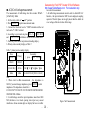
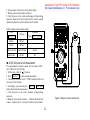
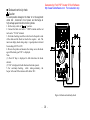
personal computer. See the follow figure
3. Execute the software to take the date for your necessary.
Accessories
Manual
Test leads
Battery (9V)
Protective holster
1
1
1
1
Options
80KP-1 Rotational speed adapter
80KP-2 Hi frequency adapter
RS-232 Package
TP-03
Type K termocouple
RS232 adapter installation
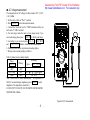
This meter has a communication capability. This function will
assist user to recording and keeping data easy. We have offer
RS232 ADAPTER to optional accessories. The RS232
ADAPTER include a cable with photoelectric receiver and a
software disc. We will continuous release new version per
year .So you can contact the place of purchase to update the
software.
Please refer following procedures if you want to communicate
with personal computer.
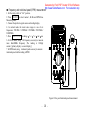
1. Power on the meter and then press the T
I
M
E
R
push button more than 2 seconds, the symbol
“R
S
2
3
2” will appear on the display.
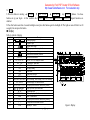
Figure 16.
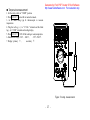
2. Fixes one side of cable to the holster of meter and connect the
9 pin's terminal of cable to communication port 1 or 2 of
-
26 -
RS232 adapter installation