1
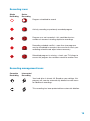
Colour coding
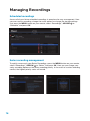
In the Guide, TV Listings appear in a grid format with channel numbers and network
logos down the left side and times along the top. Some listings have a coloured
underline to help you identify different types of programs:
· Purple: Movies
· Green: Sports
· Orange: Children’s programs
Navigating full listings
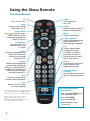
· Press GUIDE to access your programming guide to search for program listings for
the current time and up to 14 days in advance
· Use the
arrows on your remote to navigate program titles, and the arrow
to see program listings for later that day and for future days
· For faster searching:
- Or press the DAY
a day at a time
T
- Use the PAGE T
buttons on your remote while in the listings
buttons on your remote to advance ahead
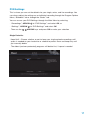
· Press INFO on your remote to see detailed program information
· Highlight a program title and press OK. If the program is playing, you will tune to it.
If the program is on later, you will see an information screen that provides program
details and the option to set a reminder
Learn more about Reminders on page 20.
11