1
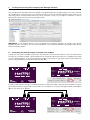
5 Creating Presets Using the Prostage System Manager Software The Prostage System Manager software (available as free download on the Prostage website) is the user’s interface for configuring the Prostage system. The software provides a tab for the Remote WahWah, which allows you to also create presets for the Remote Volume very easily. Therefore, a XDS | XLS | XTMpro is required. It is used as MIDI interface and is the heart of every Prostage system. IMPORTANT => The Remote Volume is the little brother of the Remote WahWah. All settings in the System Manager software are made in the tab “Remote WahWah”. The settings for WahWah and Contour Boost do not affect the Remote Volume. 5.1 Connecting the Remote Volume to the XDS | XLS | XTMpro In order that the System Manager software can communicate with the Remote Volume, it must be connected to the XDS | XLS | XTMpro via MIDI. Connect [MIDI Out A] or [MIDI Out B] from the XDS | XLS | XTMpro to the [MIDI In] of the Remote Volume. In the System Manager window in the upper left you have to specify which MIDI Out you are using [WahWah is connected to MIDI Out A B]. MIDI Cable usb out B out A MIDI in power StageWire™ XLR to MIDI converter MIDI mapper / router switch system tap relais XTMpro relais switches 2 3 1 4 store StageWire™ foot controller In order to also read the settings of the Remote Volume, another MIDI cable is required from the [MIDI Out/Thru] of the Remote Volume to the [MIDI In] of the XDS | XLS | XTMpro. In the System Manager window, [MIDI Out Thru] has to be set to „ Out“. MIDI Cables usb out B out A MIDI in power StageWire™ XLR to MIDI converter MIDI mapper / router switch system 1 tap relais XTMpro relais switches 2 3 4 store StageWire™ foot controller Page 8