1
Table of Contents
1
Introduction
3
1.1 1.2
Remote Volume Features
The Prostage System
3
3
2
Terminology
4
2.1 2.2 2.3 2.4 2.5 2.6 2.7 MIDI - WTF is that???
VCA
Expression Pedal
Instant Access = On/Off Switches (Stompbox Mode)
Preset | Program Change
Control Change | CC = > Real-time control with an Expression Pedal (e.g. Volume)
Bypass | Hard-Bypass
4
4
4
4
4
5
5
3
Connecting the Remote Volume
6
3.1
3.2
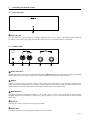
The Front Panel
The Rear Panel
6
6
4
Using the Remote Volume
7
4.1
4.2 Basic Functions of the Remote Volume
Switching the Remote Volume On and Off
7
7
5
Creating Presets Using the Prostage System Manager Software
8
5.1 5.2 5.3 5.4 5.5 5.6 5.7
Connecting the Remote Volume to the XDS | XLS | XTMpro
Reading the Settings of the Remote Volume
Recalling Presets
Adjusting and Store the Settings in the Remote Volume
Renaming Presets
Saving the Settings to the Local Hard Disk
Reading the Settings from Local Hard Disk
8
9
9
9
10
10
10
6
Creating Presets with a Sequencer Software
11
6.1
6.2 Controling the Parameters using Control Change Commands
Saving Presets and Changing the Basic Settings using Sysex Commands 11
11
7
The Settings of the Remote Volume
12
7.1 7.2 Global Parameters
Preset Related Parameters
12
12
8Examples
14
8.1 Volume Pedal
8.2 Line Driver | Buffer Amp
8.3 Volume Boost
8.4 Volume Reduction
8.5Mute
14
14
15
15
16
9
Warning Instructions and Warranty
17
9.1 9.2
9.3
Warnings and Safety Instructions
Warranty / Support
Disposal of Old Devices
17
17
17
10 Declaration of Conformity
18
11
Apendix A | MIDI Implementation Cart
19
11.1
Control Change List
20
Page 2