1
Section 4
User interface and navigation
4.1 Keypad
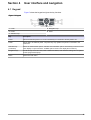
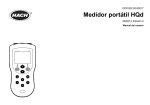
Figure 7 shows the keypad and gives the key functions.
Figure 7 Keypad
1 Power
4 Navigation keys
2 Printer
5 Home
3 Selection keys
Key
Description
Power
Sets the instrument power to on or off. Push the key for 2 seconds to set the power to off.
Printer
Sends data to an attached printer. The printer key only operates if a printer is connected to the
instrument.
Selection keys
(contextual)
Shows the measurement options, selection and confirmation options. Use this key to exit the current
menu display or open sub-menus. Available options show on the display above each key.
Navigation keys
Scrolls through menus and data, enter numbers and letters, enter checkbox settings and set options
for the syringe and the pump.
Home
Goes to the main menu.
19