1
Getting Started
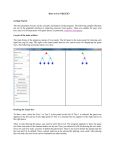
5. Adding balls
You can add balls onto a space on the pitch
or you can balls and attach them directly to
players.
To add balls:
1. Activate the ball functionality
Open the ball panel on the toobar, then
choose to add a ball.
You can now....
2. Add a ball to space
To add a ball to a space, left click on a
space on the pitch. A ball will be placed at
that point.
or...
3. Add a ball to a player
Connect a ball directly to a player by
moving your mouse over the player. You
will feel that the ball ‘snaps’ onto the ball.
Now left click to add the ball to the player.
4. You can continue to add more balls to the
pitch. To deactivate the functionality, click
on the black arrow on the toolbar.
www.coachfxlive.com