1
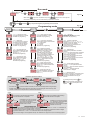
Run mode
SET
1000
SET
SET
500
Measured
value
499
OSET
500
MIN
OSET
MAX
OSET
Out set value
Out set value
Page 3/4
Out set value
SET
While holding
key out set value flashes and by using
keys the value can be adjusted.
MAX
OSET
MIN
Out set value changes fastly if increase or decrease key is pressed for 0.6 second.
SET
SET
If first
&
ASET
OSET
and then
keys are pressed together programming mode is entered
ASET
OSET
Page 3/4
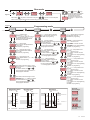
Programming mode
out.
d.Cnf.
Alr.
ASET
ASET
MIN
MIN
o.HYS. = Out hysteresis value.
Can be adjusted between 1 and 200.
See NOTE 1 for programming.
o.Hys.
MAX
o.StA. = State of out.
If H1 is selected then out output is
energized above the out setpoint .
If Lo is selected then out output is
energized below the out setpoint .
See NOTE 1 for programming.
o.StA.
MAX
o.UP.L = Out value upper limit.
Can be adjusted between out value
lower limit (o.lo.l.) and upper limit
for scale (H.SCL.).
See NOTE1 for programming.
MAX
MIN
a.sta.
MIN
o.lo.L. = Out value lower limit.
Can be adjusted between lower
limit for scale (L.SCL.) and out
value upper limit (o.UP.l.)
See NOTE1 for programming.
o.lo.L.
MAX
i.typ.
MAX
A.tyP. = Function of alarm output.
Three kinds of functions can be selected.
IndE = Independent.
De = Deviation.
band = Band.
See NOTE 1 for programming.
A.Sta. = State of alarm output.
If independent or deviation alarm is
selected the alarm output can be Lo
and HI. For Lo, alarm output is
energized below the alarm setpoint.
For HI, alarm output is energized
above the alarm setpoint. If band alarm
is selected this parameter can be
bI.HI and bo.HI. For bI.HI, alarm
output is energized between the band.
For bo.HI, alarm output is energized
out of the band.
See NOTE1 for programming.
a.UP.L. = Alarm value upper limit.
Can be adjusted between higher limit
for scale (H.SCL.) and alarm value lower
limit (a.Lo.L.).
See NOTE1 for programming.
a.Lo.L. = Alarm value lower limit.
Can be adjusted between lower limit for
scale (L.SCL.) and alarm value upper
limit (a.UP.L.).
Parameter adjustment method
SET
SET
SET
1000
L.SCL.
OSET
rate
RAtE = Sampling rate.
Measurement is performed at each 200ms.
However,
for FASt rate, each measurement is displayed.
for SLo.1 rate, the average of 4 successive
measurements is displayed.
for SLo.2 rate, the average of 8 successive
measurements is displayed.
for SLo.3 rate, the average of 16 successive
measurements is displayed.
See NOTE 1 for programming.
MAX
MIN
Hold
MIN
MAX
Hold = Display holding parameter.
Selecting NonE , this parameter becomes
inactive.
Selecting Lo. , always the minimum measured
value is displayed.
Selecting Hi. , always the maximum
measured value is displayed.
MIN
Unit
Unit = Measurement unit.
A constant, a message etc. to be displayed can
be entered. If a decimal point is desired, it
should be included before entering the
character.
SET
SET
999
OSET
dSP.C. = Display configuration.
Selectable as PrcS. or Pr.Un. . If PrcS. is
selected, process value appears. If Pr.Un. is
selected, process value and then
measurement unit are displayed 4 and 2
seconds successively.
See NOTE 1 for programming.
MIN
MIN
A.Lo.L.
NOTE 1
MIN
dsp.C.
MAX
i.typ. = Input type.
Input type can be selected as 0-20mA,
4-20mA, 0-1V or 0-10V.
See NOTE 1 for programming.
MIN
A.UP.L.
MAX
A.HYS. = Alarm hysteresis value.
Can be adjusted between 1 and 200.
See NOTE 1 for programming.
MIN
A.typ.
MIN
o.UP.L.
MIN
a.HYS.
MAX
MIN
MAX
ASET
For including decimal point first,
1000
MAX
OSET
then,
OSET
OSET
keys are pressed and held together. And
MAX
SET
While holding
key out set value flashes and by using
MAX
OSET
If increment key
keys the value can be adjusted.
then, by using
adjusted.
key decimal point can be
MIN
MIN
is pressed and held 0.6 seconds, the value of the selected parameter changes rapidly.
MAX
If waited enough, the value increases 100 at each step. After 1 second following the release of the key, initial
condition is returned. The same procedure is valid for the decrement key.
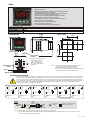
NOTE 2
CAL.
CAL okey?
NOTE 3
The message on the left flashes approximately 5
seconds and calibration is completed.
No
Yes
C.end
s.err.
CAL.
If calibration is error free, the message
CAL okey?
C.End appears for 1 seconds. However,
if it is wrong, the message S.Err.
Yes
appears for 1 seconds and the program
is shifted to the next step.
C.end
The message on the left flashes approximately 5
seconds and calibration is completed.
No
C.err.
If calibration is error free, the message
C.End appears for 1 seconds. However,
if it is wrong, the message C.Err.
appears for 1 seconds and the program
is shifted to the next step.
ERROR MESSAGES
s.err.
C.err.
If the difference between the reference voltages or currents applied for the calibration of H.inP. and L.inP. is lower than one
half of the full scale, this error message appears on the display.
For example: Assume that the selected input type is 0-1V. In this case, if the difference between the reference voltages
applied for calibration of H.inP.and L.inP. is lower than 0.5V, this error message appears.
If the reference voltage or current applied to the input for calibration is too high or too low, this error message appears.
2./4
EI7412-E