1
are contained in a single file (or two if you are using two different snippet
styles).
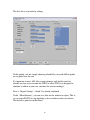
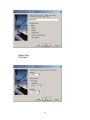
There are two “Snippet Tempate” boxes, which allows you to make two
completely different looking snippets, without having to click create, go in
and modify the snippet template, then create again.
On the right hand side, you can set the snippet filename (remember, if you
intend on using both filetypes, make the filenames different!).
You can also set the length of the snippet that is output. As before, this
number represents characters, not words.
The default setup in the snippet template looks like this:
The default value for this field looks like this:
<a href='[#Filename#]'>[#Title#]</a><BR>[#Body#]<BR><BR>
21