1
Atomic DCF77 Clock
INSTALLATION
Connecting the DCF77N clock
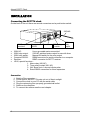
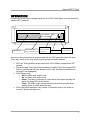
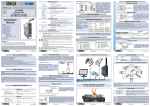
On the back of the unit there are several connectors and a push button switch:
230VAC
HD15, special
functions
•
•
•
•
•
•
Computer
RS232
Receiver
230V relay
switch
230V AC:
Use a grounded mains connection!
230V relay output:
230VAC switched mains output for use with timer
230V relay switch:
Manual ON switch for the relay output
Computer RS232:
DB9M connector for serial connection to a computer
Receiver:
DB9F connector for DCF77 receiver
HD15, special functions :
1. Alarm relay (NO,NC)
2. Timer relay contact (NO, NC)
3. 24V Slave clock 1 second minute pulse
4. Extra RS232 connection for future expansion
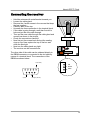
Connection
1. Switch off the computer
2. Find a spot for the DCF77N main unit out of direct sunlight
3. Connect the clock to your PC with the serial cable
4. Plug the mains plug into a properly grounded wall outlet
5. Switch on the computer.
6. To connect the receiver see the next chapter.
2
230V
relay
output