1
Software setting method:
Use GUI (Graphic user interface) for basic RAID mode setting.
The software will list available RAID selection according to hard drive type and capacity.
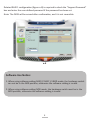
When users select RAID mode as demand, the software will automatically calculate and
create RAID volume. For example, if user choose RAID 1, the software will automatically
create RAID 1 volume like figure a-1.
a-1 Create RAID 1
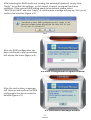
To create password for the RAID volume (optional), please check the “Support Password”
box and enter the password (figure a-2).
a-2 Create Password for the RAID volume (optional)
3