1
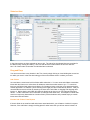
reports. Make the appropriate selection for the “Include in Reports” filed to determine whether or not to
include the selected item in reports.
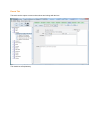
Buttons
Find - locate any item in the tree based on a text value in one of the first Identification fields. This
is particularly useful for large collections.
Copy - create a new item based on the currently selected item. All relevant ID, Description, Receipt, and Disposition data will be copied. This is particularly useful if you acquire many similar
items at the same time. Be sure to change something immediately after the duplication so as to
distinguish the items one from another.
Insert - create a new item from scratch. If a collection is selected when the Insert button is
pressed, the new item will be inserted as a member of that selected collection. If an item is selected when the Insert button is clicked the currently selected item will be converted to a folder
and the newly inserted item will be automatically associated with that item. If this is not your intent you can use the Demote button below to make the newly inserted item an equivalent to the
selected item.
Delete - delete the current item. Be careful with this as there is no recovery unless you recover
your database from backup.
Promote (Arrow Left) - promote (shift left) the selected item.
Demote (Arrow Right) - demote (shift right) the selected item.