1
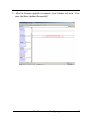
The password option allows user to set or clear the raid subsystem’s password protection feature. Once the password has been set, the user can only
monitor and configure the raid subsystem by providing the correct password.
The password is used to protect the internal RAID subsystem from unauthorized entry. The controller will check the password only when entering the
Main menu from the initial screen. The RAID subsystem will automatically go
back to the initial screen when it does not receive any command in ten
seconds.
To disable the password, press Enter key only in both the Enter New Password
and Re-Enter New Password column. Once the user confirms the operation
and clicks the Submit button. The existing password will be cleared. No password checking will occur when entering the main menu from the starting screen.
7.6
Upgrade Firmware
Please reference the chapter 4 for more information.
32
Web Browser-based Configuring