1
BEFORE YOU START
Please locate and check that you have a spare
LAN port available on the back of your broadband
Internet router. You will need to plug in the
supplied Ethernet cable. If all of the ports are in
use, you can add more connections by purchasing
an Ethernet Switch / Hub.
You will also need a spare mains socket available
close by for the supplied Plug top mains power supply.
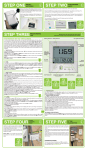
STEP ONE - Insert batteries into the
Transmitter
Slide back cover off of the Transmitter and insert
the batteries into the unit. Keep the Transmitter
with you alongside the Network OWL until Step Six.
You should NOT fit the Sensors at this time.
PART NO. CMR180
MADE IN CHINA
INSERT 2 x AA BATTERY
STEP TWO - Power up Network OWL
• Ensure antenna is screwed, finger tight, onto brass connector on side of
the Network OWL.
• Select UK or Euro adaptor as required. Fit to the power supply and rotate
90° until it latches into place.
• Plug the power supply into the mains and insert the DC jack
connector into the base of the Network OWL.
• The green LED will flash rapidly. After about 30
seconds the blue LED will start a steady flash
indicating that it is in Pairing Mode.
• Quickly move to Step Three.
GREEN LED
CHECK FINGER
TIGHT
2
BLUE LED
PLUG IN DC POWER CONNECTOR
© 2 Save Energy Limited 2012