1
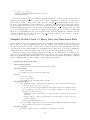
will use the run method that our World01 inherits from GridWorldGUI, which handles this for us.) Second,
we will not access myagents as a global variable: instead we use the agents attribute of our World01,
which it inherits from GridWorldGUI. Finally, we replace the function call move(agent) with the method
call agent.move().
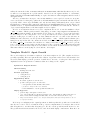
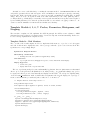
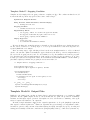
As before, we must take four steps to run our first simulation: create a grid of locations for our agents,
create a world based on that grid, populate the world with initialized agents, and run the scheduled actions
repeatedly. Each of these steps is familiar, and only the last changes substantively from our procedural
implementation. A World01 has a run method (inherited from GridWorldGUI) that repeatedly calls its own
schedule method, so myworld.run(maxiter=250) will run our simulation for 250 iterations. Our more
object-oriented implementation of the first template model is complete.
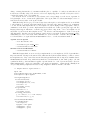
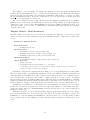
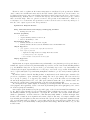
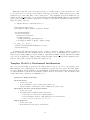
We add one modification that is not needed to implement the model: we run the simulation only if
name ==’main’. This is a purely forward looking change: we want to import Agent01 and World01 into
other modules without running our first template model. However, a module’s code is executed when the
module is imported. We could put the code to set up and run the model in a separate file, but for the
purposes of this paper, we wish to group our class definitions beside the code that creates and runs our
simulations. Our solution is to use the special module attribute, name , which is just the filename (as a
string) for an imported module. In contrast, the module executed as the main program is always assigned
the string ’ main ’ as its name. We can therefore condition on the value of name in order to prevent
some code from being executed when a module is imported. The code in the body of this if statement will
not be executed if the module is imported, but it will be executed if the module is executed as a script.10
This ensures that we can freely import our module into other scripts.
Template Model 2: Agent Growth
The second template model assumes completion of the first template model. (The template models are
generally sequential.) The new requirement is the addition of agent state in the form of data attributes. An
associated visual-display goal is the provision of visual clues to the state of each agent.11 Once again, the
emphasized text in our specification constitutes additions or changes to the original.
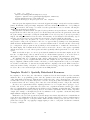
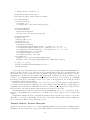
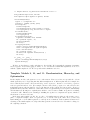
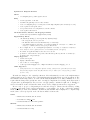
Specification: Template Model 2
World and Setup
• unchanged from model 1
Iteration (sequential)
• each agent moves
• each agent grows
Supplementary Detail
• movement: agents move as in model 1
• growth: each agent “grows” at a fixed rate
– each agent has an data attribute named size
– growth is a change in the “size“ attribute
– size is initialized to 1.0; the growth increment is 0.1
Display Suggestions
• position, shape, and update: as in model 1
• color: each agent’s fill color should represent its “size”. (Specifically, use white if size=0.0, red
if size>=10.0, and increasingly chromatic tints of red as “size” increases from 0 to 10.)
• delay: ensure that the agents’ color changes during the model’s first ninety iterations are not
too rapid for viewing
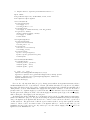
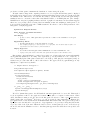
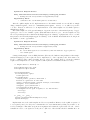
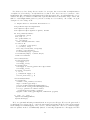
We clear up one ambiguity in the original specification, which says that the growth action “is scheduled
after the move action”. In accord with the NetLogo reference implementation, we interpret this to mean
that all agents move, and after that all agents grow. We also cut the growth increment from 1.0 to 0.1.
The growth increment is inessential to the model, aside from visual display considerations. Even after our
8