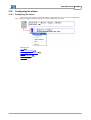
1
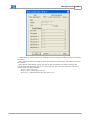
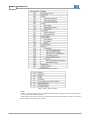
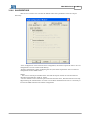
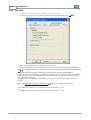
Motors | Automation | Energy | Transmission & Distribution | Coatings
Software
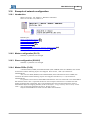
WSCAN
User's Manual
User's Manual
Series: WSCAN V2.0X
Language: English
Publication Date: 11/2010
Content
3
Index
0
Parte I General Information
6
1 About ...................................................................................................................................
this manual
6
2 About the
...................................................................................................................................
WSCAN
6
3 Abbreviations
...................................................................................................................................
and definitions
6
4 Numerical
...................................................................................................................................
representation
7
5 Documents
...................................................................................................................................
7
6 Main advantages
...................................................................................................................................
of WSCAN
7
Parte II Introduction to the CANopen
protocol
1 CAN
7
...................................................................................................................................
7
2 Data frame
...................................................................................................................................
8
3 Remote
...................................................................................................................................
frame
8
4 Network
...................................................................................................................................
acess
8
5 Error control
...................................................................................................................................
8
6 CAN and
...................................................................................................................................
CANopen
9
7 Characteristics
...................................................................................................................................
of the CANopen network
9
8 Physical
...................................................................................................................................
Media
9
9 Address
...................................................................................................................................
on the CANopen network
9
10 Data access
...................................................................................................................................
10
11 Data transmission
...................................................................................................................................
10
12 Communication
...................................................................................................................................
Objects - COBs
10
13 COB-ID
...................................................................................................................................
11
14 EDS file
...................................................................................................................................
12
Parte III WSCAN Software
12
1 Running
...................................................................................................................................
the WSCAN software
12
2 Main Window
...................................................................................................................................
14
3 Main Menu
...................................................................................................................................
14
4 Button
...................................................................................................................................
Bar
15
5 Device
...................................................................................................................................
Tree
16
6 Log Window
...................................................................................................................................
16
7 CANopen
...................................................................................................................................
network
17
8 Configuring
...................................................................................................................................
a new network
17
9 Configuring
...................................................................................................................................
the master
19
Configuring the.........................................................................................................................................................
master
19
Copyright © 2006-2010 WEG. All rights reserved.
4
WSCAN V2.0X
NMT
......................................................................................................................................................... 20
SYNC PRODUCER
......................................................................................................................................................... 20
SDO
......................................................................................................................................................... 21
HEARTBEAT PRODUCER
......................................................................................................................................................... 22
FOLLOW
......................................................................................................................................................... 24
10 Configuring
...................................................................................................................................
the slaves
25
Configuring the.........................................................................................................................................................
slaves
25
NMT
......................................................................................................................................................... 26
NODE GUARDING
......................................................................................................................................................... 26
HEARTBEAT PRODUCER
......................................................................................................................................................... 27
EMCY
......................................................................................................................................................... 28
SAVE/RESTORE
......................................................................................................................................................... 31
FOLLOW
......................................................................................................................................................... 32
11 Slave...................................................................................................................................
Object Dictionary
33
Slave Object Dictionary
......................................................................................................................................................... 33
List of Objects ......................................................................................................................................................... 33
Object Data
......................................................................................................................................................... 34
Changing the numerical
.........................................................................................................................................................
base
35
Changing the object
.........................................................................................................................................................
value
36
12 Master/Slave
...................................................................................................................................
PDOs Configuration
36
Master/Slave PDOs
.........................................................................................................................................................
Configuration
36
PDOs List
......................................................................................................................................................... 37
PDO communication
.........................................................................................................................................................
parameters
38
PDO Mapping ......................................................................................................................................................... 39
13 Viewer/Configuration
...................................................................................................................................
of PDOs connections
41
Viewer/Configuration
.........................................................................................................................................................
of PDOs connections
41
Procedure for connecting
.........................................................................................................................................................
PDOs
41
Procedure for connecting
..................................................................................................................................................
PDOs
41
Selecting the producer
..................................................................................................................................................
(TxPDO)
42
Selecting the consumer
..................................................................................................................................................
(RxPDO)
43
Connecting the..................................................................................................................................................
producer (TxPDO) to the consumer (RxPDO)
45
Connecting objects
..................................................................................................................................................
of different sizes
46
Listing the connections
......................................................................................................................................................... 48
14 Network
...................................................................................................................................
configuration
48
Create configuration
......................................................................................................................................................... 48
Transfer configuration
......................................................................................................................................................... 49
Online monitoring
......................................................................................................................................................... 49
15 Interface
...................................................................................................................................
with the ladder programming
52
Interface with the
.........................................................................................................................................................
ladder programming
52
I/O memory mapping
......................................................................................................................................................... 53
Control Word and
.........................................................................................................................................................
Status Word
53
Control Word and
..................................................................................................................................................
Status Word
53
Status of the CANopen
..................................................................................................................................................
communication
54
Status of the CANopen
..................................................................................................................................................
slave
55
Control of the CANopen
..................................................................................................................................................
communication
56
Address of the ..................................................................................................................................................
destination slave
56
Ladder Block (SDO)
......................................................................................................................................................... 56
16 Example
...................................................................................................................................
of network configuration
Introduction
57
......................................................................................................................................................... 57
Master configuration
.........................................................................................................................................................
(PLC2)
57
Slave configuration
.........................................................................................................................................................
(SCA-05)
57
Master PDOs (PLC2)
......................................................................................................................................................... 57
Copyright © 2006-2010 WEG. All rights reserved.
Content
5
Slave PDOs (SCA-05)
......................................................................................................................................................... 58
PDOs connections
......................................................................................................................................................... 59
Reading slave status
.........................................................................................................................................................
information from the ladder program
62
Commanding the
.........................................................................................................................................................
slave from the ladder program
63
17 Example
...................................................................................................................................
of follow CANopen configuration
Introduction
63
......................................................................................................................................................... 63
WSCAN configuration
......................................................................................................................................................... 64
WLP configuration
......................................................................................................................................................... 67
CFW11 and PLC11
.........................................................................................................................................................
parameterization
67
Index
Copyright © 2006-2010 WEG. All rights reserved.
68
6
WSCAN V2.0X
1
General Information
1.1
About this manual
This manual describes the operation of the WSCAN software and the configuration of the
CANopen masters designed by WEG. This manual shall be used along with the WLP software and
CANopen master board manuals.
Related topics :
About the WSCAN 6
Abbreviations and definitions 6
Numerical representation 7
Documents 7
Main advantages of WSCAN 7
CAN 7
Running the WSCAN software 12
Main Window 14
Main Menu 14
Button Bar 15
Device Tree 16
Log window 16
CANopen network 17
Configuring a new network 17
Configuring the master 19
Configuring the slaves 25
Slave Object Dictionary 33
Master/Slave PDOs Configuration 36
Viewer/Configuration of PDOs connections 41
Create configuration 48
Transfer configuration 49
Online monitoring 49
Interface with the ladder programming 52
Example of network configuration 57
Example of follow CANopen configuration 63
1.2
About the WSCAN
The WSCAN - “WEG Software CANopen Config” - is a Windows-based software used for
configuring and programming the masters designed by WEG for the CANopen network.
1.3
Abbreviations and definitions
CAN
CiA
COB
COB-ID
SDO
PDO
RPDO
TPDO
NMT
ASCII
ro
rw
Controller Area Network
CAN in Automation
Communication Object
Communication Object Identifier
Service Data Object
Process Data Object
Receive PDO
Transmit PDO
Network Management Object
American Standard Code for Information Interchange
Read only access
Read/write access
General Information
1.4
7
Numerical representation
Decimal numbers are represented by digits without suffix. Hexadecimal numbers are represented
with the 'h' letter after the number.
1.5
Documents
1.6
Main advantages of WSCAN
- Network definition through graphical environment.
- Network configuration through dialog boxes.
- Download of configuration through the PC serial port.
7
- Possibility of configuring up to 25(1)
slave devices on the CANopen network.
7
- Possibility of configuring up to 1600(2)
input digital points and 1600(2)
- On-line monitoring of network status and communication errors.
7
output digital points.
(1) 8 for PLC2 or 25 for PLC11-01
(2) 512 for PLC2 or 1600 for PLC11-01
2
Introduction to the CANopen protocol
2.1
CAN
The CANopen network is based on the CAN network. In other words, it uses CAN messages for
network data exchange.
The CAN protocol is a serial communication protocol that describes the services of layer 2 of the
ISO/OSI model (data link layer). This layer defines the different types of messages (frames), the error
detection algorithm, and the validation and arbitration of messages.
NOTE !
On the CAN protocol specification, the ISO 11898 standard is used as reference for defining the
layer 1 of this model (physical layer).
8
WSCAN V2.0X
Related topics :
Data frame 8
Remote frame 8
Network acess 8
Error control 8
CAN e CANopen 9
Characteristics of the CANopen network
Physical Media 9
Address on the CANopen network 9
Data access 10
Data transmission 10
Communication Objects – COBs 10
COB-ID 11
EDS file 12
2.2
9
Data frame
In a CAN network the data are transmitted through a data frame (telegram). This type of frame is
basically composed of an 11-bitsstandard (11bits) and extended (29 bits). Only standard frames (11 bits)
are accepted for the CANopen protocol of the WEG master. identifier field (arbitration field) and a data
field that may contain up to 8 data bytes.
NOTE !
The CAN 2.0 specification defines two types of data frames: standard (11bits) and extended (29
bits). Only standard frames (11 bits) are accepted for the CANopen protocol of the WEG master.
2.3
Remote frame
Besides the data frame, there is also the remote frame (RTR frame). This type of frame does not
contain the data field, only the identifier. It works as a request so that another device on the network can
transmit the intended data frame.
2.4
Network acess
Any device on a CAN network can try transmitting a frame to the network in a certain instant. In
case two devices try accessing the network at the same time, the message with higher priority will be
transmitted. The message priority is defined by the identifier of the CAN frame - the lower the identifier
value, the higher the message priority. Consequently, a message with identifier 0 (zero) has the higher
priority.
2.5
Error control
The CAN specification defines several error control services, which renders it a very reliable
network with a very low rate of transmission errors that are not detected. Each network device must be able
to identify this error and inform the other network elements that an error was detected.
A CAN network device has internal counters that are incremented every time a transmission or
reception error is detected and decremented when a telegram is successfully received. When a substantial
number of errors is detected, the device may enter into the following states:
Introduction to the CANopen protocol
9
- Warning: the device enters into the warning state when the counter exceeds a predefined number of
errors, which means that a high error rate was detected.
- Error Passive: the device enters into the error passive state when the counter value exceeds a higher limit.
In this state the device is not active anymore on the network (cannot send or receive messages). It can only
transmit Error Passive Flags.
- Bus Off: the device goes into this state when the Transmit Error Counter is greater than 255. In this
mode, the device cannot send or receive messages, acknowledge messages, or transmit error frames of any
kind.
2.6
CAN and CANopen
The definitions of error detection, frame generation and message transmission are not sufficient
for completely defining the data that is transmitted through network. It is necessary that a specification
indicates how the identifier and the data should be built and how the information should be exchanged.
Thus, the network elements can properly interpret the data that is transmitted. The CANopen specification
defines how to exchange data between devices and how each device should interpret these data.
There are several other protocols based on CAN that also use CAN frames for communication,
such as DeviceNet, J1939, etc. However, these protocols cannot operate in the same network.
2.7
Characteristics of the CANopen network
Since message transfer is carried out through a CAN bus, all CANopen network devices have the
same rights for accessing the network, where the priority of the identifier defines how to solve the conflicts
when simultaneous accesses to the network take place. This feature makes possible the direct
communication between network slaves, in addition to the fact that the data can be made available in an
optimized manner without requiring a master, which cyclic access all devices on the network to update the
data, for controlling the communication.
Another important characteristic of the CAN network is the adoption of the producer / consumer
model for data transmission. It means that a message transmitted over the network does not have a fixed
destination address. This message has an identifier that indicates which data type it is carrying. Any device
on the network that needs to use this information for its operation can consume it and, therefore, the same
message can be used for several network devices at the same time.
2.8
Physical Media
The physical media for data transmission in a CANopen network is specified by the ISO 11898
standard. The physical media specified by the standard is a twisted pair with differential electrical signal.
The master of a CANopen network uses an isolated interface circuit from the network with
external power supply. The device responsible for the signal transmission and reception is known as
transceiver and it follows what is specified on the ISO 11898 standard.
2.9
Address on the CANopen network
Every CANopen network shall have a master, which is responsible for the services of network
management, and may also have a maximum set of 127 slaves. Each device on the network can also be
named as “node”. Every slave on a CANopen network is identified by its address, or Node-ID, which must
be unique for each slave on the network and can vary from 1 to 127.
The WEG CANopen master can control a maximum of 8 slaves, which can be addressed from 1
to 63.
10
2.10
WSCAN V2.0X
Data access
Each slave on the CANopen network has a list called object dictionary that contains all the data
that are accessible through the network. Each object in this list is identified by an index, which is used
during the device configuration and message exchange to identify what is transmitted.
A more detailed description of how the object dictionary is structured is provided in the
Addendum I.
2.11
Data transmission
The transmission of numerical data through CANopen messages is carried out by using the
hexadecimal representation of the number (the least significant data byte must be sent first).
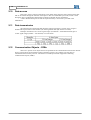
Example: transmission of a 32-bits signal integer (12345678h = 305419896 decimal) plus a
16-bits signal integer (FF00h = -256 decimal) in a CAN frame.
2.12
Communication Objects - COBs
There are a specific set of objects that are responsible for the communication between the network
devices. These objects are divided according to the data type they carry and the way how they are
transmitted and received by a device. The master of a CANopen network supports the following
communication objects (COBs):
Introduction to the CANopen protocol
11
The communication of the device with the network is always carried out through these objects.
The data that can be accessed through the network are listed on object dictionary of each device.
2.13
COB-ID
A CANopen message is always transmitted by a communication object (COB). Every COB has an
identifier that indicates the type of data it is transmitting. This identifier, named COB-ID, has an 11-bits
length, and it is transmitted in the identifier field of the CAN message. It is subdivided in two parts:
- Function code: indicates the type of object that is being transmitted.
12
WSCAN V2.0X
- Node address: indicates with which network device the message is related to.
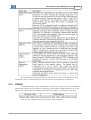
The default values of the different communication objects that are available in the devices are
presented in the table below. It is important to notice that the object default value is dependent upon the
slave address, except the COB-Ids for NMT and SYNC objects that are common to all network devices.
These values can also be changed during the device configuration step.
2.14
EDS file
Each device on a CANopen network has a configuration file called EDS, which contains several
data about the operation of the device over the CANopen network, as well as a description of all available
objects for communication. In general this file is used by the master or by the configuration software for
programming the devices connected to the CANopen network.
3
WSCAN Software
3.1
Running the WSCAN software
The WSCAN can be executed in two modes:
1st - Via WLP software, by using the option “CANopen” under the “Tools” menu or by using the
shortcut keys “Shift+F11”
NOTE!
The CANopen master function is available only on versions 1.30 or later of the PLC2 board.
When the WSCAN software is executed from the WLP, a configuration file of the CANopen
WSCAN Software
13
network (with the same name of the current WLP project) will be created / opened and will be stored inside
the current project folder.
2nd - Through the shortcut created in the Windows Start menu.
Related topics :
Main Window 14
Main Menu 14
Button Bar 15
Device Tree 16
Log window 16
CANopen network 17
Configuring a new network 17
Configuring the master 19
Configuring the slaves 25
Slave Object Dictionary 33
Master/Slave PDOs Configuration 36
Viewer/Configuration of PDOs connections
Create configuration 48
Transfer configuration 49
Online monitoring 49
Interface with the ladder programming 52
Example of network configuration 57
41
14
3.2
WSCAN V2.0X
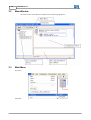
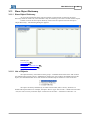
Main Window
The main window of the WSCAN software has the following appearance:
3.3
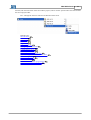
Main Menu
File menu:
Edit menu:
WSCAN Software
View menu:
Configuration menu:
Communication menu:
Tools menu:
Help menu:
3.4
Button Bar
It is composed of the following buttons:
- New CANopen configuration file.
- Open CANopen configuration file.
- Save CANopen configuration file.
15
16
WSCAN V2.0X
- Cut.
- Copy.
- Paste.
- Viewer/Configuration of PDOs connections.
- Create configuration.
- Transfer configuration.
- Online monitoring.
- Print.
- About the WSCAN.
3.5
Device Tree
It contains the list of available devices that can be used as slaves on the CANopen network. This
list is created from the content of the “EDS” folder that is located inside the WSCAN installation folder,
which is the same of the WLP (usually “C:\Weg\WLP VX.YZ” where X.YZ is the WLP version).
In order to add a device to this list, just copy the EDS (Electronic Data Sheet) file provided by the
device manufacturer to the “EDS” folder mentioned previously. It is necessary to restart the software so
that the added files can be included in this list.
3.6
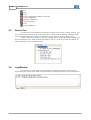
Log Window
It contains the list of registers/errors generated by the software. Registers or errors that may
happen during the analysis of the “EDS” files and creation of configuration will be listed on this window.
WSCAN Software
3.7
17
CANopen network
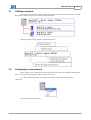
The network structure will be always graphically represented on the WSCAN software. The main
data related to master and slaves are listed in this representation.
The device data will be organized in the following mode:
3.8
Configuring a new network
When creating a new CANopen network project the devices will be not configured (including the
master). Therefore, the following procedures shall be carried out:
1st - Define the network master by clicking on the master picture and select the option
“Properties”.
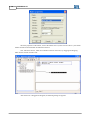
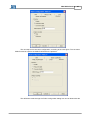
The following dialog box appears:
18
WSCAN V2.0X
The basic properties of the master, such as the master device (in this case the “PLC2”), the master
address and the network baudrate are defined in this box.
2nd - Add slave devices, which are available on the list of devices, by dragging and dropping
them into the network structure area.
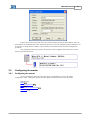
After the device is dragged and dropped, the following dialog box appears:
WSCAN Software
19
At this time, the basic properties of the slave will be defined, such as the slave address. Once the
slave address was defined and the “OK” button was pressed, it cannot be changed anymore. Therefore, if it
is necessary to change the slave address, remove the device from the network structure and repeat this
procedure.
After completion of these procedures, the network will be configured with a slave device and it
will be represented as follows:
3.9
Configuring the master
3.9.1
Configuring the master
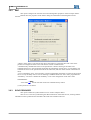
Click on the master picture and select the option “Configuration” to access the master
configuration. Then, a dialog box appears with the options that are described in the next items.
Related topics :
NMT 20
SYNC PRODUCER 20
SDO 21
HEARTBEAT PRODUCER
FOLLOW 24
22
20
3.9.2
WSCAN V2.0X
NMT
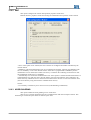
This option configures the network control and management properties of the CANopen master.
Defines the basic properties of the master during the initialization and management of the
network:
- Master: if this option is not selected, the device will behave as a network slave and it will not be
possible to configure the other slaves and start the network communication.
- Simultaneously command the slaves to the operational: it allows selecting if the master will
command the slaves to the operational mode after the initialization of each slave, or if the master will
command all slaves to the operational mode at the same time (after the whole network initialization is
done).
- Error on mandatory slave, reset all nodes: it allows programming the master to restart all the network
slaves or only the faulty slave in case of detecting a communication error with a slave programmed as
“mandatory”. The slave is defined as mandatory or not in the configuration of the slave itself.
NODE RESET :
- Wait Time (1)
20
: wait time after node reset command sent by master.
(1) Only for PLC11-01 board.
3.9.3
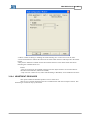
SYNC PRODUCER
This option enables the synchronization service of the CANopen master.
This service is used for synchronizing the data transmission of the PDO service, ensuring that the
information will be produced and consumed at the same time in different devices.
WSCAN Software
21
- COB-ID: indicates the identifier of the SYNC message. Modifications in this identifier are not
allowed. Therefore, the default value of the SYNC message on the CANopen network shall be used.
- Cycle: defines the cycle time of the SYNC message transmitted by the network master. If the
communication cycle time is disabled the master will behave as a SYNC Consumer.
NOTE!
- Very short cycle times for the SYNC message will overload the network and cause communication
errors of the various services.
3.9.4
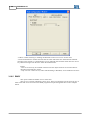
SDO
Properties of the SDO server of the CANopen master.
This option configures the properties of the SDO server, which is used by the SDO ladder block in
the WLP and also in the communication between master and slaves via Modbus protocol.
22
WSCAN V2.0X
- Timeout: defines the time that the network master shall wait for an answer every time the SDO client
of the master issues a request to the SDO server of any slave on the network. An error will be indicated
in case the answer is not received within the programmed time.
3.9.5
HEARTBEAT PRODUCER
This option enables the heartbeat producer service of the CANopen master.
A slave with a configured heartbeat consumer uses this service to monitor the master
communication with the CANopen network.
WSCAN Software
23
- Enable: it allows enabling or disabling the production of heartbeat messages by the network master.
- Period of transmission: in case it is enabled, this will be the transmission cycle of heartbeat messages.
Once it is programmed, other network devices with heartbeat consumer can be programmed to monitor
these messages and detect communication errors.
24
3.9.6
WSCAN V2.0X
FOLLOW
It enables the Follow producer or consumer service via CANopen.
It is used to perform speed or position synchronism via the WLP Follow block (1)
24
.
- Disable: It disables the Follow producer or consumer function.
- Producer Enabling (Real Axis): It enables the master to produce Follow data through the TPDO 01.
- Producer Enabling (Virtual Axis): It enables the master to produce Follow data through the TPDO 01
(2) 24 .
- Consumer Enabling: It enables the master to consume Follow data through the RPDO 01.
- COB-ID (hexa): It is the TPDO 01 or RPDO 01 identifier in the CANopen network. In order that the
Follow data produced in one equipment be consumed in another, the value of this parameter must be
the same in both equipments.
- Speed Source: It selects which speed the follow producer (actual speed or speed reference) will
transmit.
Refer to the programming example of the Follow
63
block via CANopen for more details.
(1) Available only for the PLC11-01 and PLC11-02 with firmware >= 1.20.
(2) Available only for the PLC11-01 and PLC11-02 with firmware >= 1.30.
WSCAN Software
3.10
25
Configuring the slaves
3.10.1 Configuring the slaves
Click on the slave picture and select the option “Configuration” to access the slave configuration.
Then, a dialog box appears with the options that are described in the next items.
Related topics :
NMT 26
NODE GUARDING 26
HEARTBEAT PRODUCER
EMCY 28
SAVE/RESTORE 31
FOLLOW 32
27
26
WSCAN V2.0X
3.10.2 NMT
This option configures the control and operation properties of the slave.
Defines the basic properties of the slave during the initialization and operation of the network:
- Slave: if this option is not selected, the device will be not configured and neither initialized by the
network master.
- Mandatory node with initialization error do not initialize the network: it allows programming if the
slave is mandatory or not to the network master. If the slave is programmed as mandatory and an
initialization error is detected, the master will not try to initialize the remaining network slaves until
the initialization of this slave is completed.
- Automatically reset node with communication error: if this option is selected and the master detects a
communication error with this slave, then the master will reset and restart the slave. Otherwise, the
master will only indicate de error in the status word and wait for the user to reset and restart the slave
(this can be done by using the words for communication control).
NOTE!
- It is necessary to enable any error control service (Node Guarding or Heartbeat).
3.10.3 NODE GUARDING
This option enables the node guarding service of the slave.
This service is used for monitoring the slave communication with the CANopen network. This
monitoring is carried out by the master as well as by the slave.
WSCAN Software
27
- Enable: it allows enabling or disabling the Node Guarding error control service for the slave.
- Period of transmission: defines the time-interval within which the slave shall respond to the master
request.
- Retry factor: defines the number of time-intervals that the slave or the master shall wait before
indicating the communication error.
NOTE!
- This service will only be available if the slave has the objects need for its execution that are
described in the EDS file (100Ch and 100Dh).
- Only one error control service, either Node Guarding or Heartbeat, can be enabled in the slave.
3.10.4 HEARTBEAT PRODUCER
This option enables the heartbeat producer service of the slave.
This service is used for monitoring the slave communication with the CANopen network. This
monitoring is carried out only by the master.
28
WSCAN V2.0X
- Enable: it allows enabling or disabling the Heartbeat control error service for this slave.
- Period of transmission: defines the time-interval within which the slave shall transmit heartbeat
messages to the network. A communication error is indicated if the network master does not receive
any of these messages from the slave within the heartbeat time.
NOTE!
- This service will only be available if the slave has the objects need for its execution that are
described in the EDS file (1017h).
- Only one error control service, either Node Guarding or Heartbeat, can be enabled in the slave.
3.10.5 EMCY
This option enables the EMCY service of the slave.
This service is used for indicating a device error. These error messages will be stored in up to 8
status words that can be accessed in the ladder program developed through the WLP to the CANopen
master.
WSCAN Software
29
- Enable Mapping: it allows enabling or disabling the master mapping of EMCY messages transmitted
by the slave.
- Time: defines the time-interval that the slave shall wait before transmitting a new EMCY message to
the network.
- Status: defines which master register will store the data transmitted in the EMCY message. The
content of this data identify the type of error occurred in the slave. Each data represents one of the 7
existent fields in a EMCY message:
- Word 1 : Error code (CiA)
- Word 2 : Error register (object 1001h)
- Word 3 to 7 : Manufacturer specific error field (1 to 5).
30
WSCAN V2.0X
Error code CiA - Word 1 EMCY.
Object 1001h - Word 2 EMCY.
NOTE!
- EMCY : This service will only be available if the slave has the objects need for its execution that
are described in the EDS file (1014h).
- Inhibit Time: This service will only be available if the slave has the objects need for its execution
that are described in the EDS file (1015h).
WSCAN Software
31
3.10.6 SAVE/RESTORE
This service is used to save or restore the default values of the parameters in the slave object
dictionary.
- Save configuration: at the end of the slave configuration, the master requests the slave to save its
configurations in a non-volatile local memory.
- Restore configuration: before configuring the slave, the master requests the slave to restore its
configurations to the default values.
NOTE!
- This service will only be available if the slave has the objects need for its execution that are
described in the EDS file (1010h or 1011h).
- The use of these services consume quite some time from the slaves, therefore timeout errors may
happen during the communication. In order to avoid these communication errors it is necessary to
increase the SDOs timeout in the master configuration.
32
WSCAN V2.0X
3.10.7 FOLLOW
It enables the Follow producer or consumer service via CANopen.
It is used to perform speed or position synchronism via the WLP Follow block (1)
32
.
- Disable: It disables the Follow producer or consumer function.
- Producer Enabling (Real Axis): It enables the master to produce Follow data through the TPDO 01.
- Producer Enabling (Virtual Axis): It enables the master to produce Follow data through the TPDO 01
(2) 32 .
- Consumer Enabling: It enables the master to consume Follow data through the RPDO 01.
- COB-ID (hexa): It is the TPDO 01 or RPDO 01 identifier in the CANopen network. In order that the
Follow data produced in one equipment be consumed in another, the value of this parameter must be
the same in both equipments.
- Speed Source: It selects which speed the follow producer (actual speed or speed reference) will
transmit.
Refer to the programming example of the Follow
63
block via CANopen for more details.
(1) Available only for the PLC11-01 and PLC11-02 with firmware >= 1.20.
(2) Available only for the PLC11-01 and PLC11-02 with firmware >= 1.30.
WSCAN Software
3.11
33
Slave Object Dictionary
3.11.1 Slave Object Dictionary
As previously mentioned, all the objects accessible via the network are listed on the object
dictionary inside the “EDS” file, and sometimes it may be interesting to access the content of these objects.
In order to access the slave object dictionary click on the slave picture and select the option
“Object Dictionary”. The following dialog box appears:
Related topics :
List of Objects 33
Object Data 34
Changing the numerical base
Changing the object value 36
35
3.11.2 List of Objects
The object dictionary is divided into three groups: “Communication Profile Area” that contains
the communication specific objects, “Manufacturer Profile Area” that contains the manufacturer specific
objects, and “Standard Profile Area” that contains the standard objects common to a class of devices.
The objects are always identified by its index and sub-index (when it exists), which have a
hexadecimal representation. For example, the object “Device Type” has an index = 1000h and a sub-index
= 0h (as it does not exist), while the object “Vendor Id” has an index = 1018h and a sub-index = 1h.
34
WSCAN V2.0X
The bolded objects in this list belong to the DCF file, which is a specific list used by the CANopen
master during the slave initialization. If an object belongs to the DCF file, it means that the master will be
responsible for defining the object value during the initialization.
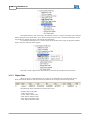
It is possible to add objects to or remove objects from the DCF file by right-clicking the intended
object. Then, the following menu appears:
Only add or remove objects from the DCF file if you know specifically the object function.
3.11.3 Object Data
When an object is selected from the list of objects, its information is presented on the screen.
When the selected object has sub-objects then the whole list of sub-objects will be also presented.
The following object information is listed on the screen:
- SubIdx: Object sub-index.
- Name: Object name.
- Value: Object current value.
- Data: Object numerical type.
- Min: Object minimum value.
- Max: Object maximum value.
WSCAN Software
35
- Access: Object access rights.
- Default: Object default value.
- PDO: PDOs mapping.
Data types:
- BOOLEAN
- INTEGER8
- INTEGER16
- INTEGER32
- UNSIGNED8
- UNSIGNED16
- UNSIGNED32
- REAL32
- VISIBLE_STRING
- OCTET_STRING
- UNICODE_STRING
- TIME_OF_DAY
- TIME_DIFFERENCE
- DOMAIN
- INTEGER24
- REAL64
- INTEGER40
- INTEGER48
- INTEGER56
- INTEGER64
- UNSIGNED24
- UNSIGNED40
- UNSIGNED48
- UNSIGNED56
- UNSIGNED64
Access type:
- rw: read an write access
- wo: write-only access
- ro: read-only access
- const: value is constant, read only access
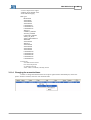
3.11.4 Changing the numerical base
In order to change the numerical base of an object right-click the intended object, choose the
option “Format” and then, select the new numerical base.
36
WSCAN V2.0X
3.11.5 Changing the object value
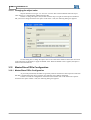
Objects that have access type “rw” and “wo” can have their values modified. When the object
value changes, it is automatically added to the DCF file.
In order to change the object value, double-click the object or right-click the object information
that you want to change and choose the option “Edit Value”. Then, the following dialog box appears:
Use this dialog box to change the object value in one of the three numerical bases (the conversion
to the other bases is automatic) or apply the default value. When the default value is applied, the object is
removed from the DCF file.
3.12
Master/Slave PDOs Configuration
3.12.1 Master/Slave PDOs Configuration
As previously mentioned, the PDOs are generally used for transmission and reception of real-time
data that is needed during the device operation and, therefore, they shall be configured.
In order to access the configuration of the master/slave PDOs click on the master/slave picture
and choose the option “PDOs”. Then, the following dialog box appears:
WSCAN Software
Related topics :
PDOs List 37
PDO communication parameters
PDO Mapping 39
37
38
3.12.2 PDOs List
The PDOs are divided into two groups: “RxPDO” and “TxPDO”, where the “RxPDO” are the
Receive-PDOs and the “TxPDO” are the Transmit- PDOs.
The bolded PDOs in this list are enabled.
38
WSCAN V2.0X
3.12.3 PDO communication parameters
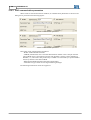
When a PDO is selected from the list of PDOs, its communication parameters are shown in the
dialog box as presented in the following figures:
RxPDO communication parameters.
TxPDO communication parameters.
Description of the communication parameters:
- Enable: enables/disables the PDO.
- COB-ID (hexadecimal): this is the PDO identification number in the CANopen network.
The COB-ID range is from 0181h to 057Fh. This identifier is used to connect TxPDOs to
RxPDOs, i.e., if we want a data produced by a TxPDO to be consumed by a specific RxPDO
then, they shall have the same COB-ID.
- RTR Allowed: RTR allowed/not allowed (remote frame).
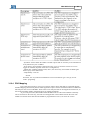
- Transmission Type: Mode of receiving/transmitting messages.
The following transmission modes are supported:
WSCAN Software
39
- Sync Rate: used to define the number of SYNC objects that are necessary to the transmission
of “Synchronous cyclic” TxPDOs.
- Event Timer: used to define a temporized event. It can or cannot be used as an event to
trigger the TxPDOs (depends on the device configuration).
- Inhibit time: TxPDOs inhibition time, that is, the device may not transmit the PDO again
before expiry of the inhibit time.
- Compatibility: reserved.
NOTE!
On master, the "Asynchronous manufatures event" transmission type is only by "Event
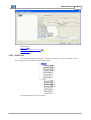
Timer" programing.
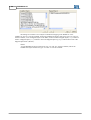
3.12.4 PDO Mapping
Every PDO can transmit or receive up to 64-bits of data. These data shall be configured through
the PDO Mapping that basically defines which application objects will be transmitted within a TxPDO and
which objects will receive an RxPDO. There will be a list of objects that can be mapped for each device, as
well as the maximum number of mapped objects by TxPDO or RxPDO.
As previously described, the TxPDO and the RxPDO must have the same COB-ID so that they
can be connected. In the same way, the total size of mapped bits in these PDOs must be the same. The
TxPDO can transmit more data than the RxPDO is programmed to receive, but never the inverse.
40
WSCAN V2.0X
The dialog box contains a list of objects available for mapping in the RxPDO or in the
TxPDO“rw” and “wo” will be available, and for the TxPDOs the objects with access type “rw” and “ro”
will be available., a list of mapped objects in the PDO, a button to add a mapped object (“?”), a button to
remove a mapped object (“?”), a button to move the mapped object up (“Up”) and a button to move the
mapped object down (“Down”).
NOTE!
- For the RxPDOs the object with access type “rw” and “wo” will be available, and for the
TxPDOs the objects with access type “rw” and “ro” will be available.
WSCAN Software
3.13
41
Viewer/Configuration of PDOs connections
3.13.1 Viewer/Configuration of PDOs connections
This window is used to connect Transmit-PDOs (TxPDO) to Receipt-PDOs (RxPDO) in different
devices.
Related topics :
Procedure for connecting PDOs
Listing the connections 48
41
3.13.2 Procedure for connecting PDOs
3.13.2.1 Procedure for connecting PDOs
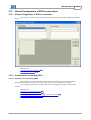
The procedure for connecting PDOs consists basically on selecting a device that produces
determined information (Producer) and a device that consumes this information (Consumer).
The example presented here is based on the network configuration created in item 9 of this
manual.
Related topics :
Selecting the producer (TxPDO) 42
Selecting the consumer (RxPDO) 43
Connecting the producer (TxPDO) to the consumer (RxPDO)
Connecting objects of different sizes 46
45
42
WSCAN V2.0X
3.13.2.2 Selecting the producer (TxPDO)
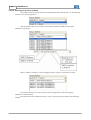
The producer is the device responsible for transmitting the data to the network. Use the following
selection box to select the producer.
After the producer device was selected, a list with the available TxPDOs and their basic
information is presented.
When a TxPDO is selected, its current mappings and its respective connections are listed.
The producer table moves to the position of the first mapped object when the mapping
information is double-clicked.
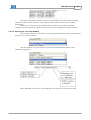
The data related to the TxPDO connections, if any, will be presented according to the following
example:
WSCAN Software
43
This figure shows that the TxPDO is connected to the RxPDO#1 of the Node-ID#2. By double
clicking the connection data, the device and its respective RxPDO will be selected in the consumer
configuration.
If there are no connections for that TxPDO and it is enabled, it means that the TxPDO is
configured to produce data to the network, but that no other device is configured to consume this data.
3.13.2.3 Selecting the consumer (RxPDO)
The consumer is the device responsible for receiving the data from the network. Use the following
selection box to select the consumer.
After the consumer device was selected, a list with the available RxPDOs and their basic
information is presented.
When an RxPDO is selected, its current mappings and its respective connections are listed.
44
WSCAN V2.0X
The consumer table moves to the position of the first mapped object when the mapping
information is double-clicked.
The data related to the RxPDO connections, if any, will be presented according to the following
example:
This figure shows that the RxPDO is connected to the TxPDO#1 of the Master-ID#1. By double
clicking the connection data, the device and its respective TxPDO will be selected in the producer
configuration.
If there are no connections for that RxPDO and it is enabled, it means that the RxPDO is
configured to consume data from the network, but that no other device is configured to produce data.
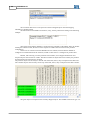
Besides, after selecting a certain producer and consumer, all its mapped transmission and
reception objects will be listed on a table. This table contains all objects that can be used by the producer
for transmission and consumer for reception.
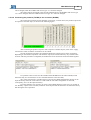
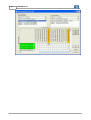
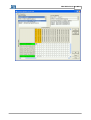
The producer objects will be always in the left side of the table, that is, they correspond to the table rows.
The consumer objects will be always on the top of the table, that is, they correspond to the table columns.
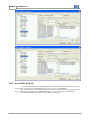
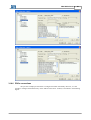
The green objects correspond to the currently mapped objects. The TxPDOs with access type “rw”
WSCAN Software
45
can be changed, while the TxPDOs with access type “ro” cannot be changed.
The orange objects correspond to the currently mapped objects. The RxPDOs with access type
“rw” can be changed, while the TxPDOs with access type “ro” cannot be changed.
3.13.2.4 Connecting the producer (TxPDO) to the consumer (RxPDO)
The connection procedure consists basically on selecting, via check boxes, the producer object and
its respective consumer object, as shown in the following figure:
After connecting all producer objects to their respective consumer objects, click on the “Apply
Connections” button so that the connections can be created.
Several verification procedures are performed during the creation process of the connections.
Depending on the number of producer and consumer objects, the creation time may vary and take a few
seconds. After this procedure is completed, the window the list of connections shows the following data:
It is possible to observe that now the TxPDO and the RxPDO have the same COB-ID, which
means that they are connected (this is also confirmed from the connection data).
The “Apply Connections” procedure does not save the new PDO configurations directly on the
object dictionary. Press the “OK” button to confirm that the new PDO configuration is valid and,
consequently, save it on the object dictionary.
In certain situations it is necessary to preserve the TxPDO mapping. In this case it is possible to
use “Dummy” objects in the consumer, which are virtual objects that can be used to consume unnecessary
data during the device operation.
46
WSCAN V2.0X
3.13.2.5 Connecting objects of different sizes
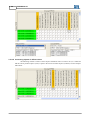
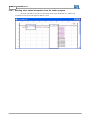
The following window is used to connect objects of different sizes. In order to do so, it is sufficient
that the sum of producer objects (rows) is equal to the sum of consumer objects (columns). See the example
that follows:
WSCAN Software
47
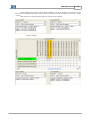
In this example, the producer objects “Write WORD 1” and “Write WORD 2”, which have 16-bits
each, will be consumed by the object “Target Velocity”, which has 32-bits. In other words, 16 bits + 16 bits
= 32 bits.
This will be the resulting mapping after the connections are applied:
Another example:
48
WSCAN V2.0X
3.13.3 Listing the connections
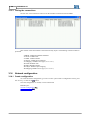
Click on the “List Connection” button to list the available connections between PDOs:
This window shows all available connections listed by object. The following connection data are
presented:
- COB-ID: TxPDO and RxPDO Identifier.
- Tx-Node: TxPDO node.
- Tx-PDO: TxPDO number.
- Tx-Object: TxPDO object mapping.
- Tx-Mapping: TxPDO access type (“ro” or “rw”).
- Rx-Node: RxPDO node.
- Rx-PDO: RxPDO number.
- Rx-Object: RxPDO object mapping.
- Rx-Mapping: RxPDO access type (“ro” or “rw”).
3.14
Network configuration
3.14.1 Create configuration
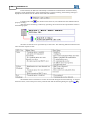
To create the master configuration, go to the “Create” option under “Configuration” menu, press
the “F7” key, or click on the
button.
Once the configuration is created, it can be transferred.
Related topics :
Transfer configuration
Online monitoring 49
49
WSCAN Software
49
3.14.2 Transfer configuration
To transfer the master configuration, go to the “Transfer” option under “Configuration” menu,
press the “F8” key, or click on the
button.
During the transmission of the master configuration, the ladder program developed by the user as
well as the CANopen communication will be interrupted. After the transmission is completed, the ladder
program is executed again and the master reinitializes the CANopen network (runs the initialization
services and configures all slaves).
The following window appears in case the communication with the CANopen master via Modbus
is not available:
In this case, check the serial cable connection between the serial port on the PC and the board
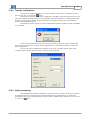
serial connector. Besides that, verify the serial configuration set in the WSCAN software as well as the
board configuration.
To access the serial configuration (see Figure 67) go to the “Configure Serial” option under
“Communication” menu or press the “Shift + F8” keys at the same time.
3.14.3 Online monitoring
After transmitting the master configuration, may be necessary to monitor the devices to check if
all configured devices are connected to the network and effectively communicating. To monitor the
network devices go to the “Online Monitoring” option under “Communication” menu, press the “F9” key,
or click on the
button.
50
WSCAN V2.0X
At this moment, the WSCAN will attempt to establish the communication with the board by
testing the serial communication. If the communication is properly working, the following message is
displayed in the status bar at the bottom of the WSCAN software.
A flashing blue LED
, also located in the status bar, will indicate that the communication is
properly working.
After the online monitoring is effectively operating, the network will be represented as shown in
the following figure:
The status of each device is represented by its LED color. The following table describes the LED
colors and their respective state:
The detailed status of each device can also be accessed during the online monitoring. To monitor
51
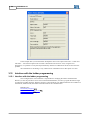
the device status, click on the picture of any network node and the following dialog box appears(1)
:
WSCAN Software
51
(1) "Bus Off" and "Power Off" indications only for PLC11-01 board.
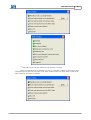
When an initialization error is detected in a slave, it is possible to identify in which stage of the
initialization process the error took place. Click on the “Details” button (see figure below) in the master
status window to view more error details:
52
WSCAN V2.0X
In the example above, when the master attempted to write to the object with index = 1A03h and
sub-index = 1 the slave#2 reported an error that is described in the text box. Now, using the error
description, it is possible to verify the Object Dictionary and the User Manual of the device and solve the
problem.
The information in this dialog is only valid when an initialization error takes place in a slave.
3.15
Interface with the ladder programming
3.15.1 Interface with the ladder programming
Once configured, the network master is responsible for managing the whole communication.
However, it must be possible to access received and transmitted data, as well as, program the desired logic
of operation in ladder language. With this purpose, some interfaces were defined: data that are available on
the network, ladder blocks, and status and control data of the communication.
Related topics :
I/O memory mapping 53
Control Word and Status Word
Ladder Block (SDO) 56
53
WSCAN Software
53
3.15.2 I/O memory mapping
Read words, write words, read bytes and write bytes are made available for data mapping in the
CANopen network. They are organized in the following way:
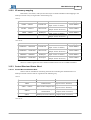
- PLC2 :
Address
Name
%RW0 ... %RW31
Read Words
%WW0 ... %WW31
Write Words
%RB0 ... %RB31
Read Bytes
%WW0 ... %WW31
Write Bytes
Ladder Acess
Read
(Input: escravo à mestre)
Write
(Output: mestre à escravo)
Read
(Input: escravo à mestre)
Write
(Output: mestre à escravo)
Mapping
Master RPDOs
Master TPDOs
Master RPDOs
Master TPDOs
- PLC11-01 :
Address
Name
%RW4200 ... %RW4299
Read Words
%WW4600 ... %WW4699
Write Words
%RB4400 ... %RB4499
Read Bytes
%WW4800 ... %WW4899
Write Bytes
Ladder Acess
Read
(Input: escravo à mestre)
Write
(Output: mestre à escravo)
Read
(Input: escravo à mestre)
Write
(Output: mestre à escravo)
Mapping
Master RPDOs
Master TPDOs
Master RPDOs
Master TPDOs
These are volatile registers that store all data transmitted and received via PDO and EMCY.
3.15.3 Control Word and Status Word
3.15.3.1 Control Word and Status Word
Some words are available for monitoring the state and controlling the communication of a
CANopen network. These words are organized in the following way:
- PLC2 :
Address
%RS0
%RS1 ... %RS63
%WC0
%WC1
- PLC11-01 :
Name
Status of the CANopen
communication
Ladder Acess
Read
(Input: escravo à mestre)
Read
Status of the CANopen slave
(Input: escravo à mestre)
Control of the CANopen
Write
commnication
(Output: mestre à escravo)
Write
Endereço do escravo destino
(Output: mestre à escravo)
54
WSCAN V2.0X
Address
Name
Status of the CANopen
communication
%RS4000
%RS4001 ... %RS4063
%WC4136
%WC4137
Ladder Acess
Read
(Input: escravo à mestre)
Read
Status of the CANopen slave
(Input: escravo à mestre)
Control of the CANopen
Write
commnication
(Output: mestre à escravo)
Control of the CANopen
Write
commnication
(Output: mestre à escravo)
The next sections describe each one of these words.
Related topics :
Status of the CANopen communication 54
Status of the CANopen slave 55
Control of the CANopen communication 56
Address of the destination slave 56
3.15.3.2 Status of the CANopen communication
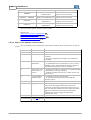
This word indicates the communication status of the CANopen master. Each bit has one specific
purpose:
Bit
Description
Values
0...2
Reserved
-
3
Slaves initialization 0: Initialization procedure of the CANopen network is not
concluded.
1: All slaves configured as mandatory were initialized
successfully.
4
Error in the slaves
initialization
5
Failure in the error 0: All the slaves with error control service (Node Guarding
control service of
or Heartbeat) are correctly operating.
the slave
1: A failure was detected in the error control service of at
least one slave.
6
Slave transmitted
an EMCY object
0: No Emergency objects were detected.
1: At least one slave reported an error through the
Emergency object.
7
Reserved
-
8
Toggle bit feedback Indicates the value of the toggle bit that was written in the
control word. The toggle bit alternates between two
consecutive requests (first request has toggle bit set to 0).
After executing the command, the slave copies the master
toggle bit to inform that the action was successfully
performed. An incorrect toggle bit value means
communication error.
9…14
Reserved
13
Bus Off (1)
0: Slaves were initialized successfully.
1: An initialization error was detected in a slave. If this is
a mandatory slave, the initialization procedure cannot be
concluded until the master is able to configure it.
55
0: Master OK.
WSCAN Software
55
1: Master with communication disabled by bus off error.
14
Power Off (1)
15
Communication is
disabled
55
0: Master OK.
1: Mestre without power supply on can interface.
0: Communication operating normally.
1: Master received a command for disabling the
communication (through the control word) and the
communication was disabled.
(1) "Bus Off" e "Power Off" indication only for PLC11-01.
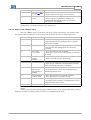
3.15.3.3 Status of the CANopen slave
This is an ARRAY with 63 words where each array position represents the slave address on the
network and each word indicates the slave status. Each bit of each slave has the following function:
Bit
Description
Values
0
Slave identified
0: Slave identification was not performed.
1: Slave identification (by reading the device type) was
carried out successfully.
1
Slave configured
0: Slave configuration was not performed.
1: Procedure for slave configuration was carried out
successfully.
2
Error control
service started
0: Error control service was not started.
1: Slave error control service (node guarding or heartbeat)
was started.
3
Initialization
procedure
concluded
0: Master did not initialize the slave.
1: Master concluded the slave initialization.
4
Initialization error
0: Slaves was initialized successfully.
1: Slave was not initialized. The initialization procedure
cannot continue until this slave is initialized.
5
Failure in the error 0: Error control service is properly working.
control service
1: Error control service of the slave (node guarding or
(node guarding or heartbeat) reported an error.
heartbeat)
6
Slave transmitted
an EMCY object
0: Slave did not report errors via EMCY objects.
1: Slave reported errors via EMCY objects.
7
Slave reset
0: Performing no operation on the slave.
1: Performing slave reset due to a communication error or
a command in the control word.
8...15
Reservado
-
NOTE!
In spite of the CANopen network supports addresses from 1 to 127, the maximum address of slave
allowed is 63 because the other positions do not have correspondent status words.
56
WSCAN V2.0X
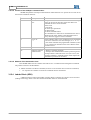
3.15.3.4 Control of the CANopen communication
WORD that performs CANopen communication related functions in a specific device. Each bit of
the word has a different function:
Bit
Description
Values
0...7
Command to the
slave
Management command of the slave status. The following
values can be used in these bits so that the master can
command the slaves on the network:
1:Start Node
2: Stop Node
128: Enter pre-operational
129: Reset Node
130: Reset Communication
The command set in these bits is transmitted to the device
indicated in the word “address of the destination slave”
always when the toggle bit value is modified.
8
Toggle bit
Bit that indicates when a new command can be transmitted
to the slave. When this bit value changes (0 ? 1 or 1 ?
0), the master transmits the programmed command (in bits
0 to 7) to the device indicated in the word “address of the
destination slave”.
9 ... 14
Reserved
-
15
Disables CANopen 0: Master is operating normally.
communication
1: Interrupts the communication and the processing of the
CANopen master. When this bit is reset (set to zero), the
CANopen interface is restarted and the master repeats the
initialization procedure for all slaves.
3.15.3.5 Address of the destination slave
This WORD defines the slave address that shall receive a communication management command.
The possible values for this WORD are:
0: Master transmits a broadcast command (all slaves on the network must execute the command).
1 ... 127: Specific slave address to which the command must be transmitted.
3.15.4 Ladder Block (SDO)
A SDO block was created in the ladder program (WLP) so that the slave objects can be accessed
(reading and writing). Refer to the WLP manual for further details on the SDO block.
WSCAN Software
3.16
57
Example of network configuration
3.16.1 Introduction
Master: PLC2 Rev. 130, Address: 1, Baudrate: 1000 Kbit/s
Slave: SCA-05 Rev. 210, Address: 2
Related topics :
Master configuration (PLC2) 57
Slave configuration (SCA-05) 57
Master PDOs (PLC2) 57
Slave PDOs (SCA-05) 58
PDOs connections 59
Reading slave status information from the ladder program
Commanding the slave from the ladder program 63
62
3.16.2 Master configuration (PLC2)
Standard, no parameter was changed.
3.16.3 Slave configuration (SCA-05)
Standard, no parameter was changed.
3.16.4 Master PDOs (PLC2)
A transmit-PDO (TxPDO) with COB-ID 0502h (same COB-ID of the slave RxPDO) was created
for the master and the following objects were mapped: Write Word 0, 1 and 2 (all of them are
UNSIGNED16).
Also, a receive-PDO (RxPDO) with COB-ID 0482h (same COB-ID of the slave TxPDO) was
created for the master and the following objects were mapped: Read Word 0, 1 e 2 (all of them are
UNSIGNED16).
It is possible to notice that an INTEGER32 data from the slave was connected to two INTEGER16
data from the master. This is a possible situation on the CANopen network since it considers the total
number of mapped bits in the PDOs. This is also needed because the CANopen master does not have
INTEGER32 objects for mapping. Besides, the SCA-05 objects - “Target Velocity” and “Velocity Actual
Value” - only use the least significant bits, that is, the first 16-bits.
Only the enabled PDOs are listed. The other PDOs were disabled.
58
WSCAN V2.0X
3.16.5 Slave PDOs (SCA-05)
A receive-PDO (RxPDO) with COB-ID 0502h was created for the slave and the following objects
were mapped: “Controlword” (UNSIGNED16) and “Target Velocity” (INTEGER32).
Also, a transmit-PDO (TxPDO) with COB-ID 0482h was created for the slave and the following
objects were mapped: “Statusword” (UNSIGNED16) and “Velocity Actual Value” (INTEGER32).
Only the enabled PDOs are listed. The other PDOs were disabled.
WSCAN Software
59
3.16.6 PDOs connections
The previous example presented how to configure the PDOs individually. However, it is also
possible to configure the PDOs directly on the “PDOs Connections” window, as described in the following
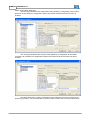
figures:
60
WSCAN V2.0X
WSCAN Software
61
62
WSCAN V2.0X
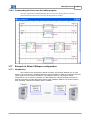
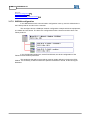
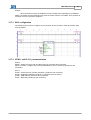
3.16.7 Reading slave status information from the ladder program
The status information of Node 2 is obtained from the word “Read Status 2” (%RS2) and
converted into bit registers through the “DMUX” block.
WSCAN Software
63
3.16.8 Commanding the slave from the ladder program
The logic command for enabling/disabling the drive uses the “Writing Word 0” (WW0).
The speed reference for the drive uses the “Writing Word 2” (WW2).
3.17
Example of follow CANopen configuration
3.17.1 Introduction
The Follow function performs the speed or position synchronism between two or more
motors. The synchronism is established through the transmission of PDO type telegrams from the
Follow producer to the Follow consumers. In a CANopen network, one producer can be
configured for one or several consumers. It is also allowed to configure several producers for
several consumers, provided that each producer uses a different COB-ID. The Follow function,
when activated, reserves the RPDO1 and the TPDO01.
64
WSCAN V2.0X
See also :
WSCAN configuration 64
WLP configuration 67
CFW11 and PLC11 parameterization
67
3.17.2 WSCAN configuration
In the WSCAN the whole communication configuration is set up, and it is defined who is
the Follow producer and who is the consumer.
The next figure shows a CANopen network configuration example with three equipments,
one master and two slaves. The slave 2 is configured as Follow consumer and the slave 3 as
Follow producer.
In the Configuration dialog box, at the FOLLOW tab, the whole configuration of the
Follow function PDOs is performed.
The equipment that will be the producer must be initially defined, informing the PDO
COB-Id. It is necessary to define whether the speed is theoretical or actual, as the next figure
illustrates.
WSCAN Software
65
The next step is the consumer configuration, according to the next figure. The consumer
COB-ID must be equal to the COB-ID defined for the producer.
The definitions made through the Follow configuration dialog box can be observed at the
66
WSCAN V2.0X
PDOs configuration dialog box.
The next figure illustrates the transmission PDO (TPDO 01) configuration at the Follow
producer. All the TPDO 01 configuration options are locked, because the Follow function is
enabled.
The next figure illustrates the reception PDO (RPDO 01) configuration at the Follow
consumer. All the RPDO 01 configuration options are locked, because the Follow function is
enabled.
The baud rate and the number of telegrams in the CANopen network can influence the
positioning precision. It is recommended to use the Follow function with a minimum baud rate of
WSCAN Software
67
250 bps.
When the Follow function is enabled at a PLC11 board that is operating as a CANopen
master, the board must be initialized every time the Follow function is modified, from producer to
consumer or from consumer to producer.
3.17.3 WLP configuration
The Follow block is used to configure the synchronism at the consumer. Refer to the WLP help
for more details.
3.17.4 CFW11 and PLC11 parameterization
CFW11:
P0202 – Select the vector with encoder mode (4), (Producer and consumer).
P0221 or P0222 – Program one of these parameters for PLC11 reference, (Producer and
consumer).
PLC11:
P1262 – Inform the main encoder resolution, (Producer and consumer).
P1285 – Enable the CANopen protocol (1), (Producer and consumer).
P1286 – CAN address, (Producer and consumer).
P1287 – Baud rate, (Producer and consumer).
68
WSCAN V2.0X
Index
-EEDS file 12
EMCY 28
Error control 8
Example of network configuration
-AAbbreviations and definitions 6
About the WSCAN 6
About this manual 6
Address of the destination slave 56
Address on the CANopen network 9
-B-
-FFOLLOW
24, 32
-HHEARTBEAT PRODUCER
Button Bar
15
22, 27
-I-
-CCAN 7
CAN and CANopen 9
CANopen network 17
Changing the numerical base 35
Changing the object value 36
Characteristics of the CANopen network 9
COB-ID 11
Commanding the slave from the ladder program
63
Communication Objects - COBs 10
Configuring a new network 17
Configuring the master 19
Configuring the slaves 25
Connecting objects of different sizes 46
Connecting the producer (TxPDO) to the consumer
(RxPDO) 45
Control of the CANopen communication 56
Control Word and Status Word 53
Create configuration 48
-DData access 10
Data frame 8
Data transmission
Device Tree 16
Documents 7
57
10
I/O memory mapping 53
Interface with the ladder programming
52
-LLadder Block (SDO) 56
List of Objects 33
Listing the connections 48
Log Window 16
-MMain advantages of WSCAN 7
Main Menu 14
Main Window 14
Master configuration (PLC2) 57
Master PDOs (PLC2) 57
Master/Slave PDOs Configuration
36
-NNetwork acess 8
NMT 20, 26
NODE GUARDING 26
Numerical representation
7
Copyright © 2006-2010 WEG. All rights reserved.
Index
-OObject Data 34
Online monitoring
49
-PPDO communication parameters 38
PDO Mapping 39
PDOs connections 59
PDOs List 37
Physical Media 9
Procedure for connecting PDOs 41
-RReading slave status information from the ladder
program 62
Remote frame 8
Running the WSCAN software 12
-SSAVE/RESTORE 31
SDO 21
Selecting the consumer (RxPDO) 43
Selecting the producer (TxPDO) 42
Slave configuration (SCA-05) 57
Slave Object Dictionary 33
Slave PDOs (SCA-05) 58
Status of the CANopen communication
Status of the CANopen slave 55
SYNC 20
54
-TTransfer configuration
49
-VViewer/Configuration of PDOs connections
Copyright © 2006-2010 WEG. All rights reserved.
41
69