1
4. CARD READERS TYPES AND CONNECTION
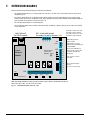
The AcNetPro controller may recognise many kind of reader technologies, selected by jumpers JP4/6,7,8. Hereunder the
connection for the most popular one (magnetic and proximity). For other technologies, refer to the relevant manual.
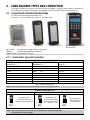
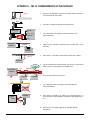
4.1 Connecting the Proximity Reader Range
It is adviced to use the ACTEC proximity reader range.
PR 103/104 – a 125 KHz models or smart reader – a 13,56 MHz model
PR 104 Anti Vandal
PR 103 Prox
PR 106 Prox Pincode
Type of cable:
8 shielded wires, 22 AWG. Maximum length: 100m.
Interface:
ISO2 (clock/data) or Wiegand (data0/data1)
SW - 7 Fingerprint (refer to the
relevant Manual)
NOTE : connection readers table on next page
4.1.1 Card readers type and connection
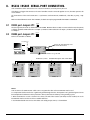
PR TYPE READERS - CABLE CONNECTION
Reader / ISO2 Interface
(Proxpoint, etc…)
Reader / Wiegand Interface
(PR 03/04/06, etc..)
ACNET 200 PCB
Reader 1/2
+DC
+DC
Red
12Vdc
GROUND
GROUND
Black
0v
CLOCK
DATA 0
Green
CLK1/CLK2
DATA
DATA 1
White
DAT1/DAT2
DATA RTN (If exists)
DATA RTN
GREEN LED (If exists)
BLUE LED
RED LED (If exists)
GREEN LED Orange
Brown
0v
LED1/LED4
BEEPER (If exists)
BEEPER
BUZ1/BUZ2
Yellow
Fig 3. connection readers table
Note 2 : Refer to the reader manufacturer instruction manual for reader operation detail
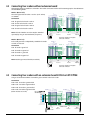
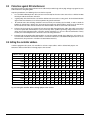
AcNetPro Dip switches DS1
ISO 2 INTERFACE (Clock/Data) :
Any Wiegand card
6 50 bits with
6 parity
6
up to
7
7
7
checking
based
on
ISO2
format.
8
8
8
6
7
8
off
WIEGAND INTERFACE (See also note 1 below) :
on
DS1
off
on
DS1
off
off
on
on
DS1DS1
6
7
8
off
Any Wiegand card
up to 506bits 6with parity
7
7
checking based
8
8 on format:
PE
….
Data
bits
off on
off off
on
on ….PO
on
6
7
8
DS1DS1
DS1DS1
6
7
8
off
on
Any Wiegand card
up to 50 bits without
parity checking
DS1
Fig 3. setup of DS1 switch
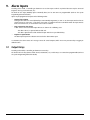
NOTE! Bfore connecting the PR 106 – make sure to reprogram it to Motorola output signal.
Read PR 106 instruction for details.
The AcNetPro 4x4 Installation Manual
7