1
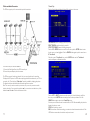
To use the Swann DVR4-Net - Plus with remote viewing capabilities you may have to
®
“open“ ports on your Windows Firewall, your Software Firewall or on the
Broadband Router/Modem that you use to connect to the Internet. Please consult the
documentation or help files on the relevant software or system for instructions on
how to do this. To successfully access your cameras from the Internet you will need
to have allowed access to and from the following ports from an outside connection.
This process is also called “Port Forwarding” or creating a “Virtual Server” connection.
For more information on Port Forwarding, please visit www.portforward.com
Once you have correctly forwarded the ports, please check to see what your
external IP address is (this cannot start with 192.168.x.x). You can check this by going
to http://www.whatismyip.com (note: you must do this on the server machine to find
the correct external IP of the router.)
Once you have your external IP, you can open the Net Viewer software and enter
the server IP as listed on whatismyip.com and use the default password:”0000”.
You may also have to place the IP address of the Swann DVR4-Net - Plus in the
“DMZ” of your Firewall to enable the remote viewing interface. Information on how
to do this should be detailed in the documentation covering operation of your
Firewall.
As ADSL and CABLE MODEM network users usually use a dynamic IP address, once
the MODEM restarts, the IP addresses can change. Users can opt for a static IP
address which does not change by contacting their ISP. Otherwise users can apply for
a DNS service through www.no-ip.com or www.dyndns.com
6. Playback .................................................................................................................. 23
7. Search Play............................................................................................................... 24
8. Time Search............................................................................................................. 24
9. Event Search............................................................................................................ 25
10. Start Stop Search...................................................................................................... 25
11. Zoom Operation...................................................................................................... 26
12. PIP Operation........................................................................................................... 26
13. Information Display................................................................................................... 27
14. USB Backup.............................................................................................................. 27
15. PTZ Operation......................................................................................................... 27
16. Default Setting.......................................................................................................... 28
17. Menu Option Table.................................................................................................. 28
18. Remote Control....................................................................................................... 29
19. Serial Port Control.................................................................................................... 29
20. PC View Software Operation.................................................................................... 29
Appendix A: Trouble shooting guide............................................................. 33
Appendix B: Serial port protocol.................................................................... 35
Appendix C: Record Time Table..................................................................... 37
Appendix D: Internet Viewing/Playback Configurations............................. 38
Specifications....................................................................................................42
Exterior Dimensions...........................................................................................42
Contents list
Name
4 Channel DVR
IR Remote Control
Power Cable
Power Adaptor
BNC to RCA Female Adaptors
Hard Drive Tray and 2 Keys
Remote Viewing Software
User Manual
Quantity
1
1
1
1
6
1
1
1
If any of these components are missing, please contact your retailer.
41
2