1
LOOP – Toggle Arrangement Loop.
CLIP/TRK – Toggle between Clip and Track Views.
NOTE 1: If a Pedal is connected, it will sustain the currently held Note(s).
NOTE 2: If you’re using an application other than Ableton Live, please see
the Other Apps section.
X/Y PAD
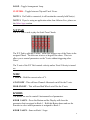
The X/Y Pad is used to play the Scale Tone Chords.
The X/Y Pad is split into 6 zones. Each zone triggers one of the Notes in the
assigned Chord. The 6th zone is twice as large as the others. This is to
allow you to control parameters on the Y-axis without triggering other
Notes.
The Y-axis of the X/Y Pad controls velocity unless Fixed Velocity is turned
on.
MISC
Y HOLD – Hold the current value of Y.
AT ON/OFF – This will turn Channel Aftertouch on/off for the Y-axis.
MOD ON/OFF – This will turn Mod Wheel on/off for the Y-axis.
KNOBS
The Knobs are used to control 8 instrument-level parameters.
KNOB 1 ASGN – Press this Button and the Display will show the
parameter that is assigned to Knob 1. Hold this Button down and use the
Encoder to select which parameter is assigned to Knob 1.
KNOB 2 ASGN – Same as Knob 1 Asgn.
4