1
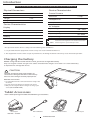
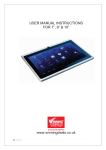
Tablet Features
This section provides information about the features available on your tablet.
Feature
NOTE:
Function
Power Button
• To switch the device on, press and hold
Power adapter/
connection port
• Connect the power adapter to power the tablet
and charge the battery.
Micro-USB Port
• Connect USB devices or connected to your computer
to transfer or synchronize data, music, photos, videos,
contacts, etc.
• Connect the USB cable to charge the battery.
Front Mic
• Capture audio.
Front Camera
• Capture an image or record video from the
front camera.
Speaker
• Audio output for video playback and music.
Touch Screen
• Touch the screen to use the onscreen controls
including buttons, menu items, and the onscreen
keyboard.
Feature
Function
The front camera does
not support zoom, face
recognition or the touch
function to focus.
NOTE:
The tablet battery requires
about 2 hours to fully charge.
CAUTION:
Use the original Lutema
charger to charge the device.
NOTE:
MicroSD Expansion
Slot
• Supports up to 32GB of memory.
We recommend Lutema SoundDrive Micro Memory
available in 2GB, 4GB, 6GB, 8GB and 16GB.
* Sold separately.
Volume up Key
• Press to increase the volume level.
Volumen down Key
• Press to decrease the volume level.
Headphone Jack
• Plug in any headset or speaker with a 3.5mm plug
for alternate audio output.
2
FEATURES
Recomendamos adquirir
SoundDrive MicroSD
para su tablet MobileOne
CAUTION:
Only use the original Lutema
charger to charge your device.
Get the car charging adaptor
*Sold Separately
(Model : MITTBL1CAR)