1
Connecting the system
Power supply
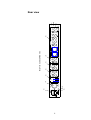
Please connect the power jack (1) at the rear with your wall outlet (Please
refer to page 8). Use the provided power cable or another one allowed for
your home country specifications.
NOTE:
The power specifications (2) on the rear must meet to your home
country specifications.
The mains-button (3) at rear must be switched off. The PRE 1 G2 is
a Class I system and must be earthed. Please ensure that the earthconnection is in best condition. For best performance connect the hot
wire seeing from the front with the left pin.
Ground Connection
With the PRE 1 G2 comes a yellow-green ground cord for optimal
ground connection. Please connect this additional ground cord to the plug
(10) at the back of the PRE 1 G2 and put the plug into a socket near to
the power cord.
Audio sources
The Audionet PRE 1 G2 is a very sensitive system. Please ensure that all
used connector cables are in absolutely best condition.
For connecting or removing audio sources, PRE 1 G2 has to be switched
off (stand by-state) or must be muted.
Inputs
The Audionet PRE 1 G2 has one balanced and five unbalanced high level
RCA inputs (4). Additionally, a true monitor loop is available. Please connect left and right inputs to the corresponding outputs of the designated
high-level source.
3