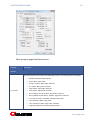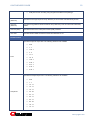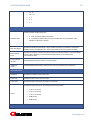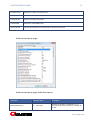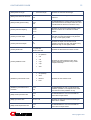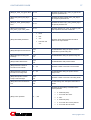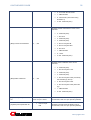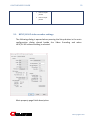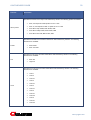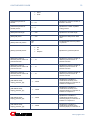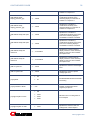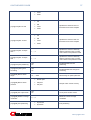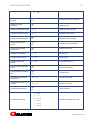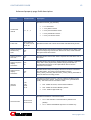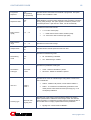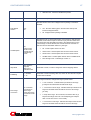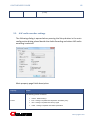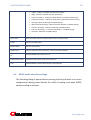
1
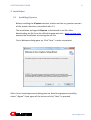
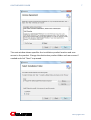
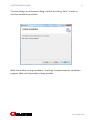
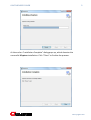
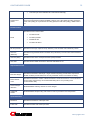
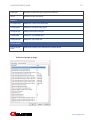
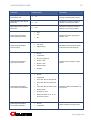
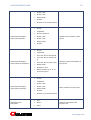
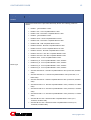
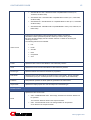
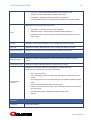
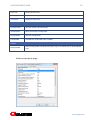
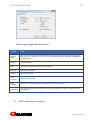
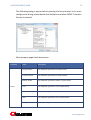
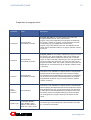
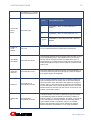
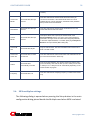
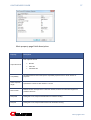
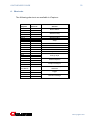
JCapture User’s Guide 2 JCAPTURE USER’S GUIDE LEGAL NOTICE The information in this manual is furnished for informational use only. No part of this manual may be reproduced or transmitted in any form or by any means, electronic or mechanical, for any purpose, without the prior written permission of Jongbel Media Solutions Ltd. The software described in this manual is owned by Jongbel Media Solutions Ltd. It is protected by Bulgarian Copyright Law as well as by international copyright treaties and may be used or copied only in accordance with the license agreement. Jongbel Media Solutions Ltd. provides this manual “as is” without any warranty, either express or implied. This publication may contain typographical errors or technical inaccuracies. While every precaution has been taken in the preparation of this document, Jongbel Media Solutions Ltd. assumes no responsibility for errors or omissions. Nor is any liability assumed for damages resulting from the use of the information contained herein. Changes are periodically made to the information herein; they will be incorporated in new versions of the manual. Please check the Jongbel Media Solutions website regularly for User Manual updates. Jongbel Media Solutions Ltd. may introduce changes or improvements in the products described in this manual at any time without any special notice. Please address your comments or questions to: Jongate a brand of Jongbel Media Solutions Ltd. [email protected] www.jongate.com www.jongate.com 3 JCAPTURE USER’S GUIDE TABLE OF CONTENTS 1. Overview............................................................................................................................................... 4 1.1 General Features .............................................................................................................................. 4 1.2 Supported Output Stream Formats.................................................................................................. 5 2. Installation ............................................................................................................................................ 6 2.1 Installing JCapture ............................................................................................................................ 6 2.2 Uninstalling JCapture...................................................................................................................... 10 3. General ............................................................................................................................................... 10 4. Functions ............................................................................................................................................ 11 4.1. File Functions.................................................................................................................................. 11 4.2. Control Functions ........................................................................................................................... 12 4.3. View Functions ............................................................................................................................... 12 4.4. Tools Functions............................................................................................................................... 13 4.5. Help Functions ................................................................................................................................ 13 5. Setting up the encoder ....................................................................................................................... 13 5.1. AVC/H.264 video encoder settings................................................................................................. 15 3.1. HEVC/H.265 video encoder settings .............................................................................................. 29 3.2. MPEG-2 video encoder settings ..................................................................................................... 40 3.3. AAC audio encoder settings ........................................................................................................... 48 3.4. MPEG audio encoder settings ........................................................................................................ 49 3.5. MPEG multiplexer settings ............................................................................................................. 50 3.6. MP4 multiplex settings ................................................................................................................... 56 4. HLS and DASH ..................................................................................................................................... 58 5. Trial and NFR version restrictions ...................................................................................................... 58 6. Shortcuts ............................................................................................................................................ 59 www.jongate.com JCAPTURE USER’S GUIDE 4 1. Overview JCapturer is a powerful SD and HD SDI capture and encoding solution. It accepts SDI, HDMI, Component and Composite inputs. AVC/H.264, HEVC/H.265 and MPEG-2 video encoding, AAC and MPEG audio encoding, MPEG Transport and Program Stream, MP4, HLS and DASH multiplex are supported. Multi-channel audio volume monitoring and control. The product is suitable for automation through the scheduler module. The CPU monitor provides a system processing load overview. 1.1 General Features Vast variety of output format resolutions and frame rates, from SD up to 4K, including 3D Input interfaces: SD-SDI, HD-SDI, 6G-SDI, HDMI, Composite, Component Containers: MPEG Transport Stream, MPEG Program Stream, MP4, HLS and DASH www.jongate.com JCAPTURE USER’S GUIDE 5 Video compressions supported: MPEG-1/2, AVC/H.264, HEVC/H.265 Audio compressions supported: MPEG Audio Layer I/II, AAC Audio volume metering and control Bitrate preview module CPU load preview module Video encoding PSNR preview module Automation: single daily and weekly capturing through a schedule module Manual capture mode Timer 1.2 Supported Output Stream Formats Supported multiplex formats: MPEG-2 Transport Stream MP4/QuickTime HLS – HTTP Live Streaming DASH – Dynamic Adaptive Streaming over HTTP Supported video compression formats: AVC/H.264 Video MPEG-2 Video Supported audio compression formats: AAC Audio MPEG Audio Layer I/II/III www.jongate.com 6 JCAPTURE USER’S GUIDE 2. Installation 2.1 Installing JCapture Before installing the JCapture solution, make sure that any previous version of the product has been uninstalled refer 2.2. The installation package of JCapture is distributed in msi file. After downloading the file from the official Jongate web site – www.jongate.com, execute the installation by starting the msi file. First a Welcome dialog pops up. Click “Next” in order to proceed. After this a License Agreement dialog pops up. Read the agreement carefully, select “I Agree” if you agree all the terms and click “Next” to proceed. www.jongate.com 7 JCAPTURE USER’S GUIDE The next window shown specifies the installation product location and user access to the product. Change the destination product folder and user access if needed and click “Next” to proceed. www.jongate.com 8 JCAPTURE USER’S GUIDE The next dialog is a confirmation dialog. Confirm by clicking “Next” in order to start the installation procedure. While the product is being installed an “Installing” window shows the installation progress. Wait until the product is being installed. www.jongate.com 9 JCAPTURE USER’S GUIDE At the end an “Installation Complete” dialog pops up, which denotes the successful JCapture installation. Click “Close” to finalize the process. www.jongate.com JCAPTURE USER’S GUIDE 2.2 10 Uninstalling JCapture The application can be removed opening the Control Panel – Programs and Features. Select the JCapture application and click Uninstall. 3. General JCapture is an encoding and capturing solution, working on Windows OS systems. The solution supports all BlackMagic Design video capture cards, which accept SD SDI, HD SDI, 6G, Component, HDMI and composite as a source for the encoding and capturing process. The output of the solution is an MPEG or MP4 files. The encoding and multiplexing is multi-threaded / multi-processor optimized. Multiple instances can run at the same time, with different inputs, encoding settings, destination files and schedules, enabling the solution for multi-channel workflows. A highly professional product wrapped in easy-to-use graphical user interface. Along with the manual encoding and capturing, the solution allows timeautomated encoding and capturing through its Scheduler module, which can be used in any automated workflow. Each schedule item can be of a “Single”, “Daily” or “Weekly” type, with a start date, start time and end time or clip duration. www.jongate.com 11 JCAPTURE USER’S GUIDE Easy to build, edit, export and import schedule lists. The schedule lists are exchangeable with the lists created by the scheduler of JIPEncoder. JCapture is multi-channel audio enabled. It supports from 1 to 16 input mono audio streams. The audio streams can be embedded SDI, AES/EBU or balanced analog audio. The Audio Volume module provides audio volume monitoring and control. The audio levels are represented in “dB” scale from +20 dB to -120 dB. The volume level can be altered precisely in preview mode, before and during the encoding and capturing process. 4. Functions 4.1. File Functions The following functions are available from the application’s File menu. Device Select – The input device of the solution can be selected from this menu. Exit – Closes the JCapture solution. www.jongate.com 12 JCAPTURE USER’S GUIDE 4.2. Control Functions The following functions are available from the application’s Control menu. Start Encoding – Starts the encoding process with the selected video capture input device, encoding, multiplexing settings. The function is also available as a button at the bottom of the main form. Stop Encoding – Stops the encoding process. The function is also available as a button at the bottom of the main form. Setup – Opens the main settings dialog for encoding and multiplexing configuration. The configuration form is described in details below. 4.3. View Functions The following functions are available from the application’s View menu. Volume Control – Shows/hides the Volume Control form. The form shows the current volume in dB of all input audio mono channels. It is possible to control the volume level of all the channels before being encoded and streamed. Timer – Shows/hides the Timer form, which displays the current time of the system. CPU – Shows/hides the CPU monitor form, which displays each CPU load. It is also possible to monitor only one CPU core or the average CPU load level of all the cores on the system. Schedule – Shows/hides the scheduler form, which is used to automate the capturing process. Arrange Windows – Arranges all shown windows in predefined positions. www.jongate.com 13 JCAPTURE USER’S GUIDE 4.4. Tools Functions The following functions are available from the application’s Tools menu. Change Style – Opens the visual style form, which allows the user to change visual style of the solution. 4.5. Help Functions The following functions are available from the application Help menu. Registration – Opens the product registration form. This function is available only in the full licensed version of the product. Check For Updates – Enables/Disables automatic check for updates. About – Opens the About dialog box of the product. 5. Setting up the encoder JCapture can be configured from the Control menu, selecting Setup. The following form shows the main solution settings. www.jongate.com JCAPTURE USER’S GUIDE 14 Video Input Format holds the list of the available input video formats of the selected capture video device, and shows the currently selected input video format. Audio Input Format holds the list of the available input audio formats of the selected capture video device, and shows the currently selected input audio format. Video Encoding shows the selected video compression. The available compressions are MPEG-2 and AVC/H.264. The Setup button opens a configuration dialog of the selected video compression. Audio Encoding shows the selected audio compression. The available compressions are MPEG Audio and AAC. The Setup button opens a configuration dialog of the selected audio compression. Multiplexing shows the selected multiplex type. Currently MPEG-2 and MP4 multiplex are available. The Setup button opens a configuration dialog of the selected multiplex. www.jongate.com 15 JCAPTURE USER’S GUIDE Presets holds the corresponding video, audio and multiplex presets. All the compressions and multiplex have predefined some of the most popular format presets. “+” button, located on the right of each compression and multiplex preset, can be used to add new custom preset. The preset is added to the corresponding preset list having the last component settings. It is then possible to edit the new preset settings hitting the “Setup” button. “-” button, located on the right of each compression and multiplex preset, can be used to remove the currently selected preset from the preset list. The preset is deleted permanently. “R” button, located on the right of each compression and multiplex preset, can be used to rename the currently selected preset. “E” button, located on the right of each compression and multiplex preset, can be used to export all the presets of the corresponding component to an external registry file. The file can be imported to a different system or used later after pre-installation. Video & Audio Preview enables/disables the video and audio preview. 5.1. AVC/H.264 video encoder settings The following dialog is opened when pressing the Setup button in the main configuration dialog placed beside the Video Encoding and when AVC/H.264 video encoding is selected. www.jongate.com JCAPTURE USER’S GUIDE 16 Main property page fields description: Property Description Generic Specifies the format of the output Video Elementary Stream. The following presets are defined: AVC preset • Baseline 600 kbit/s, Baseline profile • Main 3 Mbit/s, Main profile • SVCD 1.15 Mbit/s, Main profile, interlaced • D1 3 Mbit/s, Main profile, interlaced • High 6 Mbit/s, High profile, interlaced • DVD 3 Mbit/s, High profile, interlaced • Blu-ray Blu-ray Disc SD, 8 Mbit/s, High profile, interlaced • Blu-ray HD Blu-ray Disc (Main), 20 Mbit/s, High profile, interlaced • Sony PSP Sony PSP compatible, 700 kbit/s, Main profile • HD 1280x720p 8 Mbit/s, High profile • HD 1440x1080i 10 Mbit/s, High profile, interlaced • Apple iPod Apple iPod, 600 kbit/s, Baseline profile www.jongate.com 17 JCAPTURE USER’S GUIDE • AVCHD AVCHD compatible, 20 Mbit/s, High profile, interlaced • AVCHD 2.0, 28 Mbit/s, High profile, progressive • 1seg 1seg compatible, 384 kbit/s, Baseline profile, CBR • DivX Plus DivX Plus video, 20 Mbit/s, High profile, VBR • 3GP 3GP compatible, 256 kbit/s, Baseline profile, VBR • Silverlight Microsoft Silverlight compatible, 500 kbit/s, High profile, VBR • Intra Class 50 Panasonic's AVC Intra Class 50 • Intra Class 100 Panasonic's AVC Intra Class 100 • Intra Class 50 RP2027-2012 • Intra Class 100 RP2027-2012 • Intra Class 200 RP2027-2012 • XAVC Intra CBG • XAVC Intra VBR • DASH264 • SONY XAVC Long GOP • Panasonic AVC-LongG 4:2:2 Classes G50 (50 Mbps) • Panasonic AVC-LongG 4:2:2 Classes G25 (25 Mbps) • Panasonic AVC-LongG 4:2:0 Classes G12 (12 Mbps) • Panasonic AVC-LongG 4:2:0 Classes G6 (6 Mbps) Specifies the Profile of the encoded H.264/AVC Video Elementary Streams. The following selections are available: Profile • Baseline Profile • Main Profile • High Profile • High 10 Profile • High 4:2:2 Profile Specifies the Level of the encoded H.264/AVC Video Elementary Streams. The following selections are available: Level • Level 1 • Level 1b • Level 1.1 • Level 1.2 • Level 1.3 • Level 2 • Level 2.1 www.jongate.com 18 JCAPTURE USER’S GUIDE • Level 2.2 • Level 3 • Level 3.1 • Level 3.2 • Level 4 • Level 4.1 • Level 4.2 • Level 5 • Level 5.1 • Level 5.2 • Level Auto (the most suitable level is selected automatically) Note: Level will be set to "Auto" after input pin connection. If you need a special level, it should be installed manually after connecting. Performance preset Specifies the performance level. There are 16 performance presets available currently: from 0 (the fastest encoding speed, the worst video quality) to 15 (the slowest encoding speed, the best video quality), default value is 9. Specifies the frame type. The following selections are available: Frame type Slice count • Progressive frame • Interlaced fields • Interlaced frame (MBAFF) Specifies the number of slices per picture. Bit Rate Control Specifies the rate control modes: Mode • Constant bit rate • Constant quantizer • Variable bit rate • Target quality mode Specifies the multi-pass encoding modes. The following selections are available: Pass • Single pass: regular single pass encoding • Multi pass analyze: encoding and gathering statistics for the next pass www.jongate.com 19 JCAPTURE USER’S GUIDE • Multi pass encode: encoding using the gathered statistics and updating it Bit rate (kbits/sec) Specifies the average output bit rate (in kbits/sec) of the encoded video elementary stream. HSS rate (kbits/sec) Specifies the hypothetical stream scheduler rate (in kbits/sec) of the encoded video elementary stream. CPB size (kbits) Specifies the size of the coded picture buffer (CPB) in kilobits. Use HRD Specifies whether HRD conformance should be maintained or not. Bit Rate Control Specifies the picture aspect ratio. The following selections are available: Pass • Auto • 1:1 • 1.25 : 1 • 4:3 • 1.5 : 1 • 16 : 9 • 1.85 : 1 • 2.00 : 1 • 2.21 : 1 • 2.35 : 1 • 2.39 : 1 Specifies the sample aspect ratio. The following selections are available: Sample AR • Auto • 1:1 • 12 : 11 • 10 : 11 • 16 : 11 • 40 : 33 • 24 : 11 • 20 : 11 • 32 : 11 • 80 : 33 • 18 : 11 • 15 : 11 www.jongate.com 20 JCAPTURE USER’S GUIDE • 64 : 33 • 160 : 99 • 4:3 • 3:2 • 2:1 GOP Structure Enable extended sample aspect ratio. Extanded SAR • 1 - write real sample aspect ratio always. • 0 - round sample aspect ratio to the nearest table value from specification if the difference is less than 2 percent Max GOP length Specifies the maximum GOP length. Larger numbers frequently provide better compression. Smaller numbers provide better error recovery and better access to the frames for editing. Max B-frames count Specifies the maximum number of B frames between consecutive Pframes. In some situations such as video conferencing it is recommended setting this to 0 for providing lower communication delay. Scene changes detection Enables/disables inserting I-frames on scene changes. Adaptive B frames Enables/disables adaptive using of B frames in order to provide the best compression Input Information Resolution Specifies the resolution of the input video. Frame rate Specifies the frame rate of the input video. Frame type Specifies the input frame type: progressive or interlaced. Specifies the input data layout. The following values are available: Layout • YUV 4:2:0 (10 bits) • YUV 4:2:2 (10 bits) • YUV 4:4:4 (10 bits) • RGB 24 bits • RGB 32 bits Input Information www.jongate.com 21 JCAPTURE USER’S GUIDE Encoded frames Displays the number of encoded frames. Average speed Displays the average encoding speed. Average bit rate Display the average encoding bit. Overall PSNR Displays the overall PSNR value. Restore default Restores all properties to the default state for selected H.264 Preset. Advanced property page Advanced property page fields description: Parameter Available Value Description [GOP] IDR frequency 0, ...,limit of INT Specifies the frequency of IDR frames, e.g. 3 means that first, fourth, seventh, etc. I frames will be IDR. www.jongate.com 22 JCAPTURE USER’S GUIDE [GOP] Minimum length 1, ...,Max GOP length Specifies the minimum GOP length. [GOP] Use B-frame as reference Yes No Enables/disables marking B-frames as used for reference. [GOP] Enable pyramid coding Yes No Enables/disables the pyramid coding of B frames (also "Max B frames count" should be 3 and "Use B frames as reference" should be "Yes"). [Picture] Chroma sampling 4:0:0 4:2:0 4:2:2 Specifies the chrominance data sampling. Note that some values are not allowed for certain profiles. [Picture] Luma bit depth 8 10 Specifies the depth of luminance data samples. Note that more than 8 bit depth is only allowed for High 10 and higher profiles. [Picture] Chroma bit depth 8 10 Specifies the depth of chrominance data samples. Note that more than 8 bit depth is only allowed for High 10 and higher profiles. [Picture] Field order Top field first Bottom field first Specifies the field dominance within a frame. [Picture] Pulldown mode [Resilience] Intra refresh mode • No pulldown • 2:3i • 3:2i • 2:3p • 3:2p • Auto • Off (Default) • Slow • Medium • Fast Specifies the video pulldown mode. "Auto" denotes detection of pulldown using media sample timestamps Specifies the intra refresh mode. [Resilience] Constrained intra prediction Yes No Enables/Disables the use of constrained intra prediction (whether to use adjacent inter coded macroblocks for intra prediction or not) [Rate] Fixed input frame rate Yes No Enables/disables the use of the userdefined frame rate for input stream. [Rate] Input frame rate 0.01 to 172 Specifies the input frame rate if the fixed input frame rate is enabled. [Rate] Fixed output frame rate Yes No Enables/disables the use of the userdefined frame rate for output stream. www.jongate.com 23 JCAPTURE USER’S GUIDE [Rate] Output frame rate 0.01, ...,172 Specifies the output frame rate if the fixed output frame rate is enabled. [RC] Minimum quantizer 0, ...,51 Specifies the minimum quantizer the encoder is allowed to use. [RC] Maximum quantizer 0, ...,51 Specifies the maximum quantizer the encoder is allowed to use. [RC] Initial HRD buffer fullness (percent) 0, ...,100 Specifies the initial state of the HRD buffer. [RC] Target HRD buffer fullness (percent) 0, ...,100 Specifies the desired state of the HRD buffer in the end of encoding. -100, ...,100 Specifies the weight of the macroblock luminance in the process of calculation of the quantizer. Positive strength denotes coarser quantization for light macroblocks and vice versa. -100, ...,100 Specifies the weight of the macroblock contrast in the process of calculation of the quantizer. Positive strength denotes coarser quantization for high contrast macroblocks and vice versa. [RC] Complexity-based adaptive quantization strength -100, ...,100 Specifies the weight of the macroblock complexity in the process of calculation of the quantizer. Positive strength denotes coarser quantization for macroblocks with a lot of small details and vice versa. [ME] Search range 0, ...,511 Specifies the motion estimation search range in full pixels. [ME] Allow out of picture MVs Yes No Enables/disables the out of picture motion vectors. [ME] Number of reference frames 0, ...,16 Number of reference frames. [ME] Use sub-block search Yes No Specifies whether to use subblock search in motion estimation or not. [RC] Luminance-based adaptive quantization strength [RC] Contrast-based adaptive quantization strength [ME] Sub-pixel search depth [ME] Enable weighted prediction [ME] Sub-block ME • Full Pel • Half Pel • Quarter Pel Yes No Motion estimation sub-pixel depth. Enables/disables the weighted prediction for Pframes. • Fast • Slow Specifies the sub-block motion estimation mode. www.jongate.com 24 JCAPTURE USER’S GUIDE • Slow on reference [ME] Multi-reference ME • Fast • Slow • Slow on Specifies the multi-reference motion estimation mode. reference [RDO] Hadamard SATD • Enable • Disable • Enable on Enables/disables using of Hadamard SATD for coding mode decisions. reference [RDO] RD optimization mode • Fast • Slow • Slow on Specifies the rate-distortion optimization mode. reference [RDO] Inter decisions • Fast • Slow • Slow on Specifies the inter coding decision mode. reference [RDO] Intra decisions • Fast • Slow • Slow on Specifies the intra coding decision mode. reference [RDO] Quantization mode [LF] Use deblocking filter Yes No • Off (ref quant) • Mode1 • Mode2 Specifies the quantization method. Enables/disables the in-loop deblocking filter. www.jongate.com 25 JCAPTURE USER’S GUIDE [LF] Deblocking alpha c0 offset -6, ...,6 In-loop deblocking alpha c0 offset. [LF] Deblocking beta offset -6, ...,6 In-loop deblocking beta offset. [IP] Enable I_16x16 mode in intra slices Yes No Enables/disables the Intra 16x16 mode in intra slices. [IP] Enable I_8x8 mode in intra slices Yes No Enables/disables the Intra 8x8 mode in intra slices. [IP] Enable I_4x4 mode in intra slices Yes No Enables/disables the Intra 4x4 mode in intra slices. [IP] Enable I_PCM mode in intra slices Yes No Enables/disables using of PCM macroblocks in intra slices. [IP] Enable I_16x16 mode in inter lices Yes No Enables/disables the Intra 16x16 mode in inter slices. [IP] Enable I_8x8 mode in inter slices Yes No Enables/disables the Intra 8x8 mode in inter slices. [IP] Enable I_4x4 mode in inter slices Yes No Enables/disables the Intra 4x4 mode in inter slices. [IP] Enable I_PCM mode in inter slices Yes No Enables/disables using of PCM macroblocks in inter slices. [Misc] Timestamp pass through mode Keep input AVI compatible Specifies whether to keep original DirectShow timestamps (from input samples) or not [Misc] Output mediatype [Misc] Output stream type • Original • VSS • Type I • Type I + SEI • Type II • Type II without Specifies the fourCC for the encoder to use for the output mediatype. Specifies the stream type. SEI [Misc] Full range colors Yes No Specifies whether the input stream has the full range colors or not. [Misc] Write access unit delimiters Yes No Enables/disables writing of access unit delimiters. [Misc] Write end of sequence code Yes No Enables/disables writing the end of sequence code. www.jongate.com 26 JCAPTURE USER’S GUIDE [Misc] Write frame timecode Yes No Enables/disables writing the frame timecode in picture timing SEI. [Misc] Timestamp offset 0..MAX_INT Frame offset (in #frames) for timestamps (default = 0). [Misc] Enable drop frame timecode Yes No Enables/disables NTSC drop frame timecode notation for 29.97 and 59.94 target frame rates [Misc] Frame packing arrangement mode Disable Checkboard Column interleaving Row interleaving Side-by-side Top-Buttom Define mode for Frame packing arrangement SEI message writing [Misc] CPU optimization • Auto • Plain C • Up-to MMX • Up-to MMX+ • Up-to SSE • Up-to SSE2 • Up-to SSE3 Selects the optimization CPU instruction set. [Misc] Max number of threads 0 (Auto), ..., 16 Specifies the maximum number of threads to be used. [Misc] Film grain optimization strength 0, ...,100 Specifies the film grain optimization strength. [Misc] Cb QP offset -12, ...,12 Specifies the chroma Cb quantization offset. Used only for High profiles. [Misc] Cr QP offset -12, ...,12 Specifies the chroma Cr quantization offset. Used only for High profiles. [Misc] Video format [Misc] log2_max_frame_num_minus4 in SPS • Auto • PAL • NTSC • SECAM • MAC • Unspecified 4, ...,16 Specifies the representation of the pictures of the input video. Specifies the value of log2_max_frame_num_minus4 of the sequence parameter set www.jongate.com 27 JCAPTURE USER’S GUIDE [Misc] pic_order_cnt_type in SPS 0 or 2 Specifies the value of pic_order_cnt_type of the sequence parameter set [Misc] fixed_frame_rate_flag in SPS 0 or 1 Specifies the value of fixed_frame_rate_flag of the sequence parameter set [Misc] pic_order_present_flag in PPS 0 or 1 Specifies the value of pic_order_present_flag of the picture parameter set [Misc] Frame rate based num_units_in_tick / time_scale 0 or 1 Specifies whether num_units_in_tick/time_scale ratio represents the frame or field rate [Misc] Write HRD parameters • None • NAL • VCL • both NAL and Specifies which HRD parameters should be written to the output stream. VCL [Misc] Write picture structure info Yes No Enables/disables writing the picture structure information in picture timing SEI. [Misc] Write picture timing SEI message Yes No Enables/disables writing the picture timing SEI. [Misc] Enable HRD Preview Yes No Enables/disables HRD prewiev feature [Misc] Maximum number of seconds to source buffer 0, ...,20 Specifies number of seconds to source buffer [Misc] Maximum number of seconds to encoding buffer 0, ...,20 Enables/disables writing the product version stamp in SEI [Misc] Write product version stamp in SEI messages Yes No Specifies number of seconds to encoding buffer [Misc] Write color information in VUI Yes No Enables writing color description information in stream Specifies the chromaticity coordinates of the source primaries: [Misc] Colour primaries 0, ..., 255 • 0 - Reserved (Auto). • 1 - ITU-R Rec. BT.709-5. • 2 - Auto. • 3 - Reserved (Auto). • 4 - ITU-R Rec. BT.470-6 System M. • 5 - ITU-R Rec. BT.601-6 625. www.jongate.com 28 JCAPTURE USER’S GUIDE • 6 - ITU-R Rec. BT.601-6 525. • 7 - SMPTE 240M. • 8 - Generic film (colour filters using Illuminant C). • 9..255 - Reserved (Auto). Specifies transfer characteristics of the source primaries: [Misc] Transfer characteristics 0, ..., 255 • 0 - Reserved (Auto). • 1 - BT.709-5. • 2 - Reserved (Auto). • 3 - Reserved (Auto). • 4 - BT.470-6 System M. • 5 - BT.470-6 System B G. • 6 - BT.709-5. • 7 - SMPTE 240M. • 8 - Linear. • 9..255 - Reserved (Auto). Specifies matrix coefficients of the source primaries: [Misc] Matrix coefficients 0, ..., 255 • 0 - Reserved (Auto). • 1 - BT.709-5 System 1125. • 2 - Reserved (Auto). • 3 - Reserved (Auto). • 4 - BT.709-5 System 1250 (not exactly the same like (5), but ok). • 5 - BT.709-5 System 1250. • 6 - BT.709-5 System 1250 (same like (5)). [SI] Write sequance parameter set SPS once per IDR SPS once per I-frame • [SI] Write picture parameter set PPS once per IDR • 7 - SMPTE 240M. • 8..255 - Reserved (Auto). Specifies how SPS should be written (only for Intra RP2027, SPS once per I picture by default) Specifies how PPS should be written (only for Intra RP2027, PPS once per I picture by default) www.jongate.com 29 JCAPTURE USER’S GUIDE • PPS once per I picture • PPS once per picture 3.1. HEVC/H.265 video encoder settings The following dialog is opened when pressing the Setup button in the main configuration dialog placed beside the Video Encoding and when HEVC/H.265 video encoding is selected. Main property page fields description: www.jongate.com 30 JCAPTURE USER’S GUIDE Property Description Generic Specifies the format of the output Video Elementary Stream. The following presets are defined: HEVC preset • Main, Corresponds to Main profile of ITU-T H.265 • Main 10, Corresponds to Main 10 profile of ITU-T H.265 • Divx HEVC 720p Profile, Main Profile, VBR • Divx HEVC 1080p Profile, Main Profile, VBR • Divx HEVC 4k Profile, Main Profile, VBR Specifies the Profile of the encoded H.265/HEVC Video Elementary Streams. The following selections are available: Profile • Main Profile • Main 10 Profile Specifies the Tier of the encoded H.265/HEVC Video Elementary Streams. The following selections are available: Tier • Main Tier • High Tier Specifies the Level of the encoded H.265/HEVC Video Elementary Streams. The following selections are available: Level • Level 1 • Level 2 • Level 2.1 • Level 3 • Level 3.1 • Level 4 • Level 4.1 • Level 5 • Level 5.1 • Level 5.2 • Level 6 • Level 6.1 • Level 6.2 www.jongate.com 31 JCAPTURE USER’S GUIDE • Performance preset Level Auto (the most suitable level is selected automatically) Specifies the performance level. There are 32 performance presets available currently: from 0 (the fastest encoding speed, the worst video quality) to 31 (the slowest encoding speed, the best video quality), default value is 15. Bit Rate Control Specifies the rate control modes: Mode • Constant bit rate • Constant quantizer • Variable bit rate • Constant rate factor Bit rate (kbits/sec) Specifies the average output bit rate (in kbits/sec) of the encoded video elementary stream. HSS rate (kbits/sec) Specifies the hypothetical stream scheduler rate (in kbits/sec) of the encoded video elementary stream. CPB size (kbits) Specifies the size of the coded picture buffer (CPB) in kilobits. Use HRD Specifies whether HRD conformance should be maintained or not. Aspect Ratio Control GOP Structure Max GOP length Specifies the maximum GOP length. Larger numbers frequently provide better compression. Smaller numbers provide better error recovery and better access to the frames for editing. Max B-frames count Specifies the maximum number of B frames between consecutive Pframes. In some situations such as video conferencing it is recommended setting this to 0 for providing lower communication delay. Scene changes detection Enables/disables inserting I-frames on scene changes. Adaptive B frames Enables/disables adaptive using of B frames in order to provide the best compression Input Information Resolution Specifies the resolution of the input video. Frame rate Specifies the frame rate of the input video. www.jongate.com JCAPTURE USER’S GUIDE Frame type Specifies the input frame type: progressive or interlaced. Layout Specifies the input color spaces 32 Statistics Encoded frames Displays the number of encoded frames. Average speed Displays the average encoding speed. Average bit rate Display the average encoding bit. Overall PSNR Displays the overall PSNR value. Actual framerate Displays the output frame rate. Restore default Restore default button Restores all properties to the default state for selected Preset. Advanced property page www.jongate.com 33 JCAPTURE USER’S GUIDE Parameter Available Value Description [General] Max decoded picture buffer size -1, ..., 16 Specifies the maximum number of pictures in decoded picture buffer. [General] Max source picture buffer size 0, ..., 100 Specifies the maximum number of pictures in source picture buffer. [General] Min source picture buffer size 0, ..., 100 Specifies the minimum number of pictures in source picture buffer. [Video signal description] Video signal type present [Video signal description] Video full range [Video signal description] Input colour primaries • Auto • Yes • No • Full range • Clipped range • BT.709 • Unspecified • BT.470-6 System M • BT.601-6 625 • BT.601-6 525 • SMPTE 240M • BT.2020 • BT.709 • Unspecified • ITU-R Rec. BT.470-6 System M • ITU-R Rec. BT.470-6 System B, Specifies that video signal type is present or not Specifies the black level and range of the luma and chroma signals Specifies colour primaries of input picture. G [Video signal description] Input transfer characteristics • ITU-R Rec. BT.601-6 525 or 625 • SMPTE 240M • BT.2020 for 10 bit • SMPTE ST 2084 for 10, 12, 14 Specifies Transfer characteristics of input picture. and 16-bit systems [Video signal description] Input matrix coefficients • BT.709 • Unspecified Matrix coefficients of input picture. www.jongate.com 34 JCAPTURE USER’S GUIDE [Video signal description] Output colour primaries • BT.601-6 625 • BT.601-6 525 • SMPTE 240M • BT.2020 • BT.2020 non-constant luminance • BT.709 • Unspecified • BT.470-6 System M • BT.601-6 625 • BT.601-6 525 • SMPTE 240M • BT.2020 • BT.709 • Unspecified • ITU-R Rec. BT.470-6 System M • ITU-R Rec. BT.470-6 System B, Specifies colour primaries of input picture. G [Video signal description] Output transfer characteristics • ITU-R Rec. BT.601-6 525 or 625 • SMPTE 240M • BT.2020 for 10 bit • SMPTE ST 2084 for 10, 12, 14 Specifies Transfer characteristics of input picture. and 16-bit systems [Video signal description] Output matrix coefficients [Performace] CPU optimization • BT.709 • Unspecified • BT.601-6 625 • BT.601-6 525 • SMPTE 240M • BT.2020 • BT.2020 non-constant luminance • Auto • Plain-C • SSE2 Matrix coefficients of input picture. Selects the optimization CPU instruction set. www.jongate.com 35 JCAPTURE USER’S GUIDE • SSE4 • AVX2 [Performace] Number of threads 0, ..., 64 Specifies the maximum number of threads to be used. [Performace] Number of parallel pictures 0, ..., 8 Specifies the number of parallel coding pictures. [GOP] Min GOP length 1, ..., 360 Specifies the min GOP length [GOP] IDR period 1, ..., 300 Specifies the IDR period in GOP units [GOP] Fixed intra position Yes No Enables/disables the fixed position of I pictures [GOP] Pyramid B pictures • Off • On • Adaptive Specifies the pyramid B pictures [GOP] Max number of reference pictures used on P pictures from list0 1, ..., 16 Specifies the maximum number of reference pictures used on P pictures from list0 [GOP] Max number of reference pictures used on B pictures from list0 1, ..., 16 Specifies the maximum number of reference pictures used on B pictures from list0 [GOP] Max number of reference pictures used on B pictures from list1 1, ..., 16 Specifies the maximum number of reference pictures used on B pictures from list1 -1, ..., 50000 Specifies the normalized xcoordinate chromaticity of the mastering display in increments of 0.00002 for component 0 -1, ..., 50000 Specifies the normalized xcoordinate chromaticity of the mastering display in increments of 0.00002 for component 1 [SEI SMPTE 2086] display_primaries_x[2] -1, ..., 50000 Specifies the normalized xcoordinate chromaticity of the mastering display in increments of 0.00002 for component 2 [SEI SMPTE 2086] display_primaries_y[0] -1, ..., 50000 Specifies the normalized ycoordinate chromaticity of the mastering display in increments of [SEI SMPTE 2086] display_primaries_x[0] [SEI SMPTE 2086] display_primaries_x[1] www.jongate.com 36 JCAPTURE USER’S GUIDE 0.00002 for component 0 -1, ..., 50000 Specifies the normalized ycoordinate chromaticity of the mastering display in increments of 0.00002 for component 1 -1, ..., 50000 Specifies the normalized ycoordinate chromaticity of the mastering display in increments of 0.00002 for component 2 -1, ..., 50000 Specifies the normalized xcoordinate chromaticity of the white point of the mastering display in normalized increments of 0.00002 -1, ..., 50000 Specifies the normalized ycoordinate chromaticity of the white point of the mastering display in normalized increments of 0.00002 -1, ..., 2147483647 Specifies the nominal maximum display luminance of the mastering display in units of 0.0001 candelas per square metre [SEI SMPTE 2086] min luminance -1, ..., 2147483646 Specifies the nominal minimum display luminance of the mastering display in units of 0.0001 candelas per square metre [SEI CLL] Max CLL -1, ..., 65535 Specifies the maximum content light level [SEI CLL] Max PALL -1, ..., 65535 Specifies the maximum picture average light level [SEI SMPTE 2086] display_primaries_y[1] [SEI SMPTE 2086] display_primaries_y[2] [SEI SMPTE 2086] white point x [SEI SMPTE 2086] white point y [SEI SMPTE 2086] max luminance [Layer] WPP [Layer] Number of Slices [Layer][CTU] Min CU Size [Layer][CTU] Max CU Size • Off • On 1, ..., 256 • 8x8 • 16x16 • 32x32 • 64x64 • 16x16 Enables/disables Wavefront Parallel Processing Number of independent slices segments per picture Minimum size of a coding block of luma samples Specifies the maximum size of a coding block of luma samples www.jongate.com 37 JCAPTURE USER’S GUIDE [Layer][CTU] Min TU Size [Layer][CTU] Max TU Size • 32x32 • 64x64 • 4x4 • 8x8 • 16x16 • 32x32 • 4x4 • 8x8 • 16x16 • 32x32 Specifies the minimum size of a transfrom block of luma samples Specifies the maximum size of a transfrom block of luma samples [Layer][CTU] Max TU depth intra 1, ..., 4 Specifies the maximum hierarchy depth for transform units of coding units coded in inter prediction mode [Layer][CTU] Max TU depth inter 1, ..., 4 Specifies the maximum hierarchy depth for transform units of coding units coded in intra prediction mode [Layer][Intra] Intra partitioning Yes No Enables/disables the intra partitioning [Layer][Intra] Strong intra smoothing Yes No Enables/disables the strong intra smoothing [Layer][ME] Motion search range 16, ..., 2048 Search range in quarter pixel units [Layer][ME] Motion search precision • Quarter pixel • Half pixel • Full pixel Sub-pel motion search accuracy [Layer][ME] Out of picture MV Yes No Out of picture motion vectors [Layer][ME] Number of merge candidates 0, ..., 5 Maximum number of merge candidates [Layer][ME] Inter partitioning • Asymmetric • Symmetric Inter partitioning www.jongate.com 38 JCAPTURE USER’S GUIDE • Off [Layer][ME] Temporal MV prediction Yes No Temporal motion vector prediction [Layer][Loop Filter] Deblocking Yes No Deblocking filter [Layer][Loop Filter] Beta offset -6, ..., 6 Deblocking filter beta offset [Layer][Loop Filter] TC offset -6, ..., 6 Deblocking filter tc offset [Layer][Loop Filter] SAO luma Yes No SAO filter for luma samples [Layer][Loop Filter] SAO chroma Yes No SAO filter for chroma samples [Layer][Loop Filter] Filter across slices Yes No Filtering across slice [Layer][RC] Min quantizer 0, ..., 51 Minimum QP [Layer][RC] Max quantizer 0, ..., 51 Maximum QP [Layer][RC] Initial CPB fullness 0, ..., 99 Initial CPB fullness in % [Layer][Transform] Sign data hiding Yes No Sign hide quantization [Layer][Transform] Transform skip Yes No Transform skip [Layer][Transform] Chroma Cb QP offset -12, ..., 12 Chroma Cb qp offset [Layer][Transform] Chroma Cr QP offset -12, ..., 12 Chroma Cr qp offset [Layer][Transform] RDOQ Yes No RDO quantization [Layer][VUI] Sample AR • Auto • 1:1 • 12 : 11 • 10 : 11 • 16 : 11 • 40 : 33 Specifies the sample aspect ratio www.jongate.com 39 JCAPTURE USER’S GUIDE • 24 : 11 • 20 : 11 • 32 : 11 • 80 : 33 • 18 : 11 • 15 : 11 • 64 : 33 • 160 : 99 • 4:3 • 3:2 • 2:1 • 1 - write real sample aspect ratio always. • 0 - round sample aspect ratio to the nearest table value from [Layer][VUI] Extanded SAR Enable extended sample aspect ratio specification if the difference is less than 2 percent [Layer][VUI] Horz size of sample aspect ratio 1, ..., 4096 The horizontal size of the sample aspect ratio [Layer][VUI] Vert size of sample aspect ratio 1, ..., 4096 The vertical size of the sample aspect ratio [Layer][Stream] Annex B Yes No Annex B [Layer][Stream] Stream type • Type I • Type I with SEI • Type II • Type II without SEI Output stream type [Layer][Stream] Access Unit Delimeters Yes No Access Unit Delimeters (AUD) [Layer][Stream] End Of Sequence code Yes No End Of Sequence code (EOS) [Layer][Stream] Single SEI per NALU Yes No Single SEI per NALU www.jongate.com 40 JCAPTURE USER’S GUIDE [Layer][Stream] SEI timing info Yes No VUI timing info [AQ] Enable Yes No Allows adaptive quantization with internal VAM [AQ][VAM] Number of spatial levels 1, ..., 8 Number of spatial levels for VAM [AQ][VAM] Number of temporal levels 1, ..., 6 Number of temporal levels for VAM [AQ][VAM] Filter size 1, ..., 10 Filter size used to generate VAM [AQ][VAM] Temporal weight of mix parameter 1, ..., 10 Weight of mix parameter for temporal VAM 3.2. MPEG-2 video encoder settings The following dialog is opened when pressing the Setup button in the main configuration dialog placed beside the Video Encoding and when MPEG-2 video encoding is selected. Main property page fields description: www.jongate.com 41 JCAPTURE USER’S GUIDE Property Description Generic Specifies the format of the output Video Elementary Stream. The following presets are defined: MPEG Type • MPEG-1 - general MPEG-1 video. • MPEG-1 VCD - VCD compatible MPEG-1 video. • MPEG-1 DVD - DVD-Video compatible MPEG-1 video. • MPEG-2 - general MPEG-2 video. • MPEG-2 SVCD - SVCD compatible MPEG-2 video. • MPEG-2 DVD - DVD-Video compatible MPEG-2 video. • MPEG-2 DVB - DVB compatible MPEG-2 video. • MPEG-2 MicroMV - MicroMV compatible MPEG-2 video. • MPEG-1/2 DVHS - DVHS compatible MPEG-1/2 video. • MPEG-2 HD DVD - HD DVD compatible MPEG-2 video. • MPEG-2 HDV HD1 - HDV HD1 compatible MPEG-2 video. • MPEG-2 HDV HD2 - HDV HD2 compatible MPEG-2 video. • MPEG-2 ATSC - ATSC compatible MPEG-2 video. • MPEG D10_25 - D10 compatible MPEG-2 video, 25 Mbit/s. • MPEG D10_30 - D10 compatible MPEG-2 video, 30 Mbit/s. • MPEG D10_40 - D10 compatible MPEG-2 video, 40 Mbit/s. • MPEG D10_50 - D10 compatible MPEG-2 video, 50 Mbit/s. • XDCAM 1080 CBR 25 - XDCAM compatible MPEG-2 video (1440x1080, 25 Mbit/s CBR). • XDCAM 1080 VBR 17.5 - XDCAM compatible MPEG-2 video (1440x1080, 17.5 Mbit/s VBR). • XDCAM 1080 VBR 35 - XDCAM compatible MPEG-2 video (1440x1080, 35 Mbit/s VBR). • XDCAM 540 CBR 12.5 - XDCAM compatible MPEG-2 video (1440x540, 12.5 Mbit/s CBR). • XDCAM 540 VBR 8.75 - XDCAM compatible MPEG-2 video (1440x540, 8.75 Mbit/s VBR). • XDCAM 540 VBR 17.5 - XDCAM compatible MPEG-2 video (1440x540, 17.5 Mbit/s VBR). • XDCAM HD 420 1280 - XDCAM HD MP compatible MPEG-2 video (4:2:0, 1280x720, 35 Mbit/s VBR) • XDCAM HD 422 1920 - XDCAM HD 422P compatible MPEG-2 video (4:2:2, 1920x1080, 50 Mbit/s CBR) www.jongate.com 42 JCAPTURE USER’S GUIDE • XDCAM HD 422 1280 - XDCAM HD 422P compatible MPEG-2 video (4:2:2, 1280x720, 50 Mbit/s CBR) • XDCAM EX 1920 - XDCAM EX MP compatible MPEG-2 video (4:2:0, 1920x1080, 35 Mbit/s VBR) • XDCAM EX 440 - XDCAM EX MP-14 compatible MPEG-2 video (4:2:0, 1440x1080, 25 Mbit/s CBR) • XDCAM EX1280 - XDCAM EX MP compatible MPEG-2 video (4:2:0, 1280x720, 35 Mbit/s VBR) Indicates the representation of pictures before being coded in accordance with MPEG-2 video specification (ISO/IEC 13818-2). It sets the video_format flag in the Sequence display extension header and does not affect the encoding and decoding processes. The following selections are available: Video Format • PAL • NTSC • SECAM • MAC • Unspecified • Auto Profile Specifies Profile of the encoded MPEG-2 video elementary streams. Level Specifies the Level of the encoded MPEG-2 video elementary streams. Picture Type Specifies whether the frames are interlaced or progressive. Field Order Specifies which of the two fields of an interlaced frame comes earlier - the top (odd) field or the bottom (even) one. If NTSC pull down is in effect, this option is set automatically. Pulldown This parameter specifies the NTSC pulldown generated in the video stream. Aspect Ratio Specifies the display aspect ratio code and depends on the MPEG type. Bit Rate Control Specifies the rate control mode: • VBR - Variable Bit Rate mode. The average, maximum and minimum bitrates can be specified. Mode The maximum bitrate is written in the sequence header. • CBR - Constant Bit Rate mode. The average bitrate can be specified and is written in the sequence header. www.jongate.com 43 JCAPTURE USER’S GUIDE • CQ_strict - Constant quantization parameter mode. All frames in the stream is encoded with specified quantization parameters. • CQ adaptive - Average quantization parameter is specified, but quantization parameters for macroblocks are generated due to adaptive algorithm. Specifies the use of two-pass rate control mode: Pass • Single pass - Two-pass rate control mode is disabled. • Multi-Pass Analyze - The first pass is performed (statistics gathering). • Multi-Pass Encode - The second pass is performed (statistics gathered on the first pass is used). Bit-rate Specifies the average bitrate (Kbits/sec) of the encoded video elementary stream. Max. rate Specifies the maximum bitrate (Kbits/sec) of the encoded video elementary stream. VBV buf. Size (bits) Specifies the VBV buffer size of the encoded video elementary stream in bits. GOP Structure Max GOP length Specifies the number of frames between I frames or the number of frames in a group of pictures. Max B-frames count Specifies the number of B frames between consecutive I and P frames. Specifies the scene change detection (SCD) algorithm. This flag causes the encoder to insert I-frames when new scenes are detected: • None - Do not use SCD. • Fast - Automatically create new GOPs when appropriate, according to the source content. This setting does not incur any speed penalty but if an application specifies chapter Scene change detection points, some of the specified chapter points may be ignored. • Refined - The same function as Fast, only the auto GOP placement is more refined (and a bit slower). This setting honors all of the application defined chapter points. • Regular Input Info Resolution Displays the resolution. www.jongate.com JCAPTURE USER’S GUIDE Frame rate Displays the frame rate. Picture type Displays the picture type. Color format Display the color format. 44 Statistics Encoded frames Show the number of encoded frames. Average speed Shows the average encoding speed. Average bitrate Show the average bitrate. Overall PSNR Calculates the overall PSNR value if enabled. General Restore Default Restores all properties provided by this property page to the default state for selected MPEG Type. Advanced property page www.jongate.com 45 JCAPTURE USER’S GUIDE Advanced property page fields description: Parameter Available Value Description Specifies the closed_gop periodicity: Closed GOP interval 0, 1, 2, ..., n • 0 - no closed GOP • 1 - every GOP is closed • 2 - every second GOP is closed • 3 - every third GOP is closed .... • n - every n-th GOP is closed Frame rate Auto, 23.97, 24, 25, 29.97, 30, 50, 59.94, 60 Specifies the frame rate code of the encoded video elementary stream. Write a sequence header every GOP Yes No Specifies whether the sequence header is contained in every GOP or just once at the beginning of the stream. Note that for VCD, SVCD and DVD this option should be turned on. Write a sequence end code Yes No Specifies whether the encoder writes a sequence end code at the end of the stream. Write a sequence display extensions Yes No Specifies whether the sequence display extension should be contained in every GOP. Some players have problems playing SVCDs that are encoded with extensions. So this option allows users to turn the extensions off if needed. Write a picture display extensions Yes No Specifies whether the picture display extensions should be contained in the video stream. This option must be enabled to use the frame_centre_horizontal_offset and frame_centre_vertical_offset fields. It does not affect the encoding process. Specifies the effective precision of the DC coefficient in MPEG-2 intra coded macroblocks. Usually, 10-bits is enough for the good saturation quality. This value must be 0 for MPEG-1 video. Intra DC precision 8 bit 9 bit 10 bit 11 bit • 8 bit - Default for SVCD, must be fixed for MPEG-1. • 9 bit - Default for all other MPEG-2 presets. • 11 bit - Valid for High Profile only. Specifies the resolution of chrominance data. Chroma format Chroma 4:2:0 Chroma 4:2:2 • 4:2:0 - Half resolution in both dimensions (default for all presets). • 4:2:2 - Valid for the MPEG2 High and 4:2:2 Profiles only. www.jongate.com 46 JCAPTURE USER’S GUIDE Progressive sequence Yes (Progressive) No (Interlaced) Specifies whether the frames are interlaced or progressive. This option must be "Yes" for MPEG-1 video. Repeat first field Yes No Specifies whether the first field of a frame must be repeated after the two fields displaying. The exact action depends on the progressive_sequence and top_field_first flags. This option signals to decoder to perform 2:3 or 3:2 NTSC pull down. If pull down is in effect, it is set automatically. Specifies the motion search mode: Motion search quality 1,2, ..., 15 • 0 - no motion search (fast) • .. 7 - middle motion search method, medium quality • .. 15 - best motion search method, high quality Motion search range 0,1, ..., 31 Specifies the motion search range. Halfpel search Yes No Specifies whether the half pel motion search is used. Specifies the deinterlacing mode. Deinterlacing mode Yes No • No - Deinterlacing is disabled. • Yes - Deinterlacing is enabled. Specifies the quantization scale types. Quantization scale type Non-linear Linear • Linear - Default for all MPEG-1 presets. • Non-linear - Default for all MPEG-2 presets. Specifies which of the two variable length coding tables is used for the intra coded blocks. Intra VLC Table 0 Table 1 • Table 0 - Default for all presets, must be fixed for MPEG-1. • Table 1 - Is considered to be statistically optimized for Intra coded pictures coded within the sweet spot range (e.g. 0.3 to 0.6 bit/pixel) of MPEG-2. Scanning type Alternate scan Zig-Zag scan Specifies one of two entropy scanning patterns defining the order in which quantized DCT coefficients are run-length coded. The alternate scanning pattern is considered to be better suited for interlaced video if the encoder does not employ sophisticated forward quantization. • Zig-Zag scan - Must be fixed for MPEG-1. www.jongate.com 47 JCAPTURE USER’S GUIDE • Out sample size 0, ... Alternate scan - Default for all MPEG-2 presets. Specifies the output samples size. Specifies whether the mode of skipped frames padding is enabled or disabled. Pad skipped frames Yes No • Yes - Encoder detects gaps in the frame time stamps and inserts the skipped frames. • No - Skipped frames padding is disabled. Specifies the use of closed caption data. If the certain CC data format is selected, the encoder accepts CC data as a byte pairs and writes them into the frames User data fields according to the selected format. If the "pass-through" mode is selected, the encoder writes the received CC data into the User data fields without any changes. ClosedCaption No, ATSC format, SCTE format, CCUBE format, Passthrough mode • No - Closed caption data is not used. • ATSC format - Closed caption data is used in ATSC format. • SCTE format - Closed caption data is used in SCTE format. • CCUBE format - Closed caption data is used in CCUBE format. • Pass-through mode - Passthrough mode is on. Skip Mode Skip frames if required, Skip only in underflow case Parameter is used, in order to change the mode for skipping frames. Prefiltering 0 - disabled, 1 - 15 Parameter is used for blurring video out, which can be useful for complex content with low bitrate. Pixel range conversion, changes the range of pixels values • 0 - No conversion - Indicates what input stream is full range [0..255] and encoded stream should be full range. Pixel range conversion No conversion Conversion to short range Keep short range Conversion to full range • 1 - Conversion to short range - Indicates what input stream is full range and encoded stream should be convert to short range [16..235]. • 2 - Keep short range - No conversion, but doesn't allow to go beyond short range when use color resampling (for example when convert from 4:2:0 to 4:2:2 format). • 3 - Conversion to full range - Indicates what input stream is short range and encoded stream should be convert to full range www.jongate.com 48 JCAPTURE USER’S GUIDE [0..255]. 3.3. AAC audio encoder settings The following dialog is opened when pressing the Setup button in the main configuration dialog placed beside the Audio Encoding and when AAC audio encoding is selected. Main property page fields description: Property Action The following presets are defined: Preset • default - Default settings • PSP - Settings compatible with PlayStation Portable by Sony • iPod - Settings compatible with iPod by Apple • 3GPP - Settings compatible with 3GPP specification www.jongate.com 49 JCAPTURE USER’S GUIDE • 3GPP2 - Settings compatible with 3GPP2 specification • ISMA - Settings compatible with ISMA specification • Flash low resolution - Settings for Adobe Flash (Low Resolution WebContent) • Flash high resolution - Settings for Adobe Flash (High Resolution Web Content) • Silverlight - Microsoft Silverlight compatible settings • fMP4 IIS Smooth Streaming - fMP4 IIS Smooth Streaming compatible settings • DivX Plus Streaming - DivX Plus Streaming compatible settings • DivX Plus Streaming 5.1 - DivX Plus Streaming 5.1 compatible settings • DASH264 - DASH264 compatible settings Rate control Sets rate control mode and average output bit rate or average quality. Profile Sets the encoding profile. MPEG Version Sets the output format. Header Type Sets the output bit stream format (raw, LATM or with ADTS headers). High frequency cutoff Enables/disables high frequency cut-off. Protect ADTS stream Specifies if audio stream contains CRC protection. TNS Enables/disables Temporal Noise Shaping (TNS) algorithm. 3.4. MPEG audio encoder settings The following dialog is opened when pressing the Setup button in the main configuration dialog placed beside the Audio Encoding and when MPEG audio encoding is selected. www.jongate.com 50 JCAPTURE USER’S GUIDE Main property page fields description: Property Action Channel Mode Sets the output channel mode. This parameter allows the joint coding mode setting for stereo input audio streams (or downmix it to mono), for mono input audio streams this parameter doesn�t affect encoding process. Bit Rate Sets output bitrate. Layer Specifies the MPEG audio layer to use for encoding. Copyright Sets the Copyright flag. Original Sets the Original flag. CRC protection Enables CRC protection. Swap channels Activates input channel swapping (left and right channels change places). Pad frames Activates frame padding (allows the encoder to use the padding slot in order to maintain output bit rate precisely). 3.5. MPEG multiplexer settings www.jongate.com 51 JCAPTURE USER’S GUIDE The following dialog is opened when pressing the Setup button in the main configuration dialog placed beside the Multiplex and when MPEG Transport Stream is selected. Main property page fields description: Parameter Output Value Description Program Stream The multiplexer generates the Program Stream. Transport Stream The multiplexer generates the Transport Stream. MPEG1 System The multiplexer generates an MPEG-1 System stream. VCD The multiplexer generates a VCD-compliant stream. SVCD The multiplexer generates a SVCD-compliant stream. DVD The multiplexer generates a DVD-compliant stream. DVD_MPEG1 The multiplexer generates a DVD MPEG-1-compliant stream. www.jongate.com 52 JCAPTURE USER’S GUIDE DVB The multiplexer generates an DVB stream, including the corresponding SI tables set. ATSC The multiplexer generates an ATSC stream. HDV1 The multiplexer generates a HDV1 compliant stream. AVCHD The multiplexer generates an AVCHD-compatible stream. HDMV The multiplexer generates a Blu-ray HDMV compatible stream. CABLELABS The multiplexer generates a CABLELABS stream. 1SEG The multiplexer generates a 1Seg stream. Required Bitrate, bits/s Numerical value, Bits per Second This option is available only for Transport Streams (incl. DVB, ATSC, AVCHD etc.). You can specify this value to achieve the necessary TS bitrate. If the value is equal to zero, the TS bitrate is calculated from the bitrates of multiplexed streams. PCR Repetition Rate (ms) Numerical Value, Milliseconds This option is available only for Transport Stream. Allows the user to specify a time distance between two consecutive Program Clock Reference fields. This value is automatically assigned for the profiles which have strict requirements on this. This option is available only for Transport Streams. Allows the user to specify a time distance between two consecutive PSI tables sets. This value is automatically assigned for the profiles which have strict requirements on this. PSI Repetition Rate Transport Stream ID Numerical value, automatically corrected This is a 16-bit field that identifies the Transport Stream among other streams in a network. The value is defined by the user. (ISO/IEC 13818-1) Enable Padding Yes or No Enables/disables the padding packets sending to meet the STD restrictions. The 0x1FFF padding packets are sent in Transport Streams, PES padding packets are sent in Program Streams. Number of TS packets to deliver Numerical value, number of packets This option specifies the number of transport packets accumulated on the output pin's buffer to be sent at once by the single media sample. www.jongate.com 53 JCAPTURE USER’S GUIDE None Compatibility DVD Obsolete. Consider to set the Output instead. SVCD Compute Output Bitrate Numerical value, Bits per Second The TS / PS rate which is used by the multiplexer in case if Required Bitrate is not set. The value is automatically calculated by the multiplexer basing on the input streams' bitrates. (Statistical, read only). Muxer Time Time value, �hh:mm:ss:mss� The current PCR or SCR value (Statistical, read only). Graph Time Time value, �hh:mm:ss:mss� Statistical value (read only). Indicates the time interval (in 100 ns units) which has left since the multiplexing process run. The value is derived using the DirectShow Graph clocks. If clocks are unavailable, the parameter has 0 value. This value is updating in real-time each time when data is sent to the multiplexer's output. For real-time multimedia streaming systems, this value should go on closely to the Muxer Time value. The increasing difference between these two values indicates that the streaming fails to achieve real-time conditions, and the playback on the receiver's side can be faster or slower than intended. Such effect can be observed, e.g., if the encoding PC performance is not enough and an encoder generates less frames per second than needed. Padding, packets Numerical value This option is available for Transport Stream, if the Enable Padding option is on. Indicates the number of padding packets in the Transport Stream (Statistical, read only). Allow missing Input Streams Yes or No Not supported in SDK 8.0. 192-byte TS packets Yes or No Obsolete. The multiplexer automatically use the proper TS packet size for each given Output profile. The 192- byte TS packets are generated for AVCHD and Blu-ray HDMV. Write PES Length for Video Yes or No This option is only available for Transport Stream. If this parameter is enabled, the multiplexer writes a certain value of video PES packet length, instead of writing of zero value. www.jongate.com 54 JCAPTURE USER’S GUIDE Properties on program level: Parameter Program ID Program # PCR PID User Defined PCR PID Stream Type Value Description Numerical value, automatically corrected program_map_PID is a 13-bit field specifying the PID of the Transport Stream packets, which will contain the program_map_section applicable for the program as specified by the program_number. No program_number shall have more than one program_map_PID assignment. The value of the program_map_PID is defined by the user, but shall take only the values that are specified in table 2-4 on page 23. (ISO/IEC 13818-1 document). Numerical value, automatically corrected program_number is a 16-bit field. It specifies the program to which the program_map_PID is applicable. If this is set to 0x0000, then the following PID reference will be the network PID. For all other cases, the value of this field is defined by the user. This field will not accept any single value more than once within one version of the program association table. The program_number may be used as a designation for a broadcast channel, for example. (ISO/IEC 138181 document). Numerical value, automatically corrected This option is only available for Transport Streams. This parameter specifies the PID of elementary stream that carries the Program Clock Reference (PCR) timestamps for the program. The PCR PID can be chosen among PIDs of streams belonged to the program. This parameter is effective only for Transport Streams. (ISO/IEC 13818-1 document). Numerical value This option is only available for Transport Streams. This parameter allows specifying the independent PID at which PCR will be carried. PCR timestamps only and no payload are carried, and also allows to make the PCR PID shared between the programs. Please note, that the PID values of the streams belonging to another program can be assigned for a program, referring to this stream as PCR carrier. H.264 Video; MPEG-2 Video; MPEG-2 Audio; MPEG-1 Video; MPEG-1 Audio; AC-3; AAC; LPCM; The stream type is automatically set at the connection of the input pin. It cannot be set manually. www.jongate.com 55 JCAPTURE USER’S GUIDE PES streams; VC-1; Private data; DVD subpicture; Free PES Packet Size in Bytes Padding in small packets Value Result PES packet size 0 Compatibility = None, 0 < PES packet size <= 0xFFF0 N Compatibility = None, 0 < PES packet size <= N Ignored Compatibility != None, PES packet size = restrict by standard Numerical, bytes Yes or No If Yes, small PES packets are padded till the specified size. Input Buffer Size (Byte) Numerical value, Bytes This parameter specifies the physical input buffer size which is used for the multiplexing process. The multiplexer tries to process and send the data to the output as fast as it available at the input, so large buffering is not usually required. Please note, that the minimal buffer size should be enough to accommodate two complete access units at once. Initial Time Shift (ms) Numerical value, msec This feature shifts PTS values in the stream to the specified time. It is used to synchronize audio and video (lip sync) when the streams from capture devices are multiplexed. Numerical value is automatically corrected Only for Transport Streams. The PID is a 13-bit field, indicating the type of the data stored in the packet payload. PID value 0x0000 is reserved for the Program Association Table (table 2-26 on page 47 ISO/IEC 13818-1). PID value 0x0001 is reserved for the Conditional Access Table (table 2-28 on page 49 ISO/IEC 13818-1). PID values 0x0002-0x000F are reserved. PID value 0x1FFF is reserved for null packets. (see ISO/IEC 13818-1). Stream ID Stream PES ID Numerical value, automatically corrected In Program Streams, the stream_id specifies the type and number of the elementary stream as defined by the stream_id table 2-19 (ISO/IEC 13818-1). In Transport Streams, the stream_id may be set to any valid value that correctly describes the elementary stream type as defined in table 2-19 (ISO/IEC 13818-1). In Transport Streams, the elementary stream type is defined in the Program Specific Information as specified in 2.4.4 on page 44 (ISO/IEC www.jongate.com 56 JCAPTURE USER’S GUIDE 13818-1). Announced Bitrate Numerical value, Bits per Second This value indicates the stream bitrate retrieved from the pin connection information. If the stream bitrate value can not be obtained the pin connect information, the default value (2000000 bit/s) is used as announced bitrate. Real Bitrate Numerical value, Bits per Second This value indicates the stream bitrate calculated from the real stream data amount and PTS values. Correct Bitrate Numerical value, Bits per Second This option allows user to specify the stream bitrate, if the Announced Bitrate value is not correct. If the value provided in pbFormat is too high, set the accurate value using this parameter, to save the output bandwidth, or consider specifying the Required Bitrate of the output stream (Main setting tab). Correct EB size Numerical value, Bytes Only for video streams. The size of EB buffer that is used in the TSTD or P-STD models. Announced frame rate Numerical value, Frames per Second This value indicates the video stream frame rate retrieved from the pin connection information. Read only. Sub ID Numerical value, automatically corrected Only for Program Streams. The value in range from 0xA0 to 0xA7 (for LPCM audio), from 0x80 to 0x87 (for AC-3 audio) or from 0x55 to 0x5C (for VC-1 video) that is set automatically depending on the stream number in program. Frequency Numerical value, Hz This value indicates the sampling frequency of audio stream. Read only. 3.6. MP4 multiplex settings The following dialog is opened when pressing the Setup button in the main configuration dialog placed beside the Multiplex and when MP4 is selected. www.jongate.com 57 JCAPTURE USER’S GUIDE Main property page fields description: Property Description Sets output file format: Output file format • MP4 file • 3GPP file • JPEG2000 file Compatibility Generates MP4 file that meets specific compatibility requirements for certain devices or purposes: Video sequence length Specifies the number of video frames in a chunk Remove SEI Deletes the SEI messages in the H.264/AVC stream, because some decoders might have problems with them Keep AUD Setting this to On, keeps the AU delimiter for H.264/AVC muxing. Keep PS Setting this to On, keeps the SPS and PPS for H.264/AVC muxing. www.jongate.com 58 JCAPTURE USER’S GUIDE Sync mode The option enables/disables the atom reordering: Atom Order 32-bit mdat size • MDAT before MOOV - Atom reordering disabled. • MOOV before MDAT - Atom reordering enabled. Setting it to On, a 32-bit field size for mdat atom is used. By default used large presentations(64-bit), it may be desirable to have more data in this atom than a 32-bit size would permit. Init timeout in mS 4. HLS and DASH The solution also supports direct ingest of HLS - HTTP Live Streaming and DASH – Dynamic Adaptive Streaming over HTTP, which can be configured by selecting HLS & DASH ingest. The solution ingests HLS and DASH live streams simultaneously. The solution allows configuring a different output local or remote folder, allowing integration with Nginx and Apache. 5. Trial and NFR version restrictions The Trial and NFR versions of the JCapture solution have the following restrictions: the encoded video has burned-in encoder demo logo. The encoded audio streams are limited to 30 seconds only. After the 30th second the audio stream is encoded with silence. www.jongate.com 59 JCAPTURE USER’S GUIDE 6. Shortcuts The following shortcuts are available in JCapture: JCapture Fast Shortcuts Ctrl+O O Ctrl+D D Ctrl+P P Ctrl+E E Ctrl+T T Ctrl+S S Ctrl+U U General Device Select Start Encoding Stop Encoding Setup Ctrl+Shift+V Volume Control Ctrl+Shift+T Timer Ctrl+Shift+P Video PSNR Ctrl+Shift+S Schedule Ctrl+Shift+A Arrange Windows Alt+Y Change Style Ctrl+Shift+Y Alt+R Enable Graphics Ctrl+Shift+R Alt+G Graphics Designer Ctrl+Shift+G Enable/Disable Fast Keyboard Shortcuts Ctrl+Shift+F Alt+O Logger Ctrl+Shift+O Ctrl+G G Ctrl+I I Detection Settings www.jongate.com