1
ANSWERING SYSTEM OPERATION
AT THE BASE
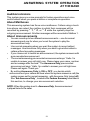
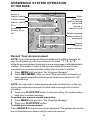
Call Screening/Intercept
1 Make sure the answering system is on, and set the message playback
2
3
volume control above level 1 so you can hear the caller’s message.
If you decide to take the call, press PHONE on the handset.
If you pick up an extension phone during the announcement and the
announcement does not stop right away, press and release the
telephone switchhook.
Record a Memo
You can record a memo up to four minutes long to store as an incoming
message.
1 Press and release REC/MEMO .
2 Press a PLAY/STOP button to select a mailbox for the memo.
After the beep, speak toward the microphone. The Message
Window displays the length of your memo.
3 To stop recording, press the PLAY/STOP button again.
Message Window Display
Window Displays: When:
0
No new messages in any mailbox
1 - 98, flashing
Total number of messages in all mailboxes
0 - 99
Memory is full, or total number of messages is 99
F
Counting 1 to 99
Duration of announcement or memo recording
99, flashing
Length of recording is more than 99 seconds
1 – 99
Current message number during message playback
1 – 8, steady for
one second
Indicates volume level selected when VOLUME +
or VOLUME - is pressed
00 – 99
Current Remote Access Code while setting
A
Announce Only mode
ON or OFF, steady for Displayed when any setting is changed from
one second
on or off
CL
normal display
Clock needs to be set
--
System is answering a call or is in remote operation
-- , flashing
System is in programming mode or initializing
25