1
Turning the Power On and OFF
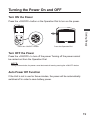
Turn ON the Power
Press the <ON/OFF> button or the Operation Dial to turn on the power.
Press the Operation Dial
Getting Ready
Press the <ON/OFF> Button
Turn OFF the Power
Press the <ON/OFF> to turn off the power. Turning off the power cannot
be carried out from the Operation Dial.
NOTE:
During communication, the power cannot be turned off even by pressing the <ON/OFF> button.
Auto Power Off Function
If the Unit is not in use for three minutes, the power will be automatically
switched off in order to save battery power.
19