1
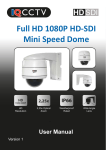
HD 960H
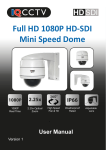
HD 960H 12x Zoom PTZ Mini
Speed Dome Camera
960H
12x
960H
Resolution
12x Zoom
360°
High Speed
Pan & Tilt
IP66
Weatherproof
Rated
User Manual
Version 1
Low Lux
Level
Contents
1. Product Overview ................................................................
1.1. Product Features ...........................................
4
4
2. Product Contents ................................................................
5
3. Installation ..........................................................................
6
4. Camera Operation ..............................................................
4.1. Setup Camera Address .................................
10
10
5. OSD Menu ..........................................................................
5.1. Camera Setup ...............................................
5.2. Focus Setup ..................................................
5.3. Pan Tilt Setup ................................................
5.4. Pattern Setup ................................................
5.5. Protocol Setup ...............................................
5.6. Reset Menu Setup .........................................
11
11
13
14
15
16
17
6. OSD Map ..........................................................................
18
7. Specifications ......................................................................
19
Warning
Warning: To reduce the risk of
electric shock, non-professional
personnel should not remove the
cover.
Caution: To prevent electric
shock and fire hazards, please
don’t use a power supply not
listed in the manual.
This symbol alerts the user to operate and maintain the
product according to the manual.
This symbol alerts the user to be careful as the product may
lead to serious shock hazard.
Caution: Any changes or modifications in construction of the
product that are not approved by our company,may affect the
functionality of the camera.
Precautions
Install and use the camera in an environment where
temperatures DO NOT exceed -20°C ~ +50°C and maintain good
ventilation.
Do not use the camera in a high pressure or highly corrosive
environment.
Do not install the camera in a place where lighting conditions are
not stable.
3
1. Product Overview
Thank you for purchasing the IQC960S12 Internal/External 12x Zoom Mini
Speed Dome Camera from IQCCTV.
The camera features a wide-angle megapixel lens to capture more without
the need to adjust the camera. The dome is ideal for indoor or outdoor use
(IP66 Rated) and has a cable managed and compact design.
The IQC range of 960H cameras from IQCCTV are designed to offer crystal
clear images and amazing value for money, this is achieved by removing
high-end features not needed in everyday applications.
1.1 Product Features
360°
960H
12x
960H
Real Time
12x Zoom
High Speed
Pan & Tilt
IP66
Weatherproof
Rated
HD 960H Resolution
Cable Managed Bracket
Control from any Pelco D/P
Durable High Quality Housing
compatible DVR or Controller
Internal/External
IP 66 Rated
High Speed Pan Tilt & Zoom
5-60mm (4-49°) Auto Iris Lens
4
Low Lux
Level
2. Product Contents
Before installing this product, please ensure that it contains the following;
Contents
1x IQC960S12
Speed Dome Camera
HD 960H
HD 960H 12x Zoom PTZ Mini
Speed Dome Camera
1x User Manual
960H
12x
960H
Resolution
12x Zoom
360°
High Speed
Pan & Tilt
IP66
Weatherproof
Rated
Low Lux
Level
User Manual
Version 1
1x Wall Bracket
1x Ceiling Bracket
1x Installation Pack
Please Note: This item does not include a Cable or Power Supply. A 12V DC
Power Supply and 20m Cable are available as an accessory (Model IQ20C1)
2.1 Connections
BNC Socket for Video
DC Socket for Power
RS485 Connection for Speed
Dome Control
5
3. Installation
The IQC960S12 is designed to be wall or ceiling mounted using the cable
managed brackets supplied. To install the camera, please follow the steps below.
Ceiling Mount
1. Add the bracket extension to the
ceiling camera bracket.
2. Using the bracket as a stencil, mark
out the drill holes needed in the wall.
3. If feeding wires through the ceiling
you will need to drill a hole through the
ceiling for the wires to go. However, if
placing through the bracket, you can just
feed through the side.
4. Drill the holes in the ceiling where you
made the stencils. If feeding the cables
through the ceiling, drill a hole for the
cables to go.
6
5. Feed the wires through the bracket.
6. Attach the camera bracket to the
camera using a cross head screw driver
and turning the screws clockwise
7. Lastly, screw the bracket into the
ceiling.
7
Wall Mount
1. Using the bracket as a stencil, mark
out the drill holes needed in the wall.
2. If feeding wires through the wall you
will need to drill a hole through the wall
for the wires to go. However, if placing
through the bracket, you can just feed
through the side.
3. Drill the holes in the wall where you
have made the marks. Insert wall plugs
here if required.
4. Remove the main camera from the
bracket. To do this, use a cross head
screw driver and turn screws in
anti-clockwise.
8
5. Now, thread the cable from the main
camera back through the bracket.
6. Then, attach the cable to the camera
as shown below.
7. Re-attach the main camera to the
bracket. To do this, use a cross head
screw driver and turn screws in
clockwise.
8. Lastly, screw the bracket into the wall.
9
4. Camera Operation
The Speed Dome camera will be controlled through the DVR using the arrow keys
etc. However, it is advised to use an external Speed Dome controller, for more
control over the camera.
4.1 Setup Camera Address
1. When the camera has initially been switched on, the OSD will display 485
baudrate, address and protocol (as shown below).
P27X02
20 02
INITIAL...
PROTOCOL: PELCO-D
ADDRESS: 001
BAUDRATE: 9600BPS
INPUT PELCO COMMAND:
(IRIS OPEN)----OSD MENU
(IRIS CLOSE)----AUTO FOCUS
(GOTO PRESET 95)--OSD MENU
To make the Speed Dome Controller will work with the camera, make sure you
have the baudrate, address and protocol matching on both.
2. Change the camera’s protocol by calling Preset 95 and entering the OSD
menu.
MAIN MENU
PAN TILT ZOOM
CAMERA SETUP
FOCUS SETUP
PAN TILT SETUP
PATTERN SETUP
PROTOCOL SETUP
RESET MENU SETUP
PROTOCOL:
ADDRESS:
BAUDRATE:
PELCO D
001
9600BPS
RETURN
EXIT MENU
EXIT MENU
3. Click on the sub-menu of protocol and use the arrow keys to adjust each
parameter. When finished, navigate to the ‘Return’ option to save.
10
5. OSD Menu
Enter into the OSD menu by calling Preset 95. The menu allows you to adjust
camera settings such as focus, pan tilt zoom and protocol.
5.1 Camera Setup
MAIN MENU
PAN TILT ZOOM
CAMERA SETUP
FOCUS SETUP
PAN TILT SETUP
PATTERN SETUP
PROTOCOL SETUP
RESET MENU SETUP
SHUTTER:
WHITE BALANCE:
BACKLIGHT:
PIC ADJUST:
EXIT MENU
AUTO
OFF
NEXT
RETURN
EXIT MENU
Shutter/AGC
Auto:
Manual:
Auto set shutter and AGC
Manually set shutter and AGC
White Balance
Adjust the white balance on the camera.
Backlight
Set the backlight options, choose from setting backlight compensation, highlight
supression or turn the function off.
Pic Adjust
Adjust the picture functions. Here you can set; mirror function, brightness, contrast,
image sharpness, hue and gain.
ATR
Turn the ATR function on or off.
11
Motion Detection
Turn the motion detection function on or off. If set to on, you can set the detection
areas and sensitivity.
Privacy
This option allows you to set the privacy zones on the camera.
NR
Turn the Noise Reduction function on to improve picture quality. You can set the
NR levels according to your application.
Camera ID
Set the Camera ID on the camera.
Return
Return to the previous Menu.
Exit Menu
Exit the menu.
12
5.2 Focus Setup
MAIN MENU
FOCUS SETUP
CAMERA SETUP
FOCUS SETUP
PAN TILT SETUP
PATTERN SETUP
PROTOCOL SETUP
RESET MENU SETUP
FOCUS TYPE:
AF AFTER MOVE:
PRESET LOAD ZOOM:
DISPLAY ZOOM TIMES:
EXIT MENU
AUTO
ON
ON
OFF
RETURN
EXIT MENU
Focus Type
Auto:
Manual:
Camera will automatically focus
Manually focus the camera
Auto Focus After Move
Set the camera to automatically focus after it has panned, tilted or zoomed.
Preset Load Zoom
Automatically adjusts the focus when you apply the preset scan modes.
Display Zoom Times
Set the display zoom times.
On:
Off:
Display zoom times
Turn off display of zoom times
Return
Return to the previous Menu.
Exit Menu
Exit the menu.
13
5.3 Pan Tilt Setup
MAIN MENU
PAN TILT SETUP
CAMERA SETUP
FOCUS SETUP
PAN TILT SETUP
PATTERN SETUP
PROTOCOL SETUP
RESET MENU SETUP
TILT LIMIT SET:
TILT LIMIT RESET:
PAN TILT LIMIT SPEED:
ZOOM LIMIT SPEED:
EXIT MENU
SET
SET
063
063
RETURN
EXIT MENU
Tilt Limit Set
Set the upward tilting limit. To do this, move the camera to the limit you wish using
the arrow keys on the controller. Then, press the ‘Iris Open’ key to confirm.
Tilt Limit Reset
Reset the Tilt limit to default. To do this, use the arrow key to navigate to the ‘Tilt
Limit’ Reset’ option and press the ‘Iris Open’ button.
Pan Tilt Limit Speed
Set the panning and tilting speed on the camera. Adjust speeds from 0-63 with 63
being the fastest.
Zoom Limit Speed
Set the zoom speed on the camera. Adjust speeds from 0-63 with 63 being the
fastest.
Return
Return to the previous Menu.
Exit Menu
Exit the menu.
14
5.4 Pattern Setup
MAIN MENU
CAMERA SETUP
FOCUS SETUP
PAN TILT SETUP
PATTERN SETUP
PROTOCOL SETUP
RESET MENU SETUP
EXIT MENU
PATTERN SETUP
PATTERN TOUR:
PATTERN POINT NUM:
PATTERN DWELL TIME:
STOP
000
010
RETURN
EXIT MENU
Pattern Tour
Stop: Stop pattern
Start: Start pattern
Pattern Point Num
This allows you to set the number of preset positions in the cruise. For example, if
set to 5, the pattern will cruise between 1-5 preset points.
Pattern Dwell Time
Set the time that each preset position will stay in that position. You can adjust the
time from 0-10 seconds per preset position.
Return
Return to the previous Menu.
Exit Menu
Exit the menu.
15
5.5 Protocol Setup
MAIN MENU
CAMERA SETUP
FOCUS SETUP
PAN TILT SETUP
PATTERN SETUP
PROTOCOL SETUP
RESET MENU SETUP
EXIT MENU
PAN TILT ZOOM
PROTOCOL:
ADDRESS:
BAUDRATE:
PELCO D
001
9600BPS
RETURN
EXIT MENU
Protocol
Change the protocol on the camera to match your speed dome controller. Adjust
the protocol from Pelco D or P.
Address
Change the address on the camera so that you can control more than one camera
on your controller. Addresses can be set 1~255.
Baudrate
Set the baudrate of the camera. Can set the rates
1200BPS/2400BPS/4800BPS/9600BPS
Random Address
When using the address 255, press the IRIS-OPEN button to enter the OSD and
choose the ‘PAN TILT SETUP’ sub-menu. The Return option (as shown above) will
become ‘Random Address’. When in ‘Random Address’ press the ‘IRIS-OPEN’ key
and this will create a random address
Return
Return to the previous Menu.
Exit Menu
Exit the menu.
16
9
5.6 Reset Menu Setup
MAIN MENU
CAMERA SETUP
FOCUS SETUP
PAN TILT SETUP
PATTERN SETUP
PROTOCOL SETUP
RESET MENU SETUP
EXIT MENU
RESET MENU SETUP:
SET
FACTORY DEFAULT SETUP: SET
RETURN
EXIT MENU
Reset Menu Setup
Set the PTZ menu to the factory default settings.
Factory Default Set
Reset all parameters to the original factory settings.
Return
Return to the previous Menu.
Exit Menu
Exit the menu.
10
17
6. OSD Map
LENS
AUTO
MANUAL
TYPE: DC / VIDEO
MODE: CLOSE / AUTO / OPEN SPEED: 0-255
HIGH LUMINANCE MODE: SHUT+AUTO
IRIS/AUTO LENS
AUTO
SHUTTER
/AGC
BRIGHTNESS: 0-255
LOW LUMINANCE MODE: OFF/AGC
BRIGHTNESS: x0.25, x0.5, x0.75, x1
MODE: SHUT+AGC
MANUAL
SHUTTER: 1/50. 1/120, 1/250, 1/500, 1/1000,
1/2000, 1/4000, 1/10000
ATW
SPEED / DELAY CNT / ATW FRAME / ENVIRONMENT
AGG: 6, 12, 18, 24, 30, 36, 42, 44.8
WHITE BAL
OSD
SET
PUSH / ANTI CR / PUSH LOCK / USER1 / USER 2 / MANUAL
BACK LIGHT
OFF / BLC / HLC
PIC ADJUST
MIRROR / BRIGHTNESS / CONTRAST / SHARPNESS / HUE
/ GAIN
ATW
MOTION
DETECTION
PRIVACY
OFF
LUMINANCE / CONTRAST
ON
OFF
DETECT SENCE / BLOCK DISP / MONITOR AREA /
AREA SEL / TOP / BOTTOM / LEFT / RIGHT
ON
OFF
AREA SEL / TOP / BOTTOM / LEFT / RIGHT
COLOUR / TRANSP / MOSAIC
ON
COLOUR
BURST: OFF/ON
B/W
BURST: OFF/ON
AUTO
NR
DELAY CNT / DAY-NIGHT / NIGHT-DAY
MODE: Y/C, OFF, Y, C
NR
CAMERA ID OFF/ON
SYNC
LANGUAGE
INT
ENGLISH / CHINESE / JAPANESE / ESPANOL /
PORTUGUES / PYCCKNN / FRANCAIS / DEUTCH
CAMERA RESET / BACK / EXIT / SAVE ALL
18
7. Specifications
Camera Specifications
Image Sensor
1/3 Sony Super HAD CCD II
Resolution
960H
Lens Size
5 - 60mm
Minimum Illumination
0.001 Lux
Weight (Kg)
2.8
Power Supply
12v DC 800mA
Operating Temperature
-10°C ~ 50°C
Dimensions (WxHxD)
138x266x138mm
Weatherproofing
IP66
19
Manufactured for:
TECHNICAL SUPPORT
For technical support, please contact your local distributor.
Alternatively, call 0871 222 1430
LIMITED WARRANTY
This product is supplied with a 12 month warranty. The warranty excludes products
that have been misused (including accidental damage) and damage caused by
normal wear and tear. In the unlikely event that you encounter a problem with this
product, it should be returned to the place of purchase.
IQCCTV, Unit 2 Valley Point, Beddington Farm Road, Croydon, Surrey CR0 4WP
www.iqcctv.co.uk