1
4.4)
Downloading the photos/Videos
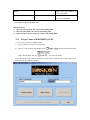
To download your photos/videos to a PC. First make sure the Camera is power switch is in the
“TEST” Mode. Connect the supplied cable to the Camera’s USB port. Then connect main USB
port on your computer. Then, the camera will be recognized as a standard “ USB Mass storage”
Device.
On all windows OS, the Camera will also be listed as a “ Removable Disk” if you open my
computer” window. The camera’s photo file are named “PTDC0001.JPG”. video file names will
end with “.AVI”. you may copy the photos/videos to your hard drive as you would any file-just
copy/paste or drag the file name or Icons to your drive or desktop.
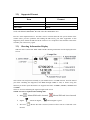
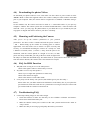
4.5) Mounting and Positioning the Camera
After you’ve set up the camera’s parameters to your personal
preferences. You have to take it outside and slide the power switch to
“ ON “. When setting up the camera for scouting game or outdoor
applications. You must make sure to mount it in place correctly and
securely, we recommend mounting the camera on a sturdy tree with
a diameter of 6inch (15cm). (5 meters ) Away from the place to be
monitored, with the camera placed at a height of 5-6.5ft. (1.5-2M).
please also keep in mind that you will get the best results at night when
the subject is within the ideal flash range. No farther than 45’ (14m) and no closer than 10’ (3m)
from the camera. Besides, The camera can be also mounted on a tripod
4.6) FAQ On MMS Function
Ø
Ø
Ø
Why did it take so long to receive the mms pictures
Check if the signal is stable or if the battery is ran out
why didn’t i receive any mms picture ?
Check if you set right mms parameters in mms setup.
Check if the camera has signal
Check if the camera is under Video mode
I was pretty sure the battery was quite low, But I didn’t get any test alert. Why ?
Please make sure you didn’t install some old batteries in the battery box, if you replace the
present batteries with some used ones in a point before receiving test alert, the camera will
get confused and can’t send a text alert later on.
4.7) Troubleshooting/FAQ
Ø
Camera stops taking images or won’t take images
1. Check the batteries to make sure that they are new Alkaline or lithium AA batteries.
Please don’t install short battery life.
2. Make sure that the camera power switch is in the “ON” position and not in the “OFF” or
“setup” modes.
3. Make sure that you are using a good quality SD card in your camera.