1
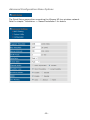
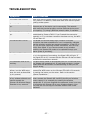
Item
Fragment Threshold
RTS Threshold
Beacon Interval
DTIM Period
Data / N Data Rate
Channel Width
Preamble Type
Broadcast ESSID
WMM
CTS Protect
Description
The fragmentation threshold is used to set the maximum size of
a packet that a client will send. The smaller the maximum size,
the better the reliability of the wireless connection — but the
performance is likely to decrease. Leave this value as 2346
unless you have a very poor wireless signal. Lowering the value
can help improve the connection in such cases.
In case you experience poor wireless performance, you can try
using values between 1200 and 500, and below 500 in severe
cases. The default value is 2347, and that should normally not be
modified.
A beacon is a packet broadcast by the router to synchronize the
wireless network. 50 is recommended in areas with poor
reception.
According to the 802.11 standards, a Delivery Traffic Indication
Message (DTIM) period value is a number that determines how
often a beacon frame includes a Delivery Traffic Indication
Message. The higher the DTIM period, the longer a client device
may sleep and, therefore, the more power that particular client
device may potentially save. Higher values may save battery life
of connected WLAN devices, but they reduce the performance of
the WLAN connection.
If you want to force your WLAN devices to connect only at a
certain speed, then you can set the data rate here; otherwise,
you should leave this as “Auto.”
Select the wireless channel width. 40 MHz provides better
network speed for 802.11n wireless clients. “Auto 20/40 MHz” is
the recommended value.
Select “Long Preamble” if you need to support old wireless devices
(think late 1990s or early 2000s), but if your network consists of
wireless G and wireless N devices, you can go with “Short
Preamble” to improve the wireless performance.
If you disable this option, the iStream HD will no longer
broadcast the name of the wireless network, and any station that
wishes to connect to it must enter the network name manually
since it is no longer shown. Disabling the broadcast is a weak
security measure that can easily be circumvented, so if you think
that you do not need to set up proper WPA2 encryption because
you hide the ESSID, think again – you are doing it wrong.
Enable or disable Wireless Multi-Media. When enabled, this
device will give priority to multimedia-related network
applications so they will have better performance. It is
recommended to leave this option enabled.
In busy WLAN networks with many stations communicating at
the same time, CTS Protect should be set to “Auto.” In networks
that are extremely busy, you can even activate “Always.” In a
typical home network, however, with only a handful of WLAN
devices, you can set this to “None” to gain a little better WLAN
performance.
- 21 -