1
User Manual Corpus 3G
Design and function
Design and function
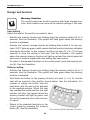
Memory function
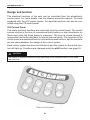
The control panel has a built-in memory with three storage locations. Each location can store all the electric settings of the seat.
Save setting
Adjust the seat to the position you want to save.
- Activate the memory function by holding down the memory button (8) for 2
seconds. See the illustration. The symbol will flash green when the memory
function is activated.
- Activate the memory storage function by holding down button 4 for two seconds. LED 7 lights up green, which means that the function has been activated.
- Hold down the button for the memory function you want (5, 6 or 7) for three
seconds to store the setting of the seat. See the illustration. The symbol
above the relevant memory function will light up red and the control panel will
emit a short acoustic signal when the setting has been saved.
- To return to the standard functions on the control panel, press the memory button (8). See the illustration.
Retrieve setting
- Activate the memory function by holding down the memory button (8) for 2
seconds. See the illustration. The symbol will flash green when the memory
function is activated.
- Hold down the button for the memory function you want (1, 2 or 3), and the
seat will be moved to the position stored earlier. See the illustration. For
reasons of safety, the button must be
held down until the seat is fully adjusted
to the required position. When the seat
has reached the saved position, the seat
1
actuator will stop, the symbol above the
2
3
4
5
memory location will light up green, and
6
the control panel will emit a short acous7
8
tic signal.
- Return to the standard functions on the
control panel by pressing the memory
button (8). See the illustration.
The control panel memory function.
25