1
6 Troubleshooting
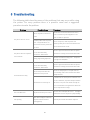
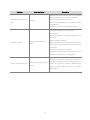
The following table describes some of the problems that may occur while using
the printer. For every problem there is a possible cause and a suggested
procedure to solve the problem.
Problem
Possible Cause
There is no power in the electric
outlet.
The printer does not turn on.
Check if there is a central switch for the room /
outlets. Connect any other equipment to the
outlet to check its operation.
Possible problem with the power
cord – it may be broken or not
well connected to the printer and
/ or outlet.
The communication cable has one
or more lines with faulty
The printer does not respond to
Procedure
connections / broken wires.
the commands.
Wrong programming sequences.
The communication cable has one
or more lines with faulty
connections / broken wires.
The interface pin-out does not
follow the correct protocol.
Communication is faulty.
Turn off the printer; check the power cord
continuity and a perfect connection between the
printer and the electric outlet.
Check for a good connection between the printer
and the host or change the communication cable.
Check the command set being used. The printer
is configured to ESC/POSTM.
Check for a good connection between the printer
and the host or change the communication cable.
Check if the adopted pin-out complies with the
protocol being used for data transmission. Cables
and Dip switches.
If the baud rate set in the printer is different from
the host’s baud rate, the printer will print random
The baud rate is incorrectly set.
characters or not print at all. Check carefully the
host’s serial baud rate configuration as well as the
printer’s dip switches settings.
The error LEDs are on
The printer informs you its status
Check the Error and Paper LED status. A red light
means there is an error in printer or paper loading.
Paper dust and paper residues on
Poor printing.
the print head can influence
printing quality
20
Clean the print head as described at chapter 3.